
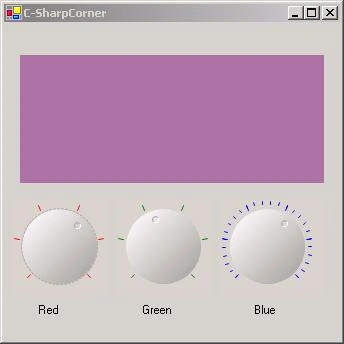
Control creation for windows form was never so easy like its now with .Net, although it needs some math skills if you want to create self drawn control. I havent seen much of examples to create such controls so I decided to make one.
You must be familiar with slider control for windows form, my example Knob control is very much similar to that control in respect of functionality but there is major change in GUI.
- I have inherited control from UserControl class to make application simpler.
- Delegates used for event handling of value changed.
- Read carefully what is done in overriding IsInputKey method because by default using up down keys will change focus from object.
- I have created variable _IsFocused that will show if object is in focus.
- For sample I have selected Label control whose color will change when you will change value of three knob controls.
KnobControl.cs is Code for control.
Utility.cs contains important static methods used for Drawing.
Form1.cs is sample that shows use of knob Control.
However lots of checking will be required to use this control in commercial application but this sample will give you head start if you are going in that direction.


zhifeng liPosted Aug 20, 2019, 4:22 AM EDT
Thank sir,that's what i want to learn
ankit serasiyaPosted Feb 2, 2014, 8:40 PM EST
thank you sir................ Greate Application
Patta PuthaPosted Aug 25, 2013, 7:56 AM EDT
patta!!!!!
zack fPosted Aug 2, 2012, 6:52 PM EDT
thanks a lot
Stuart RubinPosted May 13, 2011, 11:29 AM EDT
Great article and the code runs great on the desktop. I'm trying to make a knob control work in a Windows CE, .net CF environment to no avail. Any ideas?
Martin GrassoPosted Jun 20, 2010, 6:03 PM EDT
Grasias!!! por este control ActiveX
adolfoPosted Jun 16, 2010, 1:15 AM EDT
very useful, thanks