
We will use Visual Studio 2015 to create a Web API and perform the operations. In this project we are going to create a database and a table called tbl_Subcribers which actually contains a list of data. We will use our normal jQuery ajax to call the Web API, once the data is ready we will format the same in an html table. I hope you will like this.
What is a Web API
A Web API is a kind of framework which makes building HTTP services easier than ever. It can be used almost everywhere including wide range of clients, mobile devices, browsers, etc. It contains normal MVC features such as Model, Controller, Actions, Routing, etc. Support all HTTP verbs like POST, GET, DELETE, PUT.
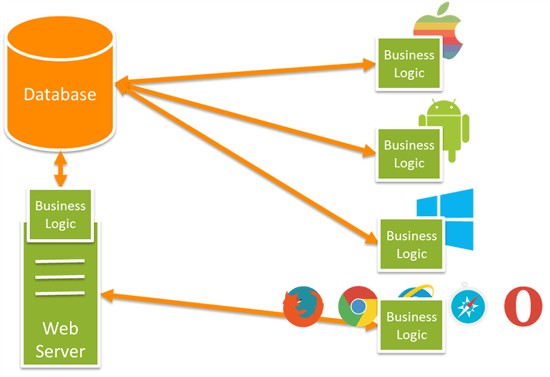
Image Courtesy: blogs.msdn.com
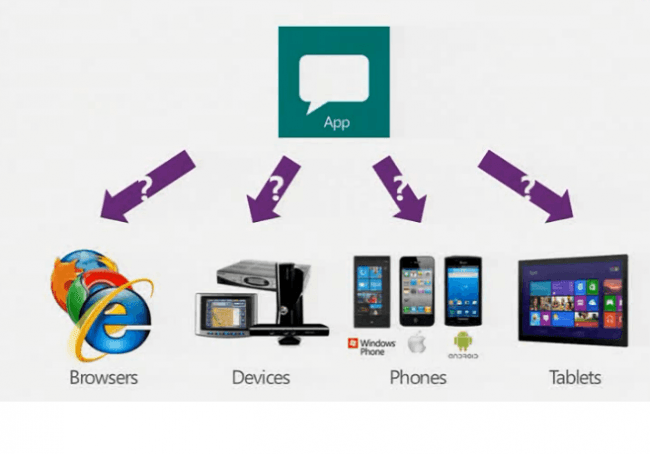
Image Courtesy : forums.asp.net
Using the code
We will create our project in Visual Studio 2015. To create a project click File, New, then Project.
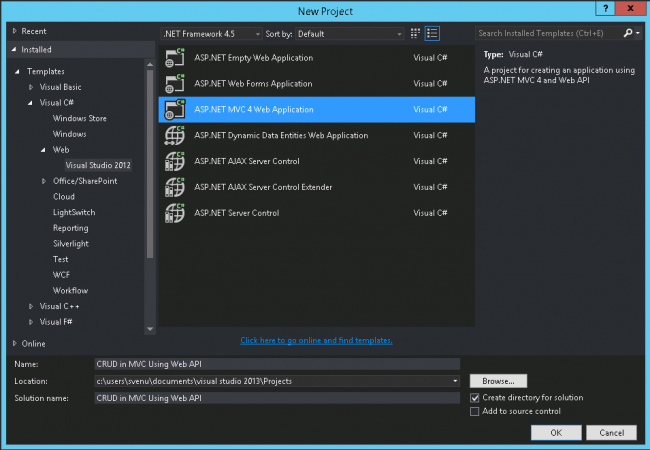

Create a control
Now we will create a control in our project.

Select Empty API Controller as template.

As you can notice we have selected Empty API Controller instead of selecting a normal controller. There are few difference between our normal controller and Empty API Controller.
Controller Vs Empty API Controller
A controller normally render your views. But an API controller returns the data which is already serialized. A controller action returns JSON() by converting the data. You can get rid of this by using API controller.
Find out more: Controller VS API Controller.
Create a model
As you all know, we write logic in a class called model in MVC. So next step what we need to do is creating a model.
Right click on Model and click Add new Items and then class. Name it Subscribers. We are going to handle the subscriber list who all are subscribed to your website.
Now we will create a Database to our application.
Create Database

Once you created the database, you can see your database in App_Data folder.
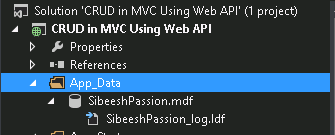
Now will add a new table to our database.
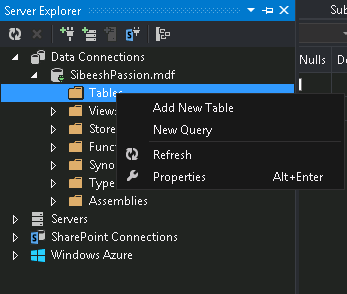
You can see the query to create a table below.
- CREATE TABLE[dbo].[Table]
- (
- [SubscriberID] INT NOT NULL PRIMARY KEY, [MailID] NVARCHAR(50) NOT NULL, [SubscribedDate] DATETIME2 NOT NULL)
It seems our database is ready now.

The next thing we need to do is to create an ADO.NET Entity Data Model. So shall we do that? Right click on your model and click on add new item, in the upcoming dialogue, select ADO.NET Entity Data Model and name that file. Here I have given the name as SP. And in the next steps select the tables, stored procedures, and views you want.

So a new file will be created in your model folder.
Now we will create an ajax call so that you can call the web API. We will use normal Ajax with type GET since we need to just retrieve the data.
A web API control does not return any action result or any json result, so we need to manually do this. We will use the index.cshtml file as our view. We are going to call our web API as follows from the view Index.cshtml.
- @
- section scripts
- { < script > $(document)
- .ready(function ()
- {
- $.ajax(
- {
- type: 'GET',
- dataType: 'json',
- contentType: 'application/json;charset=utf-8',
- url: 'http://localhost:3064/api/Subscribers',
- success: function (data)
- {
- try
- {
- debugger;
- var html = '<table><thead><th>Mail ID</th><th>Subscription ID</th><th>Subscription Date</th></thead><tbody>';
- $.each(data, function (key, val)
- {
- debugger;
- html += '<tr><td>' + '<a ' + 'href="mailto:'</span><span> < /code> <code style=" inherit; inherit; 0px !important; 0px !important; font-size: 1em !important; 1.1em !important; font-family: Consolas, 'Bitstream Vera Sans Mono', 'Courier New', Courier, monospace !important; vertical-align: baseline !important; border-radius: 0px !important; bottom: auto !important; float: none !important; auto !important; left: auto !important; outline: 0px !important; overflow: visible !important; static !important; right: auto !important; top: auto !important; auto !important; box-sizing: content-box !important; direction: ltr !important; box-shadow: none !important; display: inline !important; background: none !important;">+ val.MailID + '">' + val.MailID + '</a > ' +
- '</td><td>' + val.SubscriberID + '</td><td>' + val.SubscribedDate + '</td></tr>';
- });
- html += '</tbody></table>';
- $('#myGrid')
- .html(html);
- }
- catch(e)
- {
- console.log('Error while formatting the data : ' + e.message)
- }
- },
- error: function (xhrequest, error, thrownError)
- {
- console.log('Error while ajax call: ' + error)
- }
- });
- });
- < /script>
- }
Once we get the data in the success part of the ajax call we are formulating the data in an HTML table and bind the formatted html to the element myGrid.
- <div id="myGrid"></div>
So we are calling our web API as http://localhost:3064/api/Subscribers. Do you remember we have already created a controller? Now we are going back to that. So we need to create an action which returns the total subscribed list from the database, so for that we will write few lines of codes as follows.
- public List < tbl_Subscribers > getSubscribers()
- {
- try
- {
- using(var db = new SibeeshPassionEntities())
- {
- Subscriber sb = new Subscriber();
- return(sb.getSubcribers(db)
- .ToList());
- }
- }
- catch(Exception)
- {
- throw;
- }
- }
Here Subscriber is our model class, to get the reference of your model class in controller, you need to include the model namespace. We are getting a list of data in tbl_Subcribers type. Now we will concentrate on model class.
You can see the model action codes here.
- public List < tbl_Subscribers > getSubcribers(SibeeshPassionEntities sb)
- {
- try
- {
- if(sb != null)
- {
- return sb.tbl_Subscribers.ToList();
- }
- return null;
- }
- catch(Exception)
- {
- throw;
- }
- }
This will return the data which is available in the table tbl_Subcribers in SibeeshPassion DB. It seems everything is set. Now what else we need to do? Yes we need to create some entries in the table. Please see the insertion query here.
- INSERT INTO[dbo].[tbl_Subscribers]([SubscriberID], [MailID], [SubscribedDate]) VALUES(1, N '[email protected]', N '2015-10-30 00:00:00')
- INSERT INTO[dbo].[tbl_Subscribers]([SubscriberID], [MailID], [SubscribedDate]) VALUES(2, N '[email protected]', N '2015-10-29 00:00:00')
- INSERT INTO[dbo].[tbl_Subscribers]([SubscriberID], [MailID], [SubscribedDate]) VALUES(3, N '[email protected]', N '2015-10-28 00:00:00')
So the data is inserted. Isn’t it?
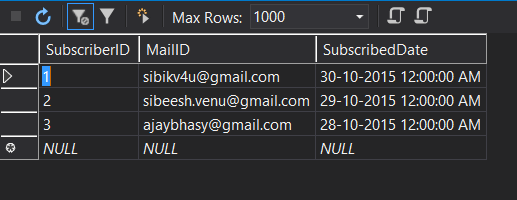
Load Data From Database Using Web API
Do you know?
Like we have RouteConfig.cs in MVC, we have another class file called WebApiConfig.cs in Web API which actually sets the routes.
- routes.MapRoute(name: "Default", url: "{controller}/{action}/{id}", defaults: new
- {
- controller = "Home", action = "Index", id = UrlParameter.Optional
- });
- <style>
- table,
- tr,
- td,
- th {
- border: 1px solid #ccc;
- border-radius: 5px;
- padding: 10px;
- margin: 10px;
- }
- </style>
If everything goes fine, you will get the output as follows.
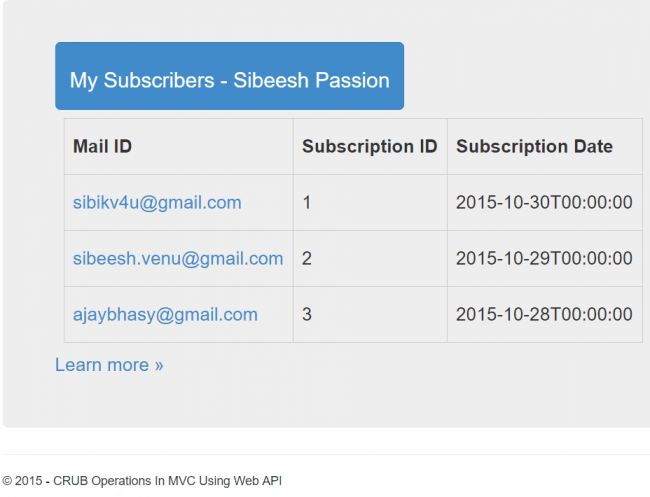
That is all. We did it. Happy coding.
Conclusion
Did I miss anything that you may think which is needed? Did you try Web API yet? Have you ever wanted to do this requirement? Could you find this post as useful? I hope you liked this article. Please share me your valuable suggestions and feedback.
Your turn. What do you think?
If you have any questions, then please mention it in the comments section.
See this article in my blog here.


Sibeesh VenuTOP 100Posted Jul 14, 2016, 8:51 AM EDT
Ravi Kandel Thanks much :)
Ravi KandelPosted Jul 14, 2016, 8:09 AM EDT
Thanks for sharing.
Sibeesh VenuTOP 100Posted Jan 17, 2016, 6:58 PM EST
Arul R Thanks a lot
Sibeesh VenuTOP 100Posted Jan 17, 2016, 6:58 PM EST
Humayun Kabir Mamun Thanks a lot
Arul RPosted Jan 17, 2016, 6:05 AM EST
Thanks for nice article
Humayun Kabir MamunPosted Nov 2, 2015, 7:41 PM EST
Nice...
Sibeesh VenuTOP 100Posted Nov 2, 2015, 7:00 PM EST
N Vinodh Thank you
Sibeesh VenuTOP 100Posted Nov 2, 2015, 6:59 PM EST
Shridhar Sharma Thank you
Sibeesh VenuTOP 100Posted Nov 2, 2015, 6:59 PM EST
Gowtham K Thank you
Sibeesh VenuTOP 100Posted Nov 2, 2015, 6:59 PM EST
Dominique Ceja Thank you
Sibeesh VenuTOP 100Posted Nov 2, 2015, 6:59 PM EST
Mahesh Chand Thank you so much Sir. Cheers!
Vinodh NarayananPosted Nov 2, 2015, 8:35 AM EST
Good one
Shridhar SharmaPosted Nov 2, 2015, 8:00 AM EST
nice share
Gowtham KTOP 100Posted Nov 2, 2015, 6:33 AM EST
Good One
Dominique CejaPosted Nov 2, 2015, 4:17 AM EST
Great article
Mahesh ChandTOP 10Posted Nov 2, 2015, 3:57 AM EST
Nice to see you guys started using "tagging" feature. Cheers!
Sibeesh VenuTOP 100Posted Nov 2, 2015, 12:45 AM EST
Upendra Pratap Shahi Thanks buddy
Upendra Pratap ShahiPosted Nov 2, 2015, 12:44 AM EST
nice sir..great article...
Sibeesh VenuTOP 100Posted Nov 2, 2015, 12:24 AM EST
Ravi Patel Thank you so much
Ravi PatelPosted Nov 2, 2015, 12:23 AM EST
nice explanation
Sibeesh VenuTOP 100Posted Nov 2, 2015, 12:19 AM EST
Ramees Thank you
RameesPosted Nov 2, 2015, 12:18 AM EST
Good one
Sibeesh VenuTOP 100Posted Nov 1, 2015, 11:42 PM EST
Manoj Kulkarni Thank you
Manoj KulkarniPosted Nov 1, 2015, 11:36 PM EST
Nice article. Thank you for sharing
Sibeesh VenuTOP 100Posted Nov 1, 2015, 11:27 PM EST
Harshad Pansuriya Thanks buddy
Harshad PansuriyaPosted Nov 1, 2015, 11:19 PM EST
Nice one Sibeesh Sir