
Introduction
This article provides an example of loading the data into a DataGridView by scrolling down.
Step 1. First, we create a table in a database as in the following
CREATE TABLE Table1
(
   id int identity(1,1),
   Column1 int,
   Column2 int
)
Step 2. Now put data into the table (for a better understanding, I filled in 1 to 60 numbers).
Step 3. Create a New Windows Form application. Drag and drop a DataGridView into a Windows Forms form.
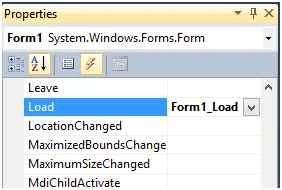
Go to the form's properties, then events, then the Load event, and then press the Enter key.
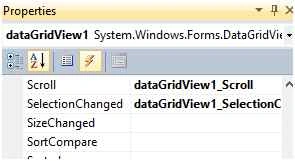
Now go to the DataGridView's properties, then events, then scroll, and then press the Enter key.
Now go to the DataGridView properties, then events, then SelectionChanged, and then press the Enter key.
Step 4. Now paste in the code.
using System;
using System.Collections.Generic;
using System.ComponentModel;
using System.Data;
using System.Drawing;
using System.Linq;
using System.Text;
using System.Windows.Forms;
using System.Data.SqlClient;

namespace LoadGridView
{
    public partial class Form1 : Form
    {
        SqlConnection con = new SqlConnection("data source=Rahul-pc\\rahul_pc;initial catalog=example;integrated security=true;");
        DataTable dt = new DataTable();
        DataSet ds;
        BindingSource bi = new BindingSource();
        SqlDataAdapter da;
        int pageIndex = 1;
        int PageSize = 20;

        public Form1()
        {
            InitializeComponent();
        }

        private void Form1_Load(object sender, EventArgs e)
        {
            LoadGridView();
        }

        private void LoadGridView()
        {
            string str = "select * from Table1 where id between "+pageIndex+" and "+PageSize;
            da = new SqlDataAdapter(str,con);
            ds = new DataSet();
            da.Fill(ds);
            dt = ds.Tables[0];
            bi.DataSource = dt;
            dataGridView1.DataSource = bi;
            dataGridView1.ClearSelection();
        }

        private int GetDisplayedRowsCount()
        {
            int count = dataGridView1.Rows[dataGridView1.FirstDisplayedScrollingRowIndex].Height;
            count = dataGridView1.Height / count;
            return count;
        }

        private void dataGridView1_Scroll(object sender, ScrollEventArgs e)
        {
            int display = dataGridView1.Rows.Count - dataGridView1.DisplayedRowCount(false);
            if (e.Type == ScrollEventType.SmallIncrement || e.Type == ScrollEventType.LargeIncrement)
            {
                if (e.NewValue >= dataGridView1.Rows.Count - GetDisplayedRowsCount())
                {
                    string str = "select * from Table1 where id between " + ((pageIndex * PageSize) + 1) + " and " + ((pageIndex + 1) * PageSize);
                    da = new SqlDataAdapter(str, con);
                    ds = new DataSet();
                    da.Fill(ds);
                    dt.Merge(ds.Tables[0]);
                    bi.DataSource = dt;
                    dataGridView1.ClearSelection();
                    dataGridView1.FirstDisplayedScrollingRowIndex = display;
                    pageIndex++;
                }
            }
        }

        private void dataGridView1_SelectionChanged(object sender, EventArgs e)
        {
            dataGridView1.ClearSelection();
        }
    }
}
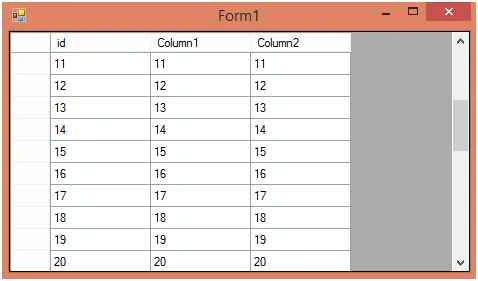
Now run the project and see that when you scroll down, data will be loaded.

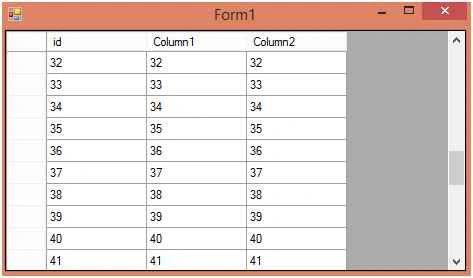
I hope you understand how to add data from a database into a DataGridView by scrolling down.


Mohsin BarbhaiwalaPosted Aug 8, 2022, 11:47 PM EDT
This is an excellent implementation. Can we do the same for scrolling up. That is, we load the datagridview with the latest few records, as we then scroll up records in the ascending order keep on adding in the view.
shubham upadhyayPosted Jul 26, 2020, 10:27 PM EDT
Can I use this in datalist?
Yuva VPosted Sep 28, 2015, 1:47 AM EDT
May I request you to explain each lone of the code using comments...thanks
Rahul PrajapatPosted Aug 24, 2015, 3:37 AM EDT
Thanks Karthikeyan K sir
Karthikeyan KPosted Aug 23, 2015, 7:21 PM EDT
Thanks for share
Rahul PrajapatPosted Aug 23, 2015, 4:31 PM EDT
Thanks Gowtham K sir
Rahul PrajapatPosted Aug 23, 2015, 4:31 PM EDT
Thanks Gopi Chand sir
Rahul PrajapatPosted Aug 23, 2015, 4:30 PM EDT
Thanks Pankaj Kumar Choudhary sir
Gopi ChandPosted Aug 23, 2015, 9:59 AM EDT
Good
Gowtham KTOP 100Posted Aug 23, 2015, 9:28 AM EDT
Good one
Pankaj Kumar ChoudharyTOP 100Posted Aug 23, 2015, 8:16 AM EDT
Nice Explain Sir........
Rahul PrajapatPosted Aug 23, 2015, 7:47 AM EDT
Thanks Sandeep Kumar sirsir
Sandeep KumarPosted Aug 23, 2015, 7:14 AM EDT
Nice article rahul sir :)
Rahul PrajapatPosted Aug 23, 2015, 6:45 AM EDT
Thanks Mohammed Ibrahim sir
Mohammed IbrahimPosted Aug 23, 2015, 5:42 AM EDT
nice..
Rahul PrajapatPosted Aug 23, 2015, 12:04 AM EDT
Thanks sir
Sibeesh VenuTOP 100Posted Aug 22, 2015, 11:47 PM EDT
Nice Share
Rahul PrajapatPosted Aug 22, 2015, 9:51 PM EDT
Thanks Rakesh Chavda sir
RakeshPosted Aug 22, 2015, 9:30 PM EDT
Good one