The attached project is a WPF application written in C# and XAML. It uses OpenFileDialog to browse text files and once text file is selected, it is loaded in a FlowDocumentReader that allows you to view, paging, and find options.
First, let's create a UI with a TextBox, a Button, and a FlowDocumentViewer control.
On Button control, we will browse a text file and set TextBox.Text property to the selected file. As you can see from code below, we create a Paragraph and add the selected text file using Paragraph.Inlines.Add method. After that, we create a FlowDocument by passing this Paragraph and in the end; we set FlowDocumentReader.Document property to the FlowDocument.
Code sample in C#:
TypeScript
privatevoidbutton1_Click(object sender, RoutedEventArgs e)
{
// Create OpenFileDialog Microsoft.Win32.OpenFileDialog dlg = newMicrosoft.Win32.OpenFileDialog();
// Set filter for file extension and default file extension
dlg.DefaultExt = ".txt";
dlg.Filter = "Text documents (.txt)|*.txt";
// Display OpenFileDialog by calling ShowDialog method Nullable<bool> result = dlg.ShowDialog();
// Get the selected file name and display in a TextBox if (result == true)
{
// Open document string filename = dlg.FileName;
FileNameTextBox.Text = filename;
Paragraph paragraph = newParagraph();
paragraph.Inlines.Add(System.IO.File.ReadAllText(filename));
FlowDocumentdocument = newFlowDocument(paragraph);
FlowDocReader.Document = document;
}
}
Code sample in VB.NET:
VB.NET
PrivateSub button1_Click(ByVal sender As System.Object, ByVal e As System.Windows.RoutedEventArgs)
'Create OpenFileDialog Dim dlg As Microsoft.Win32.OpenFileDialog = New Microsoft.Win32.OpenFileDialog()
' Set filter for file extension and default file extension
dlg.DefaultExt = ".txt"
dlg.Filter = "Text documents (.txt)|*.txt"' Display OpenFileDialog by calling ShowDialog method If (dlg.ShowDialog() = True) Then'; Open document Dim filename AsString = dlg.FileName
FileNameTextBox.Text = filename
Dim paragraph As Paragraph = New Paragraph()
paragraph.Inlines.Add(System.IO.File.ReadAllText(filename))
Dim document As FlowDocument = New FlowDocument(paragraph)
FlowDocReader.Document = document
EndIfEndSub
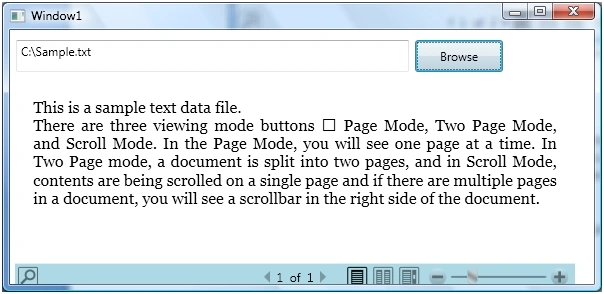
Now if you run the application and browse a text file, the output looks like Figure 2.
Figure 2
2 comments
2 Comments
Join the conversation! Your thoughts help the community grow.
Join to leave a comment
Members earn 10 SHARP for a comment, 10 SHARP for a reaction, and 1,000 SHARP for every article they publish.
Hi,
Can i know how to import textfile (tab delimited text file) into wpf application and from wpf how can i analysis it into a 3d chart? Hope to heard from you soon. thank you
regards,
Adeline
i want to display the detail of selected file on file browser in window os format like vista and window7
it is working but not showing the detail
private void button1_Click(object sender, RoutedEventArgs e)
{
System.Windows.Forms.OpenFileDialog dlg = new System.Windows.Forms.OpenFileDialog();
dlg.Title = "select file manuuaaly";
dlg.ShowDialog();
}
help out
amit




AdelinePosted Jan 9, 2011, 4:16 PM EST
Hi, Can i know how to import textfile (tab delimited text file) into wpf application and from wpf how can i analysis it into a 3d chart? Hope to heard from you soon. thank you regards, Adeline
Amit Kumar ThakurPosted Sep 8, 2009, 3:04 AM EDT
i want to display the detail of selected file on file browser in window os format like vista and window7 it is working but not showing the detail private void button1_Click(object sender, RoutedEventArgs e) { System.Windows.Forms.OpenFileDialog dlg = new System.Windows.Forms.OpenFileDialog(); dlg.Title = "select file manuuaaly"; dlg.ShowDialog(); } help out amit