
Introduction
- Read File
- Write file
- Create Folder
- Check folder and file exists
- Save Image
- Read Image
- Delete File
- Replace file
Create New Xamarin.Form Application
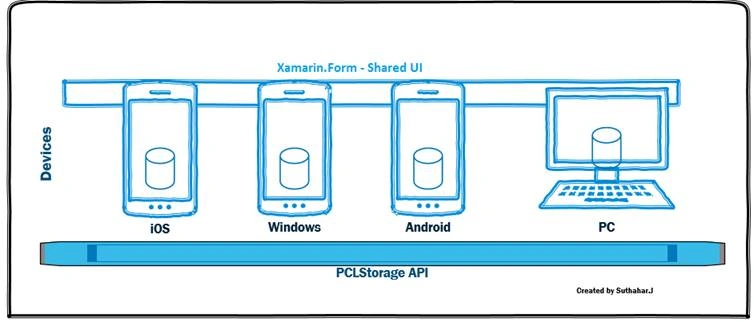
Xamarin.Forms is a cross-platform UI toolkit, which allows the user to efficiently create a native user interface layout. The code can be shared with all the devices (IOS, Android, Windows Phone, and Win store app). Just refer to my previous article to create a new Xamarin Form Application here.
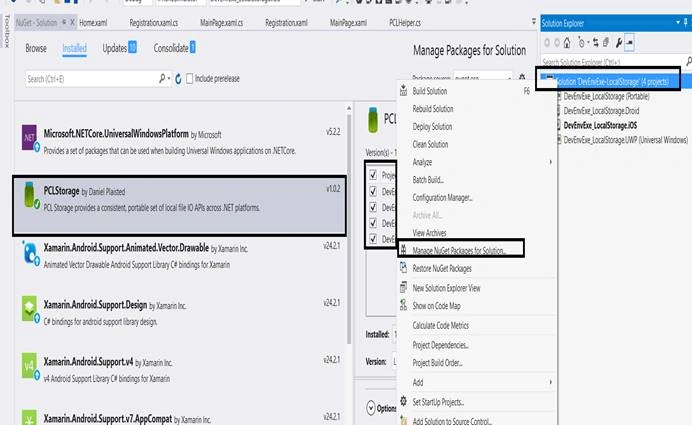
 Add PCLStorage Nuget Package
Add the PCLStorage Nuget package to all the projects. Right-click on Project Solution. Click “Manage NuGet package for Solution “. Search and select “PCLStorage”. Select all the Projects. Click Install.
More about PCLStorage.
 Start creating the code from a portable library, as shown below.
Cross-platform Local Folder
In Xamarin.Form, the PCLStorage API will help us to retrieve all the platforms' local folder names and paths, using the code given below. There is no need to write any platform-specific code to access the local folder.
- Using PCLStorage;
- IFolder folder = FileSystem.Current.LocalStorage;
- String folderName =”csharp” ;
- IFolder folder = FileSystem.Current.LocalStorage;
- folder = await folder.CreateFolderAsync(folderName, CreationCollisionOption.ReplaceExisting);
- String filename=”username.txt”;
- IFolder folder = FileSystem.Current.LocalStorage;
- IFile file = await folder.CreateFileAsync(filename, CreationCollisionOption.ReplaceExisting);
- public async static Task<bool> IsFolderExistAsync(this string folderName, IFolder rootFolder = null)
- {
- // get hold of the file system
- IFolder folder = rootFolder ?? FileSystem.Current.LocalStorage;
- ExistenceCheckResult folderexist = await folder.CheckExistsAsync(folderName);
- // already run at least once, don't overwrite what's there
- if (folderexist == ExistenceCheckResult.FolderExists)
- {
- return true;
- }
- return false;
- }
- public async static Task<bool> IsFileExistAsync(this string fileName, IFolder rootFolder = null)
- {
- // get hold of the file system
- IFolder folder = rootFolder ?? FileSystem.Current.LocalStorage;
- ExistenceCheckResult folderexist = await folder.CheckExistsAsync(fileName);
- // already run at least once, don't overwrite what's there
- if (folderexist == ExistenceCheckResult.FileExists)
- {
- return true;
- }
- return false;
- }
- public async static Task<bool> DeleteFile(this string fileName, IFolder rootFolder = null)
- {
- IFolder folder = rootFolder ?? FileSystem.Current.LocalStorage;
- bool exist = await fileName.IsFileExistAsync(folder);
- if (exist == true)
- {
- IFile file = await folder.GetFileAsync(fileName);
- await file.DeleteAsync();
- return true;
- }
- return false;
- }
- public async static Task<bool> WriteTextAllAsync(this string filename, string content = "", IFolder rootFolder = null)
- {
- IFile file = await filename.CreateFile(rootFolder);
- await file.WriteAllTextAsync(content);
- return true;
- }
- public async static Task<string> ReadAllTextAsync(this string fileName, IFolder rootFolder = null)
- {
- string content = "";
- IFolder folder = rootFolder ?? FileSystem.Current.LocalStorage;
- bool exist = await fileName.IsFileExistAsync(folder);
- if (exist == true)
- {
- IFile file = await folder.GetFileAsync(fileName);
- content = await file.ReadAllTextAsync();
- }
- return content;
- }
- public async static Task SaveImage(this byte[] image,String fileName, IFolder rootFolder = null)
- {
- // get hold of the file system
- IFolder folder = rootFolder ?? FileSystem.Current.LocalStorage;
- // create a file, overwriting any existing file
- IFile file = await folder.CreateFileAsync(fileName, CreationCollisionOption.ReplaceExisting);
- // populate the file with image data
- using (System.IO.Stream stream = await file.OpenAsync(FileAccess.ReadAndWrite))
- {
- stream.Write(image, 0, image.Length);
- }
- }
- public async static Task<byte[]> LoadImage(this byte[] image, String fileName, IFolder rootFolder = null)
- {
- // get hold of the file system
- IFolder folder = rootFolder ?? FileSystem.Current.LocalStorage;
- //open file if exists
- IFile file = await folder.GetFileAsync(fileName);
- //load stream to buffer
- using (System.IO.Stream stream = await file.OpenAsync(FileAccess.ReadAndWrite))
- {
- long length = stream.Length;
- byte[] streamBuffer = new byte[length];
- stream.Read(streamBuffer, 0, (int)length);
- return streamBuffer;
- }
- }
- using PCLStorage;
- using System;
- using System.Threading.Tasks;
- namespace DevEnvExe_LocalStorage
- {
- public static class PCLHelper
- {
- public async static Task<bool> IsFileExistAsync(this string fileName, IFolder rootFolder = null)
- {
- // get hold of the file system
- IFolder folder = rootFolder ?? FileSystem.Current.LocalStorage;
- ExistenceCheckResult folderexist = await folder.CheckExistsAsync(fileName);
- // already run at least once, don't overwrite what's there
- if (folderexist == ExistenceCheckResult.FileExists)
- {
- return true;
- }
- return false;
- }
- public async static Task<bool> IsFolderExistAsync(this string folderName, IFolder rootFolder = null)
- {
- // get hold of the file system
- IFolder folder = rootFolder ?? FileSystem.Current.LocalStorage;
- ExistenceCheckResult folderexist = await folder.CheckExistsAsync(folderName);
- // already run at least once, don't overwrite what's there
- if (folderexist == ExistenceCheckResult.FolderExists)
- {
- return true;
- }
- return false;
- }
- public async static Task<IFolder> CreateFolder(this string folderName, IFolder rootFolder = null)
- {
- IFolder folder = rootFolder ?? FileSystem.Current.LocalStorage;
- folder = await folder.CreateFolderAsync(folderName, CreationCollisionOption.ReplaceExisting);
- return folder;
- }
- public async static Task<IFile> CreateFile(this string filename, IFolder rootFolder = null)
- {
- IFolder folder = rootFolder ?? FileSystem.Current.LocalStorage;
- IFile file = await folder.CreateFileAsync(filename, CreationCollisionOption.ReplaceExisting);
- return file;
- }
- public async static Task<bool> WriteTextAllAsync(this string filename, string content = "", IFolder rootFolder = null)
- {
- IFile file = await filename.CreateFile(rootFolder);
- await file.WriteAllTextAsync(content);
- return true;
- }
- public async static Task<string> ReadAllTextAsync(this string fileName, IFolder rootFolder = null)
- {
- string content = "";
- IFolder folder = rootFolder ?? FileSystem.Current.LocalStorage;
- bool exist = await fileName.IsFileExistAsync(folder);
- if (exist == true)
- {
- IFile file = await folder.GetFileAsync(fileName);
- content = await file.ReadAllTextAsync();
- }
- return content;
- }
- public async static Task<bool> DeleteFile(this string fileName, IFolder rootFolder = null)
- {
- IFolder folder = rootFolder ?? FileSystem.Current.LocalStorage;
- bool exist = await fileName.IsFileExistAsync(folder);
- if (exist == true)
- {
- IFile file = await folder.GetFileAsync(fileName);
- await file.DeleteAsync();
- return true;
- }
- return false;
- }
- public async static Task SaveImage(this byte[] image,String fileName, IFolder rootFolder = null)
- {
- // get hold of the file system
- IFolder folder = rootFolder ?? FileSystem.Current.LocalStorage;
- // create a file, overwriting any existing file
- IFile file = await folder.CreateFileAsync(fileName, CreationCollisionOption.ReplaceExisting);
- // populate the file with image data
- using (System.IO.Stream stream = await file.OpenAsync(FileAccess.ReadAndWrite))
- {
- stream.Write(image, 0, image.Length);
- }
- }
- public async static Task<byte[]> LoadImage(this byte[] image, String fileName, IFolder rootFolder = null)
- {
- // get hold of the file system
- IFolder folder = rootFolder ?? FileSystem.Current.LocalStorage;
- //open file if exists
- IFile file = await folder.GetFileAsync(fileName);
- //load stream to buffer
- using (System.IO.Stream stream = await file.OpenAsync(FileAccess.ReadAndWrite))
- {
- long length = stream.Length;
- byte[] streamBuffer = new byte[length];
- stream.Read(streamBuffer, 0, (int)length);
- return streamBuffer;
- }
- }
- }
- }


Christian PfalzgrafPosted Jul 27, 2021, 11:27 AM EDT
PCLStorage are not supported anymore, just use System.IO that work on every platforms.
Dave ArndtPosted Oct 29, 2020, 5:13 AM EDT
Can one use PCLStorage to write to public folders, i.e., the Download folder? Example?
arulraj ganesanPosted Sep 19, 2020, 7:31 PM EDT
listvew using export CSV,excel,pdf download from android local directory
arulraj ganesanPosted Sep 19, 2020, 4:22 PM EDT
no man I need to store the CSV file in .. mobile device directory..give any sample please
arulraj ganesanPosted Sep 19, 2020, 4:17 PM EDT
no man I need to store the data in mobile device directory..
arulraj ganesanPosted Sep 19, 2020, 10:25 AM EDT
ji we need export CSV in android local store
arulraj ganesanPosted Sep 19, 2020, 1:43 AM EDT
Ji it possible to write csv file in xmarain android native app..u have any sample code
arulraj ganesanPosted Sep 18, 2020, 12:32 AM EDT
Hi i need how to export csv file in xmarain ..any sample code?
Mark ZablockiPosted Feb 20, 2020, 5:42 AM EST
Hi I am new to the programing community and I am trying to teach myself C# .NET and cross platform programming, I have implemented the simple class the you wrote and I have referenced it in a small project that I am using to test with called FileBrowserTest, The next stage for me is to call one of those specific functions and test them on my emulator...Using VS2019 and nexus_6_9.0_-_api28, is it possible for you to help me and just give a quick example on how to call for example one of those functions? Maybe an example on how to call a function that opens a folder dialog? Any help would be greatly appreciated.
Jaime StuardoPosted Jul 8, 2019, 3:09 PM EDT
Hello... can you help me? I am using PCLStorage. When getting the local folder, it retrieves /data/data/com.company.MyApp/files, however, that path does not exist anywhere. I used CreateFolderAsync to create a folder, and it is created because I check folder existence using CheckExistsAsync. But I cannot find it !! where is it? I need to find it because I have to save a file in there using file explorer. The more similar folder I've found is \Internal storage\Android\data\com.company.MyApp\files, but the created folder does not appear there. Is this magical or something?
Liêm NguyễnPosted Mar 23, 2019, 9:58 PM EDT
How to COPY exist file to that folder?
Liêm NguyễnPosted Mar 23, 2019, 9:52 PM EDT
Can create a JSON file??
ram aPosted Nov 19, 2018, 6:46 AM EST
PCL Storage is getting stucked on Folder check??
Ubaid RehmanPosted Nov 8, 2018, 12:55 AM EST
Can I save sound files by following the same steps as images? I want to save (.wav) recording into my local storage. Please Advise
Samuel ArthursPosted Sep 12, 2018, 5:57 PM EDT
Helped me a lot ! Thank you sir ! :) Sir, I need one help how can i get that permission from my app when its not enabled ? Please help me or provide me some reference to it.
JCA TechPosted Aug 15, 2018, 12:47 AM EDT
There is no no PCLStorage in my Nuget i search it but the PCLStorage is not available in my Nuget does any body knows the problem or help me to get the PCLStorage setup
Srusti ThakkarPosted Jan 23, 2018, 9:29 PM EST
I want to list down only media files from internal as well as external storage. How is it possible with this?
markand bhattPosted Dec 25, 2017, 8:22 PM EST
I am suffering with one condition , I want to save data in Local and then if there is internet connection then it will sync to server , I want Queing like system , is it possible with PCL storage , i am using Web API for my BackEnd Process coz my backend is as Microsoft sql server , Kindly guode for same \
markand bhattPosted Dec 25, 2017, 8:20 PM EST
Thank you sir Very good Blog,
Giovanni LopezPosted Nov 4, 2017, 1:44 AM EDT
Hi Suthahar, I have the same issue of Himanshu Lanjewar. I want to read a sample.txt file from Documents folder in iOS. This file must be imported from iTunes. How Can I refer to Documents folder from your PCL storage? thank you for your support.
Himanshu LanjewarPosted Oct 10, 2017, 5:30 AM EDT
Hey I am trying to create IFolder during folder creation. IFolder?folder?=?rootFolder????FileSystem.Current.LocalStorage; But it always gives exception
Parshwa kapadiaPosted Sep 13, 2017, 9:36 PM EDT
Hey, When I'm trying to store uploading image path in local storage and when I'm trying to get the that file each and every time I get different path. Any idea ? Thanks.
Lionel MennigPosted Jul 24, 2017, 6:33 AM EDT
Hey, I'm saving images as you do from bytes arrays but I can't open them afterwards under operating system because there is no file format. I've been trying to rename it with ".jpg", ".png", ".bmp" but no program could open/show it. Any tip ? Thanks.
Ajay SinghPosted Jan 24, 2017, 11:20 PM EST
Very mice.. It really helped me.
Fabio Silva LimaPosted Dec 12, 2016, 12:39 AM EST
I forgot to say something. what you think if you change name from Xamarin.Form to Xamarin.Forms "plural".?
Fabio Silva LimaPosted Dec 12, 2016, 12:38 AM EST
Very good Mr! Congratulations.
Thiruppathi RPosted Dec 11, 2016, 7:24 PM EST
thank you for your information.