
In this article, we will learn how to make an application that provides support to multiple languages or for a specific culture. In previous articles, we saw:
Localization
From the Wikipedia:
"Localization is a process of translating a product into multiple languages or adapting a product for a specific country or region."
From the Wikipedia:
"Localization is a process of translating a product into multiple languages or adapting a product for a specific country or region."
Let's Begin:
Create a new Windows Phone application and select Windows Phone 8.0 as the target Windows Phone OS for this application and click on OK.

The Windows Phone 8 application contains a folder named Resources that contains a resource file (that is a XML file) with a special .resx extension.
The Windows Phone 8 application template also contains a LocalizedStrings class that provides access to resources. An instance of this class is created in the app.xaml file with the key LocalizedStrings.

Open the AppResources.resx file and add some name/value string pairs.

Now open the properties of the project.
Under the Application tab, go to the Supported culture section and tick the languages you want your application to support. I am selecting Hindi and U. S. English (selected by default).

Create a new Windows Phone application and select Windows Phone 8.0 as the target Windows Phone OS for this application and click on OK.
The Windows Phone 8 application contains a folder named Resources that contains a resource file (that is a XML file) with a special .resx extension.
The Windows Phone 8 application template also contains a LocalizedStrings class that provides access to resources. An instance of this class is created in the app.xaml file with the key LocalizedStrings.
Open the AppResources.resx file and add some name/value string pairs.
Now open the properties of the project.
Under the Application tab, go to the Supported culture section and tick the languages you want your application to support. I am selecting Hindi and U. S. English (selected by default).
When you select the new language(I selected Hindi), Visual Studio automatically adds a new AppResources file named AppResources.hi-IN.resx (depending on the selected culture/language). Double-click on the AppResources.hi-IN.resx file to open it.

Now replace the value (the translated text) depending on the language/culture. I have translated the value of the key PageName, DemoText according to the Hindi language. Then save and build your application.

Databind the text property of TextBlock or other control to StaticResource with a key LocalizedStrings.

Source Code
- <Grid x:Name="LayoutRoot" Background="Transparent">
- <Grid.RowDefinitions>
- <RowDefinition Height="Auto"/>
- <RowDefinition Height="*"/>
- </Grid.RowDefinitions>
- <StackPanel x:Name="TitlePanel" Grid.Row="0" Margin="12,17,0,28">
- <TextBlock Text="Demo APPLICATION" Style="{StaticResource PhoneTextNormalStyle}" Margin="12,0"/>
- <TextBlock Text="{Binding Source={StaticResource LocalizedStrings},Path=LocalizedResources.PageName}"
- Margin="9,-7,0,0" Style="{StaticResource PhoneTextTitle1Style}" Padding="0 10"/>
- </StackPanel>
- <Grid x:Name="ContentPanel" Grid.Row="1" Margin="12,0,12,0">
- <StackPanel>
- <TextBlock Text="{Binding Source={StaticResource LocalizedStrings},Path=LocalizedResources.DemoText}"
- FontSize="32"></TextBlock>
- </StackPanel>
- </Grid>
- </Grid>
Build and Run the application.
Preview
Preview

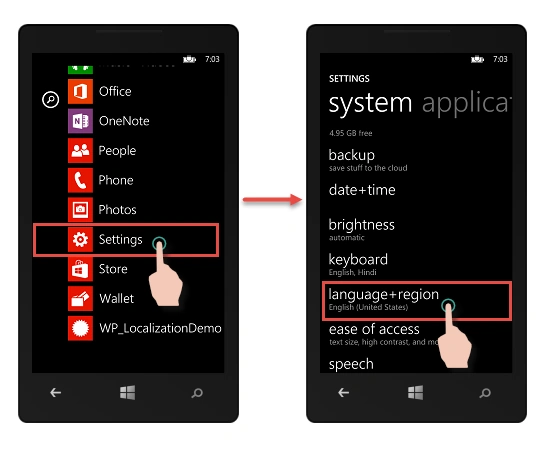
Change the Phone Language to Hindi.

Click on restart phone. After your phone restarts, open your application and you will see that our application now supports the Hindi language/culture.

I hope you like this. Thanks.


Ibrahim ErsoyPosted Mar 2, 2016, 10:10 PM EST
Localization is very important in Apps.You did a great job explaining in details :)
Murali RPosted Sep 24, 2015, 1:31 AM EDT
how to create a transparent passwordbox in windows phone 8.1
Murali RPosted Sep 7, 2015, 9:57 PM EDT
Thank you very much
Murali RPosted Aug 27, 2015, 11:05 PM EDT
hi I got struck at, replace the value (the translated text) depending on the language/culture. How to translate to tamil language
Anoop Kumar SharmaPosted Aug 6, 2015, 11:26 PM EDT
Thanks Praveen Kumar.! :-)
Praveen KumarPosted Aug 6, 2015, 10:47 PM EDT
Very Nice Anoop Kumar Sharma
Anoop Kumar SharmaPosted Aug 6, 2015, 10:23 PM EDT
Thanks Ankit Bansal..! :-)
Ankit BansalPosted Aug 6, 2015, 10:12 PM EDT
nice...thanks for share..
Anoop Kumar SharmaPosted Aug 6, 2015, 9:30 AM EDT
Thanks Gopi Chand.!! :-)
Gopi ChandPosted Aug 6, 2015, 8:32 AM EDT
Good work
Anoop Kumar SharmaPosted Aug 6, 2015, 5:45 AM EDT
Thanks Gowtham Rajamanickam :-)
Anoop Kumar SharmaPosted Aug 6, 2015, 5:45 AM EDT
Thanks Sibeesh Venu Sir..!! :-)
Gowtham RajamanickamTOP 100Posted Aug 6, 2015, 5:43 AM EDT
good one..
Sibeesh VenuTOP 100Posted Aug 6, 2015, 4:34 AM EDT
Nice Share
Anoop Kumar SharmaPosted Aug 5, 2015, 10:48 PM EDT
Thanks Rajeesh Menoth :-)
Rajeesh MenothPosted Aug 5, 2015, 9:45 PM EDT
Good one
Anoop Kumar SharmaPosted Aug 5, 2015, 9:02 PM EDT
Thanks Debasis Saha Sir..!!
Debasis SahaTOP 100Posted Aug 5, 2015, 8:51 PM EDT
Nice article..
Anoop Kumar SharmaPosted Aug 5, 2015, 8:20 PM EDT
Thanks Santhakumar Munuswamy Sir.!!
Anoop Kumar SharmaPosted Aug 5, 2015, 8:20 PM EDT
Thanks Neeraj Kumar,!!
Nilesh JadavPosted Aug 5, 2015, 8:10 PM EDT
Nice one sir, Great article for window 8 development, Even i was trying to use localization in winform, THanks for sharing
Santhakumar MunuswamyPosted Aug 5, 2015, 7:39 PM EDT
Good Article. Thanks for sharing
Neeraj KumarPosted Aug 5, 2015, 1:41 PM EDT
Nice