
In this article, we will look into T4 templates and how they are helpful in code/documents generation. We can create templates and generate code/text based on it without need of searching and replacing text in it. T4 templates are used to generate boiler-plate code by MVC, Entity framework. We can create two types of templates:
Text template [Design time]: used to generate code to be used at design time by other classes and can interact with model designers.
Runtime Text Template [preprocessed]: used to generate and execute it via code, support passing parameters and can execute outside of Visual Studio.
Let’s create a sample console application in Visual Studio 2015 and understand it:
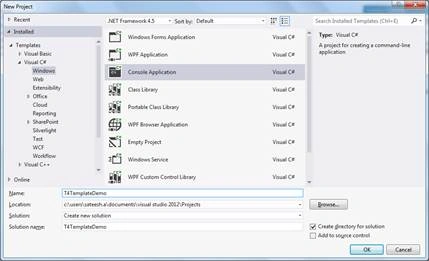
Click on Add new item in Solution Explorer and select Text template as shown below, which will add .tt file to our project:

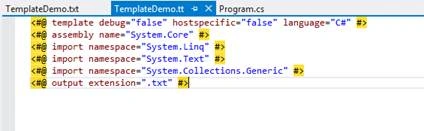
Let’s add below code and run it:
Here, I used T4 output directive (<#@ directivename attribute=”value” #>) that will give instructions to template engine to generate output file with .txt extension and should be first elements in the template.
We can use import directive to use a specific assembly in the template without fully qualified name, assembly directive for using it in the template and template directive to set attributes like debug flag to enable/disable template debugging, language flag [C# or VB] and inherits attribute to set base class for generated class.
We can add an expression block (<#= Expression #>) to compute an expression and return result within a text block (here, output is current Datetime).
We can save template or click on Run Custom Tool to execute the it and generate .txt file with current date time:
Output:

Let’s extend our template by adding statement blocks (<# statements #>), which can have multiple statements with variables, loops and other control statements in it:

Output:

Here, we used utility method WriteLine (or) Write to show text in text file.
I am ending things here, inthe next article I will drill down more on T4 Templates and look into class feature blocks and template parameters etc. I hope this article will be helpful for all.
Look at T4 Templates In Visual Studio 2015 - Part One
In this article you will look at T4 Templates in Visual Studio 2015.
Read more articles on Visual Studio 2015:


Mohammed AshrafPosted Jun 23, 2016, 8:24 PM EDT
nice..
Bhuvanesh MohankumarPosted May 3, 2016, 8:52 AM EDT
Good one..
Kuppurasu NagarajTOP 100Posted Apr 30, 2016, 10:48 AM EDT
Nice Sharing..
Rahul Kumar SaxenaTOP 100Posted Apr 30, 2016, 9:50 AM EDT
Good One
Muhammad Aqib ShehzadPosted Apr 29, 2016, 8:20 PM EDT
good one
Vignesh ManiTOP 100Posted Apr 29, 2016, 4:40 AM EDT
Nice
Thiruppathi RPosted Apr 29, 2016, 12:40 AM EDT
Good one