
We can drag and drop selected code of a block as needed.
We will learn this step-by-step.
Step 1: First open your Visual Studio application. Select a line of code and drag and drop this selected code to the Toolbox general section like the following: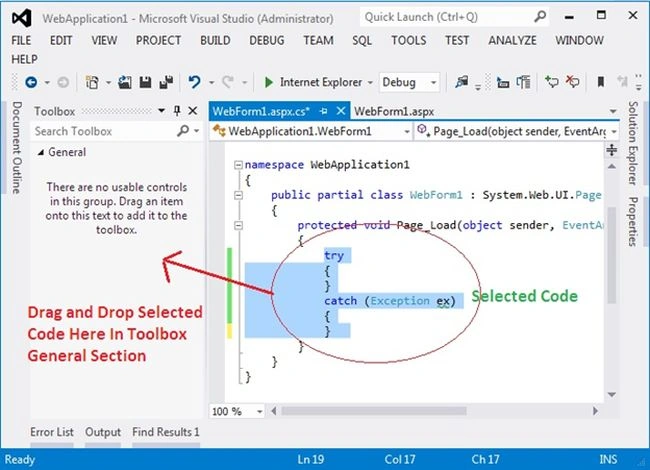
Image 1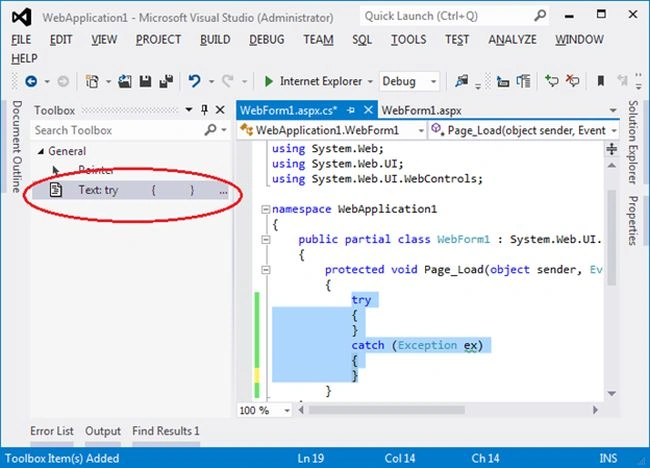
Image 2
Step 2: If you want to rename this block in the Toolbox then right-click on your item and select "Rename Item".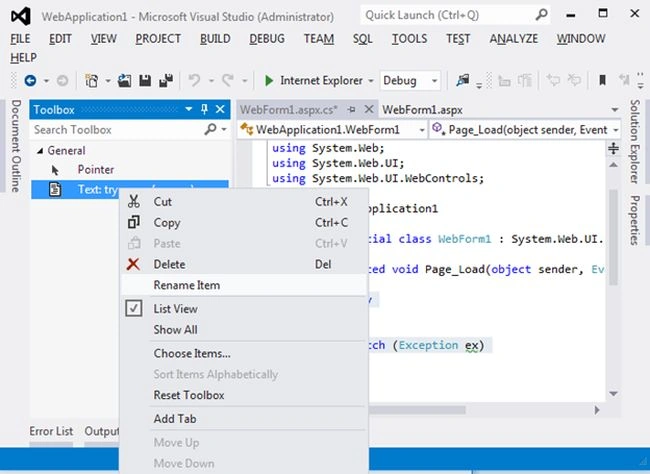
Image 3
Image 4
Now you can use this code of block anywhere in your application by dragging and dropping it.
Custom Option in Tool Box in Visual Studio
This article shows how to make our own section in the Tool Box in Visual Studio, like others controls in the Tool Box that we can drag and drop.


Faizal HussainPosted Nov 8, 2014, 11:26 PM EST
Rahul sir, Thanks for sharing..
Chandradev PrasadPosted Nov 8, 2014, 10:28 PM EST
Nice trick Rahul.