
Microsoft SQL updates in 2026 bring operational data, AI retrieval, streaming, and management closer together.
Microsoft SQL updates in 2026 point to one practical direction: keep transactional data, AI retrieval, event streams, database development, and estate management closer together. For teams using Azure SQL Database, Azure SQL Managed Instance, SQL Server, or SQL database in Microsoft Fabric, the best next step is not to adopt every feature. Start with the update that removes a real pain point, such as semantic search over operational data, idle compute cost, migration planning, or fragmented database monitoring.
Key takeaways
- DiskANN vector indexes and vector search became generally available on September 29, 2026, for Azure SQL Database, Azure SQL Managed Instance on the Always-up-to-date policy, and SQL database in Microsoft Fabric.
- Azure SQL Database Hyperscale now has larger 160 and 192 vCore Premium-series options in general availability, while serverless auto-pause and auto-resume for Hyperscale remain in preview.
- Database Hub in Microsoft Fabric is a preview management surface that can inventory supported Azure, Fabric, and on-premises database resources without moving those databases into Fabric.
- Change event streaming, migration tooling, SQL projects, SSMS, and the MSSQL extension for Visual Studio Code received updates that help connect database work to application delivery and event-driven systems.
- Availability differs by service and update policy, so check whether a feature is generally available or preview before putting it in a production design.
What changed across Microsoft SQL in 2026?
Microsoft's November 11, 2026 PASS Summit West roundup covers updates across Azure SQL Database, Azure SQL Managed Instance, SQL database in Microsoft Fabric, SQL Server, Azure Arc, drivers, and developer tools. It is a large list, but the changes make more sense when grouped around four jobs: run larger databases, build AI features near data, manage a mixed SQL estate, and ship database changes safely.
For a beginner, one distinction matters before anything else. Microsoft SQL is now delivered through several products with different release models. Azure SQL Database is a platform as a service database. Azure SQL Managed Instance is a managed service that provides more SQL Server compatibility. SQL database in Microsoft Fabric is an operational database experience connected to Fabric. SQL Server remains the product you run on your own infrastructure, Azure VMs, Azure Local, or Linux.
Some capabilities arrive first in what Microsoft calls versionless SQL services. That means Azure SQL Database, SQL database in Fabric, and Managed Instance configured with the Always-up-to-date update policy can receive features before the boxed SQL Server release cadence. Do not assume that a T-SQL feature shown in an Azure SQL demo is automatically available in every SQL Server deployment.
| Need | 2026 change to consider | Availability to check |
|---|---|---|
| Add semantic search to application data | DiskANN vector indexes and VECTOR_SEARCH | GA for Azure SQL Database, eligible Managed Instance, and SQL database in Fabric |
| Run large or growing Azure SQL workloads | 160 and 192 vCore Hyperscale Premium-series options | GA |
| Reduce compute spend on intermittent large databases | Hyperscale serverless auto-pause and auto-resume | Preview |
| Watch databases in several Microsoft environments | Database Hub in Fabric | Preview |
| Move toward Azure SQL | Arc-enabled SQL Server migration to Azure SQL Database Hyperscale | Preview |
| Bring database changes into normal development work | SQL projects, Schema Compare, SSMS, and the MSSQL extension | Feature-specific |
Why Azure SQL Hyperscale is getting more attention
Hyperscale is Azure SQL Database's architecture for workloads that need large storage and higher scale without managing SQL Server infrastructure yourself. In 2026, the service added 160 and 192 vCore Premium-series choices for single Hyperscale databases and Hyperscale elastic pools. These options reached general availability in September.
This is relevant when a database has grown beyond the comfortable range of a smaller service objective, or when performance problems are driven by sustained demand rather than a single bad query. More compute is not a replacement for indexing, query tuning, or a sound data model. But it gives teams another supported sizing choice when a workload really needs it.
Hyperscale is also becoming a more realistic place to start for development, test, and intermittent applications. Hyperscale serverless auto-pause and auto-resume is in preview. When eligible databases have no sessions and no active user CPU work during the configured delay, compute can pause and resume when work returns. The current preview has a minimum auto-pause delay of 60 minutes, and storage charges still apply while compute is paused.
That last detail matters. Auto-pause lowers idle compute consumption. It does not make the database free, and a resume can add latency to the first request after an idle period. Named replicas are not supported with Hyperscale auto-pause in the current preview. Treat it as a feature to test against a non-production workload before you build a user-facing service around its behavior.
For SaaS teams, another preview may be more interesting: higher-density Hyperscale elastic pools. The roundup describes pools supporting up to 50 databases and 128 TB per pool, subject to hardware and service-objective limits. Elastic pools are useful when tenants have separate databases but their busy periods do not all happen at the same time. They let a group of databases share provisioned compute instead of sizing each database for its own peak.
How native vector search changes an Azure SQL design
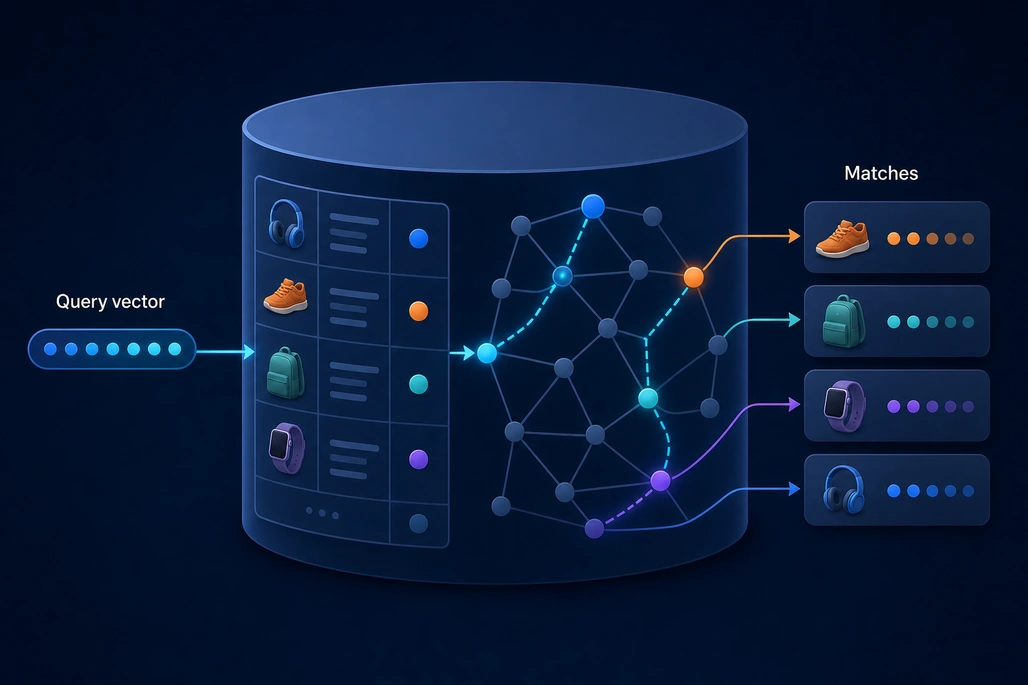
Native vector search keeps similarity retrieval next to relational filters and security rules.
The biggest application-development update is the general availability of DiskANN vector indexes and vector search. An embedding is a numeric representation of text, images, products, or documents. Similar items produce vectors near one another, so a vector search can find semantically related results even if the user did not use the same keywords.
Before native vector support, many teams used a separate vector database or search service. That can still be the right choice in some architectures. But it also means moving data, synchronizing embeddings, copying access rules, and handling failures between two systems. With Azure SQL vector search, the vector column can sit beside the relational data that already holds product status, customer permissions, inventory, and business rules.
DiskANN is an approximate nearest-neighbor index. Approximate is an important word. Instead of comparing a query vector with every vector in a table, the engine navigates an index graph to find likely nearest neighbors efficiently. Microsoft describes DiskANN as reducing the amount of data searched and reducing dependence on keeping the complete index in memory. SQLServerCentral's review of the Barcelona announcements also noted the general availability of vector search with data-modification support, which is a major step from an early prototype feature.
The production release includes INSERT, UPDATE, and DELETE support with asynchronous vector-index maintenance. It also includes iterative filtering. In plain language, that means you can ask for similar products while still applying ordinary relational conditions such as IsActive = 1, a category restriction, a region, or an existing row-level security policy.
A small vector-search example
The following query uses the same public T-SQL pattern Microsoft published for vector search. It assumes that dbo.Products contains an Embedding vector column and that the application has already generated @query_vector using a model that matches the stored embedding dimensions.
SELECT TOP (10) WITH APPROXIMATE
    p.ProductId,
    p.Name,
    s.distance
FROM VECTOR_SEARCH(
    TABLE = dbo.Products AS p,
    COLUMN = Embedding,
    SIMILAR_TO = @query_vector,
    METRIC = 'cosine'
) AS s
WHERE p.IsActive = 1
ORDER BY s.distance;
This query is useful because it combines two kinds of retrieval. VECTOR_SEARCH finds semantically similar candidates. The WHERE clause enforces an ordinary application rule. The smaller distance values are the closer matches for the selected metric, so results are ordered by s.distance.
A vector index is created separately. Microsoft documents the DiskANN form as follows:
CREATE VECTOR INDEX vec_idx
ON dbo.Products (Embedding)
WITH (METRIC = 'cosine', TYPE = 'diskann');
Do not start by embedding every historical row in your largest production database. Pick one narrow feature, such as “related support articles” or “similar active products.” Define how you will generate embeddings, decide when rows need to be re-embedded, test relevance with real user questions, and measure query behavior. Vector search can return relevant results quickly, but relevance is a product quality issue as much as a database feature.
There are trade-offs. Approximate results are not the same as exact nearest-neighbor results. An index consumes storage and has a maintenance cost. You must protect source data and embeddings with the same care you use for the rest of the table. And if your workload runs on SQL Server or Managed Instance using a versioned policy, verify platform support instead of copying an Azure SQL example.
What event streaming and Fabric SQL mean for data engineers
Many applications still move data by running scheduled extracts. That works for batch reporting, but it is often too slow for alerting, operational analytics, or near-real-time downstream processing. The 2026 roundup highlights change event streaming for Azure SQL Database, supported Azure SQL Managed Instance policies, and SQL database in Microsoft Fabric.
Change event streaming captures row-level changes and publishes them to Azure Event Hubs or Fabric Eventstream. Azure SQL Database gained the Fabric Eventstream destination during July 2026. This gives teams a supported path from an operational SQL change to an event-driven workflow without making every consumer poll the database.
This does not remove the need for design work. Consumers need idempotency because delivery and retries can happen. Events need versioning because schemas change. You should decide which tables produce events and whether every column belongs in the event payload. Database changes should not become a hidden, undocumented application integration contract.
SQL database in Microsoft Fabric also gained several capabilities that make it easier to use as part of a development and data platform. Migration Assistant for SQL database became generally available in August 2026. It can import schema metadata from a DACPAC, identify compatibility findings and fixes, and copy data through the supported Fabric workflow. Full-text indexing, auditing with logs in OneLake, a Spark connector, and SQL project database-definition import and export APIs also reached general availability.
For a data engineer, that means a Fabric SQL database can participate in both operational and analytical workflows. But choose it for a clear reason. It is a good fit when the database's relationship to Fabric, OneLake, Spark, or event-driven processing is part of the application design. It is not a reason to move a stable database simply because a new feature exists.
How Database Hub helps, and where it does not
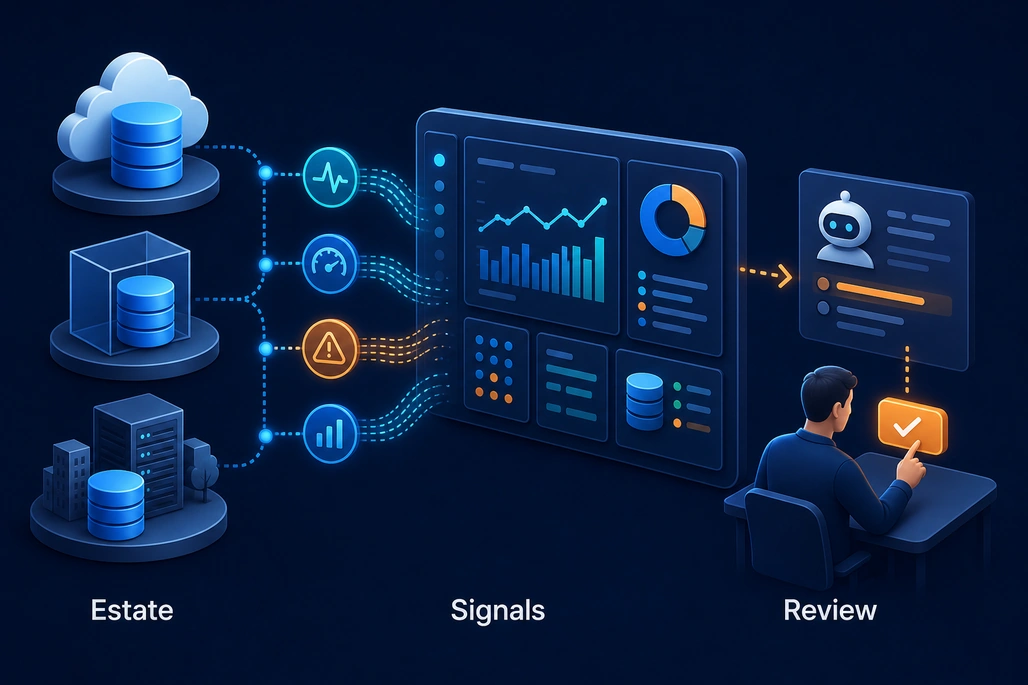
Database Hub is intended to provide a shared operational view while preserving existing permissions.
Database Hub in Microsoft Fabric is in public preview. It brings inventory, health, performance, security, risk, and optimization signals into one experience for supported resources. The documented list includes Azure SQL Database, Azure SQL elastic pools, Azure SQL Managed Instance, SQL database in Fabric, Azure Arc-enabled SQL Server, SQL Server on Azure VMs, Azure Database for PostgreSQL flexible server, and Azure Cosmos DB.
The key point is that Database Hub does not move your databases into Fabric. It works with the resources your Microsoft Entra identity can already access. It also does not grant extra permissions just because a database appears in an estate view. That is the right security model, but it means two people can see different resources in the same shared view.
For a DBA responsible for several Azure subscriptions and SQL Server instances, a single inventory and a path from a finding to a native tool can save time. It can also help a development team see performance context without sending everyone into a different portal. Database agents are intended to help investigate issues and recommend next steps, but their recommendations still require human review.
Keep the preview boundaries in mind. Microsoft documents that inventory, findings, monitoring, and available actions vary by service. At present, Azure SQL elastic pools, Azure SQL Managed Instance, and SQL database in Fabric can appear in Estate but do not show in the Performance page. Microsoft SQL services need additional setup for performance data, including registration of an Azure resource provider and, for Azure SQL Database, an extended property to begin collection.
Independent reporting has also raised a fair caution. The Register described Database Hub as a partial solution for enterprises with substantial non-Microsoft database estates. That does not make the service less useful for a Microsoft-centered organization. It does mean you should avoid replacing existing cross-platform monitoring or governance tools until you know exactly which systems, signals, and controls you need.
Security, recovery, and migration updates worth prioritizing
Some updates are less visible than AI features, but they may have a faster operational payoff. Microsoft Entra server principals for Azure SQL Database reached general availability in June 2026. They provide server-level logins for Microsoft Entra identities, which can help teams use a more consistent identity pattern instead of relying only on SQL authentication.
Automatic backup immutability is generally available for Azure SQL Database and eligible Azure SQL Managed Instance policies. It protects up to the most recent seven days of point-in-time restore backups by default without separate configuration or a feature charge. It does not currently apply to Azure SQL Database Hyperscale. This is a recovery safeguard, not a complete ransomware strategy. You still need to review restore procedures, retention requirements, access controls, and incident ownership.
For customer-managed encryption keys, versionless key support for Transparent Data Encryption is generally available. The goal is simpler key rotation by using a versionless key identifier. Azure SQL also has previews for using AES keys stored in Azure Key Vault Managed HSM as TDE protectors, regular-expression-based dynamic data masking, BACPAC import and export using managed identity, and soft-delete retention for logical servers.
If you are moving SQL Server workloads, assess before you migrate. The roundup recommends evaluating Hyperscale first and lists an Azure Arc-enabled SQL Server migration path to Azure SQL Database Hyperscale in preview. The portal workflow combines assessment, target provisioning, migration, validation, and cutover, using Azure Database Migration Service and a self-hosted integration runtime for logical migration. SQL Server Management Studio also has generally available target-sizing and pricing recommendations for Azure SQL assessments.
Do not treat an assessment report as a migration approval. Run compatibility checks, inventory SQL Agent jobs and external dependencies, test authentication and networking, measure critical queries, rehearse rollback, and define the cutover owner. A migration tool makes the path easier to follow. It cannot decide your availability, compliance, or application-risk requirements.
Developer tools now support more database-as-code work
Database work becomes easier to review when schemas, deployment scripts, and environment variables live with application code. SSMS 22.10.2, released September 28, 2026, added GitHub Copilot Agent Mode, the Database DevOps workload with SQL projects, Schema Compare, and SQL Formatter. Later 2026 servicing included connection, authentication, Copilot, and security fixes.
The MSSQL extension for Visual Studio Code received backup and restore, flat-file import, Global Search, Query Profiler, Schema Designer with GitHub Copilot, SQL Notebooks, execution-plan comparison, and live query statistics across its 2026 releases. SQL Database Projects and Data Workspaces are now built into the main extension. These additions give developers more reason to keep schema work beside the code editor they already use.
For teams building APIs, Data API builder added vector and JSON support and a self-hosted SQL MCP Server option. Expose only the tables, views, procedures, and operations an application or agent actually needs. An MCP endpoint or generated API is not a shortcut around authorization, input validation, rate limits, auditing, and deployment review.
What should you try first?
- Pick one workload that matches one feature. Try vector search for a small semantic retrieval feature, or try Hyperscale auto-pause with a non-production database that has clear idle periods.
- Check your exact service and policy. Azure SQL Managed Instance users should confirm whether they use Always-up-to-date, SQL Server 2025, or SQL Server 2022 policy before planning a feature rollout.
- Update a development tool. Install a current SSMS release or the MSSQL extension, then use SQL projects or Schema Compare on a development database before changing a production process.
- Review identity and recovery. Check whether Microsoft Entra server principals, backup immutability, and versionless TDE keys solve known operational gaps.
- Use Database Hub as an evaluation surface, not an automatic replacement for every existing monitoring tool. Confirm resource coverage, performance telemetry setup, and preview limitations with your own estate.
Frequently asked questions
Is DiskANN vector search available in SQL Server?
The 2026 roundup says DiskANN vector indexes and vector search are generally available in Azure SQL Database, SQL database in Microsoft Fabric, and Azure SQL Managed Instance using the Always-up-to-date policy. It says that, except for regex support, these versionless announcements had not yet shipped to SQL Server or versioned Managed Instance. Check the current documentation for your exact SQL Server release before planning a deployment.
Does Hyperscale serverless auto-pause remove all Azure SQL costs?
No. During the current preview, auto-pause stops compute billing while the database is paused, but storage-related charges still apply. You should also test resume behavior and use the documented minimum 60-minute auto-pause delay for Hyperscale serverless.
Do I need to move databases into Fabric to use Database Hub?
No. Database Hub can show supported Azure, Fabric, and on-premises resources while they remain in their existing environments. It uses your current Microsoft Entra identity and existing permissions, so it does not grant access to resources that you cannot already access.
Should I use a separate vector database or Azure SQL vector search?
Use Azure SQL vector search when keeping embeddings, relational data, filters, joins, transactions, and existing security rules together is useful for your application. A separate vector database can still make sense when its platform-specific capabilities, operational model, or existing architecture fit your needs better. Test quality, cost, scale, and operational complexity with your own data.
Which Microsoft SQL update should a new team evaluate first?
Start with the update tied to a current problem. For AI retrieval, test DiskANN vector search. For a growing Azure SQL workload, review Hyperscale sizing. For a scattered Microsoft database estate, evaluate Database Hub. For deployment friction, start with SQL projects and Schema Compare in a development environment.
Based on reporting by Microsoft Azure SQL Dev Corner, Microsoft Learn, SQLServerCentral and The Register.

Join the conversation! Your thoughts help the community grow.