
Minimal Download Strategy
This is a technique used to optimize page rendering. We need to activate the site feature Minimal Download Strategy to do it.
When this feature is activated, only the changes between pages will be sent back to the browser. The following are the pages involved:
- Current Page
- Requested Page
Feature Activation
You can activate this feature from Site > Settings > Manage Site Features page.
URL
Once the feature is activated, the URL is changed. 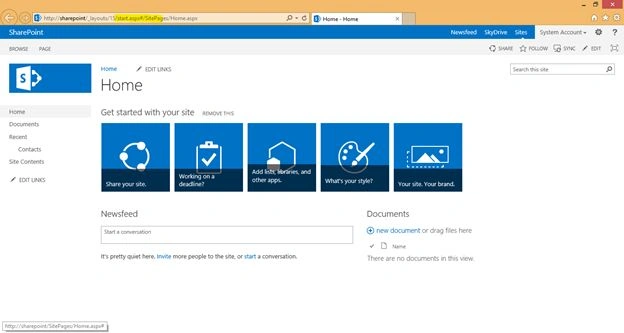
You can see all the pages will be using start.aspx for rendering.
The requested page will be passed after the #.
Advantages
The following are the advantages of using MDS:
- Speed: pages will load faster.
- Less bandwidth: less bandwidth will be used, it is good for tablets/mobiles with metered/slow connections.
How it works
There are 2 components that enable MDS:
- Server-side
- Client-side
Each page will be divided into multiple sections.
When a client requests a new page, the server calculates the delta (changes). Only the changed sections will be sent to the client. The client will be smart enough to patch the received sections to appropriate sections.
Note
By default the MDS feature is activated.
References
Summary
In this article we explored the Minimal Download Strategy. Now this also answers what the start.aspx is doing in SharePoint 2013.


Abhay ShankerPosted Jul 26, 2015, 6:52 AM EDT
Nice One Sir
Jean PaulTOP 100Posted Jul 24, 2015, 5:42 AM EDT
Thank You Dear Friends!
Gowtham RajamanickamTOP 100Posted Jul 20, 2015, 2:53 AM EDT
awesome
Sibeesh VenuTOP 100Posted Jul 20, 2015, 12:48 AM EDT
Nice Share.
Gopi ChandPosted Jul 19, 2015, 9:35 PM EDT
Its nice one
Santhakumar MunuswamyPosted Jul 19, 2015, 3:47 AM EDT
Good one
RakeshPosted Jul 19, 2015, 3:42 AM EDT
Nice one sir