
Introduction
This article explains mobile app development, related technologies, types of applications in the current scenario, from the past and the future along with their related operating systems. So buckle up and prepare for this app journey.
Here we go.
Applications | Overview
We are in an era of applications that are continuously making our life easier, better and I can say extended. So just go through all these types and be a part of this app era.
Definition
An application is nothing but a set of programs or codes designed for performing some required or pre-defined operations.
There can be several types of applications. Based on their functionality their definition and working methodology, technologies also differ from each other.
 Now I am taking you into an ocean of applications.
Current scenario | App Development
Here I am comparing the data of a few years of mobile-based devices like tablets, smartphones, tablets and so on with the internet on machines so that you can have a feel of the current app development market.

Application | Types
When we talk about applications, our mind generally takes us to several types of utility apps, gaming apps, and social networking apps, that's it, but that's neither the end nor the beginning. In the current scenario when we talk about applications, we need to be specific and more generic about what type of app we are talking about and what the scenario is for that.
So in this portion of this blog, I will talk about several existing categories of applications and further, I'll discuss them in detail. (Here we will cover app categories from the past and future perceptions along with the present needs and usefulness).
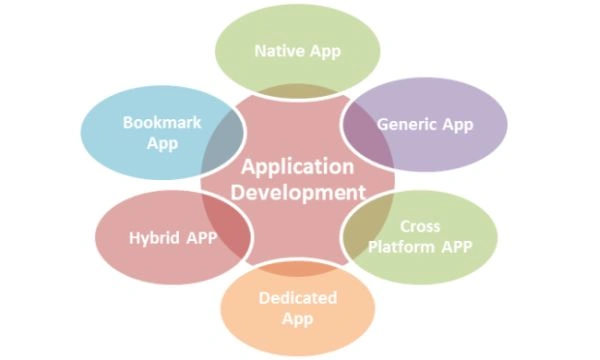
In spite of all these major categories, there can be some derived categories too that fits in every major category depending on their development procedure and various functionalities.
Generally, the most commonly used derived categories are:
In simple words, we can say that Native applications are developed for specific platforms and are installed on a computing device.
- Static Apps
- Dynamic Apps
- Single Page AppsEtc.
1. Native Applications
Native apps are generally developed using an Integrated Development Environment (IDE). IDEs are used in this kind of app development because IDEs provide:
- Built-in support
- Built-in support of libraries
- Debugging
- Version control tools
- Project management tools
And some other useful utility tools for providing full support in app development.

Native App | Features
Some of the most common features of native apps are as follows.
Pros
- MultiTouch support
- Fast graphics API
- Fluid Animation
- Ease of use
- Built-in Components
- Documentation
Cons
- Expensive Development work
- Single Platform
Native App | Technologies
Some of the most commonly used technologies are:
- Native iOS
- Native Android
- PhoneGap
- Accelerator Titanium
Native App | Example
- Walgreens
- PIM Calendar
- NFC MAC Address
- Falling Blocks
- Place Picker
2. Hybrid Applications
In very common words we can define hybrid apps as Applications that are a combination of both native and web applications.
As I explained, native apps are developed for specific platforms and are installed on a computing device and web applications are those that are built for multiple platforms and can work globally. These types of applications can be simply accessed or used by the browser via an active internet connection.
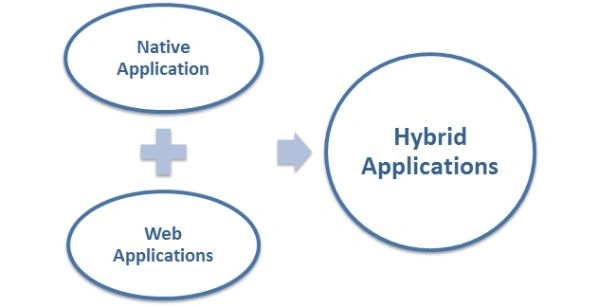
Thus hybrid apps are a combination of both of these categories, having more features than native and web applications individually.
Hybrid App | Features
Some of the most common features of hybrid apps are as follows.
Pros
- It can function whether or no the device is connected.
- Integration with device files system.
- Integration with web-based services.
- An embedded browser to dynamically update online content.
- Works on multiple platforms.
Cons
- Functionality distractions
- Feature overlapping
Hybrid App | Technologies
The most used technologies are:
- Blackberry native
- HTML5
- PhoneGap
Hybrid App | Example
Some of the popular apps are:
- Banana Republic
- Financial Times
- App shot
- Bucket List
Native VS Hybrid
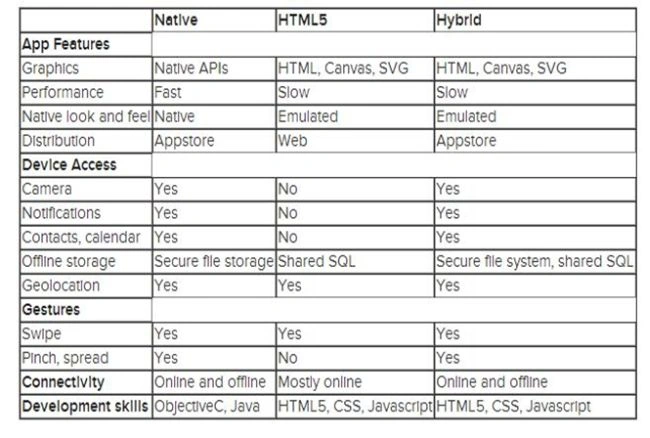
Here will compare and contrast between a native app and hybrid apps, how they differ and scenarios depending on their functionality through this picture.
Just go through this image and feel the difference:
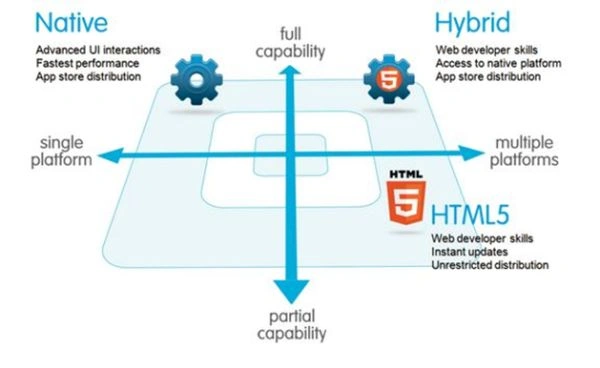
Native VS Hybrid VS Web Applications
In this portion I am showing a real scenario of these 3 major app categories:
3. Generic Apps
In simple words, we can say A mobile website will work with all the mobile platforms and phones as well.
In the diagram shown below, represents an overview or model of how generic applications actually work and their processing from one step to another without any difference. So the generic application concept is not really new, it was in the market but not at its peak but in the current scenario, it's crossing several leaps and bounds and giving tough competition to the mobile application development market.

Generic App | Features
Some measured features of generic apps are:
Pros
- Doesn't require specific GUI
- Content oriented
- Compact and cozy view
- Web API based app development
- Works on multiple platforms
Cons
- Less user interaction
- Functionally dependent on the requirement
- Generally static apps
- Requires active internet connection
Generic App | Technologies
Some preferred technologies are:
- C# (Microsoft)
- Android
- Objective C (iOS)
- FI_WARE (open Tech)
Generic App | Examples
Some popular apps are:
- NHL series
- Tomb Raider
- HTML5 Learner
- Flipkart Application
- eBay application
4. Dedicated Apps
In common words, Dedicated apps are requirement-specific static apps that are directly dependent upon the few module requirements and limited functionality.
Dedicated apps are better than bookmarked apps because several well defined and designed functionality depend on the requirements.

Some people define dedicated apps as a website that is tailored to work on mobile devices.
Dedicated App | Features
Some features of dedicated apps are:
Pros
- Supports various platforms.
- Functionality dependent app development
- Can be static or dynamic
- Based on client requirement architecture
Cons
- Less functionality
- Outdated
- Less user friendly
Dedicated App | Technologies
Some preferred technologies are:
- HTML5/CSS3
- Android
- WIN 8 Environment
Dedicated App | Examples
Some popular apps are:
- Swift key Keyboard
- Food planer
- Timely
- Keep
- Duolingo
- Path talk
- Minecraft
5. Bookmark Apps
In simple words, bookmark apps are applications that let users save web resources that they wish to access later into organized lists that can be shared online or we can say bookmark apps are mobile websites. Bookmark apps make your website compatible for viewing in mobile or tablets or mobile versions of a website.

Bookmark App | Feature
Some specific features are:
Pros
- Works in an organized way.
- Have a name different from a link.
- You just need to customize your website.
- It can be organized into several folders.
- Drag and drop functionality
Cons
- Generally static apps
- Less user interaction
- Outdated
Bookmark App | Technologies
Bookmarks applications don't use any specific technology, these applications are generally based on browser interaction, so these applications use:
- HTML5/CSS3
- Basic Scripting Languages
- Graphics/API's
Bookmark App | Example
- How-To-Geek
- InstaPaper
- Blogmarks
- Goolge Bookmarks
6: Cross-Platform Apps
In most simple words we can say In computing, cross-platform means applications/software that can work freely on various platforms or multiple platforms.
Cross-platform applications can be based on the following two types of functionalities:
- Run time packages
- Standard components

Cross-platform applications are widely used and accepted these days due to their performance and capability of supporting various platforms without serious causes. In spite of all these, it also gives developers some additional support of libraries, utility tools and so on.
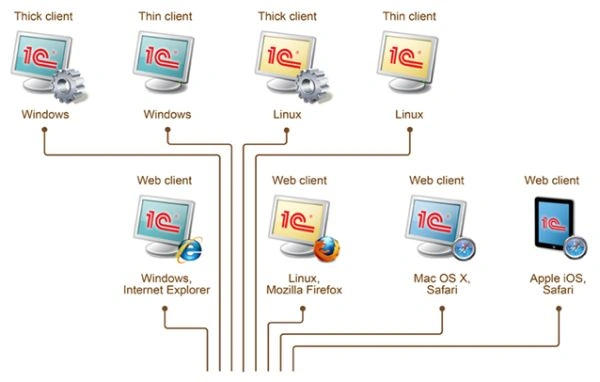
Cross-platform Design | view
This view represents the support and design architecture.
Cross-Platform App | Features
Some features of cross-platform apps are:
Pros
- Can be used is multiple platforms
- Can function both online and offline mode
- User-friendly environment
- Ease of development
- Fully function-oriented
- Combination of hybrid and native apps (in general)
- Multi-touch functionality
- Integration with web-based services
Cons
- Security aspects
- Testing issues
- Hidden privacy flaws
- Data lose
- Requires execution environment
Cross-Platform App | Technologies
Some preferred technologies/frameworks are:
- Phone Gap
- Open GL
- Mozilla application platform
- WebDev
- WinDev
- TCL/TK
Cross-Platform App | Example
Some popular apps are:
- Team Play
- Team Fortress
- UNO
- BBMS
- Shadow Run
- Lost Planet
- DUST 514


Keyur PatelPosted Aug 20, 2014, 12:42 AM EDT
Gr8. Good article on difference between Native VS Hybrid VS Web Applications:-).
Gopi ChandPosted Aug 12, 2014, 11:15 PM EDT
Its really a trending topic nowdays..
Mahesh ChandTOP 10Posted Aug 12, 2014, 8:38 PM EDT
Well, nice graphics presentation, Abhishek.
Ashutosh PathakPosted Aug 11, 2014, 2:49 AM EDT
Very interesting article...gr8 work.
Abhishek JaiswalPosted Jul 31, 2014, 9:45 AM EDT
thnks! ;)
Gopi ChandPosted Jul 31, 2014, 3:33 AM EDT
very informative article..good keep it up..!!.. :)