
CBefore reading this article, I highly recommend reading the previous installments in the series:
- MongoDB - Day 1 (Introduction To MongoDB)
- MongoDB - Day 2 (Install MongoDB in Windows)
- MongoDB - Day 3 (Database Basics)
- MongoDB - Day 4 (Basics of Collection)
- MongoDB - Day 5 (Data Types in MongoDB)
- MongoDB - Day 6 (Insert Method)
- MongoDB - Day 7 (Find Method Part 1)
- MongoDB - Day 8 (Find Method Part
- MongoDB- Day 9(Update Method)
Remove() Method
The Remove method deletes (removes) document(s) from a collection. The Remove method searches documents based on the deleting-criteria (<query>) and removes all documents matching the criteria. We can remove a single item at a time using the <justOne> parameter, but we can't use the remove() method with a capped collection.
Syntax
Parameters
The Remove method deletes (removes) document(s) from a collection. The Remove method searches documents based on the deleting-criteria (<query>) and removes all documents matching the criteria. We can remove a single item at a time using the <justOne> parameter, but we can't use the remove() method with a capped collection.
Syntax
- db.Collection_Name.remove( query,{ justOne:<Boolean>} )
| Parameter | Type | Description |
| Query | Document | Specify the deletion criteria |
| justone | Boolean | Optional, the default value is false. Remove a single document if set to true otherwise delete all the documents matching the deletion criteria. |
Return Type
The remove() returns an object containing the status of the operation. The remove() method returns a WriteResult object that contains the status of the operation. The WriteResult object is an integer type that returns the number of documents removed.
Now, we consider some examples and examine the behavior of the remove() method.
1. Create a collection
Code
- db.createCollection("Demo",{autoIndex:false,max:100,size:5040320})

Now insert some documents into the “Demo” collection.
- {
- "_id" : ObjectId("55ca1d327ad050ed6214a4e3"),
- "Product_Name" : "Pendrive",
- "Price" : 250
- "Amount" : 2
- }
- {
- "_id" : ObjectId("55ca1d547ad050ed6214a4e4"),
- "Product_Name" : "Book",
- "Price" : 350,
- "Amount" : 4
- }
- {
- "_id" : ObjectId("55ca1d6a7ad050ed6214a4e5"),
- "Product_Name" : "Photo Frame",
- "Price" : 150,
- "Amount" : 3
- }
- {
- "_id" : ObjectId("55ca1d947ad050ed6214a4e6"),
- "Product_Name" : "Pencil",
- "Price" : 15,
- "Amount" : 20
- }
- {
- "_id" : ObjectId("55ca1dc47ad050ed6214a4e7"),
- "Product_Name" : "Keyboard",
- "Price" : 1500,
- "Amount" : 4
- }
- {
- "_id" : ObjectId("55ca1dd57ad050ed6214a4e8"),
- "Product_Name" : "Mouse",
- "Price" : 125,
- "Amount" : 5
- }
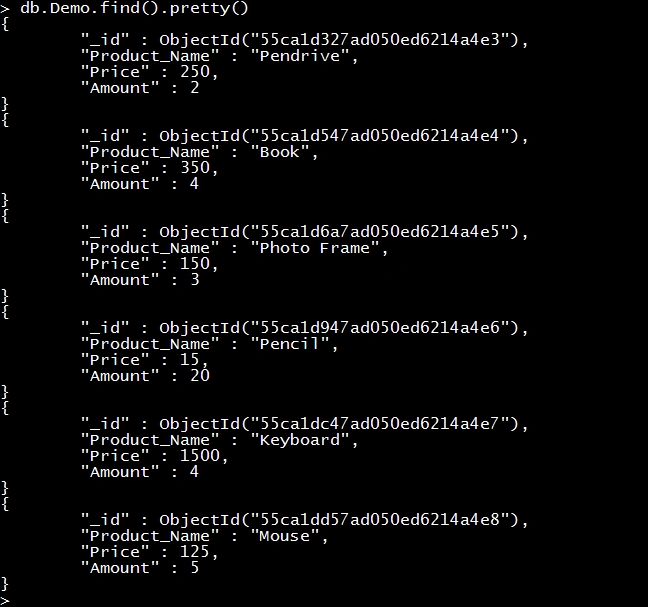
Remove all document from collection
To remove all the documents in a collection, use the remove method with an empty query document {}.
Query
- db.Demo.remove({})
This query removes all the documents from the “Demo” collection.

Note that the remove() and drop() methods are not the same. The Drop() method drops an entire collection including its structure and index, but the remove() method deletes only the documents from the collection.
Remove all Documents that Match the Deletion Criteria
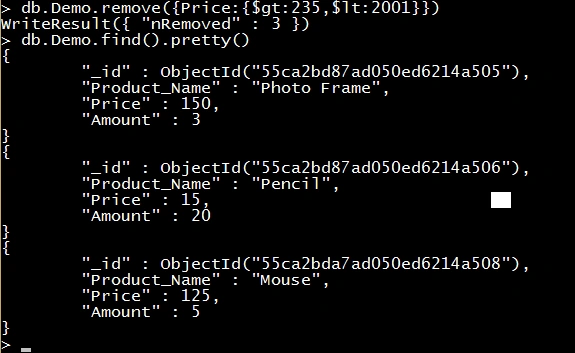
To remove all the documents that match a certain criteria, use the <query> parameter and apply the deletion criteria.
Query
- db.Demo.remove({Price:{$gt:235,$lt:2001}})
Collection after Query
Remove Single Document
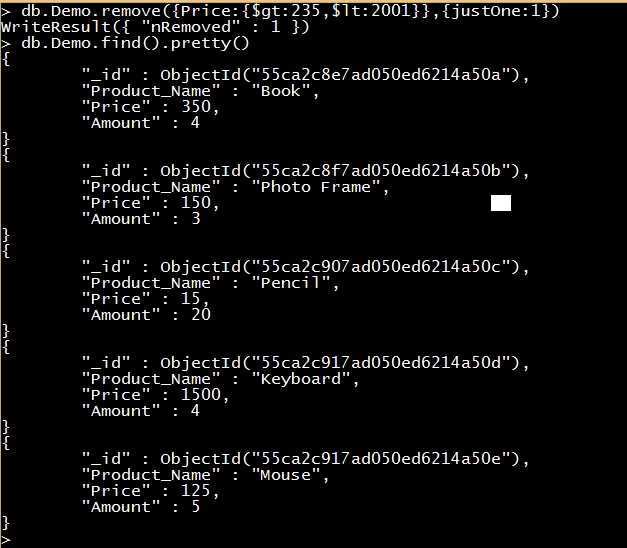
To remove the first document that matches a deletion criteria, use the “justOne” parameter of the remove() method. Set the value of the “justOne” parameter to true or 1.
Query
- db.Demo.remove({Price:{$gt:235,$lt:2001}},{justOne:1})
Collection after Query
Remove method with Capped Collection
We can't delete a specific document from a capped collection. To remove all documents from a collection, use the drop() method to drop the collection.
Let's see an example:
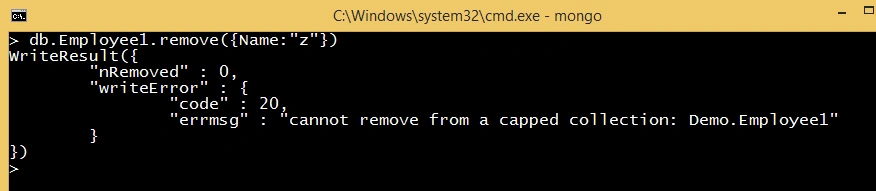
In the preceding example, we tried to use the remove method with a capped collection so MongoDB throws an error. To remove all documents from a collection, use the drop() method.
Use Isolated option with remove operation
During the removal of multiple documents, the remove operation may interleave with other read and write operations of the collection. To override this behavior, use the “$isolated” option. The isolated option ensures that no client can see the affected documents until they are all processed or an error stops the removal operation. To use the isolate behavior in the remove method, set the “$isolated” parameter to 1 or true.
Example

Today, we learned about the remove method. In next the article, I will explain another method. Until then keep coding.
Next Article >> MongoDB Collection Methods (Day 11)


Hamid KhanPosted Aug 15, 2017, 9:14 PM EDT
Very good article dear friend
Sr KarthigaPosted Feb 14, 2016, 2:44 AM EST
Good one sir
Yashwant VishwakarmaPosted Aug 25, 2015, 11:06 PM EDT
Wonderful series :-)
Vaikesh K PPosted Aug 25, 2015, 10:28 PM EDT
Good Share :)
Yashwanth MuthineniPosted Aug 25, 2015, 1:42 AM EDT
Nice Share
Shridhar SharmaPosted Aug 13, 2015, 1:34 PM EDT
nice series
Ankit BansalPosted Aug 13, 2015, 3:41 AM EDT
good one..
Pankaj Kumar ChoudharyTOP 100Posted Aug 13, 2015, 1:34 AM EDT
Thanks Vaikesh K P sir............
Pankaj Kumar ChoudharyTOP 100Posted Aug 13, 2015, 1:33 AM EDT
Thanks Sibeesh Sir........
Pankaj Kumar ChoudharyTOP 100Posted Aug 13, 2015, 1:32 AM EDT
Thanks Gowtham Sir...........
Pankaj Kumar ChoudharyTOP 100Posted Aug 13, 2015, 1:31 AM EDT
Thanks Nilesh Jadav Sir............
Pankaj Kumar ChoudharyTOP 100Posted Aug 13, 2015, 1:31 AM EDT
Thanks Karthikeyan Sir..........
Pankaj Kumar ChoudharyTOP 100Posted Aug 13, 2015, 1:30 AM EDT
Thanks Rahul..........
Gowtham RajamanickamTOP 100Posted Aug 13, 2015, 12:49 AM EDT
good one..
Sibeesh VenuTOP 100Posted Aug 13, 2015, 12:27 AM EDT
Nice Share :)
Vaikesh K PPosted Aug 12, 2015, 10:57 PM EDT
Great Series :)
Nilesh JadavPosted Aug 12, 2015, 10:50 PM EDT
This is really nice sir Day 10 uh ?? haha great Pankaj Kumar Choudhary
Karthikeyan KPosted Aug 12, 2015, 10:40 PM EDT
Good nice..Thanks for sharing
Rahul PrajapatPosted Aug 12, 2015, 4:45 PM EDT
Good article Pankaj Kumar Choudhary sir
Pankaj Kumar ChoudharyTOP 100Posted Aug 12, 2015, 4:40 PM EDT
Thanks Santhakumar Munuswamy Sir...........
Pankaj Kumar ChoudharyTOP 100Posted Aug 12, 2015, 4:39 PM EDT
Thanks Debasis Saha Sir..........
Pankaj Kumar ChoudharyTOP 100Posted Aug 12, 2015, 4:39 PM EDT
Thanks Pankaj Bajaj sir for your enthusiastic words but i am not expert , i am beginner in this field................
Pankaj Kumar ChoudharyTOP 100Posted Aug 12, 2015, 4:33 PM EDT
Thanks Chervine Bhiwoo Sir.........
Debasis SahaTOP 100Posted Aug 12, 2015, 11:15 AM EDT
good one..
Santhakumar MunuswamyPosted Aug 12, 2015, 10:52 AM EDT
Good Article. Thanks for sharing
Pankaj BajajPosted Aug 12, 2015, 9:25 AM EDT
Good Going Pankaj..Now you are MongoDB Expert..I missed some articles but will read when time permit..
Chervine BhiwooPosted Aug 12, 2015, 6:54 AM EDT
Good work
Pankaj Kumar ChoudharyTOP 100Posted Aug 12, 2015, 5:47 AM EDT
Thanks Sandeep Bro............
Sandeep KumarPosted Aug 12, 2015, 4:40 AM EDT
Nicely Done sir :)
Pankaj Kumar ChoudharyTOP 100Posted Aug 12, 2015, 3:44 AM EDT
Thanks Gopi Chand Sir........
Pankaj Kumar ChoudharyTOP 100Posted Aug 12, 2015, 3:43 AM EDT
Thanks Rajeesh Menoth Sir........
Pankaj Kumar ChoudharyTOP 100Posted Aug 12, 2015, 3:42 AM EDT
Thanks Rakesh Chavda sir.......
Pankaj Kumar ChoudharyTOP 100Posted Aug 12, 2015, 3:42 AM EDT
Thanks Vaikesh Sir....
Gopi ChandPosted Aug 12, 2015, 3:34 AM EDT
Nice job
Rajeesh MenothPosted Aug 12, 2015, 1:57 AM EDT
Good One again
RakeshPosted Aug 12, 2015, 1:18 AM EDT
Good work
Vaikesh K PPosted Aug 12, 2015, 12:26 AM EDT
Nice Series ... :)
Pankaj Kumar ChoudharyTOP 100Posted Aug 12, 2015, 12:21 AM EDT
Thanks Rahul Prajapat........
Pankaj Kumar ChoudharyTOP 100Posted Aug 12, 2015, 12:21 AM EDT
Thanks Sibeesh Venu Sir.........
Pankaj Kumar ChoudharyTOP 100Posted Aug 12, 2015, 12:21 AM EDT
Thanks Karthikeyan K Sir........
Pankaj Kumar ChoudharyTOP 100Posted Aug 12, 2015, 12:20 AM EDT
Thanks Nihal Ahmed..........
Sibeesh VenuTOP 100Posted Aug 11, 2015, 11:08 PM EDT
Nice Share...
Rahul PrajapatPosted Aug 11, 2015, 11:05 PM EDT
Thanks for sharing pankaj sir
Karthikeyan KPosted Aug 11, 2015, 9:47 PM EDT
Nice collections...Thanks for share
Nihal AhmedPosted Aug 11, 2015, 9:44 PM EDT
Nice one.