
Continuous synchronization keeps the source repository active until cutover.
You can move an Azure DevOps Services repository to GitHub while developers continue to commit, open pull requests, and run their normal work by using Enterprise Live Migrations (ELM). ELM continuously syncs Azure DevOps changes to GitHub Enterprise Cloud with data residency, then you schedule a short read-only cutover window, typically under 30 minutes for most repositories. As of November 19, 2026, ELM is generally available for this supported migration path.
This is different from a standard one-time repository import. A one-time import creates a point-in-time copy, so commits made during the import need manual follow-up. For a busy repository, continuous sync is the safer approach because it keeps the target close to the source until the team is ready to switch.
Key takeaways
Enterprise Live Migrations continuously synchronizes Azure DevOps Services repositories with GitHub Enterprise Cloud with data residency before cutover.
Teams can keep working in Azure DevOps during validation and synchronization, but should plan a brief read-only window for the final cutover.
ELM migrates Git history, branches, tags, Git LFS objects, pull request metadata, and branch policies that become GitHub rulesets.
Work items, pipeline definitions, releases, wikis, test plans, and Azure Artifacts are outside the ELM repository migration scope.
A self-hosted Linux Azure Pipelines agent, a prepared GitHub organization, correct permissions, and a GitHub personal access token are required before migration starts.
What Enterprise Live Migrations does
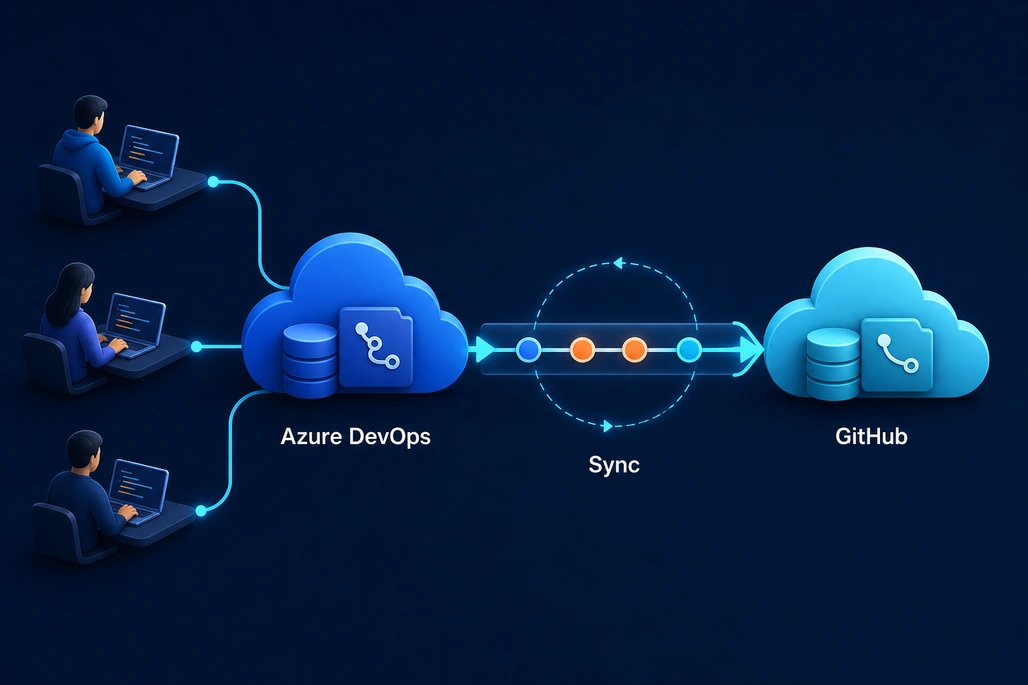
ELM copies changes continuously before the final switch.
Enterprise Live Migrations documentation describes a staged repository migration process: validation, initial synchronization, incremental synchronization, cutover, and post-migration verification. The source repository remains the system of record while synchronization is active. Developers should continue pushing only to Azure DevOps until the cutover completes.
ELM is designed for Azure DevOps Services repositories hosted at dev.azure.com. Its target is GitHub Enterprise Cloud with data residency. It does not support Azure DevOps Server directly, GitHub Enterprise Server, or a normal GitHub.com organization that is outside the supported data residency offering.
During the first sync, ELM copies the existing repository. It then uses delta tracking to copy newer work to GitHub. At cutover, the team briefly stops writes to Azure DevOps, ELM performs the final sync, and GitHub becomes the system of record.
Migration option | Can developers keep working? | What moves | Best fit |
|---|---|---|---|
Enterprise Live Migrations | Yes, until a short cutover window | Code, history, branches, tags, LFS objects, pull requests, and branch policies | Active Azure DevOps Services repositories moving to supported GitHub Enterprise Cloud |
GitHub Enterprise Importer | Not safely without manual catch-up | Repository data and supported pull request metadata | Teams that can schedule a freeze or reconcile changes manually |
Git clone and mirror push | Not as an automatic live migration | Git source, refs, and history | Small repositories where metadata migration is not needed |
Know what moves and what stays in Azure DevOps
A repository migration is not a full Azure DevOps project migration. ELM moves Git source with commit history, branches, tags, Git LFS objects, pull request titles, descriptions, comments, user history, and branch policies. Azure DevOps branch policies are migrated as GitHub branch rulesets.
Several items require separate planning. ELM does not migrate Azure Boards work items, pipeline definitions, releases, wikis, test plans, test results, or Azure Artifacts. You can keep Azure Boards and Azure Pipelines after code moves to GitHub, which is useful when your team wants a gradual change instead of replacing every service at once.
Do not treat migrated rulesets as finished security configuration. Review required reviewers, status checks, branch restrictions, bypass permissions, and merge settings after cutover. A rule that looks similar in two products can behave differently in practice.
Prepare the migration before you start synchronization
Preparation is where most migration risk is removed. Start with one low-risk repository as a pilot. Use it to confirm that your target organization, network rules, branch rulesets, pipeline connection, permissions, and developer instructions are ready before moving a business-critical repository.
Check eligibility and repository health
ELM validates common repository limits before it begins. A file larger than 400 MB anywhere in history, a Git push pack larger than 2 GB, or a branch or tag name over 255 bytes will stop validation. Clean up these problems before scheduling a cutover.
Review pull requests too. ELM does not migrate abandoned pull requests whose branches were deleted. Ask repository owners to finish, abandon, or document older pull requests rather than discovering the gap after the move.
Set up people, permissions, and the Linux agent
The migration operator needs the Enterprise Live Migrations: Manage Migrations permission in Azure DevOps. A GitHub Enterprise administrator must prepare the target organization and create the GitHub personal access token used by the Azure DevOps service connection.
ELM runs through Azure Pipelines on a self-hosted Linux agent. Keep that agent online during the migration. For a long-running sync, install it as a service so a reboot or closed terminal does not stop the job.
# Install or update the Azure DevOps CLI extension.
az extension add -n azure-devops
az extension update -n azure-devops

# Confirm that the required migration commands are available.
az extension show --name azure-devops --query version -o tsv
az devops migrations --help

# Sign in and select the Azure DevOps organization.
az login
az devops configure --defaults organization=https://dev.azure.com/contoso

# Retrieve and save the source repository GUID.
az repos show \
  --org https://dev.azure.com/contoso \
  --project Storefront \
  --repository web-api \
  --query id \
  -o tsv
The repository GUID is used by ELM commands. Keeping it in a migration worksheet avoids mistakes when repositories have similar names. Do not put a personal access token in a script, pipeline YAML file, terminal history, or source repository. Store it in the Azure DevOps service connection and give access only to people who need it.
Start a live migration with validation first
Use validation before you start a full sync. Validation checks the repository without moving the team. A successful validation remains valid for 24 hours, so plan to start the full synchronization soon after the check passes.
# Validate the repository before copying data.
az devops migrations create \
  --org https://dev.azure.com/contoso \
  --repository-id <repository-guid> \
  --target-repository https://<enterprise-url>/platform/web-api \
  --agent-pool linux-migration \
  --validate-only

# After validation succeeds, start synchronization within 24 hours.
az devops migrations resume \
  --org https://dev.azure.com/contoso \
  --repository-id <repository-guid> \
  --migration

# Check the current lifecycle stage and any validation errors.
az devops migrations status \
  --org https://dev.azure.com/contoso \
  --repository-id <repository-guid>
The target repository is private while the migration is in progress. That reduces the chance that someone starts using GitHub early. Tell developers clearly that Azure DevOps remains the only write location until the migration is marked complete.
If you are retaining Azure Pipelines, ELM can discover and rewire qualifying pipelines. It can also create an Azure Boards connection when the required GitHub app is installed. Still test every important build and deployment after the repository changes. Pipelines that reference the source repository through templates, repository resources, or custom scripts may require manual updates.
Run a controlled cutover
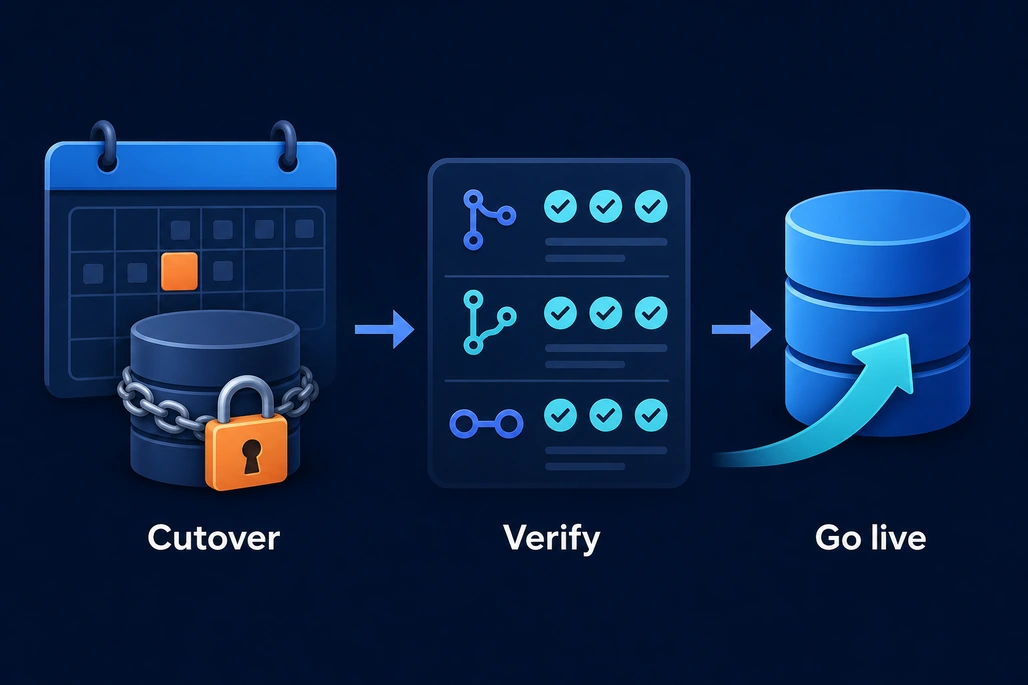
A brief read-only cutover protects the final synchronization.
Do not announce a cutover as “no downtime.” The practical promise is no long development freeze. The final read-only period prevents last-minute Azure DevOps commits from being missed while ELM completes its final synchronization.
Choose a cutover period and notify developers, release managers, and support teams.
Ask developers to push or shelve local work before the read-only period starts.
Pause merges and direct pushes to the Azure DevOps repository.
Confirm ELM shows a ready-for-cutover state and review any pipeline rewiring results.
Run cutover in the Azure DevOps portal or with the approved CLI process.
Verify branches, tags, recent commits, pull requests, rulesets, team access, builds, and deployment credentials in GitHub.
Tell developers to update their local remotes only after the verification checklist passes.
# Existing clones can point origin at the new GitHub repository.
git remote set-url origin https://<enterprise-url>/platform/web-api.git

git fetch origin --prune
git remote -v
Use the new GitHub clone URL that your enterprise provides. Then ask developers to run a fetch before beginning new work. Developers with unpushed local commits should coordinate with the migration owner before pushing, especially if their work started before cutover.
Production verification checklist
Migration success means more than a completed job. Make repository checks part of your change plan and assign each item to a named owner.
Compare the default branch, protected branches, active feature branches, release branches, and tags.
Check several recent commit IDs in both systems before Azure DevOps becomes read-only or is archived.
Open active pull requests and confirm descriptions, comments, reviewers, and linked work item behavior meet team expectations.
Review GitHub branch rulesets and required status checks before allowing merges.
Run CI for the default branch and a pull request. Then run one safe deployment path if the repository deploys software.
Update build scripts, package references, templates, documentation, and automation that contain Azure DevOps clone URLs.
Validate access using accounts from each role, including a developer, reviewer, maintainer, and automation identity.
Rotate the GitHub personal access token after the migration and remove temporary firewall or IP allow-list changes.
Common mistakes and troubleshooting
Using the wrong tool for the target platform
ELM has a specific support boundary: Azure DevOps Services to GitHub Enterprise Cloud with data residency. If your destination is standard GitHub.com or your source is Azure DevOps Server, confirm the migration path before configuring an agent. GitHub Enterprise Importer or a Git-based migration may be the correct alternative, but neither gives ELM-style delta synchronization.
Starting work in GitHub before cutover
Do not let developers push to both repositories during synchronization. Parallel writes create two histories that must be reconciled manually. Keep Azure DevOps writable and GitHub private during sync, then move all writes to GitHub after successful cutover.
Validation fails because of oversized history
Large files can exist in old commits even when the current branch looks small. Review repository history, move files that belong in Git LFS, or rewrite history after approval from repository owners. Rewriting history changes commit IDs, so communicate it before developers rebase or resume work.
The agent is offline or has no capacity
Check that the self-hosted Linux agent is online, can reach Azure DevOps and GitHub endpoints, and has access to the selected agent pool. ELM uses one agent job at a time, but it shares the pool with normal pipeline work. A dedicated migration pool is often easier to monitor when the repository is important.
A build fails after the repository moves
Start with repository URLs, service connections, webhook triggers, repository resources, and checkout steps. Then confirm the pipeline identity can read the new GitHub repository. A successful migration job does not prove every external integration has been updated.
Advantages and limits of a live migration
Advantages | Limits to plan for |
|---|---|
Developers remain productive during the initial copy and ongoing synchronization. | A short read-only cutover window is still required. |
Git history, pull request data, Git LFS objects, and branch policies are included. | Work items, wikis, releases, artifacts, and pipeline definitions need their own plan. |
You can keep Azure Boards and Azure Pipelines while placing source code in GitHub. | ELM supports only Azure DevOps Services and GitHub Enterprise Cloud with data residency. |
Pre-migration validation identifies supported repository limits before the team switches tools. | You must provide and maintain a self-hosted Linux agent through the migration. |
Summary
For a team that cannot stop development for a repository move, ELM provides a practical staged process: validate first, continuously synchronize while Azure DevOps remains the write location, perform a short controlled cutover, and verify production integrations before declaring GitHub ready. Keep the scope honest. Repository data can move live, but planning data, release tooling, wikis, artifacts, and some pipeline work need separate decisions.
Frequently asked questions
Can developers keep working during an Azure DevOps to GitHub migration?
Yes, when you use Enterprise Live Migrations on its supported path. Developers can continue working in Azure DevOps Services while ELM synchronizes changes to GitHub. Plan a brief read-only period for final cutover.
Does Enterprise Live Migrations work with Azure DevOps Server?
No. ELM supports Azure DevOps Services, not Azure DevOps Server. A team using Azure DevOps Server needs a different migration path, such as moving to Azure DevOps Services first.
What repository data does ELM migrate?
ELM migrates Git source and commit history, branches, tags, Git LFS objects, supported pull request metadata and comments, user history, and branch policies that become GitHub branch rulesets.
Will Azure Boards and Azure Pipelines move automatically?
Work items and pipeline definitions are not migrated as repository data. You can continue using Azure Boards and Azure Pipelines after the code moves, and ELM can help create an Azure Boards connection and rewire supported Azure Pipelines repositories.
What should developers do after cutover?
Developers should update their local Git remote to the GitHub repository, fetch from the new origin, and stop pushing to Azure DevOps. Anyone with local work that was not pushed before cutover should coordinate with the migration owner before publishing it.

Join the conversation! Your thoughts help the community grow.