
Introduction
In MVC we cannot pass multiple models from a controller to the single view. This article provides a workaround for multiple models in a single view in MVC.
Problem Statement
Suppose I have two models, Teacher and Student, and I need to display a list of teachers and students within a single view. How can we do this?
The following are the model definitions for the Teacher and Student classes.
public class Teacher
{
    public int TeacherId { get; set; }
    public string Code { get; set; }
    public string Name { get; set; }
}

public class Student
{
    public int StudentId { get; set; }
    public string Code { get; set; }
    public string Name { get; set; }
    public string EnrollmentNo { get; set; }
}
The following are the methods that help us to get all the teachers and students.
private List<Teacher> GetTeachers()
{
    List<Teacher> teachers = new List<Teacher>();
    teachers.Add(new Teacher { TeacherId = 1, Code = "TT", Name = "Tejas Trivedi" });
    teachers.Add(new Teacher { TeacherId = 2, Code = "JT", Name = "Jignesh Trivedi" });
    teachers.Add(new Teacher { TeacherId = 3, Code = "RT", Name = "Rakesh Trivedi" });
    return teachers;
}

public List<Student> GetStudents()
{
    List<Student> students = new List<Student>();
    students.Add(new Student { StudentId = 1, Code = "L0001", Name = "Amit Gupta", EnrollmentNo = "201404150001" });
    students.Add(new Student { StudentId = 2, Code = "L0002", Name = "Chetan Gujjar", EnrollmentNo = "201404150002" });
    students.Add(new Student { StudentId = 3, Code = "L0003", Name = "Bhavin Patel", EnrollmentNo = "201404150003" });
    return students;
}
Required output
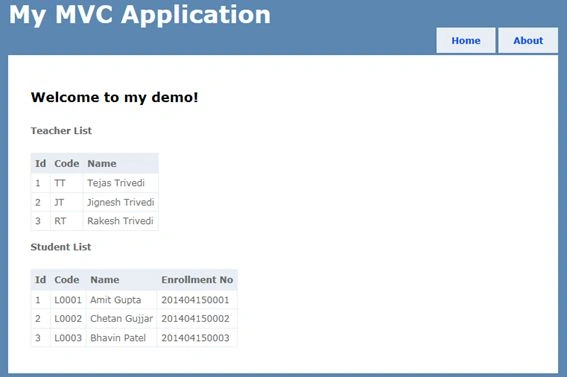
Solution
There are many ways to use multiple models with a single view. Here I will explain ways one by one.
1. Using Dynamic Model
ExpandoObject (the System.Dynamic namespace) is a class that was added to the .Net Framework 4.0 that allows us to dynamically add and remove properties onto an object at runtime. Using this ExpandoObject, we can create a new object and can add our list of teachers and students into it as a property. We can pass this dynamically created object to the view and render list of the teacher and student.
Controller Code
public class HomeController : Controller
{
    public ActionResult Index()
    {
        ViewBag.Message = "Welcome to my demo!";
        dynamic mymodel = new ExpandoObject();
        mymodel.Teachers = GetTeachers();
        mymodel.Students = GetStudents();
        return View(mymodel);
    }
}
We can define our model as dynamic (not a strongly typed model) using the @model dynamic keyword.
View Code
@using MultipleModelInOneView;
@model dynamic
@{
    ViewBag.Title = "Home Page";
}
<h2>@ViewBag.Message</h2>

<p><b>Teacher List</b></p>

<table>
    <tr>
        <th>Id</th>
        <th>Code</th>
        <th>Name</th>
    </tr>
    @foreach (Teacher teacher in Model.Teachers)
    {
        <tr>
            <td>@teacher.TeacherId</td>
            <td>@teacher.Code</td>
            <td>@teacher.Name</td>
        </tr>
    }
</table>

<p><b>Student List</b></p>

<table>
    <tr>
        <th>Id</th>
        <th>Code</th>
        <th>Name</th>
        <th>Enrollment No</th>
    </tr>
    @foreach (Student student in Model.Students)
    {
        <tr>
            <td>@student.StudentId</td>
            <td>@student.Code</td>
            <td>@student.Name</td>
            <td>@student.EnrollmentNo</td>
        </tr>
    }
</table>
2. Using View Model
ViewModel is nothing but a single class that may have multiple models. It contains multiple models as a property. It should not contain any method.
In the above example, we have the required View model with two properties. This ViewModel is passed to the view as a model. To get intellisense in the view, we need to define a strongly typed view.
public class ViewModel
{
    public IEnumerable<Teacher> Teachers { get; set; }
    public IEnumerable<Student> Students { get; set; }
}
Controller code
public ActionResult IndexViewModel()
{
    ViewBag.Message = "Welcome to my demo!";
    ViewModel mymodel = new ViewModel();
    mymodel.Teachers = GetTeachers();
    mymodel.Students = GetStudents();
    return View(mymodel);
}
View code
@using MultipleModelInOneView;
@model ViewModel
@{
    ViewBag.Title = "Home Page";
}
<h2>@ViewBag.Message</h2>

<p><b>Teacher List</b></p>

<table>
    <tr>
        <th>Id</th>
        <th>Code</th>
        <th>Name</th>
    </tr>
    @foreach (Teacher teacher in Model.Teachers)
    {
        <tr>
            <td>@teacher.TeacherId</td>
            <td>@teacher.Code</td>
            <td>@teacher.Name</td>
        </tr>
    }
</table>

<p><b>Student List</b></p>

<table>
    <tr>
        <th>Id</th>
        <th>Code</th>
        <th>Name</th>
        <th>Enrollment No</th>
    </tr>
    @foreach (Student student in Model.Students)
    {
        <tr>
            <td>@student.StudentId</td>
            <td>@student.Code</td>
            <td>@student.Name</td>
            <td>@student.EnrollmentNo</td>
        </tr>
    }
</table>
3. Using ViewData
ViewData is used to transfer data from the controller to the view. ViewData is a dictionary object that may be accessible using a string as the key. Using ViewData, we can pass any object from the controller to the view. The Type Conversion code is required when enumerating in the view.
For the preceding example, we need to create ViewData to pass a list of teachers and students from the controller to the view.
Controller Code
public ActionResult IndexViewData()
{
    ViewBag.Message = "Welcome to my demo!";
    ViewData["Teachers"] = GetTeachers();
    ViewData["Students"] = GetStudents();
    return View();
}
View Code
@using MultipleModelInOneView;
@{
    ViewBag.Title = "Home Page";
}
<h2>@ViewBag.Message</h2>
 <p><b>Teacher List</b></p>
@{

   IEnumerable<Teacher> teachers = ViewData["Teachers"] as IEnumerable<Teacher>;
   IEnumerable<Student> students = ViewData["Students"] as IEnumerable<Student>;
}
<table>
    <tr>
        <th>Id</th>
        <th>Code</th>
        <th>Name</th>
    </tr>
    @foreach (Teacher teacher in teachers)
    {
        <tr>
            <td>@teacher.TeacherId</td>
            <td>@teacher.Code</td>
            <td>@teacher.Name</td>
        </tr>
    }
</table>
 <p><b>Student List</b></p>
<table>
    <tr>
        <th>Id</th>
        <th>Code</th>
        <th>Name</th>
        <th>Enrollment No</th>
    </tr>
    @foreach (Student student in students)
    {
        <tr>
            <td>@student.StudentId</td>
            <td>@student.Code</td>
            <td>@student.Name</td>
            <td>@student.EnrollmentNo</td>
        </tr>
    }
</table>
4. Using ViewBag
ViewBag is similar to ViewData and is also used to transfer data from the controller to the view. ViewBag is a dynamic property. ViewBag is just a wrapper around the ViewData.
Controller Code
public ActionResult IndexViewBag()
{
    ViewBag.Message = "Welcome to my demo!";
    ViewBag.Teachers = GetTeachers();
    ViewBag.Students = GetStudents();
    return View();
}
View Code
@using MultipleModelInOneView;
@{
    ViewBag.Title = "Home Page";
}
<h2>@ViewBag.Message</h2>

<p><b>Teacher List</b></p>

<table>
    <tr>
        <th>Id</th>
        <th>Code</th>
        <th>Name</th>
    </tr>
    @foreach (Teacher teacher in ViewBag.Teachers)
    {
        <tr>
            <td>@teacher.TeacherId</td>
            <td>@teacher.Code</td>
            <td>@teacher.Name</td>
        </tr>
    }
</table>

<p><b>Student List</b></p>

<table>
    <tr>
        <th>Id</th>
        <th>Code</th>
        <th>Name</th>
        <th>Enrollment No</th>
    </tr>
    @foreach (Student student in ViewBag.Students)
    {
        <tr>
            <td>@student.StudentId</td>
            <td>@student.Code</td>
            <td>@student.Name</td>
            <td>@student.EnrollmentNo</td>
        </tr>
    }
</table>
5. Using Tuple
A Tuple object is an immutable, fixed-size and ordered sequence object. It is a data structure that has a specific number and sequence of elements. The .NET framework supports tuples up to seven elements.
Using this tuple object we can pass multiple models from the controller to the view.
Controller Code
public ActionResult IndexTuple()
{
    ViewBag.Message = "Welcome to my demo!";
    var tupleModel = new Tuple<List<Teacher>, List<Student>>(GetTeachers(), GetStudents());
    return View(tupleModel);
}
View Code
@using MultipleModelInOneView;
@model Tuple <List<Teacher>, List <Student>>
@{
    ViewBag.Title = "Home Page";
}
<h2>@ViewBag.Message</h2>
<p><b>Teacher List</b></p>
<table>
    <tr>
        <th>Id</th>
        <th>Code</th>
        <th>Name</th>
    </tr>
    @foreach (Teacher teacher in Model.Item1)
    {
        <tr>
            <td>@teacher.TeacherId</td>
            <td>@teacher.Code</td>
            <td>@teacher.Name</td>
        </tr>
    }
</table>
<p><b>Student List</b></p>
<table>
    <tr>
        <th>Id</th>
        <th>Code</th>
        <th>Name</th>
        <th>Enrollment No</th>
    </tr>
    @foreach (Student student in Model.Item2)
    {
        <tr>
            <td>@student.StudentId</td>
            <td>@student.Code</td>
            <td>@student.Name</td>
            <td>@student.EnrollmentNo</td>
        </tr>
    }
</table>
6. Using Render Action Method
A Partial View defines or renders a partial view within a view. We can render some part of a view by calling a controller action method using the Html.RenderAction method. The RenderAction method is very useful when we want to display data in the partial view. The disadvantages of this method is that there are only multiple calls of the controller.
In the following example, I have created a view (named partialView.cshtml) and within this view I called the html.RenderAction method to render the teacher and student list.
Controller Code
public ActionResult PartialView()
{
    ViewBag.Message = "Welcome to my demo!";
    return View();
}

/// <summary>
/// Render Teacher List
/// </summary>
/// <returns></returns>
public PartialViewResult RenderTeacher()
{
    return PartialView(GetTeachers());
}

/// <summary>
/// Render Student List
/// </summary>
/// <returns></returns>
public PartialViewResult RenderStudent()
{
    return PartialView(GetStudents());
}
View Code
@{
   ViewBag.Title = "PartialView";
<h2>@ViewBag.Message</h2>
<div>
    @{
        Html.RenderAction("RenderTeacher");
        Html.RenderAction("RenderStudent");
    }
</div>
RenderTeacher.cshtml
@using MultipleModelInOneView;
@model IEnumerable<MultipleModelInOneView.Teacher>
 <p><b>Teacher List</b></p>
<table>
    <tr>
        <th>Id</th>
        <th>Code</th>
        <th>Name</th>
    </tr>
    @foreach (Teacher teacher in Model)
    {
        <tr>
            <td>@teacher.TeacherId</td>
            <td>@teacher.Code</td>
            <td>@teacher.Name</td>
        </tr>
    }
</table>
RenderStudent.cshtml
@using MultipleModelInOneView;
@model IEnumerable<MultipleModelInOneView.Student>

<p><b>Student List</b></p>
<table>
    <tr>
        <th>Id</th>
        <th>Code</th>
        <th>Name</th>
        <th>Enrollment No</th>
    </tr>
    @foreach (Student student in Model)
    {
        <tr>
            <td>@student.StudentId</td>
            <td>@student.Code</td>
            <td>@student.Name</td>
            <td>@student.EnrollmentNo</td>
        </tr>
    }
</table>
Conclusion
This article helps us to learn how to pass multiple models from the controller to the view. I hope this will be helpful for beginners.


Terrence HlabanePosted Aug 27, 2025, 8:40 AM EDT
Thank you, this was very helpful
Ben BenPosted Jan 19, 2024, 11:29 AM EST
Hello dear Jignesh, thanks a million for sharing your knowledge with us. That's the most precious thing ever.Actually, I've got a problem and I will be happy if you reply to me. I tried two methods: [Dynamic] and [ViewModel], and they worked very well as you coded. But, when I made a break-point in curiosity I realized my service code which embraces the CRUD code, will be executed twice, is it normal? or there is something wrong?
Fernando LunaPosted Apr 29, 2022, 2:58 AM EDT
Hey man! thanks a lot for this amazing tutorial. I have a question using the second option. How can I receive values from a form into both models inside the ViewModel?
Darren RussellPosted Apr 12, 2022, 3:58 PM EDT
Probably missing something but this at the top of the View Code:@using MultipleModelInOneView;What is this namespace? I get an error saying 'The type or namespace name 'MultipleModelInOneView' could not be found (are you missing a using directive or an assembly reference?)'
Md onimPosted Jul 8, 2021, 7:00 AM EDT
Thanks for this article
Gurpreet AroraPosted Jun 26, 2021, 3:00 PM EDT
Nice Article :)
IMAD AYOUBPosted Mar 28, 2021, 3:26 AM EDT
Excellent article. Thanks a lot.
Suraj KumarPosted Feb 15, 2021, 3:19 AM EST
Very nicely explained.
MAHAMADOU ZERBOPosted Dec 5, 2020, 10:31 PM EST
It was helpful thanks a lot
محمد عبد اللهPosted Nov 8, 2020, 8:41 AM EST
It was helpful thanks a lot
fatemeh qanbariPosted Sep 5, 2020, 11:00 PM EDT
How to post this parameter in post action?
Methinee JiabjaPosted Aug 29, 2020, 6:44 PM EDT
Thank you very much. I'm a beginner. Take a lot of time to find how to do this. Thank you 3000 to you.
Mohamed AbuelattaPosted Jul 6, 2020, 4:55 PM EDT
Great article, thanks a lot. Can we make both models cascading by filtering one based on the other one selection and without postback?
Ismael EstradaPosted Jul 4, 2020, 4:07 AM EDT
I prefer the options 2 and 6 as they are strongly typed (AKA early binding) and the compiler can help identifying mistakes. The others are very flexible, but stands to the developer to find a bug that will not show until run time, the time for late binding in the case of dynamic types.
Aji BTPosted May 23, 2020, 5:46 AM EDT
How do you pass values of student data in teachers!
Dan JordanPosted Apr 14, 2020, 5:00 PM EDT
I used the Model View method and it worked great, however when I try to send an ActionLink to show a different view, it goes to the ViewModelController which does not handle the Get message. How can I send it back to the correct Controller. I really don't want to duplicate the code from one or both of the controllers in the ViewModelController.
sam MossoPosted Jan 30, 2020, 5:03 AM EST
I tried this and received an error message "Cannot use two models in a single view". How is this possible?
Aman SoniPosted Dec 2, 2019, 2:29 AM EST
Excellent...
c kPosted Nov 10, 2019, 4:08 AM EST
Can you please suggest how to pass a strongly typed model to a header view and a another view model to the body view?
Brian SavagePosted Oct 21, 2019, 12:32 PM EDT
Thanks for that. I didn't know about the dynamic model and it solved my problem very simply.
mallesh byriPosted Aug 20, 2019, 10:59 AM EDT
Thank you so much it's very helpful for me I am using viewmodel created new folder in I am created new class is a viewmodel but not bind data in mymodel object
Harika YallaPosted Jun 7, 2019, 10:28 PM EDT
Can we create a single model for multiple html pages?
Abhijit BPosted May 26, 2019, 9:44 AM EDT
Hi how to CRUD operation will be handled. Will the Default model binding work. Do you have any completed sample
Bubbles BubblesPosted Apr 4, 2019, 11:18 AM EDT
I'm using the ViewBag method to pass values from another model to a view for another model. I'm getting an error on the "@foreach" saying I can't pass a single value as an IEnumerable value. I'm not having any luck creating the ViewBag value as IEnumerable, do you have any advice? My code is "ViewBag.Record = BL.Admin.RecordManager.GetRecord(ID);" and "@foreach (var Record in ViewBag.Record)" and the code works great in getting the one value. I want it to display all values. Thank you.
Gabriel DekoladenuPosted Mar 19, 2019, 7:40 AM EDT
This is great thank you! Could you show how to do the ViewModel method with data from a HTTP GET request using HttpClient?
Mehtab MehdiPosted Mar 18, 2019, 4:55 AM EDT
AT all time it is giving an error in GetTeachers()
Amita GuptaPosted Feb 6, 2019, 6:30 PM EST
This is very useful for me. Thanks a lot.
Hamid KhanPosted Jan 20, 2019, 7:07 AM EST
Good Collection for How to return mutiple model from MVC controller action method. Thanks
Jaff BanjoPosted Jan 17, 2019, 4:38 AM EST
A real nice one, good.
Jon ShipmanPosted Dec 27, 2018, 11:54 AM EST
Thanks from me as well. Nicely done!
pramod raisingPosted Dec 19, 2018, 8:09 PM EST
Very good articale
anand srPosted Nov 30, 2018, 8:28 AM EST
Nice article! I have an additional requirement in reference to retreiving data in my controller from multiple model view. Any ideas how I can achieve this.
Navnath UgalePosted Nov 1, 2018, 3:52 AM EDT
Very nice article.
Ahmet BilgicPosted Oct 8, 2018, 8:39 PM EDT
Thanks a lot. How can we use viewmodel for create in Razor?
MrnamsPosted Oct 1, 2018, 9:27 PM EDT
Man extremely useful information, that too in very simple language with simple example. Tons of thanks for sharing with us.
Ramzanali MominPosted Sep 30, 2018, 9:25 PM EDT
Superb article
Sergei ChaschinPosted Sep 1, 2018, 3:52 PM EDT
Thanks a lot! Very informative article and extremely valuable.
Sergei ChaschinPosted Sep 1, 2018, 3:51 PM EDT
Thanks a lot! Very informative indeed!
Dave CPosted Aug 24, 2018, 12:13 AM EDT
Fantastic article - thank you. I learned TONS of useful stuff there. You sir, are my hero for the day! Please keep this article update if Microsoft add new ways to do this in the future!
Sumon SumonPosted Jul 19, 2018, 1:35 AM EDT
Thanks a lot man!!
Vishal DongaPosted Jul 6, 2018, 2:02 AM EDT
Nice Article
Vishal DongaPosted Jul 6, 2018, 2:02 AM EDT
Nice Article
Jahangir AlamPosted Jun 19, 2018, 8:41 PM EDT
Excellent Article, Thanks a lot.
Rajenthiran TPosted May 10, 2018, 4:47 AM EDT
Very nice article.........
AniruddhaPosted Jan 19, 2018, 12:34 AM EST
Wow....superbbb...
Prem LuhanaPosted Dec 29, 2017, 12:23 AM EST
Greate explanation
David HoughtonPosted Dec 20, 2017, 12:49 PM EST
Which if these would be considered best practice?
Harsh KumarPosted Dec 11, 2017, 12:15 AM EST
Great chapter to understand multiple models in single view concept easily.
michael freidgeimPosted Dec 6, 2017, 10:46 AM EST
Use names in plural for collection objects, e.g. RenderStudents or RenderStudentList instead of confusing RenderStudent.
Musab AlRianiPosted Nov 11, 2017, 9:23 PM EST
Thank you ,That was amazingly Helpful.
Ahmed AbdiPosted Sep 27, 2017, 7:42 AM EDT
Excellent article thanks for the share
Vinay Kumar GuptaPosted Aug 4, 2017, 7:32 PM EDT
mind blowing article thanks a lot
shuaib masoudPosted Jul 9, 2017, 3:12 PM EDT
Hi I want to return two different model objects definitions to one view. One object is an Azure blob and one object is Azure Sql db model, how do I return these two combined in one view?? Please experts
Ashutosh MundPosted Jun 12, 2017, 12:04 PM EDT
The dynamic option does not seem to be working. Maybe something is missing in code.
Νίκος ΠολυδερόπουλοςPosted Mar 14, 2017, 2:12 AM EDT
Basically ViewBag behind the scenes is an ExpandoObject and the ViewData points to ExpandoObject's Dictionary.
Anu VPosted Feb 20, 2017, 1:23 AM EST
Nice article.. Thanks.
Siva SankarPosted Dec 16, 2016, 1:07 AM EST
Good Keep it Up..............
Ramesh PalaniappanPosted Sep 10, 2016, 5:39 AM EDT
Good one
Mayank SharmaPosted Jul 8, 2016, 1:28 AM EDT
Awesome
Manish PandeyPosted Jun 24, 2016, 4:09 AM EDT
good one.
Asp.Net HeinPosted Jun 16, 2016, 6:45 PM EDT
Very good article and I am now very clear because of this article. Thanks a lot
Upendra Pratap ShahiPosted Apr 12, 2016, 8:35 AM EDT
nicely explain...
Atik ShaikhPosted Mar 28, 2016, 10:09 PM EDT
I am new to MVC so i am not very clear about the entity framework i uses ado.net approach to display data from controller where i require to join two table and create/reuse the class/model to populate data. I will be very thankfull for the helps
Atik ShaikhPosted Mar 28, 2016, 10:06 PM EDT
I have the same issue but I want to populate data from SQL query as the data will very as per the need private List<Teacher> GetTeachers(){ List<Teacher> teachers = new List<Teacher>(); teachers.Add(new Teacher { TeacherId = 1, Code = "TT", Name = "Tejas Trivedi" }); teachers.Add(new Teacher { TeacherId = 2, Code = "JT", Name = "Jignesh Trivedi" }); teachers.Add(new Teacher { TeacherId = 3, Code = "RT", Name = "Rakesh Trivedi" }); return teachers; } public List<Student> GetStudents() { List<Student> students = new List<Student>(); students.Add(new Student { StudentId = 1, Code = "L0001", Name = "Amit Gupta", EnrollmentNo = "201404150001" }); students.Add(new Student { StudentId = 2, Code = "L0002", Name = "Chetan Gujjar", EnrollmentNo = "201404150002" }); students.Add(new Student { StudentId = 3, Code = "L0003", Name = "Bhavin Patel", EnrollmentNo = "201404150003" }); return students; } you have populated data hand coded but how can i populate data as per sql query and display data in a view as there might be one teacher and multiple student relation
Debasmit SamalPosted Mar 12, 2016, 2:32 AM EST
superb. explanation with example is always awesome. this article made my programming day and now I am clear on how to use multiple models in single view. tons of thanks man.
Abdullah BasitPosted Jan 22, 2016, 7:17 PM EST
Excellent. Keep it up bro
Kiranteja JallepalliPosted Dec 30, 2015, 8:47 AM EST
great work
Piyush DixitPosted Dec 27, 2015, 2:25 AM EST
Thanks for clear my confusion
Vipan SharmaPosted Dec 24, 2015, 12:18 AM EST
its really great.
Sourabh SomaniTOP 100Posted Oct 27, 2015, 5:16 PM EDT
Jignesh Trivedi Sir Cool article Helpful :)
Jignesh TrivediTOP 100Posted Sep 28, 2015, 8:35 PM EDT
Hi Srinivasan K K, As per me, "View Model" good choice
Bhavesh PatelPosted Sep 28, 2015, 8:25 PM EDT
Thanks.. good post.
Srinivasan K KPosted Sep 27, 2015, 5:23 PM EDT
Jignesh , Awesome post you made it. This is the post what I was looking for. But it would be more helpful if you specify about performance for each of the way.
Shrikant BhusalwadPosted Sep 21, 2015, 6:23 PM EDT
Excellent ...!! Examples with code makes it very simple to understand ... Thanks U ...!!:) Can you please give me some comparison chart of above methods to understand which one is good to use as per requirement (Proc and Cons) ...
Soumik MukhopadhyayPosted Jul 23, 2015, 9:10 AM EDT
WOW. Superb Explanation
Ajai AjaiPosted Jul 11, 2015, 2:58 AM EDT
Wow, stupid Programmer, My question solves your blog and very-2 thankfull :)
muhammad iqbalPosted May 25, 2015, 10:47 PM EDT
thanks for very good and informative article
sonubaba mananiPosted Apr 19, 2015, 11:45 AM EDT
gr8, good article with example and with code!!!! :)
Ramsès Zogning IIPosted Jan 27, 2015, 10:43 AM EST
http://www.c-sharpcorner.com/Forums/Thread/283475/
Ramsès Zogning IIPosted Jan 27, 2015, 10:42 AM EST
Good tutorial!How should I do to do the same way (With ViewModel), but with the tables in my database that already contains data (I do not want to fill my tables manually)! Please help me! This is my Question in this forum : http://www.c-sharpcorner.com/Forums/Thread/283475/
Waqas NabiPosted Jan 8, 2015, 7:15 PM EST
Very Nice article... thanks
Manish Kumar ChoudharyPosted Jan 5, 2015, 7:51 PM EST
Very Useful..
Chris EarglePosted May 15, 2014, 9:01 AM EDT
Isn't it odd how composite models came to be known as a ViewModel? The term is likely confusing for beginners, since ViewModel is something quite different in other patterns.