Introduction
The article explains how to convert HTML to PDF with Microsoft .Net Core 2.1 using Microsoft.AspNetCore.NodeServices to execute Node.js modules for conversion. The demo is created using an .NetCore console application.
Microsoft.AspNetCore.NodeServices
NodeServices provides a fast and robust way for .NET code to run JavaScript on the server inside a Node.js environment. These services can be used to consume arbitrary functionality from NPM packages at runtime in a ASP.NET Core app.
Microsoft.AspNetCore.NodeServices
NodeServices provides a fast and robust way for .NET code to run JavaScript on the server inside a Node.js environment. These services can be used to consume arbitrary functionality from NPM packages at runtime in a ASP.NET Core app.
html-pdf (https://www.npmjs.com/package/html-pdf)
HTML to PDF converter uses phantomjs. This is an NPM package which can be used in NodeJs enviroment to convert HTML to pdf files. In this demo we do not explore all the options available with this package. The aim is to understand a very basic usage of package.
Application Walkthrough
NodeJs
Install Node.js enviroment on your machine following the steps from https://nodejs.org/en/
After installation you can verfiy by executing the following command in the command line:
Application Walkthrough
NodeJs
Install Node.js enviroment on your machine following the steps from https://nodejs.org/en/
After installation you can verfiy by executing the following command in the command line:
- node -v

package.json
- {
- "version": "1.0.0",
- "name": "exp.pdfgen",
- "private": true,
- "dependencies": {
- "html-pdf": "^2.2.0"
- }
- }
The file indicates the dependencies required to be downloaded. To install them copy the contents into the package.json file and execute the below command from command line.
- npm install
After execution of the command, you will see node_modules folder created which will contain the node dependencies.
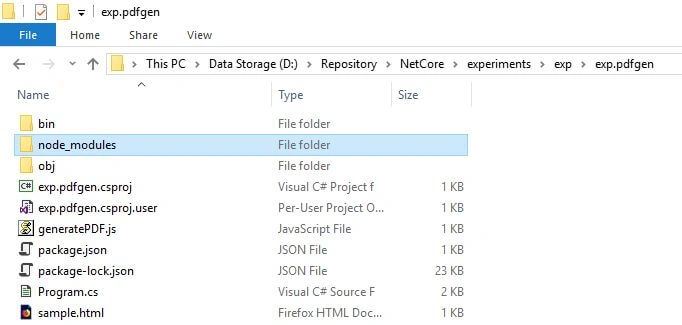
generatePDF.js
This is a small module, which will be invoked by our application. This refers to the node_modules folder for dependencies.
This will read the html file, and pass and invoke the html-pdf module with the appropriate options and parameters.
generatePDF.js
This is a small module, which will be invoked by our application. This refers to the node_modules folder for dependencies.
This will read the html file, and pass and invoke the html-pdf module with the appropriate options and parameters.
- module.exports = function (callback, inputFilePath, outputFilePath) {
- //callback : This is node style callback, since the NodeServices invokes the javascript Asynchronously
- //inputFilePath : The html file path
- //outputFilePath : The file path where the pdf is to be generated
- var fs = require('fs'); // get the FileSystem module, provided by the node envrionment
- var pdf = require('html-pdf'); // get the html-pdf module which we have added in the dependency and downloaded.
- var html = fs.readFileSync(inputFilePath, 'utf8'); //read the contents of the html file, from the path
- var options = { format: 'Letter' }; //options provided to html-pdf module. More can be explored in the module documentation
- //create the pdf file
- pdf.create(html, options).toFile(outputFilePath, function (err, res) {
- if (err) return callback(null, "Failed to generate PDF");
- callback(null, "Generated PDF Successfully");
- });
- }
Application Code
The paths mentioned can be changed as per your directory structure. To keep the article simple, publishing the node_modules and the project to relative paths is not done.
- using System;
- using System.Threading.Tasks;
- using Microsoft.AspNetCore.NodeServices;
- using Microsoft.Extensions.DependencyInjection;
- namespace exp.pdfgen
- {
- class Program
- {
- static void Main(string[] args)
- {
- //Instantiate DI container for the application
- var serviceCollection = new ServiceCollection();
- //Register NodeServices
- serviceCollection.AddNodeServices();
- //Request the DI container to supply the shared INodeServices instance
- var serviceProvider = serviceCollection.BuildServiceProvider();
- var nodeService = serviceProvider.GetRequiredService<INodeServices>();
- //Input file path of html file
- var inputFilePath = "D:\\Repository\\NetCore\\experiments\\exp\\exp.pdfgen\\sample.html";
- //Output file path of pdf file
- var outputFilePath = "D:\\Repository\\NetCore\\experiments\\exp\\exp.pdfgen\\sampleOutput.pdf";
- var taskResult = GeneratePdf(nodeService, inputFilePath, outputFilePath);
- Task.WaitAll(taskResult);
- if (taskResult.IsCompletedSuccessfully)
- {
- Console.WriteLine(taskResult.Result);
- }
- Console.ReadKey();
- }
- private static async Task<string> GeneratePdf(INodeServices nodeService, string inputFilePath, string outputFilePath)
- {
- //Invoke the javascript module with parameters to execute in Node environment.
- return await nodeService.InvokeAsync<string>(@"D:\\Repository\\NetCore\\experiments\\exp\\exp.pdfgen\\generatePDF.js", inputFilePath, outputFilePath);
- }
- }
- }
- <html>
- <body>
- <p>This is Sample Text</p>
- <p style="font:20px;color:magenta;">This is Colored Text</p>
- </body>
- </html>
Output
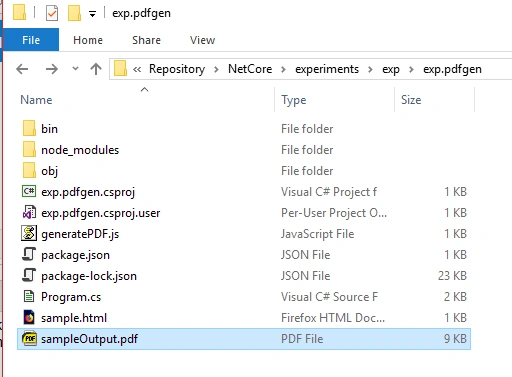
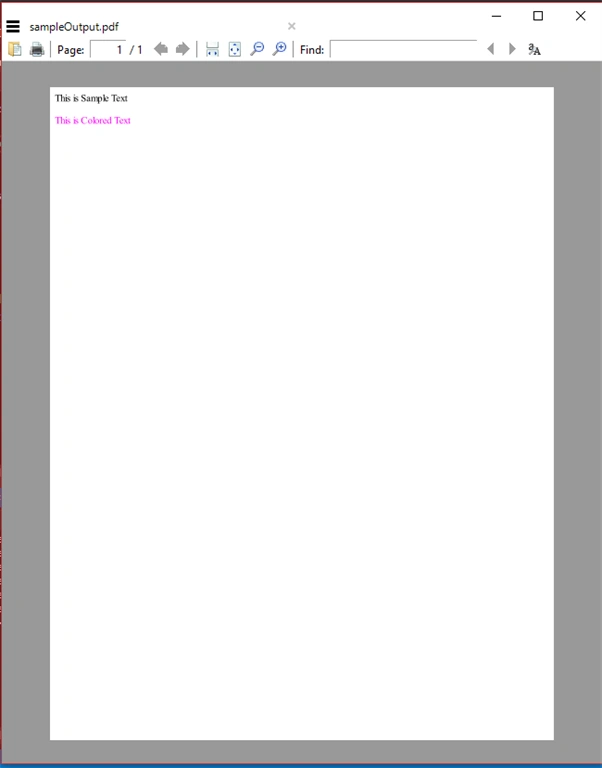
I hope the article helps you understand how to use Node.js based modules like html-pdf to generate PDF from HTML from .NetCore applications.


Chittaranjan SwainPosted Dec 15, 2019, 10:37 PM EST
Nice article.
Hemant MahajanPosted Apr 8, 2019, 1:22 PM EDT
Where to get generatePDF.js file?
Hadshana KamalanathanTOP 100Posted Jul 19, 2018, 1:30 AM EDT
Thanks for sharing
Derek WaltersPosted Jul 2, 2018, 9:42 PM EDT
I would suggest to try this ZetPDF.com that works so well.