
Introduction
In SharePoint 2013, three new delegate controls have been introduced for the purpose of displaying the new top Suite bar (with links SkyDrive, NewsFeed, Sync, follow, etc).
Here are the controls,
- PromotedActions Delegate Control
- SuiteBarBrandingDelegate delegate Control
- SuiteLinksDelegate delegate Control
So let’s take a look at where these controls are placed on the Master page and how we can replace them.
PromotedActions
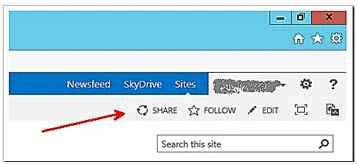
Delegate Control is responsible for displaying Links “Share, Follow, SYNC, EDIT” in top right below SuiteLinksDelegate Control. These links can be replaced by Overriding PromotedActions Delegate Control using a Custom Control created using Visual Studio to the following area on a SharePoint site in the top-right section of the page.
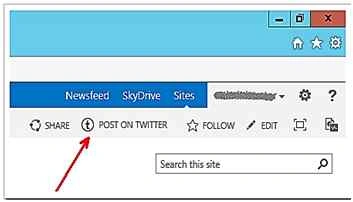
An example of adding an additional link may look like the following:
SuiteBarBrandingDelegate
Delegate Control is responsible for displaying ‘SharePoint’ or ‘Office 365′ text on top left of the new SharePoint 2013 site (in the blue bar). This text can only be replaced by overriding SuiteBarBrandingDelegate Delegate Control with a Custom Control created using Visual Studio. Normally, there’s a text reading "SharePoint" like the following:
Header before

After apply delegate control

SuiteLinksDelegate
Delegate Control is responsible for displaying Links “NewsFeed, SkyDrive and Sites” in top right of the new SharePoint 2013 site (in the blue bar). These links can be replaced by overriding SuiteLinksDelegate delegate ontrol using a Custom Control created using Visual Studio. The SuiteLinksDelegate control will allow us to modify the default links, and to add our own links, in the "suit links" section.
Before

Replaced with



Anish AnsariPosted Nov 15, 2015, 7:59 PM EST
nice
Santhakumar MunuswamyPosted Nov 11, 2015, 3:38 AM EST
Good one
Rupali ShindePosted Nov 5, 2015, 6:23 PM EST
nice information
Sibeesh VenuTOP 100Posted Nov 4, 2015, 6:21 PM EST
Nice Share
Harshad PansuriyaPosted Nov 4, 2015, 6:07 PM EST
Nice one