
Microsoft is going to announce new Visual Studio 2016, but now you can use Visual Studio “15” Preview to test some new features which are going to be launched in Visual Studio 2016. So let’s see what new features Microsoft is going to announce.
In Visual Studio “15” Preview Microsoft announce first new feature with name “Open Folder”. Firstly, download Visual Studio “15” Preview.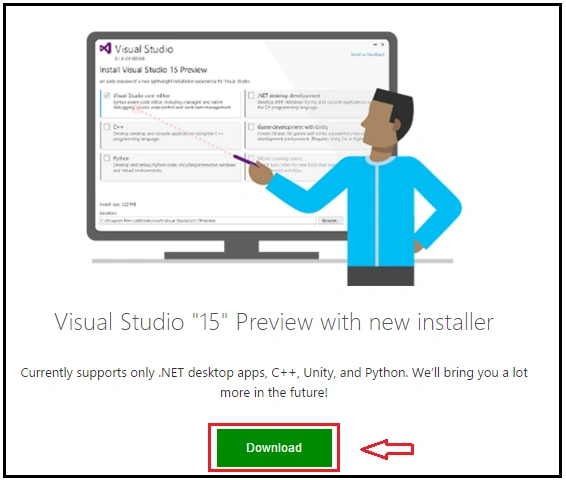
Through Visual Studio “15” Preview, you can open any folder of that application/project where you are working across multiple tools and many platforms.
For any developer, Visual Studi is introducing a new way to work with code. From Visual Studio “15” Preview, you can freely open a folder that means there is no need to spend more time creating a new solution/project.
By this functionality, you can recover your file as it is by syntax highlighting and navigation. You can quickly solve your coding problem as well.
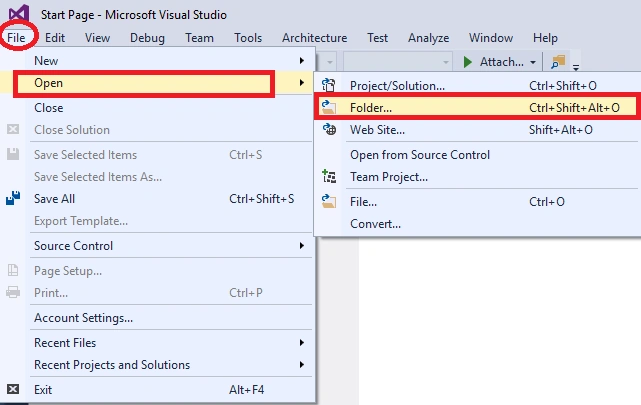
So, there are two ways to open a folder in Visual Studio. Firstly, open Visual Studio, in the File menu select “Open” and then “Folder”.
And the second one is that, in windows explorer right click on any folder and click on “Open in Visual Studio”.
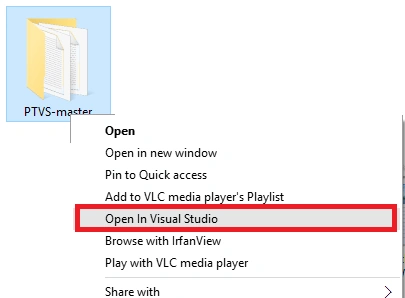
By these two options you can open any folder in Visual Studio.
Most popular languages will have Syntax Highlighting and navigation features; open any project folder in Visual Studio.
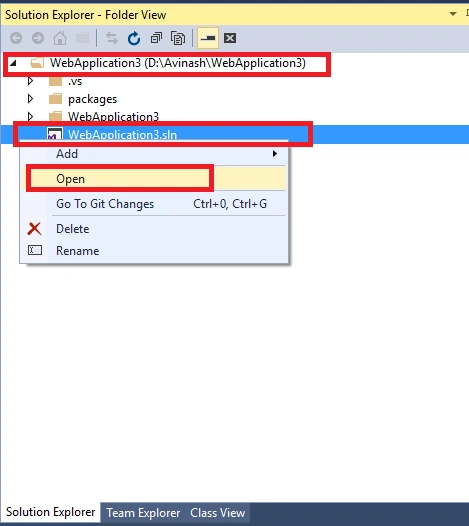
In the following screenshot you can see Syntax Highlighting and navigation feature. Now in this project you can open any file like Python, JavaScript, HTML and CSS and so on. Accordingly, you can change code of your particular file.
I hope you enjoyed this article. Stay tuned with me for more articles on all other Microsoft technologies.
Thanks.
Connect (“Nitin Pandit”);
New Feature "Open Folder" In Visual Studio 2016
In this article you will learn about new feature “Open Folder” in Visual Studio 2016.
Read more articles on Visual Studio:


Bhuvanesh MohankumarPosted May 3, 2016, 8:51 AM EDT
Good one..
Amit DavePosted May 3, 2016, 6:33 AM EDT
Keep up the Good work!
Hari ShankerPosted May 1, 2016, 8:37 PM EDT
nice share
NitinPosted May 1, 2016, 9:28 AM EDT
Thanks for sharing
Amit KumarPosted Apr 30, 2016, 11:51 PM EDT
Nice share one
Asfend YarPosted Apr 30, 2016, 9:46 PM EDT
hurrah
Pankaj Kumar ChoudharyTOP 100Posted Apr 30, 2016, 9:15 PM EDT
Nice article sir....
Kuppurasu NagarajTOP 100Posted Apr 30, 2016, 10:19 AM EDT
Nice Sharing..
Rahul Kumar SaxenaTOP 100Posted Apr 30, 2016, 9:49 AM EDT
good Show
Nitin PanditTOP 100Posted Apr 30, 2016, 9:49 AM EDT
Thanks to All :)
Vignesh ManiTOP 100Posted Apr 30, 2016, 8:47 AM EDT
Nice
Pramod ThakurPosted Apr 30, 2016, 7:42 AM EDT
thanks for sharing :)
Ammar ShaukatPosted Apr 30, 2016, 7:02 AM EDT
thanks,
Vivek KumarPosted Apr 30, 2016, 3:48 AM EDT
Nice sharing
Gowtham KTOP 100Posted Apr 30, 2016, 3:03 AM EDT
Thanks for the sharing this awesome information
Tk MahantaPosted Apr 30, 2016, 3:00 AM EDT
Really Nice Option
Debasis SahaTOP 100Posted Apr 30, 2016, 12:33 AM EDT
Nice one.
Thiruppathi RPosted Apr 30, 2016, 12:09 AM EDT
Wow nice
Jeetendra GundTOP 100Posted Apr 29, 2016, 11:38 PM EDT
Awesome..
KeyurPosted Apr 29, 2016, 10:11 PM EDT
This is what a Visual Studio Lover need...