
Introduction
In today’s connected world, users expect applications to work seamlessly even without the internet. Whether it's a field service app, warehouse system, or inspection tool — offline-first experiences are a must.
Most developers use cloud APIs that fail when there’s no internet. But what if you could still let users:
View and edit their data offline
Automatically sync changes when back online
That’s exactly what we’ll build using:
✅ IndexedDB on the Angular side for offline storage
✅ ASP.NET Core Sync API for synchronization when the network is available
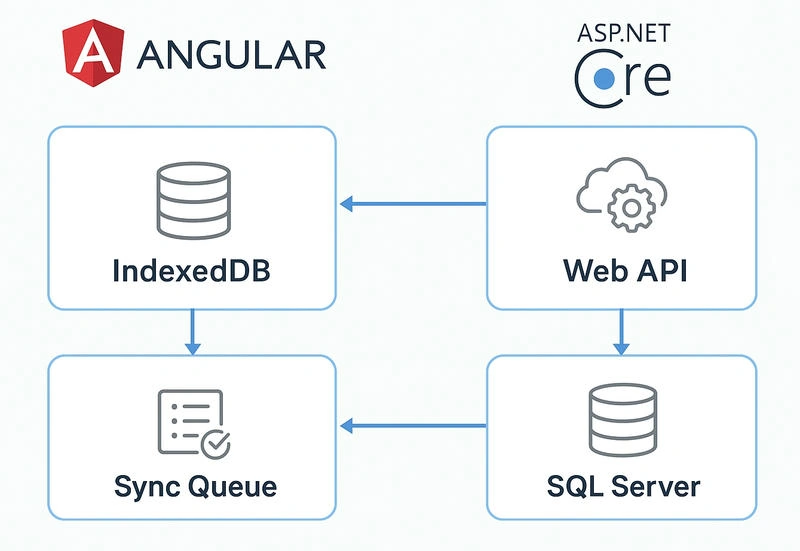
This architecture combines the power of local browser storage with intelligent server sync, giving a smooth, reliable user experience.
1. The Problem
In traditional web apps:
All CRUD operations go to the server.
If the user loses the internet, everything breaks.
Data entry or updates are lost until reconnection.
This can be a huge problem for mobile and remote teams.
Goal:
Make the Angular app work offline and automatically sync when the user reconnects.
2. The Solution Architecture
We’ll use the following technologies:
Angular IndexedDB – to store local data (tables like customers, orders, etc.)
ASP.NET Core API – to store data on the server
Sync Logic – to detect changes and update both sides intelligently
Architecture Flow
+---------------------------+                +-----------------------------+
| Angular Frontend (Browser)|                | ASP.NET Core Web API Server |
+---------------------------+                +-----------------------------+
| IndexedDB (Offline Store) | <--- Sync ---> | SQL Server (Central Store)  |
| - Orders                  |                | - Orders Table              |
| - Customers               |                | - Sync Logs Table           |
| - Changes Queue           |                | - Conflict Resolver         |
+---------------------------+                +-----------------------------+
        ^        |
        |        v
 Offline CRUD   Sync Trigger
 (user actions) (on reconnect)
3. How It Works (Step-by-Step Flow)
Step 1: User Works Offline
All user data (like creating orders, updating records) is stored in IndexedDB.
API calls are queued for later when internet returns.
Step 2: Connectivity Restored
The app detects network availability.
It sends pending changes to the ASP.NET Core Sync API.
The server processes and updates the main database.
Step 3: Sync Response
The API returns updated records (including IDs, timestamps).
The Angular app updates its local IndexedDB data accordingly.
4. Implementing IndexedDB in Angular
We can use ngx-indexed-db or the native IndexedDB API.
Installation
npm install ngx-indexed-dbSet up in app.module.ts
import { NgxIndexedDBModule, DBConfig } from 'ngx-indexed-db';

const dbConfig: DBConfig = {
  name: 'OfflineSyncDB',
  version: 1,
  objectStoresMeta: [
    {
      store: 'orders',
      storeConfig: { keyPath: 'id', autoIncrement: true },
      storeSchema: [
        { name: 'customerName', keypath: 'customerName', options: { unique: false } },
        { name: 'status', keypath: 'status', options: { unique: false } }
      ]
    },
    {
      store: 'syncQueue',
      storeConfig: { keyPath: 'id', autoIncrement: true },
      storeSchema: [
        { name: 'action', keypath: 'action', options: { unique: false } },
        { name: 'data', keypath: 'data', options: { unique: false } }
      ]
    }
  ]
};

@NgModule({
  imports: [
    NgxIndexedDBModule.forRoot(dbConfig)
  ]
})
export class AppModule { }
Adding Data Offline
this.dbService.add('orders', {
  customerName: 'John Doe',
  status: 'Pending'
}).subscribe(() => {
  console.log('Order saved offline');
});
Queue Changes When Offline
When the network is unavailable:
this.dbService.add('syncQueue', {
  action: 'ADD_ORDER',
  data: orderObject
});
When the app comes back online:
Read the
syncQueueSend items to the API
Clear successfully synced items
5. Sync API in ASP.NET Core
Step 1: Create Controller
[ApiController]
[Route("api/[controller]")]
public class SyncController : ControllerBase
{
    private readonly AppDbContext _context;

    public SyncController(AppDbContext context)
    {
        _context = context;
    }

    [HttpPost("sync-orders")]
    public async Task<IActionResult> SyncOrders([FromBody] List<OrderDto> orders)
    {
        foreach (var order in orders)
        {
            var existing = await _context.Orders
                .FirstOrDefaultAsync(o => o.LocalId == order.LocalId);

            if (existing == null)
            {
                _context.Orders.Add(new Order
                {
                    LocalId = order.LocalId,
                    CustomerName = order.CustomerName,
                    Status = order.Status,
                    LastModified = DateTime.UtcNow
                });
            }
            else
            {
                existing.Status = order.Status;
                existing.LastModified = DateTime.UtcNow;
            }
        }

        await _context.SaveChangesAsync();
        return Ok(new { message = "Sync complete" });
    }
}
Step 2: Sync Log Table (Optional)
CREATE TABLE SyncLogs (
    SyncId INT IDENTITY PRIMARY KEY,
    TableName NVARCHAR(100),
    SyncedAt DATETIME,
    RecordsSynced INT
)
This helps track how many records were synced and when.
6. Network Detection in Angular
Use window.navigator.onLine or RxJS fromEvent to detect network status.
fromEvent(window, 'online').subscribe(() => {
  this.syncPendingData();
});fromEvent(window, 'offline').subscribe(() => {
console.log('App is offline, storing data locally...');
});7. Conflict Handling
Conflicts occur when:
The same record is modified both offline and online before sync.
You can handle this by comparing:
LastModified timestamp from client and server
If conflict → prefer latest update or ask the user
8. Real-World Use Cases
| Industry | Example Use Case |
|---|---|
| Field Operations | Workers collect data in remote areas |
| Warehouse Apps | Barcode scanning when Wi-Fi drops |
| Medical | Recording patient data offline |
| Retail | Mobile billing in store basements |
| Inspection | Offline checklist with later sync |
9. Advantages
| Feature | Benefit |
|---|---|
| Works Offline | Full functionality without internet |
| Reliable Sync | Auto-updates when connected |
| Performance | Faster local operations |
| User Experience | No data loss or downtime |
| Scalable | Works for large data sets |
10. Security Considerations
Always encrypt sensitive data in IndexedDB.
Use JWT Authentication during sync API calls.
Validate all incoming records on the server.
Conclusion
Offline-first architecture is no longer optional — it’s a necessity for modern web apps.
By using Angular’s IndexedDB and a smart ASP.NET Core Sync API, you can:
Allow users to work anytime, anywhere.
Ensure data consistency and reliability.
Create a seamless online-offline experience.
It’s lightweight, scalable, and production-ready — all with native web technologies.
Other useful article: Dynamic Stored Procedure Mapping Using Reflection in Repository Pattern

Join the conversation! Your thoughts help the community grow.