
If you have ever built a website with a list — like products on Amazon or posts on Facebook — you’ve dealt with pagination. In the world of .NET and Entity Framework Core, we usually start with the easiest method: Skip() and Take(). But as your database grows from 1,000 rows to 1,000,000, that "simple" method starts to struggle.
In this article, we’ll look at the two main ways to handle paging, see why one of them eventually fails, and understand which approach is best for your application.
The “Easy” Way: Offset Pagination
Offset pagination is what most of us learn first. You tell the database:
“Skip the first 50 rows and give me the next 10.”
The EF Core Code
// Requesting Page 5 (Size 10)
var pageNumber = 5;
var pageSize = 10;
var products = await _context.Products
                              .OrderBy(p => p.Id)
                              .Skip((pageNumber - 1) * pageSize)
                              .Take(pageSize)
                              .ToListAsync();
The Real-World Problem
Imagine you are looking for a specific page in a massive physical book. Offset pagination is like saying:
“Start at page 1, flip through every single page until you reach page 500, then read the next 10 lines.”
The database actually has to process those skipped rows before returning the requested ones. As you move to deeper pages (for example, page 10,000), the database performs more work just to return the same 10 records.
Important: Cursor pagination performs best when the cursor column (such as Id or CreatedAt) is indexed.
Pro Tip: The cursor column should be unique, or combined with another unique column, to guarantee stable and predictable results.
The “Fast” Way: Cursor Pagination
Cursor pagination (also called Keyset Pagination) doesn’t use page numbers. Instead, it uses a “pointer” or “bookmark” from the last item you received.
You tell the database:
“Give me the next 10 rows where the ID is greater than the last ID I saw (105).”
The EF Core Code
// Requesting the next batch after ID 105
var lastId = 105;
var pageSize = 10;
var products = await _context.Products
                              .OrderBy(p => p.Id)
                              .Where(p => p.Id > lastId)
                              .Take(pageSize)
                              .ToListAsync();
The Real-World Advantage
Using the same book example, cursor pagination is like using a bookmark. You open the book directly where you left off and continue reading. It doesn’t matter whether you’re at the beginning or near the end — the effort is nearly the same.
Data Consistency
If your data changes frequently, pagination behavior also changes.
Imagine a new product is inserted while a user is browsing.
With Offset Pagination, users may see duplicate records or even miss some records because the row positions have shifted.
With Cursor Pagination, the query continues from the last known cursor, making it much more resilient to inserts and deletes.
This is one of the main reasons why social media platforms and modern APIs prefer cursor pagination.
Additional Performance Tips
No matter which pagination strategy you choose, these EF Core best practices can improve performance:
Use AsNoTracking() for read-only queries to reduce EF Core's tracking overhead.
Use Select() to retrieve only the columns you actually need instead of loading entire entities.
Avoid unnecessarily large page sizes. Fetching hundreds or thousands of records at once increases memory usage and network transfer time.
Always ensure the column used for sorting is properly indexed.
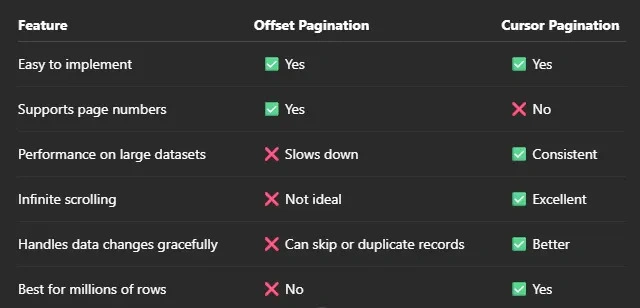
Comparison Summary
Which one should you choose?
Use Offset Pagination if:
Your tables are relatively small.
Users need to jump directly to a specific page (for example, Page 42).
You’re building admin dashboards, reports, or traditional search pages.
Use Cursor Pagination if:
You’re building a modern REST API.
Your application uses infinite scrolling.
Your database contains hundreds of thousands or millions of records.
Performance and scalability are important.
Final Thoughts
Offset pagination is simple, familiar, and works perfectly for many applications. However, as your data grows, its performance gradually declines because the database has to process more skipped rows.
Cursor pagination solves this problem by using a bookmark instead of counting pages. It delivers consistent performance, handles frequently changing data more gracefully, and is the preferred approach for high-performance APIs and infinite scrolling experiences.
The best choice depends on your application’s requirements. If users need direct page navigation, offset pagination is still a great option. But if scalability and speed are your priorities, cursor pagination is the approach you’ll want in production.

Join the conversation! Your thoughts help the community grow.