
Another very good feature that has been added into Visual Studio is the Visual Studio Page Inspector for web applications. This feature allows us to inspect the HTML markup of the page within Visual Studio, like we use the tools in the web browser. So let's explain it.
Create a new web project and select the Default.aspx page. Right-click on the page and select the option.
This opens the page in a view like we have in our browser.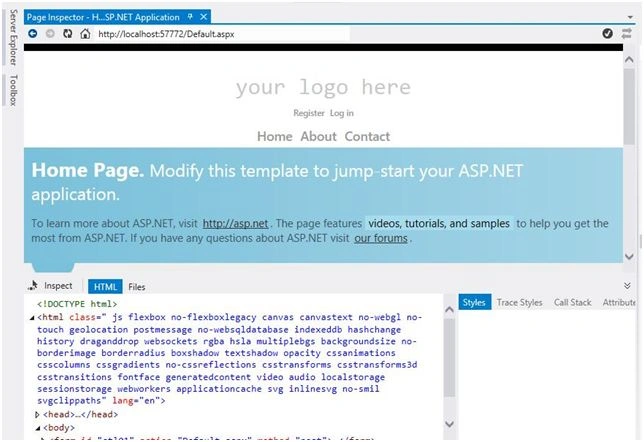
Select the HTML tab and hover over any element from the markup and the corresponding element is highlighted in the Page Inspector window. The corresponding style/CSS is also highlighted on the right side.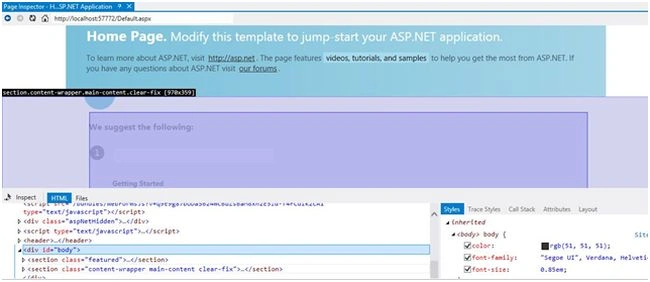
Select the Inspect tab. Now hover over any content in the page and its corresponding HTML in the page is displayed. This could even be the master page.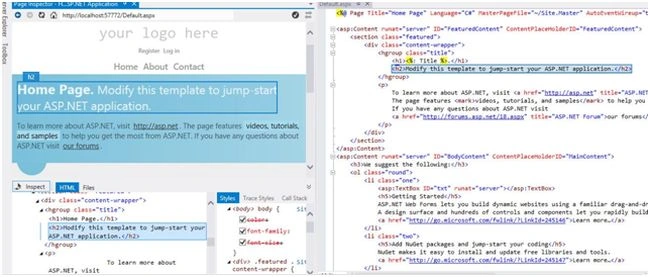
Helpful, isn't it? And all that without running the application. Happy coding!
Page Inspector in Visual Studio
In this article you will learn how to use the Page Inspector in Visual Studio.


Asfend YarPosted Mar 5, 2016, 1:53 AM EST
nice work
Vipul MalhotraPosted Jul 27, 2015, 4:50 AM EDT
Nice article
Govind KhandelwalPosted Jul 27, 2015, 2:56 AM EDT
Good One
SharadPosted Jul 27, 2015, 2:24 AM EDT
good one
Gowtham RajamanickamTOP 100Posted Jul 27, 2015, 1:18 AM EDT
good one
Sanjay SabariyaPosted Jul 26, 2015, 9:56 PM EDT
thanx.... it's very helpful
Sibeesh VenuTOP 100Posted Jul 26, 2015, 8:43 PM EDT
Nice Share. Thanks
Neeraj KumarPosted Jul 26, 2015, 12:55 PM EDT
Thanks for Sharing...
Pankaj Kumar ChoudharyTOP 100Posted Jul 26, 2015, 2:19 AM EDT
Nice Information Sir...........
Gopi ChandPosted Jul 25, 2015, 10:28 PM EDT
Well done
Santhakumar MunuswamyPosted Jul 25, 2015, 10:07 PM EDT
Thanks for nice article
RakeshPosted Jul 25, 2015, 8:28 PM EDT
Good one sir
Rajeesh MenothPosted Jul 25, 2015, 7:53 PM EDT
Nice One