
Purpose
Many a time, entities want to implement a password policy and/or determine password strength for their security purposes.
The ASP .NET Password Policy Validator web control allows the entity to set a password policy for users of their web systems.
Implementation Details
The control inherits from BaseValidator web control.
[ToolboxData("<{0}:PasswordPolicyValidator1 runat=server></{0}:PasswordPolicyValidator1>")]
public class PasswordPolicyValidator : BaseValidator
The control exposes properties which can be used to configure/set the password policy/strength requirements.
The Policy properties are
Property Explanation Accepted values UnicodeCharSetRanges Ranges of Unicode character sets. Validator defaults to English if property not specified. Comma separated Upper/Uni case followed by Lower case (if applicable) of Unicode Character Set Ranges MinPasswordLength Minimum number of characters in password 0 or greater MinNoOfUniCaseChars Minimum number of Unicase characters in password. This property is to be used by Unicase languages. 0 or greater MinNoOfLowerCaseChars Minimum number of lower case characters in password 0 or greater MinNoOfUpperCaseChars Minimum number of upper case characters in password 0 or greater MinNoOfNumbers Minimum number of numbers in password 0 or greater MinNoOfSymbols Minimum number of symbols in password 0 or greater MaxNoOfAllowedRepetitions Max number of allowed repetitions of any character in password 0 or greater DisallowedChars Characters not allowed in password Empty or list of characters UserNameControlID Specified to confirm that user name (case – insensitive) is not part of password ID of the user name text box control Property Explanation Accepted values StrengthCategories The strength categories of the password. This property is mandatory for strength determination. Comma separated list of strength categories StrengthColours The colours (supported in javascript) for the corresponding strength categories Comma separated list of strength category colours MinNoOfUniCaseCharsStrength List of no. of occurrences of Uni case characters to match for strength categories Empty or comma separated list of positive integer values MinNoOfUpperCaseCharsStrength List of no. of occurrences of Upper Case characters to match for strength categories Empty or comma separated list of positive integer values MinNoOfLowerCaseCharsStrength List of no. of occurrences of Lower Case characters to match for strength categories Empty or comma separated list of positive integer values MinNoOfNumbersStrength List of no. of occurrences of Number characters to match for strength categories Empty or comma separated list of positive integer values MinNoOfSymbolsStrength List of no. of occurrences of Symbols characters to match for strength categories Empty or comma separated list of positive integer values MaxNoOfAllowedRepetitionsStrength List of allowed repetitions to match for strength categories Empty or comma separated list of positive integer values MinPasswordLengthStrength List of password lengths to match for strength categories Empty or comma separated list of positive integer values Policy Policy properties are those that the password MUST confirm to.
The Strength properties are
Strength properties are used for determining the password strength.
StrengthCategories property is where the strength categories can be specified as below. This is mandatory for Strength determination.
StrengthCategories="weak,medium,strong"
Then, other relevant properties need to be specified for determining the strength. For eg.
MinNoOfLowerCaseCharsStrength="3,5,7"
means that 4 or less lower case chars is weak, 6 - 5 is medium and 7 or more is strong.
The Strength and Policy can be used independent of each other. Properties need not be specified if not required.
Note : It is good if the strength value of the lowest category is the same as the Min policy property if both Policy and Strength are being used.
Multi-lingual support
The Validator can be used with passwords entered in different languages. The language should be supported in Unicode.
The property UnicodeCharSetRanges is used to specify the Unicode character set ranges of the desired language. If the language is case-sensitive then it is a comma separated list of the upper-case character set range/s followed by the lower-case char set range/s. The Unicode ranges shown below will work for French, German character sets.
UnicodeCharSetRanges="A-Z\u00C0-\u00DE,a-z\u00DF-\u00F6\u00F8-\u00FF"
If the language is Uni-case then there is only one range. The Unicode range shown below is for Japanese Hiragana range.
UnicodeCharSetRanges="\u3040-\u309F"
More information on Unicode character set ranges can be found in below Unicode Chart:
http://www.ssec.wisc.edu/~tomw/java/unicode.html
The properties MinNoOfLowerCaseChars and MinNoOfUpperCaseChars are only valid for case-sensitive languages while for Uni-case languages there is a property called MinNoOfUniCaseChars.
Using these properties, passwords in languages supported in Unicode can be validated.
If the UnicodeCharSetRanges property is not specified, the Validator defaults to English.
Code snippets
In the Page Load of the control, the Validation Expression is generated using the properties of the control.
C# |
The property values are passed to a helper class (PasswordPolicy) which generates the Validation Expression using the GetExpression() API. The GetExpression() API generates a Regular Expression based on the supplied properties.
public string GetExpression()
{
   if (DisallowedChars.Length > 0)
   {
      DisallowedChars = DisallowedChars.Replace(@"\", @"\\");
   }

   string Unicase = String.IsNullOrEmpty(UnicodeCharSetRanges) ? "A-Z" : UnicodeCharSetRanges.Split(',')[0].Trim();
   string Lowercase = String.IsNullOrEmpty(UnicodeCharSetRanges) ? "a-z" : (UnicodeCharSetRanges.Split(',').Length >= 2 ? UnicodeCharSetRanges.Split(',')[1] : "a-z");

   return @"^"
         + (MaxNoOfAllowedRepetitions > -1 ? @"(?=^((.)(?!(.*?\2){" + (MaxNoOfAllowedRepetitions + 1).ToString() + @",}))+$)" : "")
         + (MinPasswordLength > -1 ? "(?=.{" + MinPasswordLength.ToString() + @",})" : "")
         + (MinNoOfNumbers > -1 ? @"(?=([^0-9]*?\d){" + MinNoOfNumbers.ToString() + ",})" : "")
         + (MinNoOfUniCaseChars > -1 ? "(?=([^" + Unicase + @"]*?[" + Unicase + @"]){" + MinNoOfUniCaseChars.ToString() + @",})" : "")
         + (MinNoOfLowerCaseChars > -1 ? "(?=([^" + Lowercase + @"]*?[" + Lowercase + @"]){" + MinNoOfLowerCaseChars.ToString() + ",})" : "")
         + (MinNoOfUpperCaseChars > -1 ? "(?=([^" + Unicase + @"]*?[" + Unicase + @"]){" + MinNoOfUpperCaseChars.ToString() + @",})" : "")
         + (MinNoOfSymbols > -1 ? "(?=([" + Unicase + Lowercase + @"0-9]*?[^" + Unicase + Lowercase + @"]){" + MinNoOfSymbols.ToString() + ",})" : "")
         + (DisallowedChars.Length > 0 ? @"(?=[^" + DisallowedChars + @"]+$)" : "")
         + @".*$";
}
This Expression does the validation of the password entered by the user.
Concepts of
- Character sets (Unicode too)
- Look ahead (positive/negative)
- Grouping
- Back references
- Lazy/Greedy match
are used in the Regular Expression.
Usage
Add a reference to Toolkit.Web.UI.WebControls.dll
In the ASPX page:
Register the web control
<%@ Register Assembly="Toolkit.Web.UI.WebControls" Namespace="Toolkit.Web.UI.WebControls" TagPrefix="cc1" %>
And then add the validator
|
<asp:TextBox ID="tbUserName" runat="server"></asp:TextBox> MinNoOfUpperCaseChars="2" MinNoOfLowerCaseChars="3" MinNoOfNumbers="1" MinNoOfSymbols="2" MinPasswordLength="10" MaxNoOfAllowedRepetitions="3" DisallowedChars="& \" UserNameControlID="tbUserName" StrengthCategories="weak,medium,strong" StrengthColours="red,magenta,green" MinNoOfUpperCaseCharsStrength="2,3,4" MinNoOfLowerCaseCharsStrength="3,4,5" MinNoOfNumbersStrength="1,2,3" MinNoOfSymbolsStrength="2,3,4" MaxNoOfAllowedRepetitionsStrength="3,2,1" MinPasswordLengthStrength="10,11,12" > </cc1:PasswordPolicyValidator> |
The properties of the Validator can be set from a database or other data source too.
The Validator has been tested for ASP .NET 3.5 and IE 7 and Firefox 3.6.8.
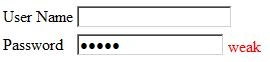
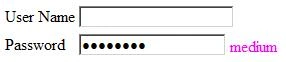
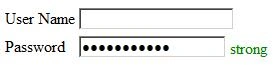
Sample usage screen shots : 


Jun WuPosted Apr 12, 2016, 7:09 PM EDT
It's not work in IE 10 and above.
Adam GentzPosted Apr 5, 2012, 2:29 PM EDT
I get a "corrupt Zip File" error when I try and open it.
Mukesh RajaramPosted Apr 29, 2011, 3:51 AM EDT
sir i m a student in mca 4th sem my project is online sending sms ,plz sending the online api with example in the design temple .sir please help me mukesh
surender bhyanPosted Apr 1, 2011, 8:21 AM EDT
Thanks Sir :-)