
Introduction
PGP stands for “Pretty Good Privacy,” and it’s most often used for sending encrypted messages between two people. Pretty Good Privacy (PGP) is a data encryption and decryption computer program that provides cryptographic privacy and authentication for data communication. PGP is often used for signing, encrypting, and decrypting texts, emails, files, directories, and whole disk partitions and to increase the security of e-mail communications.
I would recommend that you please find about cryptography before starting PGP works.
What is cryptography
Cryptography is the science of using mathematics to encrypt and decrypt data. Cryptography enables you to store sensitive information or transmit it across insecure networks (like the Internet) so that it cannot be read by anyone except the intended recipient.
How does Cryptography work?
- Plain text --> Message Encrypted Security Algorithms [Cryptography] --> Cipher text.
- Cipher text --> [Cryptography] Message Encrypted Security Algorithms --> Plain text.
PGP Conceptual view

Flow of Control
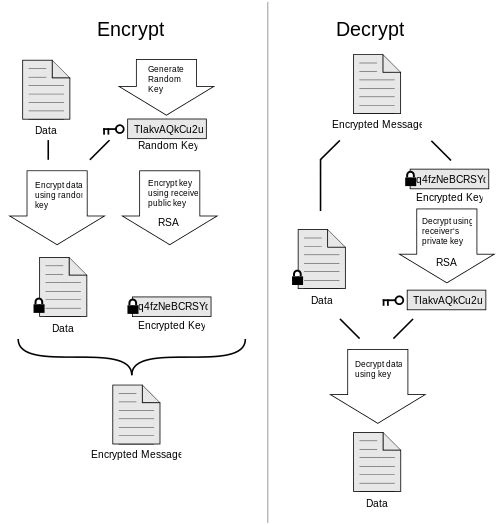
The following series of mechanical steps explains how to achieve PGP process in C#.NET.
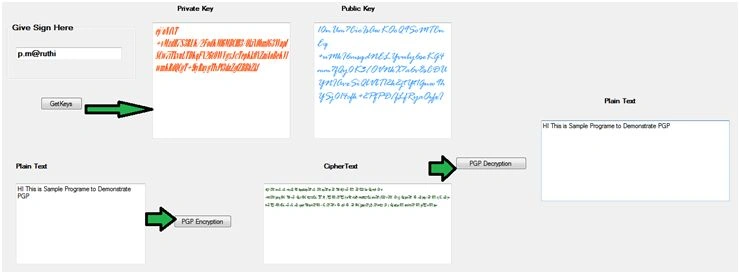
Step 1: Please enter the Signature to get the valid Keys which is private and public keys to encrypt plain text to PGP Encrypted text.
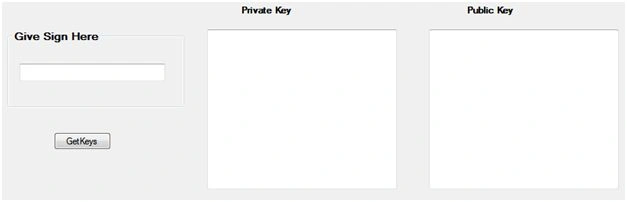
Code Snippet
private void button1_Click(object sender, EventArgs e)
{
   string signature = textBox3.Text;
   textBox1.Text = PGPKEYS.PGPKeyrings.PrivateKey(signature);
   textBox2.Text = PGPKEYS.PGPKeyrings.PublicKey(signature);
}
Keys will be now:
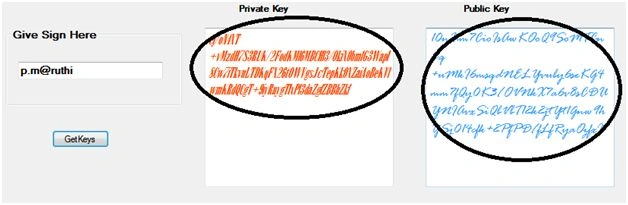
Step 2: PGP Encryption has happened with a combination of Signature + Private KEY + Public Key:
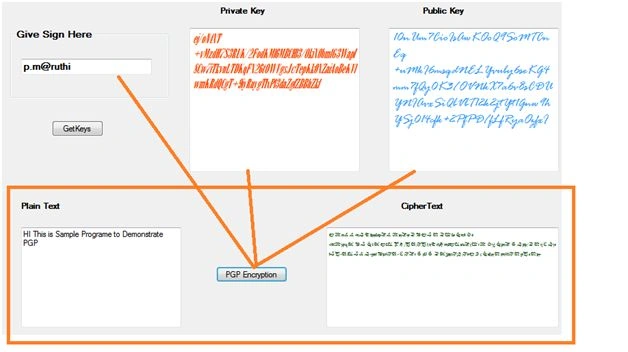
private void button2_Click(object sender, EventArgs e)
{
    PGPEncryptionText.Text = "";
    try
    {
        PGPEncryptionText.Text = PGPKEYS.PGPKeyrings.PGPEncryption(new PGPKEYS.PGPProperties
        {
            private key = textBox1.Text,
                public key = textBox2.Text,
                signature = textBox3.Text
        }, PlainText.Text.ToString());
    }
    catch (Exception ex)
    {
        MessageBox.Show("Wrong Keys Found");
    }
}
Find Cipher Text now.
Step 3: In this we can get plain text from cipher text.
private void button3_Click(object sender, EventArgs e)
{
    PGPDecryptionText.Text = "";
    try
    {
        PGPDecryptionText.Text = PGPKEYS.PGPKeyrings.PGPDecryption(new PGPKEYS.PGPProperties
        {
            private key = textBox1.Text,
                public key = textBox2.Text,
                signature = textBox3.Text
        }, PGPEncryptionText.Text.ToString());
    }
    catch (Exception ex)
    {
        MessageBox.Show("Wrong Keys Found");
    }
}
Step 4: Assertion.
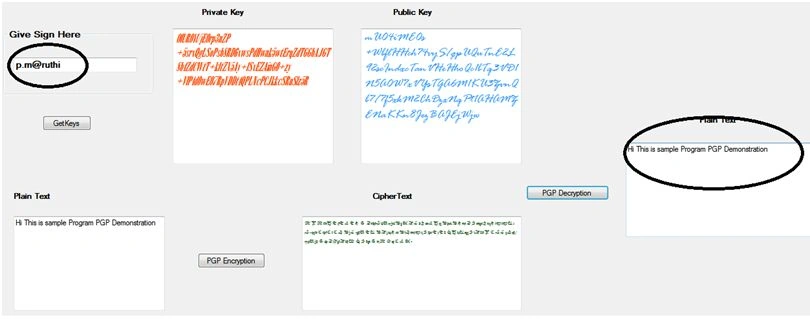
Imagine I changed Sign p.m@ruthi to p.m@ruthipall, but plain text will notbe produced if the keys are same. Your Signature Keys must be same, then only will Decryption happen.

Text with Actual Sign.
Decryption checks Signature with keys.
References


YuppskiPosted Nov 22, 2023, 5:10 AM EST
Hi Maruthi, The link for the source code appears to not be working. Could you supply another alternative link? Thanks
Gurpreet kaurPosted Apr 9, 2019, 1:44 AM EDT
I am not getting source code from below location https://code.msdn.microsoft.com/vstudio/Pretty-Good-Privacy-using-4f473c67/sourcecode?fileId=148103&pathId=1897089268
Rifat AhmedPosted Aug 10, 2018, 5:03 AM EDT
Hi Maruthi, Can I encrypt pdf/doc/image file using PGP encryption? Can you please give me a sample code for that? -Thanks in advance :)
Rohan ChapkePosted Dec 15, 2017, 2:14 PM EST
Hello, I didn't find below methods PGPKEYS.PGPKeyrings.PrivateKey(signature); PGPKEYS.PGPKeyrings.PublicKey(signature); is there any way to get Private/Public key without saving keys
Pham TrungPosted Oct 16, 2017, 8:46 AM EDT
This is not right with the PGP concept, the Private key should be used to decrypt only, the Public key is used to encrypt. It means that you can send Public key to your partner to encrypt data, and use your Private key to decrypt data, only you should know about Private Key.
nguyen truongPosted Sep 20, 2017, 8:56 PM EDT
Where is source? i need please help me
Ibrahim afifiPosted Jul 18, 2017, 5:03 AM EDT
Hi Maruthi, you are using PGPKEYS , What is this ?
s dPosted Jun 29, 2017, 5:56 AM EDT
Hi Maruthi, Nice examples...thanks for this.. just a question though, our client provided us only private key file to encrypt file before sending it to them ? your c# example expects public key, private key and passphrase... can we not encrypt without public key and passphrase or at least without passphrase ? thanks Satish
sudharshan ssPosted Jun 19, 2017, 10:32 PM EDT
Nice explaination bro..and thanks for the article provided
Sr KarthigaPosted Feb 17, 2016, 3:20 AM EST
good one
Sr KarthigaPosted Feb 17, 2016, 3:19 AM EST
Nice explanation
Santhakumar MunuswamyPosted Jan 25, 2016, 8:02 PM EST
Thanks for nice article
Humayun Kabir MamunPosted Jan 25, 2016, 5:37 PM EST
Nice...
Ankur MistryTOP 100Posted Jan 25, 2016, 5:34 PM EST
Very nice, thanks for sharing
Jaco ZwartsPosted Jan 25, 2016, 9:11 AM EST
Really good thank you for sharing
Mubarak AhmadPosted Jan 25, 2016, 4:15 AM EST
Good one...
Mahesh ChandTOP 10Posted Jan 25, 2016, 3:54 AM EST
A good one Maruthi. Encryption has become a vital part of communication today. Question - Does the private key has to be stored on local device (computer, tablet, or phone)? Does every user gets his/her own private key? Decryption has to be done on local device. Also how about size difference of encrypted data compared to original?