Introduction
- <?xml version="1.0" encoding="utf-8"?>
- <LinearLayout xmlns:android="http://schemas.android.com/apk/res/android"
- android:orientation="vertical"
- android:layout_width="fill_parent"
- android:layout_height="fill_parent">
- <Button
- android:id="@+id/playvideoplayer"
- android:layout_width="fill_parent"
- android:layout_height="wrap_content"
- android:text=" PLAY "/>
- <Button
- android:id="@+id/stopvideoplayer"
- android:layout_width="fill_parent"
- android:layout_height="wrap_content"
- android:text=" STOP "/>
- <VideoView
- android:id="@+id/viewvideo"
- android:layout_width="fill_parent"
- android:layout_height="wrap_content"/>
- </LinearLayout>
Step 2
Create a Java class file with the following:
- package com.example.thread;
- import android.app.Activity;
- import android.graphics.PixelFormat;
- import android.media.MediaPlayer;
- import android.net.Uri;
- import android.os.Bundle;
- import android.view.SurfaceHolder;
- import android.view.SurfaceView;
- import android.view.View;
- import android.view.View.OnClickListener;
- import android.widget.Button;
- import android.widget.VideoView;
- //In your class file, you will extend the Activity class that provides you the onCreate() on which the compiler comes first. Now implements the SurfaceHolder interface to play a video.
- public class MainActivity extends Activity implements SurfaceHolder.Callback{
- MediaPlayer mediaPlayer;
- SurfaceView surfaceView;
- SurfaceHolder surfaceHolder;
- boolean pausing = false;
- Button stopVideo;
- // this method is provided by the Activity class on which the compiler comes first when you run the application.Called when the activity is first created/
- @Override
- public void onCreate(Bundle savedInstanceState) {
- super.onCreate(savedInstanceState);
- setContentView(R.layout.activity_main);
- Button PlayVideo = (Button)findViewById(R.id.playvideoplayer);
- stopVideo = (Button)findViewById(R.id.stopvideoplayer);
- getWindow().setFormat(PixelFormat.UNKNOWN);
- //Displays a video file.
- final VideoView mVideo = (VideoView)findViewById(R.id.viewvideo);
- //set the playvideo button on its clickListener. So when you click on the button videoview will display a video
- PlayVideo.setOnClickListener(new Button.OnClickListener(){
- @Override
- public void onClick(View v) {
- VideoView mVideo = (VideoView)findViewById(R.id.viewvideo);
- //path of your video file.
- String Path = "android.resource://com.example.thread/"+R.raw.k;
- Uri uri = Uri.parse(Path);
- mVideo.setVideoURI(uri);
- mVideo.requestFocus();
- mVideo.setVisibility(View.VISIBLE);
- mVideo.start();
- }});
- stopVideo.setOnClickListener(new OnClickListener() {
- @Override
- public void onClick(View v) {
- // TODO Auto-generated method stub
- // on button click the video will be stop
- mVideo.stopPlayback();
- mVideo.setVisibility(View.GONE);
- }
- });
- }
- @Override
- public void surfaceChanged(SurfaceHolder holder, int format, int width,
- int height) {
- // TODO Auto-generated method stub
- }
- @Override
- public void surfaceCreated(SurfaceHolder holder) {
- // TODO Auto-generated method stub
- }
- @Override
- public void surfaceDestroyed(SurfaceHolder holder) {
- // TODO Auto-generated method stub
- }
- }
Step 3
Android Manifest.xml file with the following:
- <?xml version="1.0" encoding="utf-8"?>
- <manifest xmlns:android="http://schemas.android.com/apk/res/android"
- package="com.example.thread"
- android:versionCode="1"
- android:versionName="1.0" >
- <uses-sdk
- android:minSdkVersion="8"
- android:targetSdkVersion="18" />
- <application
- android:allowBackup="true"
- android:icon="@drawable/ic_launcher"
- android:label="@string/app_name"
- android:theme="@style/AppTheme" >
- <activity
- android:name="com.example.thread.MainActivity"
- android:label="@string/app_name" >
- <intent-filter>
- <action android:name="android.intent.action.MAIN" />
- <category android:name="android.intent.category.LAUNCHER" />
- </intent-filter>
- </activity>
- </application>
- </manifest>
Step 4
When you run the application:
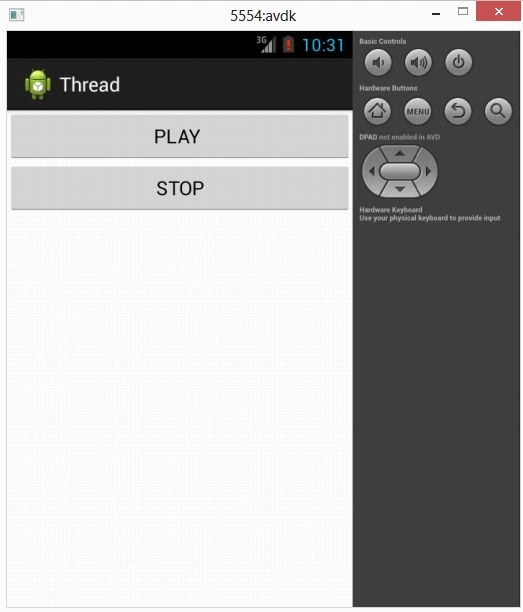

Click on "Stop"; your video will be hidden.

Join the conversation! Your thoughts help the community grow.