
In this article we are going to learn how to populate a drop down list using
JavaScript in asp.net. JavaScript is a client side scripting language which
offers an advantage of reducing the load on the server side. Reducing the load
term means that some part such as checking whether all the mandatory details are
being filled or not in an registration form, or any other type of validation. If
we try to perform all the validation on the server side naturally the server is
going to take time for processing the details and finally it will give a
response to client so this is not an efficient way to do the validation because
in multi user environment many user are connecting to your web site and to
perform validation on the server side is not the efficient way. So in this type
of scenario we can always make a use of JavaScript technology which offers
validation at the client side itself.
Code written in javascript are validate and executed at the client side only.
The server is not known about the values which are generated at the client side.
Moving to our designing part.
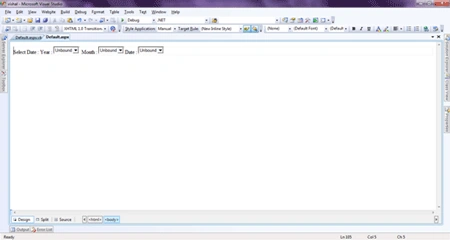
Following is the source code for design of our Default.aspx page.
<%@
Page Language="VB"
AutoEventWireup="false"
CodeFile="Default.aspx.vb"
Inherits="_Default"
%>
<!DOCTYPE html PUBLIC "-//W3C//DTD XHTML 1.0 Transitional//EN" "http://www.w3.org/TR/xhtml1/DTD/xhtml1-transitional.dtd">
<html xmlns="http://www.w3.org/1999/xhtml">
<head runat="server">
<title>Untitled Page</title>
<script type="text/javascript">
var month = new Array(11);
month[0] = "Jan";
month[1] = "Feb";
month[2] = "Mar";
month[3] = "Apr";
month[4] = "May";
month[5] = "Jun";
month[6] = "Jul";
month[7] = "Aug";
month[8] = "Sep";
month[9] = "Oct";
month[10] = "Nov";
month[11] = "Dec";
var date = new Date();
function getYear()
{
var opt = new Option("Select Year", "Select Year");
document.forms[0]["ddYear"].options.add(opt);
var currentyear = date.getYear();
for (var i = 1977; i < currentyear - 3; i++)
{
var item = new Option(i, i);
document.forms[0]["ddYear"].options.add(item);
}
}
function getMonth() {
var opt = new Option("Select Month", "Select Month");
document.forms[0]["ddMonth"].options.add(opt);
for (var i = 0; i <= 11; i++) {
var item = new Option(month[i], month[i]);
document.forms[0]["ddMonth"].options.add(item);
}
}
function getDays() {
//to clear all the items from ddDay drop down list simply set the length property to 0.
document.forms[0]["ddDay"].length = 0;
if (document.forms[0]["ddYear"].selectedIndex > 0 && document.forms[0]["ddMonth"].selectedIndex > 0) {
var yy = document.forms[0]["ddYear"].value;
var mm = document.forms[0]["ddMonth"].selectedIndex;
// alert(yy + "\n" + mm);
switch (mm) {
case 1:
case 3:
case 5:
case 7:
case 8:
case 10:
case 12:
for (var i = 1; i <= 31; i++) {
var item = new Option(i, i);
document.forms[0]["ddDay"].options.add(item);
}
break;
case 4:
case 6:
case 9:
case 11:
for (var i = 1; i <= 30; i++) {
var item = new Option(i, i);
document.forms[0]["ddDay"].options.add(item);
}
break;
case 2:
//to calculate if the year is a leap year or not.
if ((yy % 400 == 0) || (yy % 100 != 0 && yy % 4 == 0)) {
for (var i = 1; i <= 29; i++) {
var item = new Option(i, i);
document.forms[0]["ddDay"].options.add(item);
}
}
else {
for (var i = 1; i <= 28; i++) {
var item = new Option(i, i);
document.forms[0]["ddDay"].options.add(item);
}
}
}
}
}
</script>
<noscript>
<%--Redirecting Browser to a page if JavaScript support is not there
If you have developed a page which depends on JavaScript for form
validation or for any other purposes then you would be interested
in detecting the setting of the client browser and would like to redirect
to a different page explaining how to enable or disable JavaScript. Here we
will discuss how to check this setting and redirect to a different page accordingly.
We can detect this by using noscript tag and if the JavaScript is disabled then the
code within this noscript tag will be executed. Here is the code to do that. This code will
detect if the script setting is disabled and will redirect to a page explaining how to enable
or disable JavaScript with meta refresh in 2 seconds.
--%>
<meta http-equiv="refresh" content="2; URL=enable_javascript.aspx">
</noscript>
</head>
<body onload="getYear();getMonth()">
<form id="form1" runat="server">
<div>
Select Date : Year :
<asp:DropDownList ID="ddYear" runat="server">
</asp:DropDownList>
Month :
<asp:DropDownList ID="ddMonth" runat="server" onChange="getDays()">
</asp:DropDownList>
Date :
<asp:DropDownList ID="ddDay" runat="server">
</asp:DropDownList>
</div>
</form>
</body>
</html>
Design of enable_javascript.aspx.aspx page.
NOTE :- we are just simply detecting whether javascript is enabled or not. If not then it will be redirected to enable_javascript.aspx. following is the design code for the same.
<%@ Page Language="VB" AutoEventWireup="false" CodeFile="enable_javascript.aspx.vb" Inherits="enable_javascript" %>
<!DOCTYPE html PUBLIC "-//W3C//DTD XHTML 1.0 Transitional//EN" "http://www.w3.org/TR/xhtml1/DTD/xhtml1-transitional.dtd">
<html xmlns="http://www.w3.org/1999/xhtml">
<head runat="server">
<title></title>
<style type="text/css">
#body_content h2 {margin-top: 15px; margin-bottom: 1px; color: #000000; FONT-SIZE: 9pt;font-family: Verdana, Arial, Helvetica, sans-serif;font-weight: bold;}
</style>
</head>
<body>
<form id="form1" runat="server">
<div>
<center>
<table cellpadding="0" cellspacing="0" border="0" width="550">
<tr><td width="100%" valign="top" class="PPDesTxt"><b>Are you using a browser that doesn't support JavaScript?</b></td></tr>
<tr><td width="100%" valign="top" class="PPDesTxt">If your browser does not support JavaScript, you can upgrade to a newer browser, such as <a href="http://www.microsoft.com/windows/ie/downloads/ie6/default.asp">Microsoft® Internet Explorer 6</a> or <a href="http://wp.netscape.com/computing/download/bdp/index.html">Netscape 6</a>.</td></tr>
<tr><td width="100%" valign="top" class="PPDesTxt"><b>Have you disabled JavaScript?</b></td></tr>
<tr><td width="100%" valign="top" class="PPDesTxt">If you have disabled JavaScript, you must re-enable JavaScript to use this page. To enable JavaScript:<br />
<h2>
Internet Explorer 6</h2>
<ol>
<li>On the <b>Tools</b> menu, click <b>Internet Options</b>. </li>
<li>Click the <b>Security</b> tab. </li>
<li>Click <b>Custom Level</b>. </li>
<li>Scroll to <b>Scripting</b>. Under <b>Active scripting</b>, click <b>Enable</b>.
</li>
<li>Click <b>OK</b> twice. </li>
</ol>
<h2>
Netscape 6</h2>
<ol>
<li>On the <b>Edit</b> menu, click <b>Preferences</b>. </li>
<li>Click <b>Advanced</b>. </li>
<li>Select the <b>Enable JavaScript for Navigator</b> check box. </li>
<li>Click <b>OK</b>. </li>
</ol>
<h2>
FireFox</h2>
<ol>
<li>Click <b>Tools</b> </li>
<li>Click <b>Options</b>. </li>
<li>Click <b>Content</b> </li>
<li>Keep the Checkbox checked of <b>Enable JavaScirpt</b>. </li>
<li>Click <b>OK</b> </li>
</ol>
<br />
<SCRIPT type=text/javascript
src="https://apis.google.com/js/plusone.js"></SCRIPT>
<!-- Place this tag where you want the +1 button to render --></td></tr>
</table>
<table cellpadding="0" cellspacing="0" border="0" width="100%">
<tr><td width="100%" colspan="2"><img src="/images/T.gif" width="1" height="25" border="0"></td></tr>
</table></td>
</tr><tr><td>
</div>
</form>
</body>
</html>
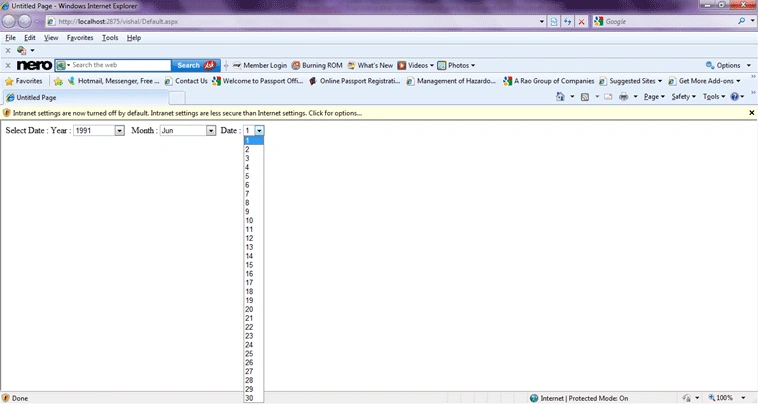
Now just run you web application
you'll find the year and the month which ever you select you'll get the no of
days in it.
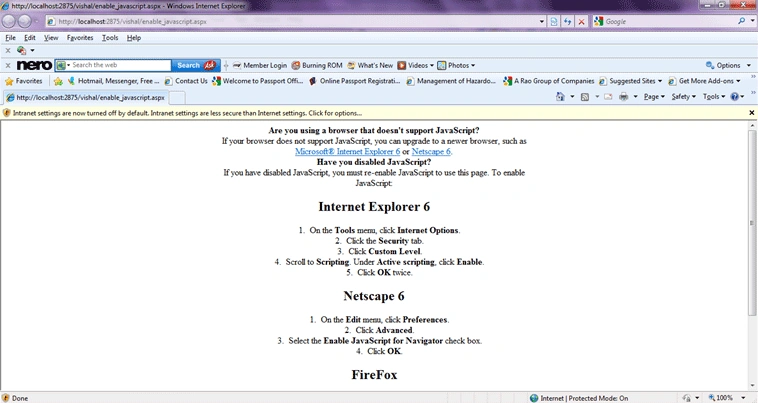
Now try to disable javascript on your browser and again run the application
you'll find you'll be redirected to enable_javascript.aspx.
Hope you have enjoyed the article.


Rimpi ManujaPosted Aug 2, 2014, 12:36 AM EDT
sir can u help me about how to bind datagrid using javaScript
Angelina ErinPosted Jul 31, 2011, 10:05 PM EDT
Nice Article