
Introduction
Pre/Post build events are useful when we wish to perform some operations before/after a project is built. These operations are nothing but the Shell commands being used from the command line. Think of a scenario where we build our library project and its .dll is saved into the Project/bin/Release directory. For some reason, we want all our library files in one common directory that we would refer somewhere in our project.
One way to do it is to manually copy the library files from their respective release or debug directories into the desired directory. Just kidding! We obviously don't want to do that. A preferred way to do it is by using Pre/Post Build Events.
Event Macros
We use post build events when we wish to perform an operation after the build is successful. Pre build events, on the other hand, are used when we want an operation to be performed before the build starts. These build events are composed of the Shell commands similar to the following one,
One way to do it is to manually copy the library files from their respective release or debug directories into the desired directory. Just kidding! We obviously don't want to do that. A preferred way to do it is by using Pre/Post Build Events.
Event Macros
We use post build events when we wish to perform an operation after the build is successful. Pre build events, on the other hand, are used when we want an operation to be performed before the build starts. These build events are composed of the Shell commands similar to the following one,
- copy "$(TargetDir)*$(TargetExt)" "$(ProjectDir)..\Library\"
Assume that the above line of code is a post build event. The event will copy the targeted files from the project directory into the Library directory, which resides in the main directory. Let's have a closer look at the command line event in parts.
- copy is the Shell command that we wish to execute when our build is successful. Similarly, we can use other commands as well. For example, we can use move instead of copy.
- $(TargetDir) returns the value of TargetDir macro, which is nothing but a directory path. This is the directory from where we wish to extract our files. Visual Studio provides a list of macros that we can use while creating our build event command. You may read more about the available macros here.
- *$(TargetExt) returns the list of all files that have the TargetExt. If the value of TargetExt is not what we want, we can simply replace the macro with our own extension. It is because of the '*' that we get all the files. If we know the file name we can use the file name with the target extension and that file will be copied to the desired location.
- $(ProjectDir) gives us the project directory path. In the sample command, I have used the project directory, however we can always replace it with other available macros as per our need.
- Because I want to store my desired files into the Library directory which lies in the main directory, I have used " ..\" followed by the directory name Library.
- When the build event is triggered, we can see the actual command executed by Visual Studio in the background, in its output window.
Conditional Events
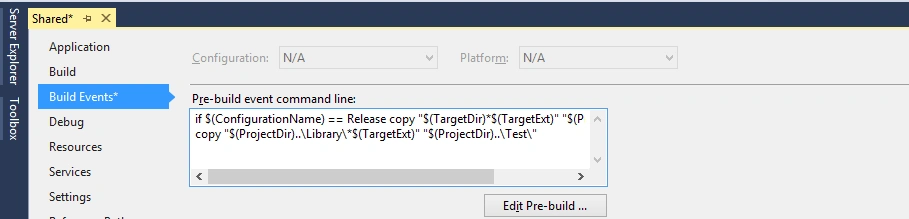
We can execute multiple commands in our build event. All we need, is to add a new line between the two commands. Not only this, we can also execute commands based on some condition. In order to achieve it, we use the if operator as shown in the following example,
- move "$(ProjectDir)..\Library\*$(TargetExt)" "$(ProjectDir)..\Test\"
- if $(ConfigurationName) == Release copy "$(TargetDir)*$(TargetExt)" "$(ProjectDir)..\Library\"
In the above event, we are executing two commands.
- The first command moves the targeted files from Library directory into the Test directory.
- The second command is, however, a conditional command which executes only if the value of $(ConfigurationName) is Release.
Summary
The article talked how we can make use of pre/post build events to perform an operation. It can be formed using a single, multiple or conditional command. While writing my own first build event, I found it a bit difficult to understand the parts of the command. Through this article, I tried to forward my learnings and help others get a basic understanding about the topic.
It’s always great to have feedback from the readers. Your valuable feedback, questions, or comments about this article are always welcome and much appreciated.

Join the conversation! Your thoughts help the community grow.