What is JSON?
- JSON stands for JavaScript Object Notation.
- JSON (JavaScript Object Notation) is a lightweight, text-based data format used for storing and exchanging data.
- It is easy for humans to read and write, and easy for machines to parse and generate.
- JSON is language-independent but uses conventions familiar to programmers of the C family (like JavaScript, Python, Java, etc.).
What is JSON Server?
- An open-source tool that lets you create a REST API from a JSON file.
- Useful for mock APIs, prototyping, and frontend development.
🔍 JSON Syntax Basics
JSON data is written in key-value pairs and can contain:
- Objects: collections of key/value pairs inside curly braces
{ } - Arrays: ordered lists of values inside square brackets
[ ] - Values: strings, numbers, booleans, arrays, objects, or
null.
👉 Example JSON
JSON
{
  "name": "Ram Shah",
  "age": 30,
  "isStudent": false,
  "skills": ["JavaScript", "React", "Node.js"],
  "address": {
    "city": "Mumbai",
    "country": "India"
  }
}
🔍 Explanation
"name"It is a string."age"It is a number."isStudent"It is a boolean."skills"It is an array of strings."address"It is an object with nested properties.
⚠️ JSON Rules
- Keys must be in double quotes.
- Data is separated by commas.
- No functions or comments allowed.
- Supports only a limited set of data types.
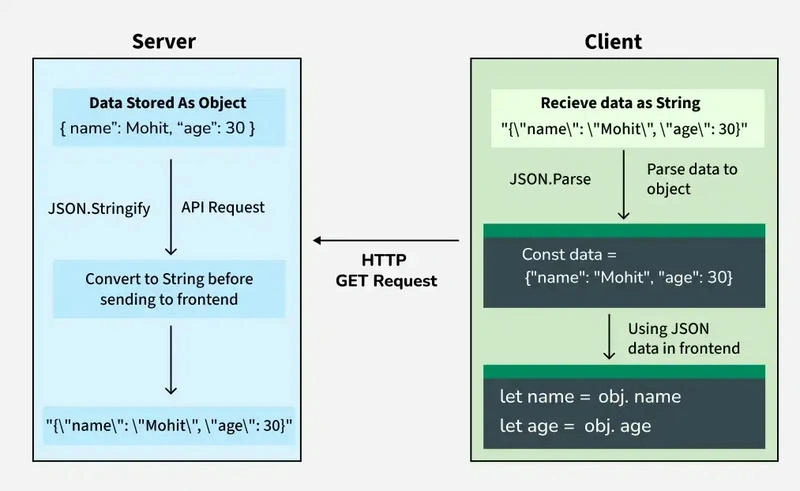
How Does JSON Work?
1. Installation
1. Show how to install JSON Server globally or locally
JSON
npm install -g json-server
# OR for local install
npm install json-server --save-dev
2. Create a db.json File
JSON
{
  "products": [
    { "id": 1, "name": "iPhone 14", "price": 799 },
    { "id": 2, "name": "Samsung Galaxy S23", "price": 699 }
  ]
}
3. Start JSON Server
JSON
json-server --watch db.json --port 5000API will be available at http://localhost:5000/products.
4. Integrate with React App
JSON is most commonly used:
- In AJAX calls to fetch data
- In REST APIs, to send/receive data
- To store data locally (e.g., in
localStorage) - With tools like React, Node.js, Express, etc.
JSON
useEffect(() => {
  fetch('http://localhost:5000/products')
    .then(res => res.json())
    .then(data => setProducts(data));
}, []);
OR using Axios
JSON
npm install axios

axios.get('http://localhost:5000/products')
  .then(res => setProducts(res.data));
5.Add / Update / Delete Data
- Read data (GET)
- Add data (POST)
- Update data (PUT/PATCH)
- Delete data (DELETE)
JSON
axios.post('http://localhost:5000/products', {
  name: 'OnePlus 12',
  price: 599
});
Benefits of Using JSON Server
- Rapid development.
- No backend setup.
- Useful for frontend testing, UI design.
- Works well with tools like Postman.
Limitations
- Not suitable for production.
- No authentication, file uploads, or real database features.
- Basic relationship support only.
🔄 JSON vs JavaScript Object
While they look similar, JavaScript Objects and JSON are not the same:
| Feature | JavaScript Object | JSON |
|---|---|---|
| Quotes around keys | Optional | Required (double quotes) |
| Functions | Allowed | Not allowed |
| Comments | Allowed | Not allowed |
| Trailing commas | Allowed | Not allowed |
🧾 Final Thoughts
JSON is the standard data format for communication between frontends and backends. It's easy to learn, widely adopted, and forms the foundation for modern web development.

Join the conversation! Your thoughts help the community grow.