
Background
A few days back, I got a requirement to read MS Excel files and store those values in the SQL Server database. Hence, in this example, I am going to show how to get the basic four types of important data such as Excel Work Book Name, Worksheet Count in that Workbook, Name of the Worksheets, and finally the Value of the First Cell in that Worksheet.
Prerequisites
First step is to download the Openxml dll from the official site.
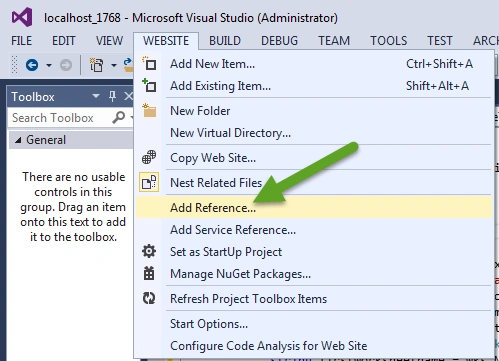
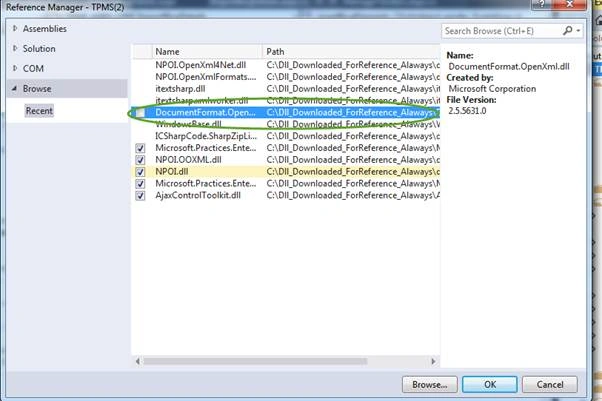
Second step is to kindly ensure to add the above dll, as shown in the screenshot, given below:
Important note
Once you load this dll and write the code, you will get the following error:
Resolution for above problem is,
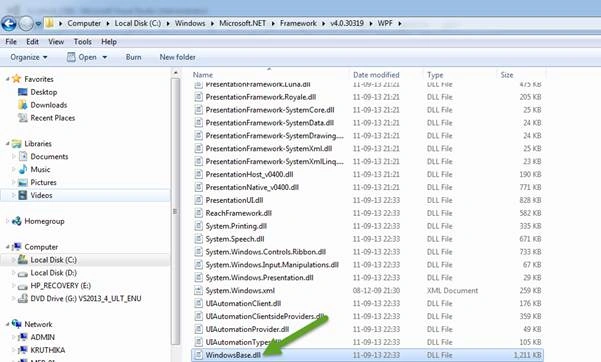
Add the above dll also to the project.
Namespace
- using DocumentFormat.OpenXml.Packaging;
- using DocumentFormat.OpenXml.Spreadsheet;
- protected void insertBoqElements_Click(object sender, EventArgs e)
- {
- try
- {
- //specify the file name where its actually exist
- string filepath = @ "D:\TPMS\Uploaded_Boq\test.xlsx";
- //open the excel using openxml sdk
- using(SpreadsheetDocument doc = SpreadsheetDocument.Open(filepath, false))
- {
- //create the object for workbook part
- WorkbookPart wbPart = doc.WorkbookPart;
- //statement to get the count of the worksheet
- int worksheetcount = doc.WorkbookPart.Workbook.Sheets.Count();
- //statement to get the sheet object
- Sheet mysheet = (Sheet) doc.WorkbookPart.Workbook.Sheets.ChildElements.GetItem(0);
- //statement to get the worksheet object by using the sheet id
- Worksheet Worksheet = ((WorksheetPart) wbPart.GetPartById(mysheet.Id)).Worksheet;
- //Note: worksheet has 8 children and the first child[1] = sheetviewdimension,....child[4]=sheetdata
- int wkschildno = 4;
- //statement to get the sheetdata which contains the rows and cell in table
- SheetData Rows = (SheetData) Worksheet.ChildElements.GetItem(wkschildno);
- //getting the row as per the specified index of getitem method
- Row currentrow = (Row) Rows.ChildElements.GetItem(1);
- //getting the cell as per the specified index of getitem method
- Cell currentcell = (Cell) currentrow.ChildElements.GetItem(1);
- //statement to take the integer value
- string currentcellvalue = currentcell.InnerText;
- }
- } catch (Exception Ex)
- {
- lbldisplayerrors.Text = Ex.Message;
- }
- }
If the cell contains a string, then this value is an index into the shared string table, pointing to the actual string value. Otherwise, the value of the cell is expressed directly in this element
Source: CellValue Class
For taking the string Value from Cell
- protected void insertBoqElements_Click(object sender, EventArgs e)
- {
- try
- {
- //specify the file name where its actually exist
- string filepath = @ "D:\TPMS\Uploaded_Boq\test.xlsx";
- //open the excel using openxml sdk
- using(SpreadsheetDocument doc = SpreadsheetDocument.Open(filepath, false))
- {
- //create the object for workbook part
- WorkbookPart wbPart = doc.WorkbookPart;
- //statement to get the count of the worksheet
- int worksheetcount = doc.WorkbookPart.Workbook.Sheets.Count();
- //statement to get the sheet object
- Sheet mysheet = (Sheet) doc.WorkbookPart.Workbook.Sheets.ChildElements.GetItem(0);
- //statement to get the worksheet object by using the sheet id
- Worksheet Worksheet = ((WorksheetPart) wbPart.GetPartById(mysheet.Id)).Worksheet;
- //Note: worksheet has 8 children and the first child[1] = sheetviewdimension,....child[4]=sheetdata
- int wkschildno = 4;
- //statement to get the sheetdata which contains the rows and cell in table
- SheetData Rows = (SheetData) Worksheet.ChildElements.GetItem(wkschildno);
- //getting the row as per the specified index of getitem method
- Row currentrow = (Row) Rows.ChildElements.GetItem(0);
- //getting the cell as per the specified index of getitem method
- Cell currentcell = (Cell) currentrow.ChildElements.GetItem(0);
- string currentcellvalue = string.Empty;
- if (currentcell.DataType != null)
- {
- if (currentcell.DataType == CellValues.SharedString)
- {
- int id = -1;
- if (Int32.TryParse(currentcell.InnerText, out id))
- {
- SharedStringItem item = GetSharedStringItemById(wbPart, id);
- if (item.Text != null)
- {
- //code to take the string value
- currentcellvalue = item.Text.Text;
- } else if (item.InnerText != null)
- {
- currentcellvalue = item.InnerText;
- } else if (item.InnerXml != null)
- {
- currentcellvalue = item.InnerXml;
- }
- }
- }
- }
- }
- } catch (Exception Ex)
- {
- lbldisplayerrors.Text = Ex.Message;
- }
- }
- public static SharedStringItem GetSharedStringItemById(WorkbookPart workbookPart, int id)
- {
- return workbookPart.SharedStringTablePart.SharedStringTable.Elements < SharedStringItem > ().ElementAt(id);
- }
Link to: Read excel files using Microsoft Office Interop Assemblies in asp.net
I hope the above information was useful. Kindly let me know your thoughts.


Varadharajan DuraisamyPosted Sep 6, 2018, 1:37 AM EDT
Hi karthick, Everything works fine but i could not read custom date from xlsx file. it is showing datatype as null and returning cellvalue/innertext as 43342. How could we determine this cell value is datetype and how to convert this to datetime.
Anjali BhattPosted Aug 12, 2018, 8:32 PM EDT
Hey.. Is this possible to write data on xlsb format, instead of xlsx using openxml.
nagatejaswi bhupathiPosted May 24, 2018, 12:37 AM EDT
Hi Karthik, I want to import Excel(which have data with 10 columns) using openxml and display the data in respective user controls ( C#). Thanks in advance
SHENYAUNG WANGPosted Apr 2, 2018, 12:09 AM EDT
Hi Karthink,I want to read excel file in datatable ,and then add some data in it. export this datatable into xlsx,but i have a problem which i read is numeric and output is string like:123 turn into "123" in excel. That will cause the formula cant be use.
vijay satuluriPosted Feb 28, 2018, 7:49 PM EST
Hi, Do i need Microsoft office to be installed in server, if i use Open XML SDK.
Ryma KhanPosted Dec 8, 2017, 1:24 AM EST
Hi, How can we notify c # program that more rows are added in excel sheet(open xml excel sdk)?
ringgo dejesusPosted Nov 27, 2017, 7:05 PM EST
Hi Karthink, I also have this task wherein the data will be exported to a template .xlsm file. It successfully exported the data in the spreadsheet but unfortunately every time I open the file I keep getting "content error" after the download is completed. I already tried all possible solution to my problem on internet but still have the same error. can you please help me as I'm still doing this for 2 weeks. :(
manisha yadavPosted Nov 16, 2017, 12:45 AM EST
Hi Karthik , I want to read excel file using open xml sdk and print values on console. Your code is working fine when all the rows nd columns has numeric value but when it is a string it just gives the index. Can u please help me out with this.
Simran ChauhanPosted Aug 27, 2017, 8:02 AM EDT
Can you please tell me how to extract particular column data from various tabs in single excel sheet using openxml
Karthik ElumalaiPosted Aug 23, 2017, 11:08 PM EDT
@Simran Chauhan I hope ,In the above article, I have mentioned starting from how to add the reference to the required dll and how to open and read content of excel with steps and screenshots. So can you please let me know for which step you want assistance? That will help me to provide details further. Happy sharing
Simran ChauhanPosted Aug 23, 2017, 10:35 PM EDT
Can you please provide me the steps of this how i write a code.
Karthik ElumalaiPosted Jun 24, 2016, 10:34 PM EDT
My pleasure ,and hearful thanks for valuable feedback and time sir.
Santhakumar MunuswamyPosted Jun 24, 2016, 10:21 PM EDT
Thank you for nice article
Karthik ElumalaiPosted Jun 24, 2016, 6:46 AM EDT
thanks for your good feedback...:) Ekrem Tapan
Ekrem TapanPosted Jun 24, 2016, 1:48 AM EDT
Nice Article
Karthik ElumalaiPosted Jun 19, 2016, 6:55 PM EDT
Thanks you very much for your time and feedback Vignesh Mani
Karthik ElumalaiPosted Jun 19, 2016, 6:55 PM EDT
Thanks a lot for your time and feedbackHumayun Kabir Mamun
Vignesh ManiTOP 100Posted Jun 18, 2016, 11:18 AM EDT
Nice
Humayun Kabir MamunPosted Jun 18, 2016, 8:55 AM EDT
Nice...