
In this article, we will learn how to register a user having multiple roles. In the example here we have the three roles "Admin", "Free User" and "Paid User". After successful registration we can also login to the system. During login we can redirect to various webpages depending on their corresponding roles.
Table Creation
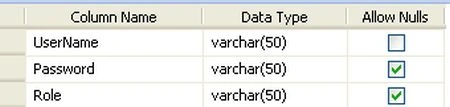
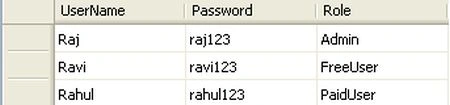
Table Data
Now let's move to the code.
Register.aspx
- <%@ Page Language="C#" AutoEventWireup="true" CodeBehind="Register.aspx.cs" Inherits="Login_role.Register" %>
- <!DOCTYPE html PUBLIC "-//W3C//DTD XHTML 1.0 Transitional//EN" "http://www.w3.org/TR/xhtml1/DTD/xhtml1-transitional.dtd">
- <html xmlns="http://www.w3.org/1999/xhtml" >
- <head runat="server">
- <title>Register</title>
- </head>
- <body>
- <form id="form1" runat="server">
- <div>
- <table align="center">
- <tr>
- <td colspan="2">
- <h3>
- Registration using Role</h3>
- </td>
- </tr>
- <tr>
- <td>
- <asp:Label ID="Label1" runat="server" Text="UserName:" Font-Bold="True" Width="100px" BackColor="#FFFF66" ForeColor="#FF3300"></asp:Label>
- </td>
- <td>
- <asp:TextBox ID="txt_UserName" runat="server" Width="150px"></asp:TextBox>
- </td>
- <td><asp:RequiredFieldValidator ID="RequiredFieldValidator2" runat="server" ErrorMessage="Enter UserName" ControlToValidate="txt_UserName"></asp:RequiredFieldValidator> </td>
- </tr>
- <tr>
- <td>
- <asp:Label ID="Label2" runat="server" Text="Password:" Font-Bold="True" Width="100px" BackColor="#FFFF66" ForeColor="#FF3300"></asp:Label>
- </td>
- <td>
- <asp:TextBox ID="txt_Password" TextMode="Password" runat="server"
- Width="150px"></asp:TextBox>
- </td>
- <td><asp:RequiredFieldValidator ID="RequiredFieldValidator3" runat="server" ErrorMessage="Enter Password" ControlToValidate="txt_Password"></asp:RequiredFieldValidator> </td>
- </tr>
- <tr>
- <td>
- <asp:Label ID="Label3" runat="server" Text="Role:" Font-Bold="True" Width="100px" Height="100px" BackColor="#FFFF66" ForeColor="#FF3300"></asp:Label>
- </td>
- <td>
- <asp:RadioButtonList ID="rbtRole" runat="server" RepeatDirection="Vertical">
- <asp:ListItem>Admin</asp:ListItem>
- <asp:ListItem>FreeUser</asp:ListItem>
- <asp:ListItem>PaidUser</asp:ListItem>
- </asp:RadioButtonList>
- </td>
- <td><asp:RequiredFieldValidator ID="RequiredFieldValidator4" runat="server" ErrorMessage="Select role" ControlToValidate="rbtRole"></asp:RequiredFieldValidator> </td>
- </tr>
- <tr>
- <td></td>
- <td>
- <asp:Button ID="btn_register" runat="server" BackColor="#CCFF99" Text="Register"
- onclick="btn_register_Click" />
- </td>
- <td><asp:HyperLink ID="HyperLink1" runat="server" NavigateUrl="~/Login.aspx"
- ForeColor="#663300">Click here to Login</asp:HyperLink></td>
- </tr>
- <tr>
- <td align="center" colspan="2">
- <asp:Label ID="lblmsg" runat="server"></asp:Label>
- </td>
- </tr>
- </table>
- </div>
- </form>
- </body>
- </html>
Register.aspx.cs
- using System;
- using System.Collections;
- using System.Configuration;
- using System.Data;
- using System.Linq;
- using System.Web;
- using System.Web.Security;
- using System.Web.UI;
- using System.Web.UI.HtmlControls;
- using System.Web.UI.WebControls;
- using System.Web.UI.WebControls.WebParts;
- using System.Xml.Linq;
- using System.Data.SqlClient;
- namespace Login_role
- {
- public partial class Register : System.Web.UI.Page
- {
- string strConnString = ConfigurationManager.ConnectionStrings["ConnectionString"].ConnectionString;
- SqlCommand com;
- protected void btn_register_Click(object sender, EventArgs e)
- {
- SqlConnection con = new SqlConnection(strConnString);
- com = new SqlCommand();
- com.Connection = con;
- com.CommandType = CommandType.Text;
- com.CommandText = "Insert into Login values(@UserName,@Password,@Role)";
- com.Parameters.Clear();
- com.Parameters.AddWithValue("@UserName", txt_UserName.Text);
- com.Parameters.AddWithValue("@Password", txt_Password.Text);
- com.Parameters.AddWithValue("@Role", rbtRole.SelectedValue);
- if (con.State == ConnectionState.Closed)
- con.Open();
- com.ExecuteNonQuery();
- con.Close();
- lblmsg.Text = "Successfully Registered!!!";
- clear();
- }
- private void clear()
- {
- txt_UserName.Text = "";
- rbtRole.ClearSelection();
- }
- }
- }
Login.aspx
- <%@ Page Language="C#" AutoEventWireup="true" CodeBehind="Login.aspx.cs" Inherits="Login_role.Login" %>
- <!DOCTYPE html PUBLIC "-//W3C//DTD XHTML 1.0 Transitional//EN" "http://www.w3.org/TR/xhtml1/DTD/xhtml1-transitional.dtd">
- <html xmlns="http://www.w3.org/1999/xhtml" >
- <head runat="server">
- <title>Login</title>
- <script type="text/javascript" language="javascript">
- function Validate()
- {
- var UName=document.getElementById('TextBox_user_name');
- var Password=document.getElementById('TextBox_password');
- if((UName.value=='') || (Password.value==''))
- {
- alert('UserName or Password should not be blank');
- return false;
- }
- else
- {
- return true;
- }
- }
- </script>
- </head>
- <body>
- <form id="form1" runat="server">
- <div>
- <asp:Label ID="lb1" runat="server" Font-Bold="True" ForeColor="#FF3300"></asp:Label><br />
- <asp:Label ID="Label1" runat="server" Text="Name" Font-Bold="True" Width="100px" BackColor="#FFFF66" ForeColor="#FF3300"></asp:Label>
- <asp:TextBox ID="TextBox_user_name" runat="server" ForeColor="#993300" Width="100px"></asp:TextBox><br />
- <asp:Label ID="Label2" runat="server" Text="Password" Font-Bold="True" Width="100px" BackColor="#FFFF66" ForeColor="#FF3300"></asp:Label>
- <asp:TextBox ID="TextBox_password" runat="server" ForeColor="#CC6600" TextMode="Password" Width="100px"></asp:TextBox><br />
- <asp:Button ID="btn_login" runat="server" Text="Login" Font-Bold="True"
- BackColor="#CCFF99" OnClientClick="Validate()" onclick="btn_login_Click"/><br />
- </div>
- </form>
- </body>
- </html>
Login.aspx.cs
- using System;
- using System.Collections;
- using System.Configuration;
- using System.Data;
- using System.Linq;
- using System.Web;
- using System.Web.Security;
- using System.Web.UI;
- using System.Web.UI.HtmlControls;
- using System.Web.UI.WebControls;
- using System.Web.UI.WebControls.WebParts;
- using System.Xml.Linq;
- using System.Data.SqlClient;
- namespace Login_role
- {
- public partial class Login : System.Web.UI.Page
- {
- string strConnString = ConfigurationManager.ConnectionStrings["ConnectionString"].ConnectionString;
- string str, UserName, Password;
- SqlCommand com;
- SqlDataAdapter sqlda;
- DataTable dt;
- int RowCount;
- protected void btn_login_Click(object sender, EventArgs e)
- {
- SqlConnection con = new SqlConnection(strConnString);
- con.Open();
- str = "Select * from Login";
- com = new SqlCommand(str);
- sqlda = new SqlDataAdapter(com.CommandText, con);
- dt = new DataTable();
- sqlda.Fill(dt);
- RowCount = dt.Rows.Count;
- for (int i = 0; i < RowCount; i++)
- {
- UserName = dt.Rows[i]["UserName"].ToString();
- Password = dt.Rows[i]["Password"].ToString();
- if (UserName == TextBox_user_name.Text && Password == TextBox_password.Text)
- {
- Session["UserName"] = UserName;
- if (dt.Rows[i]["Role"].ToString() == "Admin")
- Response.Redirect("~/Admin/Admin.aspx");
- else if (dt.Rows[i]["Role"].ToString() == "FreeUser")
- Response.Redirect("~/FreeUser/FreeUser.aspx");
- else if (dt.Rows[i]["Role"].ToString() == "PaidUser")
- Response.Redirect("~/PaidUser/PaidUser.aspx");
- }
- else
- {
- lb1.Text = "Invalid User Name or Password! Please try again!";
- }
- }
- }
- }
- }
Admin.aspx
- <%@ Page Language="C#" AutoEventWireup="true" CodeBehind="Admin.aspx.cs" Inherits="Login_role.clerk" %>
- <!DOCTYPE html PUBLIC "-//W3C//DTD XHTML 1.0 Transitional//EN" "http://www.w3.org/TR/xhtml1/DTD/xhtml1-transitional.dtd">
- <html xmlns="http://www.w3.org/1999/xhtml" >
- <head runat="server">
- <title>Admin</title>
- </head>
- <body>
- <form id="form1" runat="server">
- <div>
- <h1><font color="red">Admin Page</font></h1>
- <asp:Label ID="lb1" runat="server" Text="Label"></asp:Label>
- </div>
- </form>
- </body>
- </html>
Admin.aspx.cs
- using System;
- using System.Collections;
- using System.Configuration;
- using System.Data;
- using System.Linq;
- using System.Web;
- using System.Web.Security;
- using System.Web.UI;
- using System.Web.UI.HtmlControls;
- using System.Web.UI.WebControls;
- using System.Web.UI.WebControls.WebParts;
- using System.Xml.Linq;
- namespace Login_role
- {
- public partial class clerk : System.Web.UI.Page
- {
- protected void Page_Load(object sender, EventArgs e)
- {
- lb1.Text = "<b><font color=Brown>" + "WELLCOME ADMIN:: " + "</font>" + "<b><font color=red>" + Session["UserName"] + "</font>";
- }
- }
- }
FreeUser.aspx
- <%@ Page Language="C#" AutoEventWireup="true" CodeBehind="FreeUser.aspx.cs" Inherits="Login_role.doctor" %>
- <!DOCTYPE html PUBLIC "-//W3C//DTD XHTML 1.0 Transitional//EN" "http://www.w3.org/TR/xhtml1/DTD/xhtml1-transitional.dtd">
- <html xmlns="http://www.w3.org/1999/xhtml" >
- <head runat="server">
- <title>FreeUser</title>
- </head>
- <body>
- <form id="form1" runat="server">
- <div>
- <h1><font color="green">FreeUser Page</font></h1>
- <asp:Label ID="lb1" runat="server" Text="Label"></asp:Label>
- </div>
- </form>
- </body>
- </html>
FreeUser.aspx.cs
- using System;
- using System.Collections;
- using System.Configuration;
- using System.Data;
- using System.Linq;
- using System.Web;
- using System.Web.Security;
- using System.Web.UI;
- using System.Web.UI.HtmlControls;
- using System.Web.UI.WebControls;
- using System.Web.UI.WebControls.WebParts;
- using System.Xml.Linq;
- namespace Login_role
- {
- public partial class doctor : System.Web.UI.Page
- {
- protected void Page_Load(object sender, EventArgs e)
- {
- lb1.Text = "<b><font color=Brown>" + "WELLCOME FREE USER:: " + "</font>" + "<b><font color=red>" + Session["UserName"] + "</font>";
- }
- }
- }
PaidUser.aspx
- <%@ Page Language="C#" AutoEventWireup="true" CodeBehind="PaidUser.aspx.cs" Inherits="Login_role.PaidUser" %>
- <!DOCTYPE html PUBLIC "-//W3C//DTD XHTML 1.0 Transitional//EN" "http://www.w3.org/TR/xhtml1/DTD/xhtml1-transitional.dtd">
- <html xmlns="http://www.w3.org/1999/xhtml" >
- <head runat="server">
- <title>PaidUser</title>
- </head>
- <body>
- <form id="form1" runat="server">
- <div>
- <h1><font color="olive">PaidUser Page</font></h1>
- <asp:Label ID="lb1" runat="server" Text="Label"></asp:Label>
- </div>
- </form>
- </body>
- </html>
PaidUser.aspx.cs
- using System;
- using System.Collections;
- using System.Configuration;
- using System.Data;
- using System.Linq;
- using System.Web;
- using System.Web.Security;
- using System.Web.UI;
- using System.Web.UI.HtmlControls;
- using System.Web.UI.WebControls;
- using System.Web.UI.WebControls.WebParts;
- using System.Xml.Linq;
- namespace Login_role
- {
- public partial class PaidUser : System.Web.UI.Page
- {
- protected void Page_Load(object sender, EventArgs e)
- {
- lb1.Text = "<b><font color=Brown>" + "WELLCOME PAID USER:: " + "</font>" + "<b><font color=red>" + Session["UserName"] + "</font>";
- }
- }
- }
Output
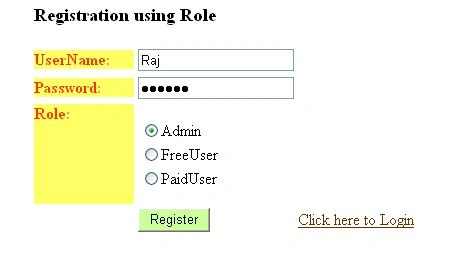
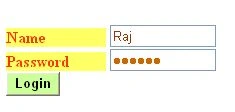
Registration using role Admin

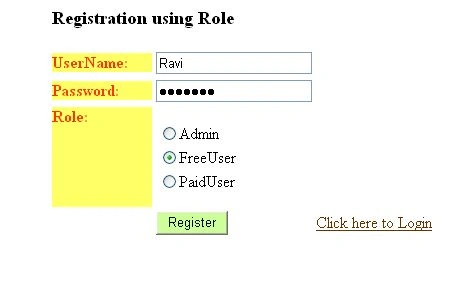
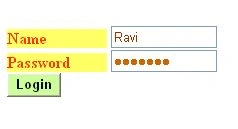
Registration using role FreeUser

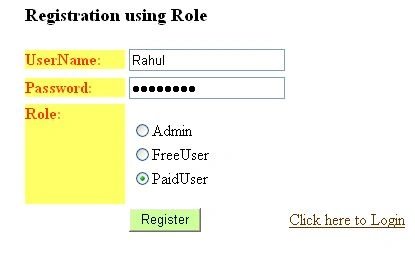
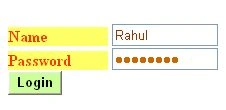
Registration using role PaidUser



Dennis J GordonPosted Jul 27, 2023, 11:48 PM EDT
What are your views on Identity?
Dimpal PalPosted Mar 29, 2021, 11:50 AM EDT
The Role Code isn't work
Dimpal PalPosted Mar 29, 2021, 11:49 AM EDT
It's Showing Error NullReferenceException not found error can you help me?
sofique uddinPosted Feb 24, 2021, 10:40 PM EST
If possible kindly give me a PDF Link
sofique uddinPosted Feb 24, 2021, 10:34 PM EST
Thank You. Dear Brother
nad sPosted May 21, 2019, 4:59 PM EDT
I tried this code but its not working properly.I mean the Role isn't working.can you please check the code.
Subin ThomasPosted Feb 4, 2019, 7:17 PM EST
Nice article
حسنين أبوسعدهPosted Dec 18, 2018, 12:08 AM EST
Thanks is great and simple
Sunny TamangPosted Nov 28, 2017, 10:00 PM EST
There is one question if u r logged in as free user and u manually changed the url for paid users, will it still be accessible by the free user?
Sai KiranPosted Dec 11, 2016, 8:49 AM EST
This article is good but I want Registration and Login By Role in ASP.NET with WCF Servicss Please post me
SubashPosted Jul 13, 2016, 9:23 AM EDT
Nice one
Sthitaprajnya Debasis NayakPosted Jan 13, 2016, 8:35 AM EST
Helped Me A lot.
Chandu KumawatPosted Oct 12, 2015, 3:12 AM EDT
nice 1
SharadPosted Jul 21, 2015, 8:32 PM EDT
good one...
Yayat YatimanPosted Jan 21, 2015, 10:06 PM EST
nice ! how to logout code