
UAP Panels is divided into the following two types:
- Linear pattern or Panel.
- Non-Liner pattern or Panel.
Linear Pattern
In a Linear Pattern all the controls should be either Horizontal or Vertical.
For example, a Stack Panel.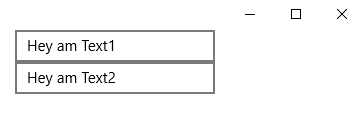
Figure 1: Stack Panel
Non-Linear pattern
In a Non-Linear pattern all the controls align in any order with relationship to other controls like top or bottom.
For example:
Child1 is top of all the elements.
Child2 is added below child1.
Child3 is added below child2, the starting position is the Child1 position.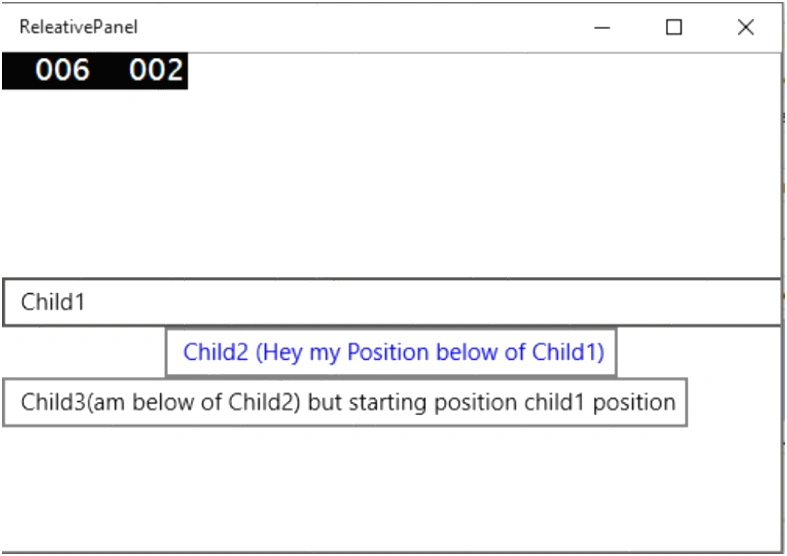
Figure 2: Child1 Position
Relative panel
Each control has a relationship with other controls with any relationship (but not a circular dependency).
A Relative Panel is a Parent control, all inside controls are child controls.
There are generally the following two types of relationships:
- Parent to child.
- Child to child.
Parent -> Child: All panel properties are parent types.
For example: TextBox (child control) is attached with Panel (AlignBottomWithPanel properties).
Figure 3: Child Control
Child relationship: child to child (other than panel relationship properties consider as child to child properties).
Properties list 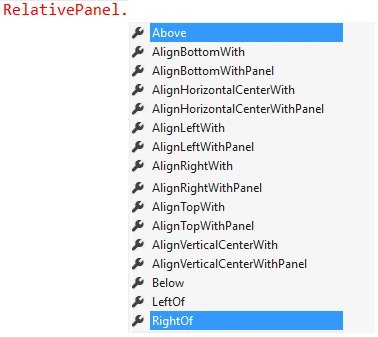
Figure 4: Property List
Properties position inside the Panel control 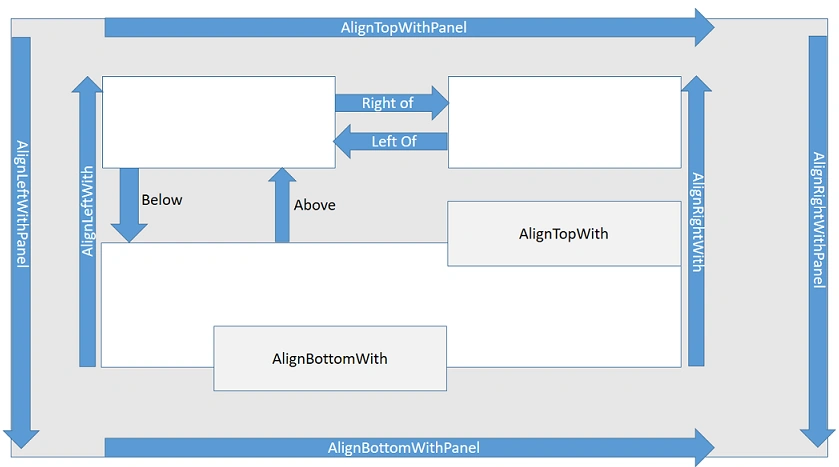
Figure 5: Panel Control
The following describes the image:
- complete box is a Relative panel.
- Inside box are child controls.
- Arrow is specified as Alignment and Position of the controls.
All the alignment properties are high-priority and the remaining (position) properties are low-priority.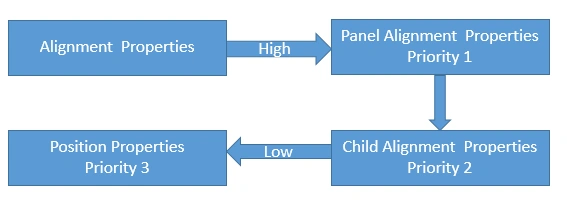
Figure 6: Low Property
Each control's relation with other controls is something. If we did not provide the relative properties then the first control aligns with the default position and the next controls overwrite the previous control and always sets the relative controls. For each control one or more relationship depends on the requirements.
For example, see the following code.
- <RelativePanel x:Name="rePanelParent" BorderBrush="Red" BorderThickness="5" CornerRadius="20" >
- <TextBox x:Name="txtChild1" Text="Child1" MinWidth="500" Foreground="Red"
- RelativePanel.AlignHorizontalCenterWithPanel="True" IsReadOnly="True" RelativePanel.AlignVerticalCenterWithPanel="True"/>
- <TextBox x:Name="txtChild2" MinWidth="250" Text="Child2 (Hey my Position below of Child1)" RelativePanel.AlignHorizontalCenterWithPanel="True" Foreground="Blue"
- IsReadOnly="True" RelativePanel.Below="txtChild1"/>
- <TextBox x:Name="txtChild3" Text="Child3(am below of Child2) Position left with Child1" Foreground="Green"
- IsReadOnly="True" RelativePanel.Below="txtChild2" RelativePanel.AlignLeftWith="txtChild1"/>
- </RelativePanel>
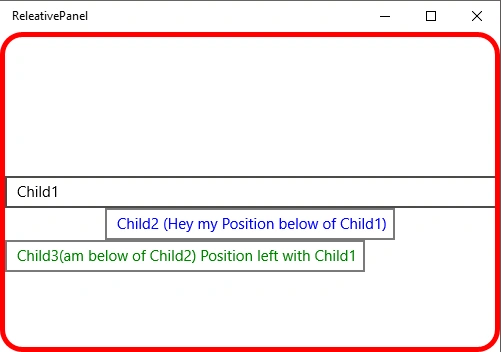
Figure 7: RelativePanel


Vishal PrajapatiPosted Feb 19, 2017, 8:56 PM EST
Very helpful for beginners...
Ammar ShaukatPosted Feb 10, 2016, 8:24 AM EST
that's really helpful
Vinoth RajendranTOP 100Posted Aug 31, 2015, 7:58 AM EDT
Thanks folks
Ankit BansalPosted Aug 31, 2015, 12:25 AM EDT
thanks for share..
Rajeesh MenothPosted Aug 30, 2015, 8:40 PM EDT
Thank you for sharing..
Hashim ShafiqPosted Aug 30, 2015, 5:47 PM EDT
nice
Hashim ShafiqPosted Aug 30, 2015, 5:41 PM EDT
nice
Vinoth RajendranTOP 100Posted Aug 30, 2015, 1:53 AM EDT
Thanks Karthi
Karthikeyan KPosted Aug 30, 2015, 1:14 AM EDT
Good one sir..Informative article
Vinoth RajendranTOP 100Posted Aug 29, 2015, 9:16 PM EDT
Thanks Sibeesh
Sibeesh VenuTOP 100Posted Aug 29, 2015, 9:11 PM EDT
Nice Share
Vinoth RajendranTOP 100Posted Aug 29, 2015, 8:50 PM EDT
thanks folks
Santhakumar MunuswamyPosted Aug 29, 2015, 8:05 PM EDT
Nice article
Gowtham KTOP 100Posted Aug 29, 2015, 7:47 PM EDT
Good one
Mohammed IbrahimPosted Aug 29, 2015, 7:41 PM EDT
nice
Pankaj Kumar ChoudharyTOP 100Posted Aug 29, 2015, 4:18 PM EDT
Nice Explain Vinoth Sir...........