
Introduction
This article shows how to remove a DOM element using jQuery. I hope you will like it.
Background
I know we are all working on the client-side technologies, especially in jQuery. Sometimes we may need to write more client-side code rather than server-side code. In that case, you may need to remove some DOM elements pragmatically. Here I will provide you a demo of how to satisfy this requirement.
Using the code
To start with, as you all know we need to load the jQuery reference.
- <script src="https://code.jquery.com/jquery-2.1.4.min.js"></script>
Once you load the reference you are ready to go.
Since this is a demo, we will explain with a procedure. Sounds good? So we will do the following.
- Add the elements to the DOM
- Delete the DOM elements using the .remove(), .get() functions
Add the elements to the DOM
We need to set our UI first, right?
- <body id="body">
- Remove a DOM element from the UI using JQuery- Sibeesh Passion
- <br/>
- <br/>
- <p id="addMe">Generate 10 Elements</p>
- </body>
Add CSS
- <style>
- p {
- color: red;
- width: 170px;
- cursor: pointer;
- border: 1px solid #ccc;
- text-align: center;
- }
- #deleteMe {
- color: white;
- width: 170px;
- cursor: pointer;
- border: 1px solid #ccc;
- text-align: center;
- background-color: blue;
- }
- </style>
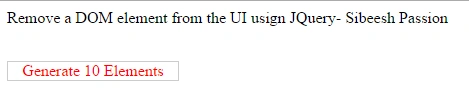
So we have set our UI and now if you run your page you can see the output as follows.
Now we will add the necessary scripts.
- < script > $(document).ready(function() {
- $("#addMe").click(function() {
- var html = '<table>';
- for (var i = 1; i <= 10; i++) {
- html += "<tr><p>My Elements</p></tr>";
- }
- html += '</table>';
- $('#body').append(html).append('<div id="deleteMe">Delete 5 Elements</div>');
- $("#addMe").hide();
- });
- $(document).on('click', '#deleteMe', function() {
- for (var i = 1; i <= 5; i++) {
- $('#body').find('p').get(i).remove();
- }
- $("#addMe").hide();
- $("#deleteMe").hide();
- });
- }); < /script>
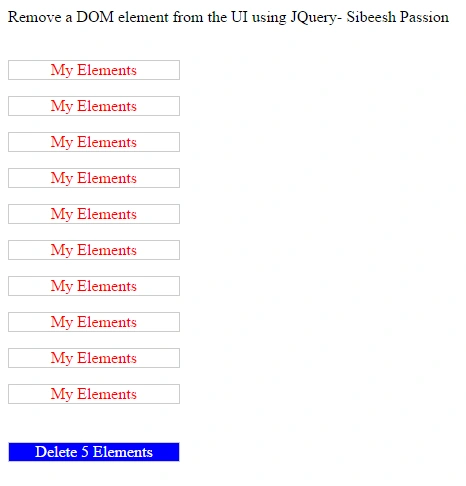
As you can see, we are adding elements to the DOM with a loop. Once you run the page you can see the output as follows.
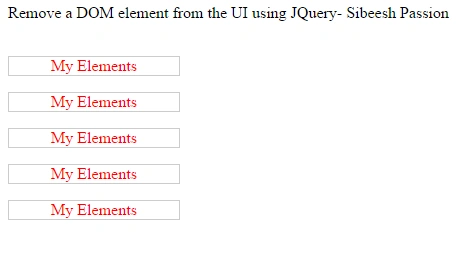
And once you click on the “Delete 5 Elements” button, 5 DOM elements will be deleted.
The following code block describes how to use the .remove() function.
- $('#body').find('p').get(i).remove();
- <html>
- <head>
- <title>emove a DOM element from the UI usign JQuery- Sibeesh Passion</title>
- <style>
- p {
- color: red;
- width: 170px;
- cursor: pointer;
- border: 1px solid #ccc;
- text-align: center;
- }
- #deleteMe {
- color: white;
- width: 170px;
- cursor: pointer;
- border: 1px solid #ccc;
- text-align: center;
- background-color: blue;
- }
- </style>
- <script src="https://code.jquery.com/jquery-2.1.4.min.js"></script>
- </head>
- <body id="body">
- Remove a DOM element from the UI using JQuery- Sibeesh Passion
- <br/>
- <br/>
- <p id="addMe">Generate 10 Elements</p>
- <script>
- $(document).ready(function() {
- $("#addMe").click(function() {
- var html = '
- <table>';
- for (var i = 1; i <= 10; i++) {
- html += "
- <tr>
- <p>My Elements</p>
- </tr>";
- }
- html += '
- </table>';
- $('#body').append(html).append('
- <div id="deleteMe">Delete 5 Elements</div>');
- $("#addMe").hide();
- });
- $(document).on('click', '#deleteMe', function() {
- for (var i = 1; i <= 5; i++) {
- $('#body').find('p').get(i).remove();
- }
- $("#addMe").hide();
- $("#deleteMe").hide();
- });
- });
- </script>
- </body>
- </html>
Conclusion
I hope you will like this article. Please share with me your valuable thoughts and comments. Your feedback is always welcomed.
Thanks in advance. Happy coding!


Santhakumar MunuswamyPosted Jul 3, 2015, 11:08 AM EDT
Thanks for nice article.:)
Manoj KulkarniPosted Jul 1, 2015, 6:56 PM EDT
Nice article. Thank you for sharing
Sibeesh VenuTOP 100Posted Jul 1, 2015, 9:35 AM EDT
Gopi Chand thank you
Sibeesh VenuTOP 100Posted Jul 1, 2015, 9:34 AM EDT
Debasis Saha thank you
Sibeesh VenuTOP 100Posted Jul 1, 2015, 9:34 AM EDT
Vipul Malhotra thank you
Gopi ChandPosted Jul 1, 2015, 9:24 AM EDT
Nice one
Debasis SahaTOP 100Posted Jul 1, 2015, 6:36 AM EDT
Good one
Vipul MalhotraPosted Jul 1, 2015, 6:10 AM EDT
Great...Thanks for sharing
Sibeesh VenuTOP 100Posted Jul 1, 2015, 5:53 AM EDT
Upendra Pratap Shahi Thank you :)
Upendra Pratap ShahiPosted Jul 1, 2015, 4:40 AM EDT
again a big blast Sibeesh Venu....nice demonstration..