
In this article we are creating a custom control renderer for Xamarin.Forms allowing developers to override the default native rendering of a Xamarin.Forms control with their own platform-specific code.
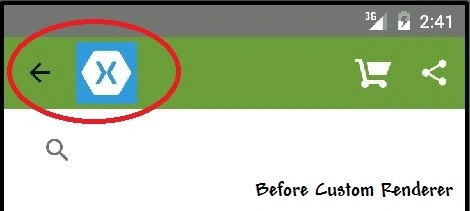
We have seen many Xamarin related forums having a strong discussion about removing the action bar icon from an Android project in Xamarin.Forms. Many of them suggest making the application icon as transparent by altering the MainActivity.cs in Android project somewhat like the following:
[Activity (Label = "Sample Application", Icon = "@android:color/transparent", MainLauncher = true]
In this condition no one notices that by altering like this they are making the application icon to be transparent. As a result the application will not show an icon when it is installed on a device.
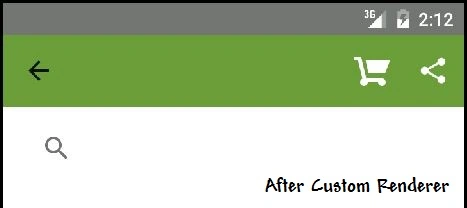
Today we are showing a way to render your page so that you will be able to remove the unwanted action bar icon depending on your needs.
Here I'm going to render the NavigationPage class that manages the navigation and user experience of a stack of other pages.
Create a class named CustomNavigationRenderer inside the Android project that will be a platform-specific implementation that contains code to hide the icon from the action bar.
- using Android.App;
- using Android.Graphics.Drawables;
- using Xamarin.Forms;
- using Xamarin.Forms.Platform.Android;
- using SampleApp;
- using SampleApp.Droid;
- [assembly: ExportRenderer(typeof(NavigationPage), typeof(CustomNavigationRenderer))]
- namespace SampleApp.Droid {
- public class CustomNavigationRenderer: NavigationRenderer {
- protected override void OnElementChanged(ElementChangedEventArgs < NavigationPage > e) {
- base.OnElementChanged(e);
- RemoveAppIconFromActionBar();
- }
- void RemoveAppIconFromActionBar() {
- var actionBar = ((Activity) Context).ActionBar;
- actionBar.SetIcon(new ColorDrawable(Color.Transparent.ToAndroid()));
- }
- }
- }
Now create a subclass of the NavigationPage control that is to be customized.


SubashPosted Aug 22, 2016, 8:41 PM EDT
Nice One
Vaikesh K PPosted Aug 13, 2015, 10:10 PM EDT
Thanks sravanthi varikoti :)
sravanthi varikotiPosted Aug 13, 2015, 10:06 PM EDT
good share
Vaikesh K PPosted Aug 13, 2015, 1:15 AM EDT
Thanks Sibeesh Venu
Sibeesh VenuTOP 100Posted Aug 13, 2015, 12:29 AM EDT
Nice Share :)
Vaikesh K PPosted Aug 12, 2015, 11:21 PM EDT
Thanks Nilesh Jadav :)
Nilesh JadavPosted Aug 12, 2015, 10:55 PM EDT
Thanks for sharing, nice article
Vaikesh K PPosted Aug 12, 2015, 8:50 PM EDT
Thanks Santhakumar Munuswamy :)
Vaikesh K PPosted Aug 12, 2015, 8:50 PM EDT
Thanks Rakesh Chavda :)
Vaikesh K PPosted Aug 12, 2015, 8:50 PM EDT
Thanks Rajeesh Menoth :)
Santhakumar MunuswamyPosted Aug 12, 2015, 10:52 AM EDT
Good Article. Thanks for sharing
RakeshPosted Aug 12, 2015, 9:16 AM EDT
Good work
Rajeesh MenothPosted Aug 12, 2015, 9:00 AM EDT
Good One