
Before proceeding to this tutorial please go to,
In previous tutorial swe learned how to assign role to users, here we will learn how to remove Role from assigned user. For this purpose we need to add a action method in account controller class. In previous tutorials we created a model class name is “AllroleWithAllUser” . we will use the same class here to pass this class in controller.
Following code is for “RemoveRoleForUser” in controller class.
- [HttpGet]
- public ActionResult RemoveRoleAddedToUser()
- {
- AssignRole objvm = new AssignRole();
- objvm.UserRolesList = GetAll_UserRoles();
- objvm.Userlist = GetAll_Users();
- return View(objvm);
- }
- [HttpPost]
- [ValidateAntiForgeryToken]
- public ActionResult RemoveRoleAddedToUser(AssignRole _assignRole)
- {
- if (_assignRole.UserRoleName == "0")
- {
- ModelState.AddModelError("RoleName", "select proper RoleName");
- }
- if (_assignRole.UserID == "0")
- {
- ModelState.AddModelError("UserName", "select proper Username");
- }
- if (ModelState.IsValid)
- {
- int currentUserId = CheckUserWithUserRole(Convert.ToInt32(_assignRole.UserID));
- if (currentUserId == Convert.ToInt16(_assignRole.UserRoleName)) {
- var UserName = GetUserName_BY_UserID(Convert.ToInt32(_assignRole.UserID));
- var UserRoleName = GetRoleNameByRoleID(Convert.ToInt32(_assignRole.UserRoleName));
- Roles.RemoveUserFromRole(UserName, UserRoleName);
- ViewBag.ResultMessage = "User Role is removed successfully !";
- } else {
- ViewBag.ResultMessage = "This current user doesn't belong to selected user role.";
- }
- _assignRole.UserRolesList = GetAll_UserRoles();
- _assignRole.Userlist = GetAll_Users();
- } else {
- _assignRole.UserRolesList = GetAll_UserRoles();
- _assignRole.Userlist = GetAll_Users();
- }
- return View(_assignRole);
- }
- public int CheckUserWithUserRole(int UserId)
- {
- using(UsersRoleContext context = new UsersRoleContext())
- {
- int RoleId = context.webpages_UsersInRole.Where(c => c.UserId == UserId).Select(c => c.RoleId).SingleOrDefault();
- return RoleId;
- }
- }
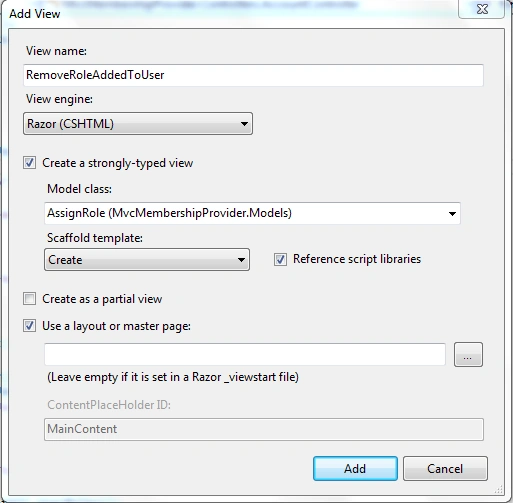
After clicking add write the following code to this view,
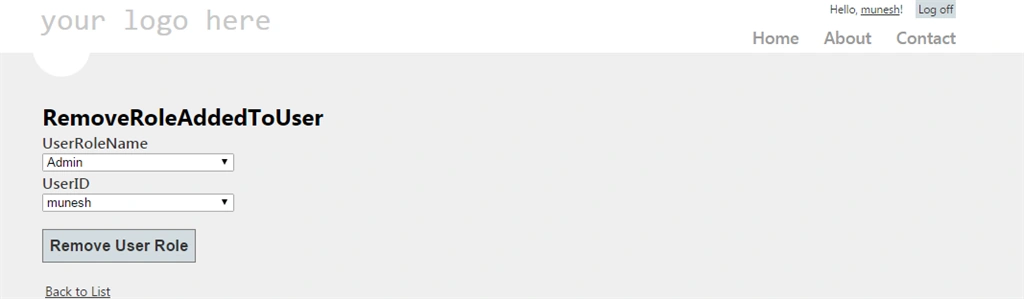
Now run your application and go to the following URL,
http://localhost:50526/Account/RemoveRoleAddedToUser
Now select user and role type from dropdown list and then check this work.
- @model MvcMembershipProvider.Models.AssignRole
- @ {
- ViewBag.Title = "RemoveRoleAddedToUser";
- } <
- h2 > RemoveRoleAddedToUser < /h2> <
- link href = "~/bootstrap/css/bootstrap.min.css"
- rel = "stylesheet" / >
- <
- script src = "~/bootstrap/js/bootstrap.min.js" > < /script>
- @using(Html.BeginForm())
- {
- @Html.AntiForgeryToken()
- @Html.ValidationSummary(true) <
- fieldset >
- <
- legend > AssignRole < /legend> <
- div class = "editor-label" >
- @Html.LabelFor(model => model.UserRoleName) <
- /div> <
- div class = "editor-field" >
- @ * @Html.EditorFor(model => model.UserRoleName) * @
- @Html.DropDownListFor(m => m.UserRoleName, newSelectList(Model.UserRolesList, "Value", "Text"),
- new {
- style = "width:200px", @class = "form-control"
- })
- @Html.ValidationMessageFor(model => model.UserRoleName) <
- /div> <
- div class = "editor-label" >
- @Html.LabelFor(model => model.UserID) <
- /div> <
- div class = "editor-field" >
- @ * @Html.EditorFor(model => model.UserID) * @
- @Html.DropDownListFor(m => m.UserID, new SelectList(Model.Userlist, "Value", "Text"),
- new {
- style = "width:200px", @class = "form-control"
- })
- @Html.ValidationMessageFor(model => model.UserID) <
- /div> <
- p >
- <
- input type = "submit"
- value = "Remove User Role" / >
- <
- /p> <
- /fieldset>
- } <
- div >
- @Html.ActionLink("Back to List", "Index") <
- /div>
- @section Scripts {
- @Scripts.Render("~/bundles/jqueryval")
- }
http://localhost:50526/Account/RemoveRoleAddedToUser
Now select user and role type from dropdown list and then check this work.
Authorize attribute in controller
We can authorize or we can give permission to the controller using attribute. There is a attribute [Authorize] to authorize. Following is the code for giving the permission code to the controller. If you want to give permission to the “admin” to full controller , if user has the permission for admin then it will redirect to this page otherwise it will redirect to login page.
- using System;
- using System.Collections.Generic;
- using System.Linq;
- using System.Web;
- using System.Web.Mvc;
- namespace MvcMembershipProvider.Controllers
- {
- [Authorize(Roles = "Admin")]
- public class Authonticate1Controller: Controller
- {
- public ActionResult Index()
- {
- return View();
- }
- }
- }
- using System;
- using System.Collections.Generic;
- using System.Linq;
- using System.Web;
- using System.Web.Mvc;
- namespace MvcMembershipProvider.Controllers
- {
- public class Authonticate1Controller: Controller
- {
- [Authorize(Roles = "Admin")]
- public ActionResult Index()
- {
- return View();
- }
- }
- }
- using System;
- using System.Collections.Generic;
- using System.Linq;
- using System.Web;
- using System.Web.Mvc;
- namespace MvcMembershipProvider.Controllers
- {
- public class Authonticate1Controller: Controller
- {
- [Authorize(Roles = "Admin", Users = "munesh")]
- public ActionResult Index()
- {
- return View();
- }
- }
- }


Sonu ChaudharyPosted May 26, 2016, 6:19 AM EDT
good one
Vignesh ManiTOP 100Posted May 26, 2016, 4:35 AM EDT
Nice one
Ketak BhalsingPosted May 25, 2016, 10:10 PM EDT
Nice Info...
Debasis SahaTOP 100Posted May 25, 2016, 9:19 PM EDT
Good One..
Kuppurasu NagarajTOP 100Posted May 25, 2016, 9:07 AM EDT
Nice Sharing..