Introduction : The Replicator Activity enables you to create an arbitrary number of instances of a single activity during run time. Each ReplicatorActivity can contain only one child activity, but the child can be a composite activity. The Replicator Activity finishes when all child activities have finished. The Replicator Activity can be use in two way.
- Sequence Type.
- Parallel Type.
When we use the Unit Condition property to stop execution of the Replicator Activity before the completion of the child activity instance. The Replicator Activity is similar to a ForEach statement in code.
Step 1 : Open Visual Studio 2010.
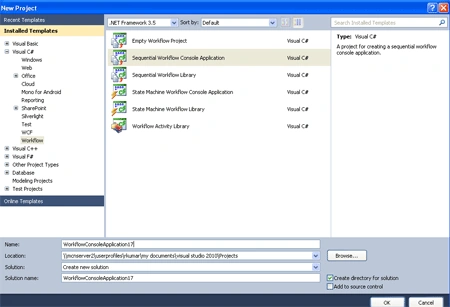
- Go to File-> New-> Project.
- Select Sequential Workflow Console Application.
Step 2 : Drag activity form Toolbox.
- Drag Replicator, Sequence, Delay, Code activity.
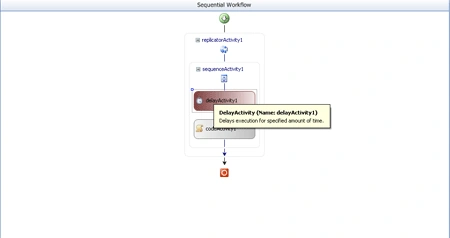
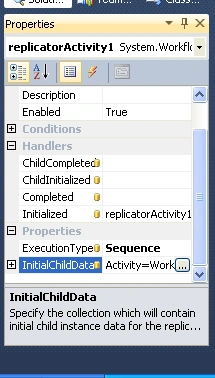
Step 3 : Now we select Replicator Activity and right -click.
- Go to the properties option and define InitialChildData, Execution Type.
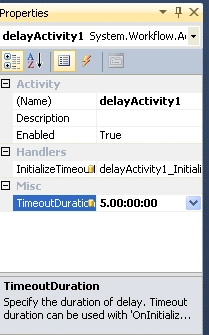
Step 4 : Again select the Delay activity and right-click.
- Define TimeOutDuration.
Step 5 : Go to the Solution Explorer and select program.cs.
- Write the below code.
Code :
using System;
using
System.Collections.Generic;
using
System.Linq;
using
System.Text;
using
System.Threading;
using
System.Workflow.Runtime;
using
System.Workflow.Runtime.Hosting;
namespace
WorkflowConsoleApplication17
{
class Program
{
static void
Main(string[] args)
{
using (WorkflowRuntime
workflowRuntime = new
WorkflowRuntime())
{
AutoResetEvent waitHandle =
new AutoResetEvent(false);
workflowRuntime.WorkflowCompleted +=
delegate(object sender,
WorkflowCompletedEventArgs e) {
waitHandle.Set(); };
workflowRuntime.WorkflowTerminated +=
delegate(object sender,
WorkflowTerminatedEventArgs e)
{
Console.WriteLine(e.Exception.Message);
Console.ReadLine();
waitHandle.Set();
};
WorkflowInstance instance =
workflowRuntime.CreateWorkflow(typeof(WorkflowConsoleApplication17.Workflow1));
instance.Start();
waitHandle.WaitOne();
}
}
}
}
Step 6 : Go to Workflow1.Designer.cs option and right a code for the DependencyProperty that is created using the DependencyProperty.RegisterAttached() function.
Code :
public static DependencyProperty LoopValueProperty = DependencyProperty.RegisterAttached("LoopValue", typeof(int), typeof(Workflow1));
Step 7 : Go to Workflow1.cs[Design] and select code activity.
- Double-click in code activity define the ReplicatorActivity works in sequential mode.
Code :
private
void codeActivity1_ExecuteCode(object
sender, EventArgs e)
{
int value = (int)replicatorActivity1.CurrentChildData[replicatorActivity1.CurrentIndex];
Console.WriteLine("Loop
value = {1}", value);
}
private void
codeActivity1_ExecuteCode_1(object sender,
EventArgs e)
{
Activity activity = (Activity)sender;
int value = (int)activity.Parent.GetValue(LoopValueProperty);
Console.WriteLine("The
current value = {0}", value);
}
Step 8 : GO to Workflow1.Designer.cs option and define the complete code for the Parallel and Sequence mode.
Code :
using System;
using
System.ComponentModel;
using
System.ComponentModel.Design;
using
System.Collections.Generic;
using
System.Collections;
using
System.Linq;
using
System.Workflow.ComponentModel.Compiler;
using
System.Workflow.ComponentModel.Serialization;
using
System.Workflow.ComponentModel;
using
System.Workflow.ComponentModel.Design;
using
System.Workflow.Runtime;
using
System.Workflow.Activities;
using
System.Workflow.Activities.Rules;
using
System.Data;
using
System.Diagnostics;
namespace
WorkflowConsoleApplication17
{
public sealed
partial class
Workflow1 :
SequentialWorkflowActivity
{
public Workflow1()
{
InitializeComponent();
}
public static
DependencyProperty LoopValueProperty =
DependencyProperty.RegisterAttached("LoopValue",
typeof(int),
typeof(Workflow1));
private void
replicatorActivity1_Initialized_1(object sender,
EventArgs e)
{
ReplicatorActivity replicator = (ReplicatorActivity)sender;
replicator.InitialChildData = new
List<int>(Enumerable.Range(1,
5));
}
private void
delayActivity1_InitializeTimeoutDuration(object
sender, EventArgs e)
{
DelayActivity delay = (DelayActivity)sender;
Random random =
new Random();
delay.TimeoutDuration = TimeSpan.FromSeconds(random.Next(5));
}
private void
replicatorActivity1_ChildInitialized(object
sender, ReplicatorChildEventArgs e)
{
e.Activity.SetValue(LoopValueProperty, e.InstanceData);
}
private void
codeActivity1_ExecuteCode(object sender,
EventArgs e)
{
int value = (int)replicatorActivity1.CurrentChildData[replicatorActivity1.CurrentIndex];
Console.WriteLine("Loop
value = {1}", value);
}
private void
codeActivity1_ExecuteCode_1(object sender,
EventArgs e)
{
Activity activity = (Activity)sender;
int value = (int)activity.Parent.GetValue(LoopValueProperty);
Console.WriteLine("The
current value = {0}", value);
}
public IList
replicatorActivity1_InitialChildData1 = default(System.Collections.IList);
}
}
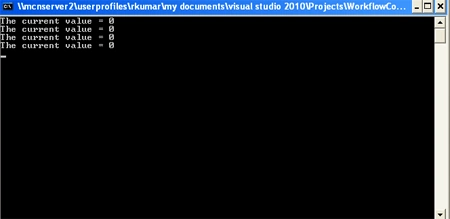
Step 9 : Press F5 and run the
application.

Join the conversation! Your thoughts help the community grow.