
This article explains the Repository Pattern in MVC applications using the Entity Framework.
First we need to understand what the Repository Pattern is. See the following Image.
MVC Application without Repository Pattern
MVC Application with Repository pattern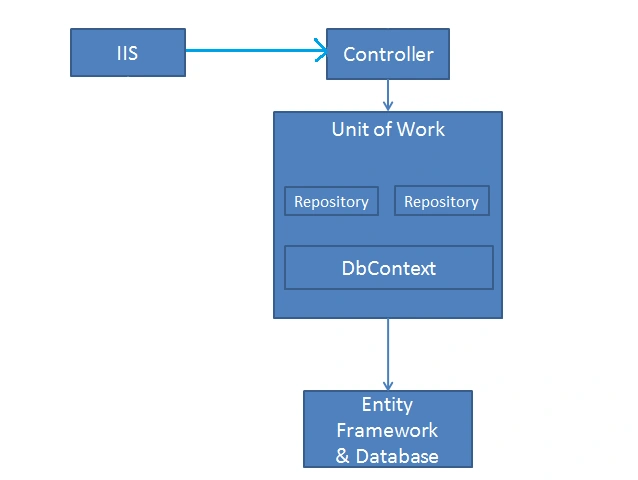
The Repository Pattern separates the data access logic and maps it to the entities in the business logic.
Now we will see the Repository Pattern with a sample application.
Open Visual Studio 2012 and go to "File" -> "New" -> "Project...".
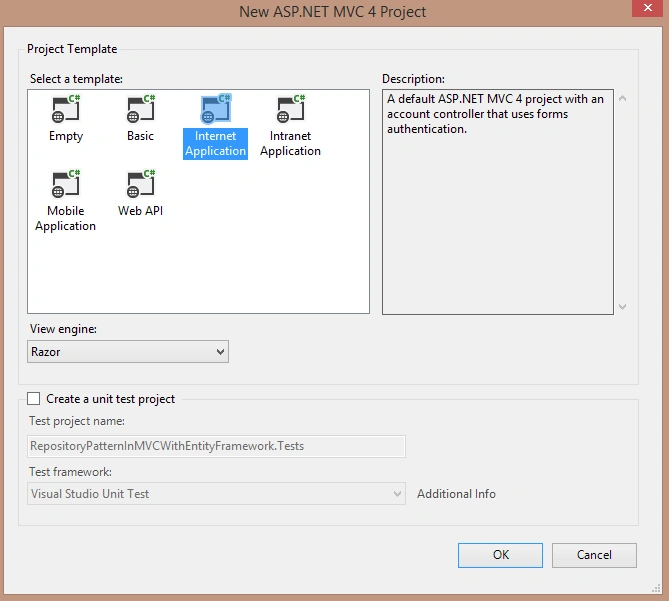
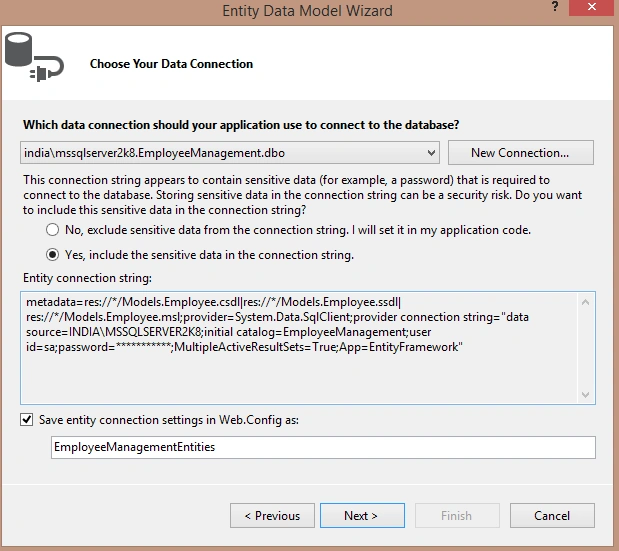
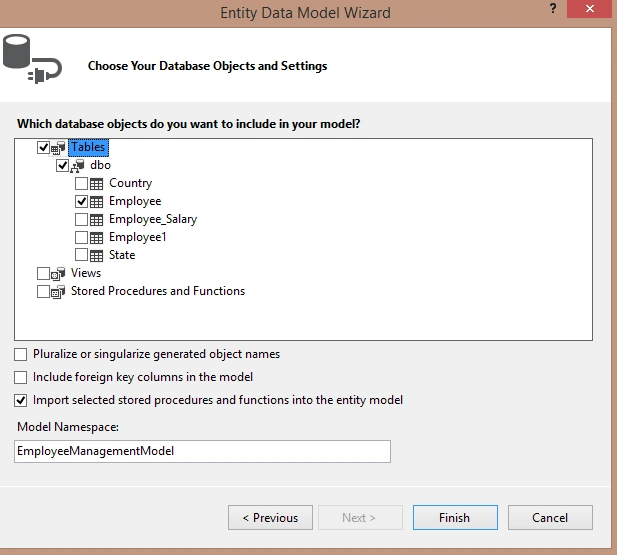
Now Add a ADO.NET Entity Data Model to your application. Right-click on the project in the Solution Explorer then select Add -> ADO.NET Entity Data Model.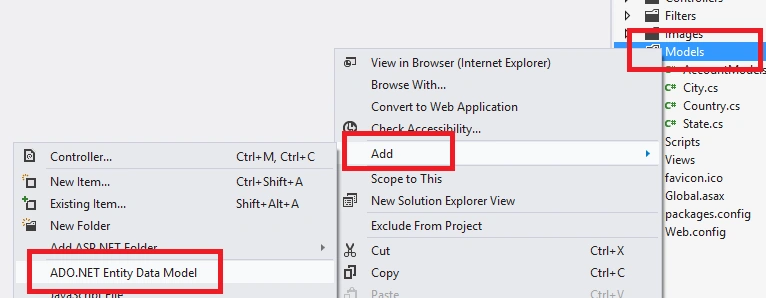


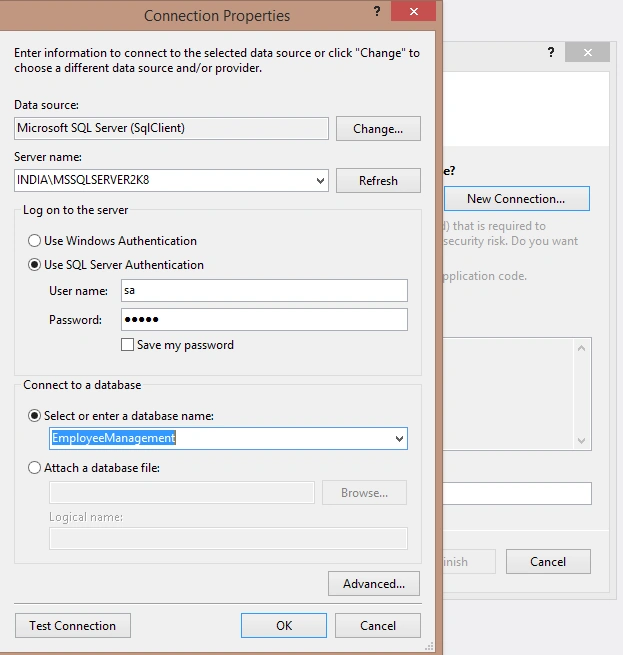
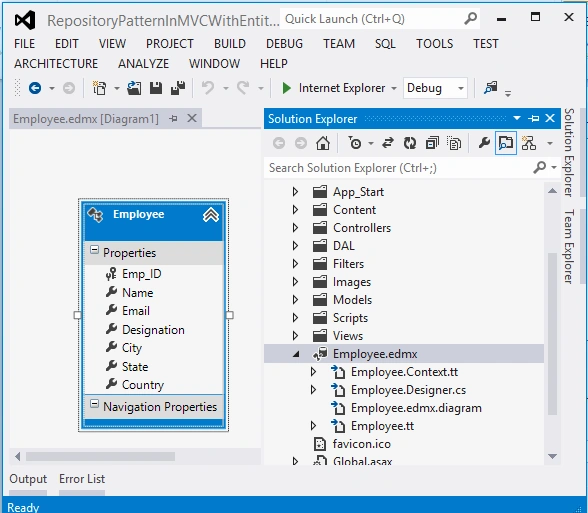
Now add a new folder to your application named DAL.
Right-click on the DAL Folder then select Add Interface -> IEmployeeRepository.cs.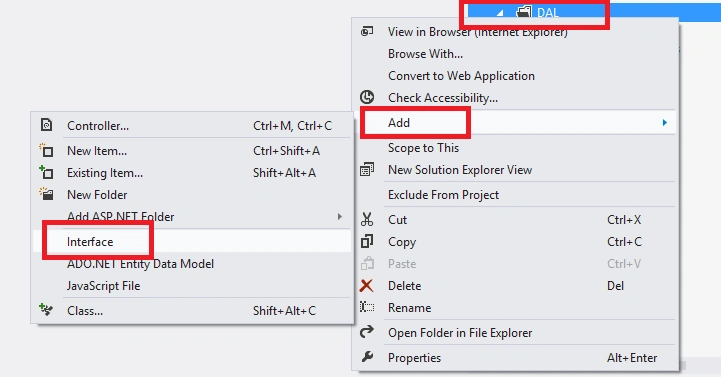
Now my IEmployeeRepository.cs is as in the following:
- using System;
- using System.Collections.Generic;
- using System.Linq;
- using System.Web;
- using RepositoryPatternInMVCWithEntityFramework.Models;
- using System.Data;
- namespace RepositoryPatternInMVCWithEntityFramework.DAL
- {
- public class EmployeeRepository : IEmployeeRepository, IDisposable
- {
- private EmployeeManagementEntities context;
- public EmployeeRepository(EmployeeManagementEntities context)
- {
- this.context = context;
- }
- public IEnumerable<Employee> GetAllEmployee()
- {
- return context.Employee.ToList();
- }
- public Employee GetEmployeeByID(int id)
- {
- return context.Employee.Find(id);
- }
- public void InsertEmployee(Employee emp)
- {
- context.Employee.Add(emp);
- }
- public void DeleteEmployee(int emp_ID)
- {
- Employee emp = context.Employee.Find(emp_ID);
- context.Employee.Remove(emp);
- }
- public void UpdateEmployee(Employee emp)
- {
- context.Entry(emp).State = EntityState.Modified;
- }
- public void Save()
- {
- context.SaveChanges();
- }
- private bool disposed = false;
- protected virtual void Dispose(bool disposing)
- {
- if (!this.disposed)
- {
- if (disposing)
- {
- context.Dispose();
- }
- }
- this.disposed = true;
- }
- public void Dispose()
- {
- Dispose(true);
- GC.SuppressFinalize(this);
- }
- }
- }
Now right-click on the Controller folder in your project in the Solution Explorer then select Add New Empty Controller -> EmployeeController and provide the following code.
EmployeeController
- using RepositoryPatternInMVCWithEntityFramework.DAL;
- using System;
- using System.Collections.Generic;
- using System.Linq;
- using System.Web;
- using System.Web.Mvc;
- using RepositoryPatternInMVCWithEntityFramework.Models;
- using PagedList;
- using System.Data;
- namespace RepositoryPatternInMVCWithEntityFramework.Controllers
- {
- public class EmployeeController : Controller
- {
- private IEmployeeRepository employeeRepository;
- public EmployeeController()
- {
- this.employeeRepository = new EmployeeRepository(new EmployeeManagementEntities());
- }
- public EmployeeController(IEmployeeRepository employeeRepository)
- {
- this.employeeRepository = employeeRepository;
- }
- public ViewResult Index(string sortOrder, string currentFilter, string searchString, int? page)
- {
- ViewBag.CurrentSort = sortOrder;
- ViewBag.NameSortParm = String.IsNullOrEmpty(sortOrder) ? "Emp_ID" : "";
- if (searchString != null)
- {
- page = 1;
- }
- else
- {
- searchString = currentFilter;
- }
- ViewBag.CurrentFilter = searchString;
- var employees = from s in employeeRepository.GetAllEmployee()
- select s;
- if (!String.IsNullOrEmpty(searchString))
- {
- employees = employees.Where(s => s.Name.ToUpper().Contains(searchString.ToUpper())
- || s.Name.ToUpper().Contains(searchString.ToUpper()));
- }
- switch (sortOrder)
- {
- case "Emp ID":
- employees = employees.OrderByDescending(s => s.Emp_ID);
- break;
- case "Name":
- employees = employees.OrderBy(s => s.Name);
- break;
- case "State":
- employees = employees.OrderByDescending(s => s.State);
- break;
- case "Country":
- employees = employees.OrderByDescending(s => s.Country);
- break;
- default:
- employees = employees.OrderBy(s => s.Emp_ID);
- break;
- }
- int pageSize = 5;
- int pageNumber = (page ?? 1);
- return View(employees.ToPagedList(pageNumber, pageSize));
- }
- // GET: /Employee/Details/5
- public ViewResult Details(int id)
- {
- Employee emp = employeeRepository.GetEmployeeByID(id);
- return View(emp);
- }
- // GET: /Employee/Create
- public ActionResult Create()
- {
- return View();
- }
- // POST: /Employee/Create
- [HttpPost]
- [ValidateAntiForgeryToken]
- public ActionResult Create(
- [Bind(Include = "Name, Email, Designation,City, State, Country")]
- Employee emp)
- {
- try
- {
- if (ModelState.IsValid)
- {
- employeeRepository.InsertEmployee(emp);
- employeeRepository.Save();
- return RedirectToAction("Index");
- }
- }
- catch (Exception ex)
- {
- ModelState.AddModelError(string.Empty, "Some Error Occured.");
- }
- return View(emp);
- }
- // GET: /Employee/Edit/5
- public ActionResult Edit(int id)
- {
- Employee emp = employeeRepository.GetEmployeeByID(id);
- return View(emp);
- }
- // POST: /Employee/Edit/5
- [HttpPost]
- [ValidateAntiForgeryToken]
- public ActionResult Edit(Employee emp)
- {
- try
- {
- if (ModelState.IsValid)
- {
- employeeRepository.UpdateEmployee(emp);
- employeeRepository.Save();
- return RedirectToAction("Index");
- }
- }
- catch (Exception ex)
- {
- ModelState.AddModelError(string.Empty, "Some error Occured.");
- }
- return View(emp);
- }
- // GET: /employee/Delete/5
- public ActionResult Delete(bool? saveChangesError = false, int id = 0)
- {
- if (saveChangesError.GetValueOrDefault())
- {
- ViewBag.ErrorMessage = "Some Error Occured.";
- }
- Employee emp = employeeRepository.GetEmployeeByID(id);
- return View(emp);
- }
- // POST: /Employee/Delete/5
- [HttpPost]
- [ValidateAntiForgeryToken]
- public ActionResult Delete(int id)
- {
- try
- {
- Employee emp = employeeRepository.GetEmployeeByID(id);
- employeeRepository.DeleteEmployee(id);
- employeeRepository.Save();
- }
- catch (Exception ex)
- {
- return RedirectToAction("Delete", new { id = id, saveChangesError = true });
- }
- return RedirectToAction("Index");
- }
- protected override void Dispose(bool disposing)
- {
- employeeRepository.Dispose();
- base.Dispose(disposing);
- }
- }
- }
- @using PagedList.Mvc;
- @model PagedList.IPagedList<RepositoryPatternInMVCWithEntityFramework.Employee>
- <link href="~/Content/PagedList.css" rel="stylesheet" type="text/css" />
- @{
- ViewBag.Title = "Employee Management System";
- }
- <h2>Employee Management System</h2>
- @using (Html.BeginForm("Index", "Employee", FormMethod.Get))
- {
- <p style="background-color:red; color:white; font-size:16pt; padding:10px;">
- Search Employee By Name: @Html.TextBox("SearchString", ViewBag.CurrentFilter as string)
- <input type="submit" value="Search" />
- @Html.ActionLink("Add New Employee", "Create")
- </p>
- }
- <table style="background-color:white;">
- <tr>
- <th></th>
- <th style="width: 100px;">
- @Html.ActionLink("Emp ID", "Index", new { sortOrder = ViewBag.NameSortParm, currentFilter = ViewBag.CurrentFilter })
- </th>
- <th>
- @Html.ActionLink("Name", "Index", new { sortOrder = ViewBag.NameSortParm, currentFilter = ViewBag.CurrentFilter })
- </th>
- <th>Email
- </th>
- <th>Designation
- </th>
- <th>City
- </th>
- <th>
- @Html.ActionLink("State", "Index", new { sortOrder = ViewBag.NameSortParm, currentFilter = ViewBag.CurrentFilter })
- </th>
- <th>
- @Html.ActionLink("Country", "Index", new { sortOrder = ViewBag.NameSortParm, currentFilter = ViewBag.CurrentFilter })
- </th>
- <th style="width: 150px;"></th>
- </tr>
- @foreach (var item in Model)
- {
- <tr>
- <td></td>
- <td>
- @Html.DisplayFor(modelItem => item.Emp_ID)
- </td>
- <td style="width:130px;">
- @Html.DisplayFor(modelItem => item.Name)
- </td>
- <td>
- @Html.DisplayFor(modelItem => item.Email)
- </td>
- <td style="width:140px;">
- @Html.DisplayFor(modelItem => item.Designation)
- </td>
- <td style="width:120px;">
- @Html.DisplayFor(modelItem => item.City)
- </td>
- <td style="width:120px;">
- @Html.DisplayFor(modelItem => item.State)
- </td>
- <td>
- @Html.DisplayFor(modelItem => item.Country)
- </td>
- <td style="width:270px;">
- @Html.ActionLink("Edit", "Edit", new { id = item.Emp_ID }) |
- @Html.ActionLink("Details", "Details", new { id = item.Emp_ID }) |
- @Html.ActionLink("Delete", "Delete", new { id = item.Emp_ID })
- </td>
- </tr>
- }
- </table>
- <br />
- <div style="background-color:orange; padding-left:15px; padding-top:10px;">
- Showing Records @(Model.PageCount < Model.PageNumber ? 0 : Model.PageNumber) of @Model.PageCount
- @Html.PagedListPager(Model, page => Url.Action("Index", new { page, sortOrder = ViewBag.CurrentSort,currentFilter = ViewBag.CurrentFilter }))
- </div>


Now add a Detail View by right-clicking on the Details Action method. (Make it Strongly Typed View with class Employee and Scaffold template Details.)
Details.cshtml
- @model RepositoryPatternInMVCWithEntityFramework.Employee
- <h2>Employee Details</h2>
- <table>
- <tr>
- <td>@Html.DisplayNameFor(model => model.Emp_ID)</td>
- <td>@Html.DisplayFor(model => model.Emp_ID)</td>
- </tr>
- <tr>
- <td>@Html.DisplayNameFor(model => model.Name)</td>
- <td>@Html.DisplayFor(model => model.Name)</td>
- </tr>
- <tr>
- <td>@Html.DisplayNameFor(model => model.Email)</td>
- <td>@Html.DisplayFor(model => model.Email)</td>
- </tr>
- <tr>
- <td>@Html.DisplayNameFor(model => model.Designation)</td>
- <td>@Html.DisplayFor(model => model.Designation)</td>
- </tr>
- <tr>
- <td>@Html.DisplayNameFor(model => model.City)</td>
- <td>@Html.DisplayFor(model => model.City)</td>
- </tr>
- <tr>
- <td>@Html.DisplayNameFor(model => model.State)</td>
- <td>@Html.DisplayFor(model => model.State)</td>
- </tr>
- <tr>
- <td>@Html.DisplayNameFor(model => model.Country)</td>
- <td>@Html.DisplayFor(model => model.Country)</td>
- </tr>
- <tr style="background-color: orange; padding: 25px;">
- <td></td>
- <td>@Html.ActionLink("Edit", "Edit", new { id = Model.Emp_ID }) |
- @Html.ActionLink("Back to List", "Index")</td>
- </tr>
- </table>
Create.cshtml
- @model RepositoryPatternInMVCWithEntityFramework.Employee
- <script src="~/Scripts/jquery-1.7.1.min.js"></script>
- <script src="~/Scripts/jquery.validate.min.js"></script>
- <script src="~/Scripts/jquery.validate.unobtrusive.min.js"></script>
- @using (Html.BeginForm())
- {
- @Html.AntiForgeryToken()
- @Html.ValidationSummary(true)
- <fieldset>
- <legend>Employee</legend>
- <div class="editor-label">
- @Html.LabelFor(model => model.Name)
- </div>
- <div class="editor-field">
- @Html.EditorFor(model => model.Name)
- @Html.ValidationMessageFor(model => model.Name)
- </div>
- <div class="editor-label">
- @Html.LabelFor(model => model.Email)
- </div>
- <div class="editor-field">
- @Html.EditorFor(model => model.Email)
- @Html.ValidationMessageFor(model => model.Email)
- </div>
- <div class="editor-label">
- @Html.LabelFor(model => model.Designation)
- </div>
- <div class="editor-field">
- @Html.EditorFor(model => model.Designation)
- @Html.ValidationMessageFor(model => model.Designation)
- </div>
- <div class="editor-label">
- @Html.LabelFor(model => model.City)
- </div>
- <div class="editor-field">
- @Html.EditorFor(model => model.City)
- @Html.ValidationMessageFor(model => model.City)
- </div>
- <div class="editor-label">
- @Html.LabelFor(model => model.State)
- </div>
- <div class="editor-field">
- @Html.EditorFor(model => model.State)
- @Html.ValidationMessageFor(model => model.State)
- </div>
- <div class="editor-label">
- @Html.LabelFor(model => model.Country)
- </div>
- <div class="editor-field">
- @Html.EditorFor(model => model.Country)
- @Html.ValidationMessageFor(model => model.Country)
- </div>
- <p>
- <input type="submit" value="Create" />
- </p>
- </fieldset>
- }
- <div>
- @Html.ActionLink("Back to List", "Index")
- </div>
- @model RepositoryPatternInMVCWithEntityFramework.Employee
- <script src="~/Scripts/jquery-1.7.1.min.js"></script>
- <script src="~/Scripts/jquery.validate.min.js"></script>
- <script src="~/Scripts/jquery.validate.unobtrusive.min.js"></script>
- <h2>Edit Employee information</h2>
- @using (Html.BeginForm())
- {
- @Html.AntiForgeryToken()
- @Html.ValidationSummary(true)
- <table>
- <tr>
- <td>@Html.LabelFor(model => model.Emp_ID)</td>
- <td>
- @Html.EditorFor(model => model.Emp_ID, new { disabled = "disabled", @readonly = "readonly" })
- @Html.ValidationMessageFor(model => model.Emp_ID)</td>
- </tr>
- <tr>
- <td>@Html.LabelFor(model => model.Name)
- </td>
- <td>@Html.EditorFor(model => model.Name)
- @Html.ValidationMessageFor(model => model.Name)</td>
- </tr>
- <tr>
- <td>@Html.LabelFor(model => model.Email)</td>
- <td>
- @Html.EditorFor(model => model.Email)
- @Html.ValidationMessageFor(model => model.Email)</td>
- </tr>
- <tr>
- <td>@Html.LabelFor(model => model.Designation)</td>
- <td>
- @Html.EditorFor(model => model.Designation)
- @Html.ValidationMessageFor(model => model.Designation)
- </td>
- </tr>
- <tr>
- <td>@Html.LabelFor(model => model.City)</td>
- <td>
- @Html.EditorFor(model => model.City)
- @Html.ValidationMessageFor(model => model.City)</td>
- </tr>
- <tr>
- <td>@Html.LabelFor(model => model.State)</td>
- <td>@Html.EditorFor(model => model.State)
- @Html.ValidationMessageFor(model => model.State)</td>
- </tr>
- <tr>
- <td>@Html.LabelFor(model => model.Country)</td>
- <td>
- @Html.EditorFor(model => model.Country)
- @Html.ValidationMessageFor(model => model.Country)</td>
- </tr>
- <tr style="background-color: orange; padding: 25px;">
- <td></td>
- <td>
- <input type="submit" value="Save" />
- @Html.ActionLink("Back to List", "Index")
- </td>
- </tr>
- </table>
- }
- @model RepositoryPatternInMVCWithEntityFramework.Employee
- <h3>Are you sure you want to delete this?</h3>
- <table>
- <tr>
- <td>@Html.DisplayNameFor(model => model.Emp_ID)</td>
- <td>@Html.DisplayFor(model => model.Emp_ID)</td>
- </tr>
- <tr>
- <td>@Html.DisplayNameFor(model => model.Name)</td>
- <td>@Html.DisplayFor(model => model.Name)</td>
- </tr>
- <tr>
- <td>@Html.DisplayNameFor(model => model.Email)</td>
- <td>@Html.DisplayFor(model => model.Email)</td>
- </tr>
- <tr>
- <td>@Html.DisplayNameFor(model => model.Designation)</td>
- <td>@Html.DisplayFor(model => model.Designation)</td>
- </tr>
- <tr>
- <td>@Html.DisplayNameFor(model => model.City)</td>
- <td>@Html.DisplayFor(model => model.City)</td>
- </tr>
- <tr>
- <td>@Html.DisplayNameFor(model => model.State)</td>
- <td>@Html.DisplayFor(model => model.State)</td>
- </tr>
- <tr>
- <td>@Html.DisplayNameFor(model => model.Country)</td>
- <td>@Html.DisplayFor(model => model.Country)</td>
- </tr>
- </table>
- @using (Html.BeginForm())
- {
- @Html.AntiForgeryToken()
- <table>
- <tr style="background-color: orange; padding: 25px;">
- <td></td>
- <td>
- <input type="submit" value="Delete" />
- @Html.ActionLink("Back to List", "Index")
- </td>
- </tr>
- </table>
- }
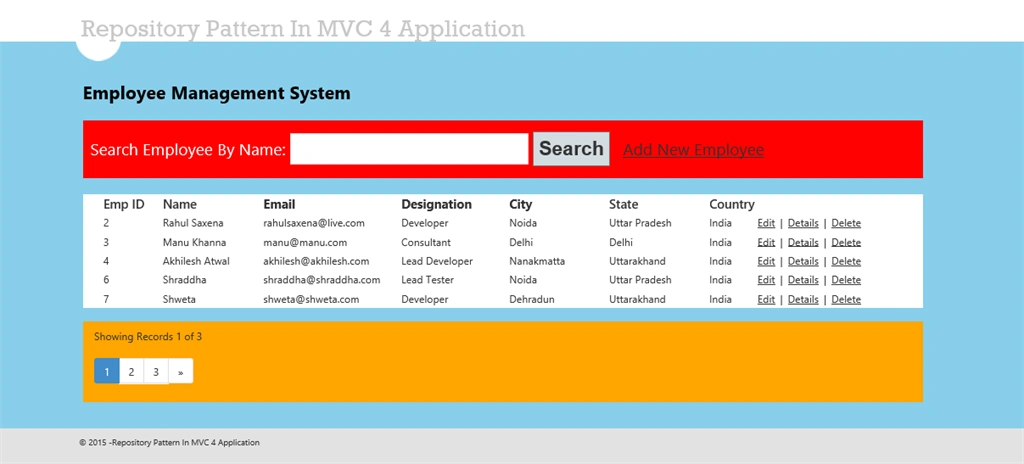
Showing All Records with Paging and Sorting.
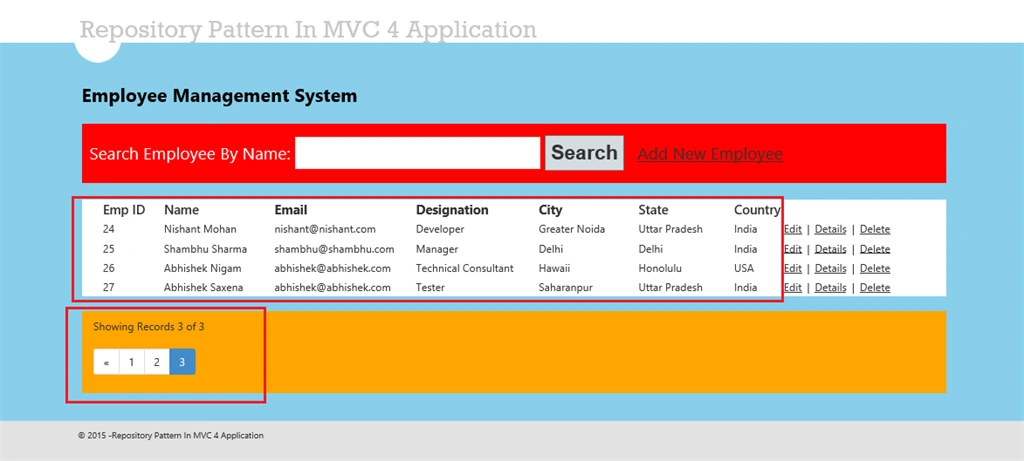
Now go to page 3 .
Now do a search.

Now click on Add New Employer.
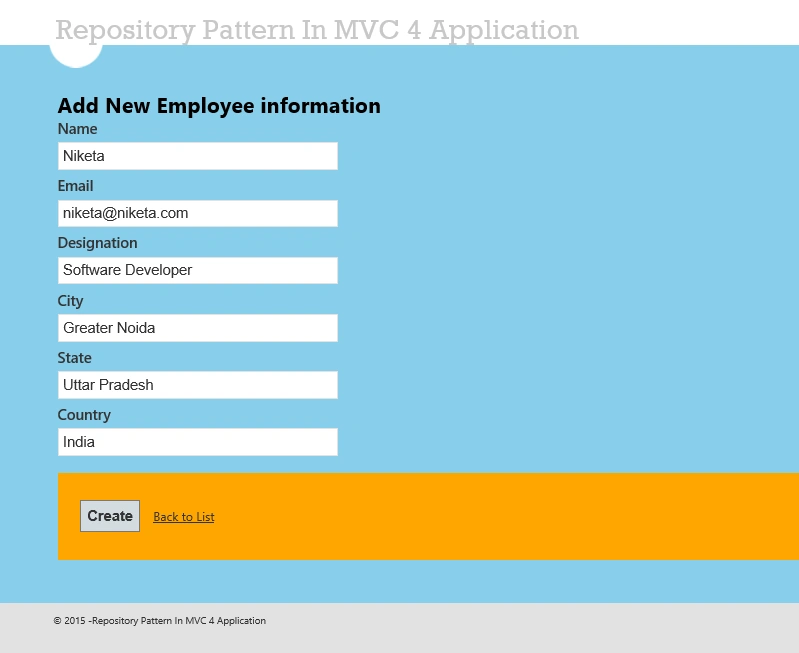
Now click on any of the records Edit button.
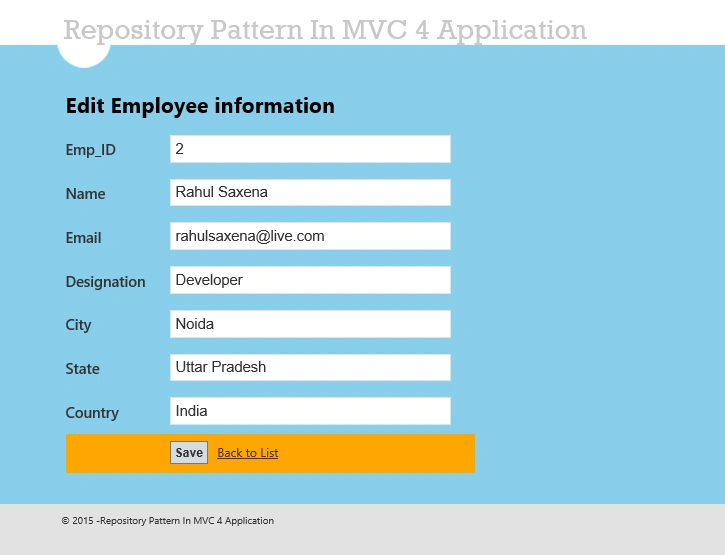
Now click on Details.

Now click on the Delete option.
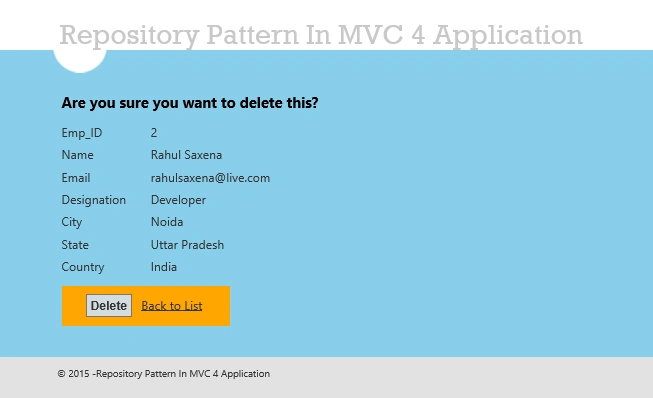
To perform CRUD operations you will see that we are not calling the DB method directly here. We are using the Repository Pattern.
For this application my Employee Table in design mode is:
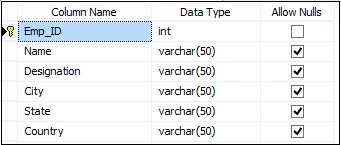
The following is the script of my table:
- CREATE TABLE [dbo].[Employee](
- [Emp_ID] [int] IDENTITY(1,1) NOT NULL,
- [Name] [varchar](50) NULL,
- [Email] [varchar](500) NULL,
- [Designation] [varchar](50) NULL,
- [City] [varchar](50) NULL,
- [State] [varchar](50) NULL,
- [Country] [varchar](50) NULL,
- CONSTRAINT [PK_Employee] PRIMARY KEY CLUSTERED
- (
- [Emp_ID] ASC)WITH (PAD_INDEX = OFF, STATISTICS_NORECOMPUTE = OFF, IGNORE_DUP_KEY = OFF, ALLOW_ROW_LOCKS = ON, ALLOW_PAGE_LOCKS = ON)
- ON [PRIMARY]) ON [PRIMARY]
- GO
- SET ANSI_PADDING OFF
- GO
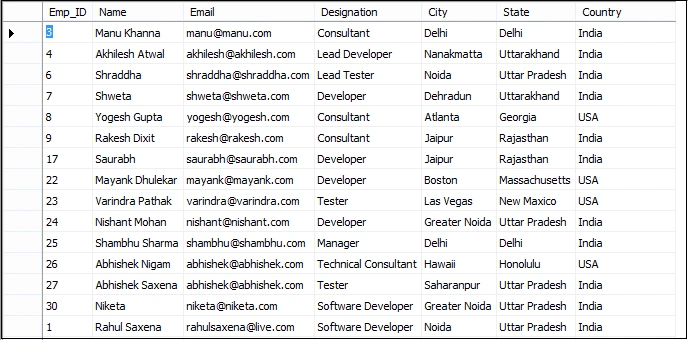
Enjoy programming.
Next I will write about the Generic Repository Pattern.


Rahul Kumar SaxenaTOP 100Posted Apr 9, 2016, 10:52 PM EDT
will write in more detail
Rahul Kumar SaxenaTOP 100Posted Apr 9, 2016, 10:52 PM EDT
thank 2 all
Rahul Kumar SaxenaTOP 100Posted Apr 9, 2016, 10:52 PM EDT
Thanks Cao Fangsheng
Cao FangshengPosted Apr 9, 2016, 5:34 PM EDT
nice
Rahul Kumar SaxenaTOP 100Posted Jun 25, 2015, 12:05 AM EDT
Thanks Umamaheswara Rao Dasari
Umamaheswara Rao DasariPosted Jun 25, 2015, 12:01 AM EDT
Good
Ivan StefanovPosted Jun 11, 2015, 1:00 AM EDT
http://www.thereformedprogrammer.net/is-the-repository-pattern-useful-with-entity-framework-part-2/
PEDRO RENE GONZALEZPosted May 20, 2015, 8:31 AM EDT
IEmployeeRepository.cs never we see, you refer to class.. but it is understood
Rahul Kumar SaxenaTOP 100Posted Mar 18, 2015, 9:09 AM EDT
Thanks Rohan Pandey
Rahul Kumar SaxenaTOP 100Posted Mar 18, 2015, 9:09 AM EDT
Thanks Syed Shanu...
ROHAN PANDEYPosted Mar 18, 2015, 6:21 AM EDT
Nice article
Syed ShanuTOP 100Posted Mar 17, 2015, 11:35 PM EDT
Good one Rahul :)
Rahul Kumar SaxenaTOP 100Posted Mar 17, 2015, 10:43 PM EDT
Thanks Tom Mohan...
Rahul Kumar SaxenaTOP 100Posted Mar 17, 2015, 10:42 PM EDT
Thanks Nitin Tyagi.. Happy to hear that my writing helped someone...
Tom MohanPosted Mar 17, 2015, 10:33 PM EDT
Great effort . nice :)
NitinPosted Mar 17, 2015, 10:27 PM EDT
Rahul Saxena Well i was looking for a good example from a long time on this.. finally got one :)
Rahul Kumar SaxenaTOP 100Posted Mar 17, 2015, 6:31 AM EDT
Thank u Harpreet Singh..
Harpreet SinghPosted Mar 17, 2015, 5:39 AM EDT
Very helpful
Rahul Kumar SaxenaTOP 100Posted Mar 16, 2015, 10:08 PM EDT
Thanks Shraddha G ... :)
Shraddha GPosted Mar 16, 2015, 10:03 PM EDT
Thanks For Sharing Such a wonderful Post. You r doing a fabulous Job.
Rahul Kumar SaxenaTOP 100Posted Mar 16, 2015, 9:47 PM EDT
Thanks Ravi makhija... :)
Ravi MakhijaPosted Mar 16, 2015, 9:46 PM EDT
very useful article.. simple to understand.. thanks rahul :)
Rahul Kumar SaxenaTOP 100Posted Mar 16, 2015, 9:45 PM EDT
Thanks Abhishek Singh ... :)
Rahul Kumar SaxenaTOP 100Posted Mar 16, 2015, 9:45 PM EDT
Thanks Santhakumar munuswamy... :)
Abhishek KumarPosted Mar 16, 2015, 9:20 PM EDT
very nice article Rahul...Thanks for this.
Santhakumar MunuswamyPosted Mar 16, 2015, 9:02 PM EDT
Thanks for nice article
Rahul Kumar SaxenaTOP 100Posted Mar 16, 2015, 8:58 PM EDT
Thanks Manish Kumar Choudhary ... :)
Rahul Kumar SaxenaTOP 100Posted Mar 16, 2015, 8:57 PM EDT
Thanks Tom Mohan.. :)
Manish Kumar ChoudharyPosted Mar 16, 2015, 7:48 PM EDT
Nice one.
Tom MohanPosted Mar 16, 2015, 6:53 PM EDT
Very useful, Thanks for sharing..