
We can use the SharePoint 2013 Representational State Transfer (REST) service to do the same tasks you can do when you use the .NetCSOM, JSOM.
Here I explain how to retrieve the site name and URL followed by the current user in SharePoint 2013 using a client object model (REST API and JavaScript) and displaying it in the SharePoint page.
1. Create a new page and a Content Editor Webpart (CEWP).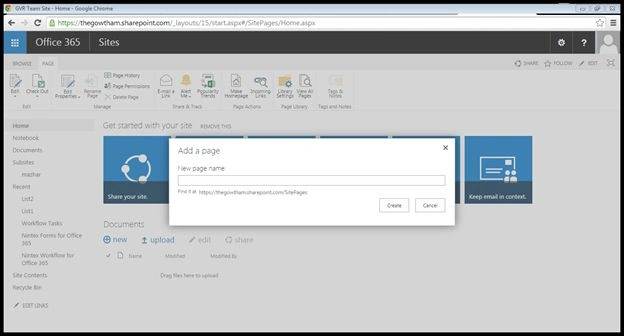
2. Edit the web part that was added to the page.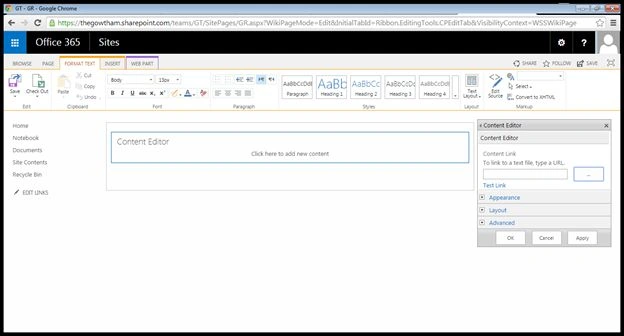
3. Upload your text file script into the site assests and copy the path of the text file and paste it into the Content link in CEWP.
4. Output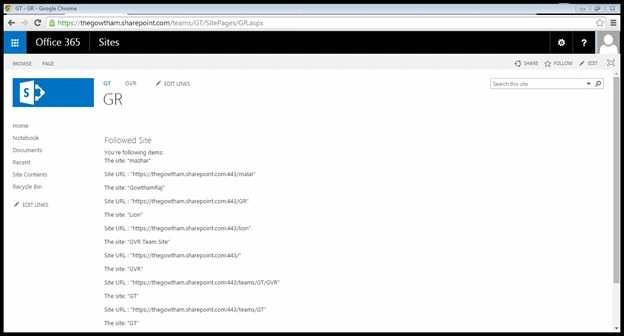
Code
The following example shows how to retrieve all of the following sites:
- <html>
- <head>
- <script type="text/javascript" src="//ajax.googleapis.com/ajax/libs/jquery/1.8.3/jquery.min.js"></script>
- <script type="text/javascript">
- var followingManagerEndpoint;
- var followedCount;
- var followingEndpoint;
- var URL;
- var website;
- var clientContext;
- SP.SOD.executeFunc('sp.js', 'SP.ClientContext', loadWebsite);
- function loadWebsite() {
- clientContext = SP.ClientContext.get_current();
- website = clientContext.get_web();
- clientContext.load(website);
- clientContext.executeQueryAsync(onRequestSucceeded, onRequestFailed);
- }
- function onRequestSucceeded() {
- URL = website.get_url();
- followingManagerEndpoint = decodeURIComponent(URL) + "/_api/social.following";
- getMyFollowedContent();
- }
- function onRequestFailed(sender, args) {
- alert('Error: ' + args.get_message());
- }
- // Get the content that the current user is following.
- // The "types=14" parameter specifies all content types
- // (documents = 2 + sites = 4 + tags = 8).
- function getMyFollowedContent() {
- $.ajax( {
- url: followingManagerEndpoint + "/my/followed(types=14)",
- headers: {
- "accept": "application/json;odata=verbose"
- },
- success: followedContentRetrieved,
- error: requestFailed
- });
- }
- // Parse the JSON data and iterate through the collection.
- function followedContentRetrieved(data) {
- var stringData = JSON.stringify(data);
- var jsonObject = JSON.parse(stringData);
- var types = {
- 1: "document",
- 2: "site",
- 3: "tag"
- };
- var followedActors = jsonObject.d.Followed.results;
- var followedList = "You're following items:";
- for (var i = 0; i < followedActors.length; i++) {
- var actor = followedActors[i];
- followedList += "<p>The " + types[actor.ActorType] + ": \"" +actor.Name + "\"</p>"+"<p>Site URL " + ": \"" +
- actor.Uri+ "\"</p>";;
- }
- $("#Follow").html(followedList);
- }
- function requestFailed(xhr, ajaxOptions, thrownError) {
- alert('Error:\n' + xhr.status + '\n' + thrownError + '\n' + xhr.responseText);
- }
- </script>
- </head>
- <body>
- <div id="Follow"></div>
- </body>
- </html>


CesPosted Jun 16, 2021, 11:59 AM EDT
Does this work in SP modern? I tried but nothing showed.
Yash patelPosted Dec 20, 2018, 2:22 AM EST
I want only followed site collection(not followed subsites) using followed rest api Is there any solution for this?/
B MPosted Jul 26, 2016, 5:22 AM EDT
Is it possible to create a link to each of the returned sites using this method?
Gowtham RajamanickamTOP 100Posted Apr 26, 2016, 5:08 AM EDT
thank u so much
Gowtham RajamanickamTOP 100Posted Apr 26, 2016, 5:08 AM EDT
thank u so much
Gowtham RajamanickamTOP 100Posted Apr 26, 2016, 5:08 AM EDT
thank u so much
Gowtham RajamanickamTOP 100Posted Apr 26, 2016, 5:08 AM EDT
thank u so much
Gowtham RajamanickamTOP 100Posted Apr 26, 2016, 5:08 AM EDT
thank u so much
Gowtham RajamanickamTOP 100Posted Apr 26, 2016, 5:08 AM EDT
thank u so much
Gowtham RajamanickamTOP 100Posted Apr 26, 2016, 5:07 AM EDT
thank u all
Sr KarthigaPosted Apr 26, 2016, 5:01 AM EDT
good one sir
Gowtham RajamanickamTOP 100Posted Apr 6, 2015, 12:08 AM EDT
thank u all
Gowtham RajamanickamTOP 100Posted Apr 6, 2015, 12:08 AM EDT
thank u vijay s
Vijay SPosted Apr 5, 2015, 11:06 PM EDT
Good Article
Gowtham RajamanickamTOP 100Posted Mar 16, 2015, 5:09 AM EDT
thank u...
Gowtham RajamanickamTOP 100Posted Mar 16, 2015, 5:09 AM EDT
thank u...
Gowtham RajamanickamTOP 100Posted Mar 16, 2015, 5:09 AM EDT
Thank u..
BK GPosted Mar 6, 2015, 4:01 PM EST
good one....
Prasham SabadraPosted Mar 3, 2015, 2:11 PM EST
Nice Article. Thanks for sharing!