
Introduction
In this article, we will learn how to create a pipe to Reverse a String in Angular Application.
Prerequisites
- Basic Knowledge of Angular 2 or higher
- Visual Studio Code
- Node and NPM installed
- Bootstrap (Optional)
Create an Angular project by using the following command.
Code
ng new angappNow install Bootstrap by using the following command.
Code
npm install bootstrap --saveNow open the styles.css file and add the Bootstrap file reference. To add a reference in the styles.css file, add this line.
Code
@import '~bootstrap/dist/css/bootstrap.min.css';Create a Reverse String Pipe
Now, create a custom pipe by using the following command.
Code
ng generate pipe ReverseNow open the Reverse.pipe.ts file and add the following code.
JavaScript
import { Pipe, PipeTransform } from '@angular/core';

@Pipe({ name: 'reverseString' })
export class Reverse implements PipeTransform {
  transform(value: string): string {
    if (!value) return value;
    return value.split('').reverse().join('');
  }
}
Now, create a new component by using the following command.
Code
ng g c actionmenuNow open searchlist.actionmenu.html file and add the following code.
JavaScript
<div class="container" style="margin-top:10px;margin-bottom: 24px;">
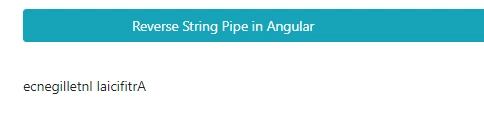
    <p>{{ 'Artificial Intelligence' | reverseString }}</p>
</div>
Now open app.component.html file and add the following code.
JavaScript
<div class="container" style="margin-top:10px;margin-bottom: 24px;">
  <div class="col-sm-12 btn btn-info">
    Reverse String Pipe in Angular
  </div>
</div>
<app-actionmenu></app-actionmenu>
Now run the application using npm start and check the result.

Join the conversation! Your thoughts help the community grow.