What I wanted in Studio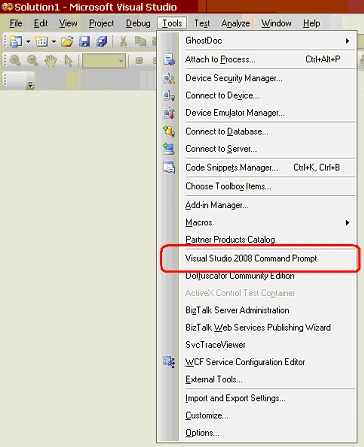
Steps:
- Open Visual Studio
- Go To "Menubar --> Tools --> External Tools"
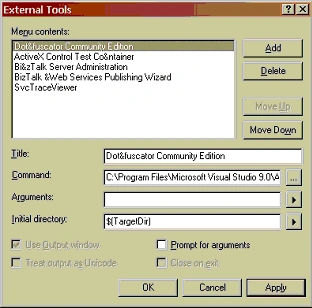
- Click "Add"
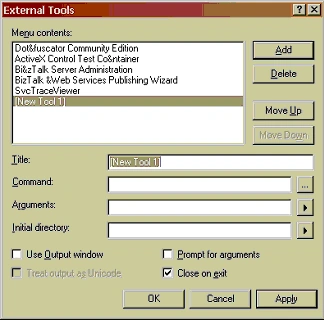
Enter Information:
Title: Visual Studio 2008 Command Prompt
Command: cmd.exe
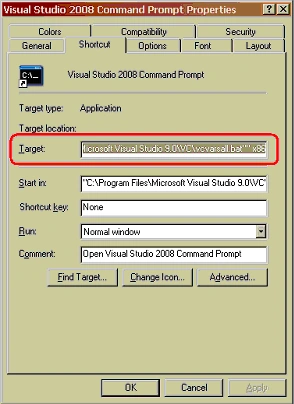
Arguments: %comspec% /k ""C:\Program Files\Microsoft Visual Studio 9.0\VC\vcvarsall.bat"" x86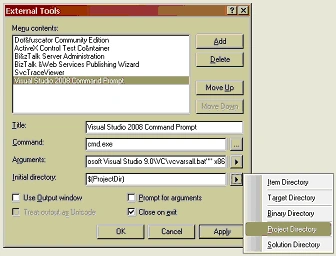
Click "Ok" and you are done.
Note: If you have a different installation directory, the arguments you need will probably be different. You can check the properties of the shortcut to the Visual Studio Command Line just to be sure: 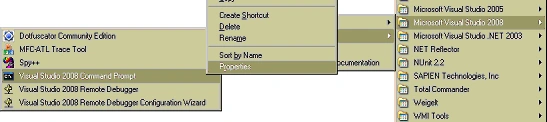
I hope you find this shortcut as useful as I did.


swapna arelliPosted Aug 29, 2018, 4:21 AM EDT
Hi, when i tried putting the arguments for VS 2013, it is directly opening windows cmd.. can u help me to open vs 2013 developer command prompt
karthick manoharanPosted Feb 21, 2012, 6:52 AM EST
hi man tanks a lot ..u did a great job ...keep it up...
Sergey MigalnikovPosted Jan 10, 2012, 11:23 PM EST
Thanks
don oneeditedPosted Apr 4, 2011, 8:57 AM EDTEdited Apr 4, 2011, 9:00 AM EDT
is this 4 c# 2005 express edition? cause im getting .cmd errors?
MarkPosted Mar 24, 2011, 4:55 AM EDT
Just what I was looking for, clearly explained.
Stewart McGeePosted Aug 5, 2010, 11:38 AM EDT
Thanks bud Really helpful
Stelian DumitrascuPosted Apr 21, 2010, 10:43 AM EDT
Thanks Matthew, I am going to build PostgreSQL on Windows using the VS command prompt.
JosePosted Aug 27, 2009, 3:06 AM EDT
Very helpful!
Susheel DakojueditedPosted Jul 16, 2009, 11:59 AM EDTEdited Jul 16, 2009, 11:59 AM EDT
I was trying to implement worflows with InfoPath on SharePoint. I needed 'Visual Studio Command Prompt' to execute commands to build class files. I am glad I found this post! Susheel Dakoju