
Initial chamber
Step 1: Open Visual Studio 2010 and create an empty website. Give it a suitable name: FileUpload_demo.
Step 2: In Solution Explorer you will get your empty website. Add a web form by following these steps:
For Web Form:
Step 3: FileUpload_demo (Your Empty Website) - Right Click, Add New Item, then Web Form. Name it Fileupload_demo.aspx.
Again get back to your website in Solution Explorer and Add New Folder and give a name [New Folder, then Images].
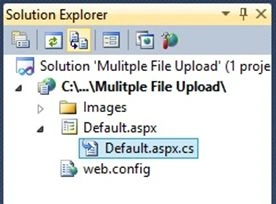
Design chamber
Step 4: Open Fileupload_demo.aspx file to create our design, we will drag an HTML table, three FileUpload controls, three buttons and three labels.
Fileupload_demo.aspx.
- <%@ Page Language="C#" AutoEventWireup="true" CodeFile="Default.aspx.cs" Inherits="_Default" %>
- <!DOCTYPE html PUBLIC "-//W3C//DTD XHTML 1.0 Transitional//EN" "http://www.w3.org/TR/xhtml1/DTD/xhtml1-transitional.dtd">
- <html xmlns="http://www.w3.org/1999/xhtml">
- <head runat="server">
- <title></title>
- <style type="text/css">
- .style1
- {
- width: 281px;
- }
- </style>
- </head>
- <body>
- <form id="form1" runat="server">
- <div>
- <table style="width:100%;">
- <tr>
- <td class="style1">
- </td>
- <td>
- </td>
- <td>
- </td>
- </tr>
- <tr>
- <td class="style1">
- <asp:FileUpload ID="FileUpload1" runat="server" Width="211px" />
- </td>
- <td>
- <asp:FileUpload ID="FileUpload2" runat="server" />
- </td>
- <td>
- <asp:FileUpload ID="FileUpload3" runat="server" />
- </td>
- </tr>
- <tr>
- <td class="style1">
- <asp:Label ID="Label1" runat="server"></asp:Label>
- </td>
- <td>
- <asp:Label ID="Label2" runat="server"></asp:Label>
- </td>
- <td>
- <asp:Label ID="Label3" runat="server"></asp:Label>
- </td>
- </tr>
- <tr>
- <td class="style1">
- <asp:Button ID="Button1" runat="server" onclick="Button1_Click" Text="Upload" />
- </td>
- <td>
- <asp:Button ID="Button2" runat="server" onclick="Button2_Click" Text="Upload" />
- </td>
- <td>
- <asp:Button ID="Button3" runat="server" onclick="Button3_Click" Text="Upload" />
- </td>
- </tr>
- </table>
- </div>
- </form>
- </body>
- </html>

Code chamber
Step 5: Open Fileupload_demo.aspx.cs file to write the following code for our three FileUpload controls.
Fileupload_demo.aspx.cs
- using System;
- using System.Collections.Generic;
- using System.Linq;
- using System.Web;
- using System.Web.UI;
- using System.Web.UI.WebControls;
- using System.Data.SqlClient;
- using System.Data;
- using System.IO;
- public partial class _Default : System.Web.UI.Page
- {
- protected void Page_Load(object sender, EventArgs e)
- {
- }
- protected void Button1_Click(object sender, EventArgs e)
- {
- if (FileUpload1.HasFile)
- {
- FileUpload1.SaveAs(Server.MapPath("images//" + FileUpload1.FileName));
- Label1.Text = "Image Uploaded";
- Label1.ForeColor = System.Drawing.Color.ForestGreen;
- }
- else
- {
- Label1.Text = "Please Select your file";
- Label1.ForeColor = System.Drawing.Color.Red;
- }
- }
- protected void Button2_Click(object sender, EventArgs e)
- {
- if (FileUpload2.HasFile)
- {
- string fileName = Path.Combine(Server.MapPath("~/images"), FileUpload2.FileName);
- FileUpload2.SaveAs(fileName);
- Label2.Text = "Image Uploaded";
- Label2.ForeColor = System.Drawing.Color.ForestGreen;
- }
- else
- {
- Label2.Text = "Please Select your file";
- Label2.ForeColor = System.Drawing.Color.Red;
- }
- }
- protected void Button3_Click(object sender, EventArgs e)
- {
- if (FileUpload3.HasFile)
- {
- string fileName = Path.GetFileName(FileUpload3.PostedFile.FileName);
- FileUpload3.PostedFile.SaveAs(Server.MapPath("~/images/") + fileName);
- Label3.Text = "Image Uploaded";
- Label3.ForeColor = System.Drawing.Color.ForestGreen;
- }
- else
- {
- Label3.Text = "Please Select your file";
- Label3.ForeColor = System.Drawing.Color.Red;
- }
- }
- }
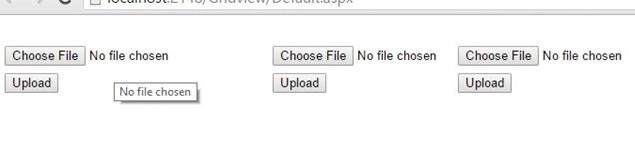
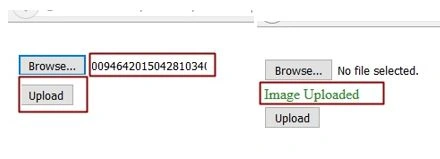
Now check this image in the images folder in the Solution Explorer or in our project.

You can check out all other FileUpload controls that they are working or not.


Dharmendra Kumar PanditPosted Nov 13, 2019, 12:24 AM EST
Nice article .........
Aktham MahmoudPosted Sep 16, 2019, 10:00 PM EDT
Hi' am trying to use this method implemented by Details View control, but no way find solution to resolve a big problems
Arul RPosted Oct 28, 2015, 1:29 AM EDT
Good one !!!
AbedElHamid AlWahidyPosted Oct 20, 2015, 1:12 AM EDT
if i store pdf or doc file how can i retrieve it in data grid to downloaded
Santhakumar MunuswamyPosted Oct 17, 2015, 11:18 PM EDT
Good one
Gowtham KTOP 100Posted Oct 13, 2015, 7:51 AM EDT
Nice Share
Gopi ChandPosted Oct 13, 2015, 7:04 AM EDT
Well done Nilesh
RakeshPosted Oct 13, 2015, 6:30 AM EDT
Good share
Debendra DashPosted Oct 13, 2015, 2:19 AM EDT
good one nilesh....
Sujeet SumanPosted Oct 13, 2015, 1:10 AM EDT
Nice Article.....................
Mukesh KumarPosted Oct 12, 2015, 10:50 PM EDT
Nice Article Sir.. Thanks for sharing