
This one is a simple application where we can select or deselect multiple check list items using simple HTML and JQuery. Many times we used to do this in form submission to select multiple items.
Description: We need to follow the following steps for implementing this application for our website.
Design HTML Page
- <head runat="server">
- <title>Select or Deselect Multiple list</title>
- <script src="//code.jquery.com/jquery-1.11.1.min.js"></script>
- <script src="Script/Script.js"></script>
- <link href="CSS/StyleSheet.css" rel="stylesheet" />
- </head>
- <body>
- <div id="div1">
- <ul class="chk-container">
- <li>
- <input class="ck1" type="checkbox" value="item1" />Item 1</li>
- <li>
- <input class="ck1" type="checkbox" value="item2" />Item 2</li>
- <li>
- <input class="ck1" type="checkbox" value="item3" />Item 3</li>
- <li>
- <input class="ck1" type="checkbox" value="item4" />Item 4</li>
- <li>
- <input class="ck1" type="checkbox" value="item5" />Item 5</li>
- <li>
- <input class="ck1" type="checkbox" value="item6" />Item 6</li>
- </ul>
- </div>
- <div class="center-div">
- <input type="button" value="Add »" id="btn-add" />
- <br />
- <br />
- <input type="button" value="« Remove" id="btn-remove" />
- </div>
- <div id="div2">
- <ul class="chk-container-Add">
- <li>
- <input class="ck1" type="checkbox" value="item7" />
- Item 7</li>
- <li>
- <input class="ck1" type="checkbox" value="item8" />
- Item 8</li>
- </ul>
- </div>
- </body>
StyleSheet.css
- #div1, #div2, .center-div {
- float: left;
- padding: 10px;
- min-height: 150px;
- }
- #div1 ul, #div2 ul {
- list-style-type: none;
- padding: 0px;
- }
- .center-div {
- margin-top: 50px;
- text-align: center;
- }
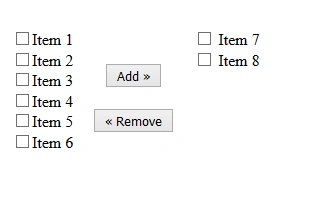
Script.js: Here is the jQuery code for adding and removing items.
- $(document).ready(function () {
- $('#btn-add').click(function () {
- $('#div1 input[type="checkbox"]:checked').each(function () {
- $('.chk-container-Add').append("<li><input class='checkbox2' type='checkbox' value='" + $(this).val() + "'>" + $(this).parent().text() + "</li>"); //append checked to div one
- $(this).parent().remove(); //remove this from div1
- });
- });
- $('#btn-remove').click(function () {
- $('#div2 input[type="checkbox"]:checked').each(function () {
- $('.chk-container').append("<li><input class='checkbox2' type='checkbox' value='" + $(this).val() + "'>" + $(this).parent().text() + "</li>");
- $(this).parent().remove();
- });
- });
- });
You can download the attached project and see the result. Hope that helps you.


VENKATESWARULU SPosted Nov 26, 2018, 10:59 PM EST
This is not working add and remove options
SubashPosted Aug 1, 2016, 2:02 AM EDT
Good
Sabyasachi MishraPosted Dec 18, 2015, 11:10 PM EST
Thanks every one
Muhammad Aqib ShehzadPosted Dec 18, 2015, 9:55 PM EST
nice
Upendra Pratap ShahiPosted Dec 17, 2015, 11:40 PM EST
good...
Humayun Kabir MamunPosted Dec 17, 2015, 11:34 PM EST
Nice...