
In this post we will see how to send data to another domain from our application. You can simply call it cross domain data sharing. In few cases we may need to send some data which is needed for our other domain or application to work as expected. I had some cases in my programming life. I have done this requirement with the help of the postMessage method. The window.postMessage method helps us to enables cross-origin communication. I hope you will like this.
Background
I was forced to maintain some cookies in my second application every time. I wanted to set that the same from my first application as well. So I implemented this with the help of window.postMessage. For the demo purpose, here I am creating two applications.
- CrossDomainDataSharing
- Receiver
Using the code
First, we will concentrate on the CrossDomainDataSharing application in which we are sending our data toReceiver application.
To start with you need to add jQuery reference to your page. And to make this application trendy, I have added Smart Alert to our application, you can see the needed references and styles below.
- <script src="Scripts/jquery-2.2.0.min.js"></script>
- <script src="js/alert.min.js"></script>
- <link href="css/alert.min.css" rel="stylesheet" />
- <link href="themes/dark/theme.css" rel="stylesheet" />
- window.onload = function () {
- document.getElementById('btnSend').addEventListener('click', sendData);
- };
- <button id="btnSend">Send Feedback</button>
- <iframe id="ifrLoad" src="http://localhost:55592/Receiver/Cross-Domain-Data-Sharing-Receiver.html" style="display: none;">
- <p>Oops!. Your browser does not support iframes.</p>
- </iframe>
- function sendData(e) {
- try {
- $.alert.open('prompt', 'Please send your feedback!.', function (button, value) {
- if (button == 'ok') {
- e.preventDefault();;
- var myIfr = window.frames['ifrLoad'].contentWindow;
- myIfr.postMessage(value, 'http://localhost:55592/Receiver/Cross-Domain-Data-Sharing-Receiver.html')
- $.alert.open('Thank you so much for your feedback.' || 'No value has been entered');
- }
- });
- }
- catch (e) {
- console.log('Error: ' + e.message);
- }
- }
You can style the button you have created as follows.
- <style>
- #btnSend {
- margin-left: 11px;
- border: solid 1px #000;
- padding: 9px 22px 7px;
- min-width: 32px;
- font-weight: bold;
- line-height: 13px;
- color: #fff;
- text-shadow: 0 1px 1px rgba(0, 0, 0, 0.5);
- background-color: #232323;
- background-image: linear-gradient(#2b2b2b 1%, #1d1d1d 99%);
- background-image: -webkit-linear-gradient(#2b2b2b 1%, #1d1d1d 99%);
- background-image: -moz-linear-gradient(#2b2b2b 1%, #1d1d1d 99%);
- background-image: -o-linear-gradient(#2b2b2b 1%, #1d1d1d 99%);
- background-image: -ms-linear-gradient(#2b2b2b 1%, #1d1d1d 99%);
- -pie-background: linear-gradient(#2b2b2b 1%, #1d1d1d 99%);
- border-radius: 3px;
- -webkit-border-radius: 3px;
- -moz-border-radius: 3px;
- -ms-border-radius: 3px;
- box-shadow: 0 1px rgba(2, 3, 3, 0.5), 0 1px rgba(255, 255, 255, 0.07) inset, 0 0 01px rgba(255, 255, 255, 0.06) inset;
- -webkit-box-shadow: 0 1px rgba(2, 3, 3, 0.5), 0 1px rgba(255, 255, 255, 0.07) inset, 0 0 0 1px rgba(255, 255, 255, 0.06) inset;
- -moz-box-shadow: 0 1px rgba(2, 3, 3, 0.5), 0 1px rgba(255, 255, 255, 0.07) inset, 0 00 1px rgba(255, 255, 255, 0.06) inset;
- -ms-box-shadow: 0 1px rgba(2, 3, 3, 0.5), 0 1px rgba(255, 255, 255, 0.07) inset, 0 00 1px rgba(255, 255, 255, 0.06) inset;
- -o-box-shadow: 0 1px rgba(2, 3, 3, 0.5), 0 1px rgba(255, 255, 255, 0.07) inset, 0 0 01px rgba(255, 255, 255, 0.06) inset;
- }
- #btnSend:hover {
- background-color: #404040;
- background-image: linear-gradient(#515151 1%, #2e2e2e);
- background-image: -webkit-linear-gradient(#515151 1%, #2e2e2e);
- background-image: -moz-linear-gradient(#515151 1%, #2e2e2e);
- background-image: -o-linear-gradient(#515151 1%, #2e2e2e);
- background-image: -ms-linear-gradient(#515151 1%, #2e2e2e);
- -pie-background: linear-gradient(#515151 1%, #2e2e2e);
- box-shadow: 0 1px rgba(2, 3, 3, 0.5), 0 1px rgba(255, 255, 255, 0.07) inset, 0 0 01px rgba(255, 255, 255, 0.06) inset;
- -webkit-box-shadow: 0 1px rgba(2, 3, 3, 0.5), 0 1px rgba(255, 255, 255, 0.07) inset, 0 0 0 1px rgba(255, 255, 255, 0.06) inset;
- -moz-box-shadow: 0 1px rgba(2, 3, 3, 0.5), 0 1px rgba(255, 255, 255, 0.07) inset, 0 00 1px rgba(255, 255, 255, 0.06) inset;
- -ms-box-shadow: 0 1px rgba(2, 3, 3, 0.5), 0 1px rgba(255, 255, 255, 0.07) inset, 0 00 1px rgba(255, 255, 255, 0.06) inset;
- -o-box-shadow: 0 1px rgba(2, 3, 3, 0.5), 0 1px rgba(255, 255, 255, 0.07) inset, 0 0 01px rgba(255, 255, 255, 0.06) inset;
- }
- </style>
- <!DOCTYPE html>
- <html>
- <head>
- <title>Cross Domain Data Sharing Demo - Sibeesh Passion</title>
- <script src="Scripts/jquery-2.2.0.min.js"></script>
- <script src="js/alert.min.js"></script>
- <link href="css/alert.min.css" rel="stylesheet" />
- <link href="themes/dark/theme.css" rel="stylesheet" />
- <style>
- #btnSend {
- margin-left: 11px;
- border: solid 1px #000;
- padding: 9px 22px 7px;
- min-width: 32px;
- font-weight: bold;
- line-height: 13px;
- color: #fff;
- text-shadow: 0 1px 1px rgba(0, 0, 0, 0.5);
- background-color: #232323;
- background-image: linear-gradient(#2b2b2b 1%, #1d1d1d 99%);
- background-image: -webkit-linear-gradient(#2b2b2b 1%, #1d1d1d 99%);
- background-image: -moz-linear-gradient(#2b2b2b 1%, #1d1d1d 99%);
- background-image: -o-linear-gradient(#2b2b2b 1%, #1d1d1d 99%);
- background-image: -ms-linear-gradient(#2b2b2b 1%, #1d1d1d 99%);
- -pie-background: linear-gradient(#2b2b2b 1%, #1d1d1d 99%);
- border-radius: 3px;
- -webkit-border-radius: 3px;
- -moz-border-radius: 3px;
- -ms-border-radius: 3px;
- box-shadow: 0 1px rgba(2, 3, 3, 0.5), 0 1px rgba(255, 255, 255, 0.07) inset, 0 0 0 1px rgba(255, 255, 255, 0.06) inset;
- -webkit-box-shadow: 0 1px rgba(2, 3, 3, 0.5), 0 1px rgba(255, 255, 255, 0.07) inset, 0 0 0 1px rgba(255, 255, 255, 0.06) inset;
- -moz-box-shadow: 0 1px rgba(2, 3, 3, 0.5), 0 1px rgba(255, 255, 255, 0.07) inset, 0 0 0 1px rgba(255, 255, 255, 0.06) inset;
- -ms-box-shadow: 0 1px rgba(2, 3, 3, 0.5), 0 1px rgba(255, 255, 255, 0.07) inset, 0 0 0 1px rgba(255, 255, 255, 0.06) inset;
- -o-box-shadow: 0 1px rgba(2, 3, 3, 0.5), 0 1px rgba(255, 255, 255, 0.07) inset, 0 0 0 1px rgba(255, 255, 255, 0.06) inset;
- }
- #btnSend:hover {
- background-color: #404040;
- background-image: linear-gradient(#515151 1%, #2e2e2e);
- background-image: -webkit-linear-gradient(#515151 1%, #2e2e2e);
- background-image: -moz-linear-gradient(#515151 1%, #2e2e2e);
- background-image: -o-linear-gradient(#515151 1%, #2e2e2e);
- background-image: -ms-linear-gradient(#515151 1%, #2e2e2e);
- -pie-background: linear-gradient(#515151 1%, #2e2e2e);
- box-shadow: 0 1px rgba(2, 3, 3, 0.5), 0 1px rgba(255, 255, 255, 0.07) inset, 0 0 0 1px rgba(255, 255, 255, 0.06) inset;
- -webkit-box-shadow: 0 1px rgba(2, 3, 3, 0.5), 0 1px rgba(255, 255, 255, 0.07) inset, 0 0 0 1px rgba(255, 255, 255, 0.06) inset;
- -moz-box-shadow: 0 1px rgba(2, 3, 3, 0.5), 0 1px rgba(255, 255, 255, 0.07) inset, 0 0 0 1px rgba(255, 255, 255, 0.06) inset;
- -ms-box-shadow: 0 1px rgba(2, 3, 3, 0.5), 0 1px rgba(255, 255, 255, 0.07) inset, 0 0 0 1px rgba(255, 255, 255, 0.06) inset;
- -o-box-shadow: 0 1px rgba(2, 3, 3, 0.5), 0 1px rgba(255, 255, 255, 0.07) inset, 0 0 0 1px rgba(255, 255, 255, 0.06) inset;
- }
- </style>
- <script>
- window.onload = function () {
- document.getElementById('btnSend').addEventListener('click', sendData);
- };
- function sendData(e) {
- try {
- $.alert.open('prompt', 'Please send your feedback!.', function (button, value) {
- if (button == 'ok') {
- e.preventDefault();;
- var myIfr = window.frames['ifrLoad'].contentWindow;
- myIfr.postMessage(value, 'http://localhost:55592/Receiver/Cross-Domain-Data-Sharing-Receiver.html')
- $.alert.open('Thank you so much for your feedback.' || 'No value has been entered');
- }
- });
- } catch (e) {
- console.log('Error: ' + e.message);
- }
- }
- </script>
- </head>
- <body> <button id="btnSend">Send Feedback</button> <iframe id="ifrLoad" src="http://localhost:55592/Receiver/Cross-Domain-Data-Sharing-Receiver.html" style="display: none;">
- <p>Oops!. Your browser does not support iframes.</p>
- </iframe> </body>
- </html>
We will just add a window load function with event listener which accepts the data from our first application. Please see the following code for further clarification.
- $(window).load(function () {
- window.addEventListener('message', addData);
- function addData(e) {
- document.cookie = "myData=" + e.data;
- };
- });
You can see the complete code for our second application here.
- <!DOCTYPE html>
- <html>
- <head>
- <title>Cross Domain Data Sharing Receiver - Sibeesh Passion</title>
- <script src="Scripts/jquery-2.2.0.min.js"></script>
- <script>
- $(window).load(function () {
- window.addEventListener('message', addData);
- function addData(e) {
- document.cookie = "myData=" + e.data;
- };
- });
- </script>
- </head>
- <body> </body>
- </html>
Output
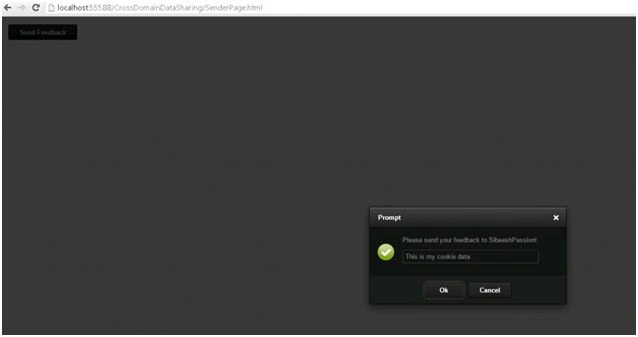
While sending the data to our second application.

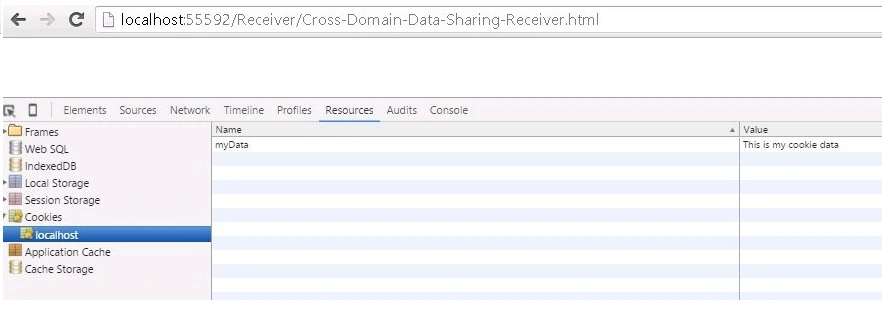
While receiving the data in our second application.
That is all. We did it. Have a happy coding.
Conclusion
Did I miss anything that you may think is needed? Have you ever wanted to do this requirement? Did you find this post useful? I hope you liked this article. Please share with me your valuable suggestions and feedback.
Your turn. What do you thin?
A blog isn’t a blog without comments, but do try to stay on topic. If you have a question unrelated to this post, you’re better off posting it on C# Corner, Code Project, Stack Overflow, Asp.Net Forum instead of commenting here. Tweet or email me a link to your question there and I’ll definitely try to help if I can.
Please see this article in my blog here.
Download Source Code


Sibeesh VenuTOP 100Posted Feb 3, 2016, 7:19 PM EST
Humayun Kabir Mamun Thanks much :)
Sibeesh VenuTOP 100Posted Feb 3, 2016, 7:19 PM EST
Santhakumar Munuswamy Thanks much :)
Sibeesh VenuTOP 100Posted Feb 3, 2016, 7:17 PM EST
Ankit Saxena Thanks much :)
Humayun Kabir MamunPosted Feb 3, 2016, 6:11 PM EST
Nice...
Santhakumar MunuswamyPosted Feb 3, 2016, 10:09 AM EST
Thanks for nice share
Ankit SaxenaPosted Feb 3, 2016, 6:10 AM EST
Very nice explanation.
Sibeesh VenuTOP 100Posted Feb 3, 2016, 1:52 AM EST
Upendra Pratap Shahi Thank you
Upendra Pratap ShahiPosted Feb 3, 2016, 1:11 AM EST
nice share sir...
Sibeesh VenuTOP 100Posted Feb 2, 2016, 8:56 PM EST
Shubham Kumar Thank you
Shubham KumarPosted Feb 2, 2016, 8:28 PM EST
nice info thnx sir
Sibeesh VenuTOP 100Posted Feb 2, 2016, 7:16 PM EST
Pankaj Kumar Choudhary Thank you
Sibeesh VenuTOP 100Posted Feb 2, 2016, 7:15 PM EST
Debasis Saha Thank you
Pankaj Kumar ChoudharyTOP 100Posted Feb 2, 2016, 3:52 PM EST
Nice Information Sir..........
Debasis SahaTOP 100Posted Feb 2, 2016, 4:50 AM EST
Good One..
Sibeesh VenuTOP 100Posted Feb 2, 2016, 3:37 AM EST
Ranjan Dailata Me too :)
Sibeesh VenuTOP 100Posted Feb 2, 2016, 3:36 AM EST
Pramod Thakur Thank you
Ranjan DailataPosted Feb 2, 2016, 2:47 AM EST
nice, I am in love with the dark theme ;)
Pramod ThakurPosted Feb 2, 2016, 2:23 AM EST
Nice Share..