
This article explains how to send emails to multiple recipients from an ASP.Net C# web application. Let us see step-by-step so beginners also can understand how to send emails from any provider. Their are many techniques to send emails from ASP.Net but in this article we will use a SMTP server with the Gmail provider to send the emails.
Prerequisites
- Active internet connection.
- Email id of any provider such as Gmail, Yahoo or your organization to send emails.
Let us create the application to send the emails from ASP.Net as:
- "Start" - "All Programs" - "Microsoft Visual Studio 2010".
- "File" - "New Project" - "C#" - "Empty web site" (to avoid adding a master page).
- Provide the project a name, such as "SendingEmailsToMultipleRecipients" or another as you wish and specify the location.
- Then right-click on Solution Explorer and select "Add New Item" - "Default.aspx" page and one class file.
- Drag and drop three Text Boxes and two buttons.
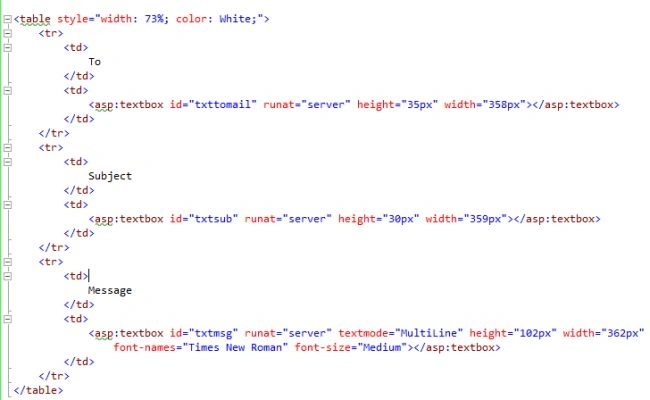
To send Emails in ASP.Net, the following namespaces must be added:
using System.Net.Mail;
using System.Net;
To learn about the two namespaces above refer to the MSDN.
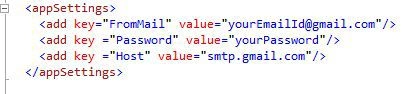
Now, move to the web.config file and add the email credentials in the app setting section so in the future, if your email credentials are changed then their is no need to change them in your code file since you can simply the change values in your app settings of the web.config file. After adding the credentials, the app setting section of the web.config file looks as in the following:
Note
In the preceding app the Settings section adds your valid email and word so emails can be sent from your email id to others.
Now add the separate class file by right-clicking on the Solution Explorer, however this is not necessary since you can also write this code in the default.aspx.cs file but for flexibility we are adding it in a separate code file.
After writing the email sending logic code, the class file will look as in the following:
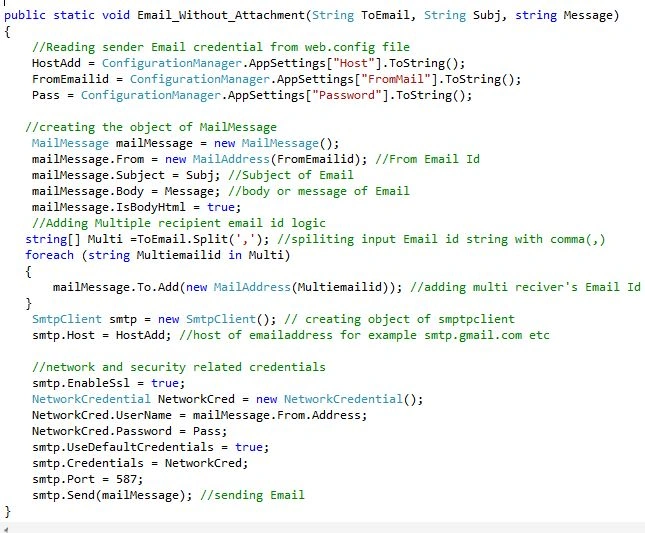
In the preceding class file, we have created one simple static function to send the emails that takes three parameters that are:
string ToEmail: recipient email id
string Subj: subject of the email
string Message: Email body or message
Logic to add multiple recipient's Email Ids
In the preceding class file I used a foreach loop to add the multiple recipient's Email Ids but before that we are using the comma (,) separated input email ids from user in one string "Tomail" then we are splitting the input sting with (,) commas and added to one string array named "Multi" then using a foreach loop we are adding each email id to the mailaddress.
I hope you have understood that.
Now call the preceding static function on the button click of the "default.aspx.cs" page as in the following:

I hope you have done all the preceding steps,
Note
If you are adding multiple recipient Email Ids then add the multiple Email Ids separated by commas (,) because in the email function we are splitting the Email Ids with commas (,), If you want some other logic to add or split Email Ids then make the relevant changes in the Email function.
Now run the application and add the email details in all the text boxes and click on the send button as in:
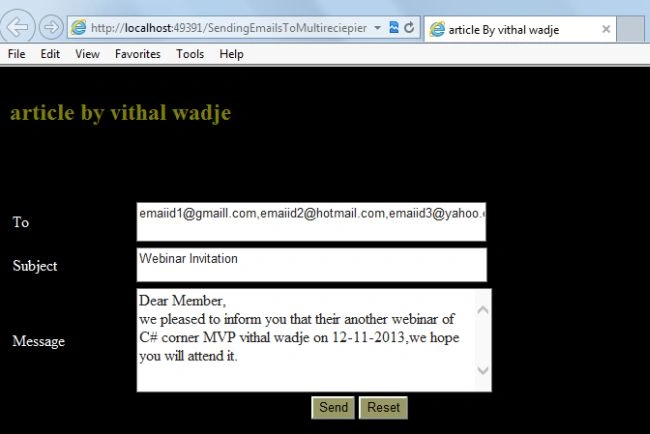
From the preceding example we learned how to send emails to multiple Recipients, I hope you have done it.
Note
- For detailed code please download the Zip file attached above.
- Don't forget to update the "Web.config" file for your email credential details.
Summary
We learned how to send emails to multiple Recipients using ASP.Net. I hope this article is useful for all students and beginners. If you have any suggestion related to this article then please contact me.


Kiran MohantyPosted Jan 4, 2021, 12:53 AM EST
Thank you for this article.
Rinka SaiPosted Sep 4, 2019, 10:19 PM EDT
Hello, I want to send email to multiple receipents at once but in email, only their own email should be visible in To Section. Please help....
deepan rPosted Feb 11, 2018, 10:56 PM EST
Hi sir,The SMTP server requires a secure connection or the client was not authenticated. The server response was: 5.5.1 Authentication Required. Learn more at
Wajeed AliPosted Sep 26, 2017, 2:19 AM EDT
Thanks for sharing such info, found useful, If I don't want to show emails in To. Means receiver should see his email in To, rather all email Ids.
Vithal WadjeTOP 100Posted Apr 10, 2015, 10:04 AM EDT
Dipendra Singh Shekhawat just read appsesting key and split it using comma same as above
Vithal WadjeTOP 100Posted Apr 10, 2015, 10:03 AM EDT
@Ravi check again
Dipendra ShekhawatPosted Apr 9, 2015, 10:42 PM EDT
What if we have a list of comma separated users in web.config file to whom we want to send email. Then how to read the users and add them to To Field ?
Ravi TilekarPosted Apr 3, 2015, 8:03 AM EDT
I am using MailSender.cs file which has namespace System.Web.Mail instead of System.Net.Mail. This split logic does not work. Can u please try giving solution?
Vithal WadjeTOP 100Posted Apr 2, 2015, 9:06 AM EDT
welcome
Ngon ThanhPosted Apr 2, 2015, 12:50 AM EDT
Thanks
Vithal WadjeTOP 100Posted Mar 31, 2015, 8:23 AM EDT
check you have used system.text namespace
Ravi TilekarPosted Mar 30, 2015, 10:32 PM EDT
I am using MailSender.cs file which has namespace System.Web.Mail instead of System.Net.Mail. This split logic does not work. Can u please try giving solution?
Vithal WadjeTOP 100Posted Mar 9, 2015, 6:33 AM EDT
hi Sohaib Ahmed sir,don't post your machine IP address publicly. this error may be no internet connection
Sohaib AhmedPosted Mar 8, 2015, 11:13 PM EDT
: No connection could be made because the target machine actively refused it 173.45.161.113:557...i keep getting this error can you help?
Vithal WadjeTOP 100Posted Nov 10, 2014, 1:54 AM EST
thanks
Thiyagu ArockiasamyPosted Nov 9, 2014, 9:25 PM EST
nice
Vithal WadjeTOP 100Posted Oct 8, 2014, 9:50 AM EDT
add reference of namespace
Tej VakhariaPosted Oct 6, 2014, 9:44 PM EDT
pls help me
Tej VakhariaPosted Oct 6, 2014, 9:44 PM EDT
SendEmail not found in current context error shows in your proejct
Vithal WadjeTOP 100Posted Jun 16, 2014, 11:17 AM EDT
yes rajitha you can send it,just select the Email Ids from database with specific group and assign to the TomailId function
Vithal WadjeTOP 100Posted Jun 16, 2014, 11:15 AM EDT
yes,why not but most of the SMTP uses 587
rajitha giridharPosted Jun 15, 2014, 9:19 PM EDT
can we use port 25 instead 587
rajitha giridharPosted Jun 15, 2014, 9:17 PM EDT
thanks for the above given example sir, but i want to send to 12000 members at a time. is it possible or can u give an example for sending to 12000 members at a time or splitting them to group wise. thanks in advance
Vithal WadjeTOP 100Posted Dec 5, 2013, 6:19 AM EST
thanks Priya mdm
priya talolePosted Dec 4, 2013, 6:19 PM EST
Nice article vithal sir
Vithal WadjeTOP 100Posted Nov 27, 2013, 5:51 AM EST
thanks Ketan sir
ketan italiyaPosted Nov 26, 2013, 7:03 PM EST
nice understanding with superb article,sir thanks you.