
Background
In this article, we will learn how to send emails from an ASP.Net C# web application. Let us see step-by-step so beginners also can understand the logic to send emails from any provider. Their are many techniques to send emails from ASP.Net but in this article we will use a SMTP server with the Gmail provider to send the emails.
Prerequisites
- Active internet connection.
- Email id of any provider such as Gmail, Yahoo or your organization to send emails.
Let us create the application to send the emails from ASP.Net as:
- "Start" - "All Programs" - "Microsoft Visual Studio 2010".
- "File" - "New Project" - "C#" - "Empty web site" (to avoid adding a master page).
- Provide the project a name, such as "Sending Emails" or another as you wish and specify the location.
- Then right-click on Solution Explorer and seelct "Add New Item" - "Default.aspx" page and one class file.
- Drag and drop three Text Boxes and two buttons.
Then the source section of the Default.aspx page looks as in the following: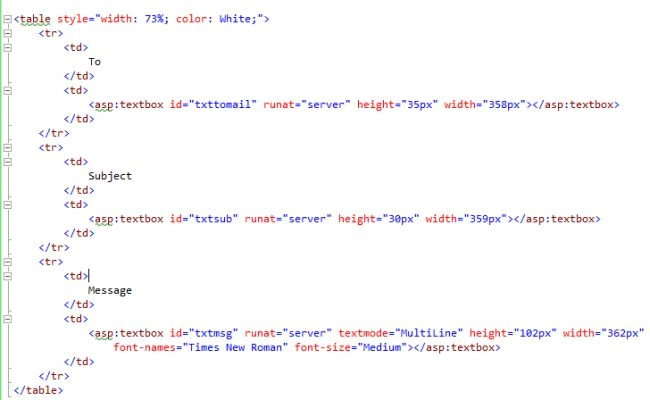
To send Emails in ASP.Net, the following namespaces must be added:
- using System.Net.Mail;
- using System.Net;
Now, move to the web.config file and add the email credentials in the app setting section so in the future, if your email credentials are changed then their is no need to change them in your code file since you can simply the change values in your app settings of the web.config file. After adding the credentials, the app setting section of the web.config file looks as in the following:
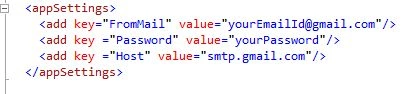
In the preceding app settings section, we are adding the sender email details credentials such as email id and word, so we can send the emails and later on we will read these values in the .cs file.
Note
In the preceding app Settings section add your valid email and word so emails can be sent from your email id to others.
Now add the separate class file by right-clicking on the Solution Explorer, however this is not necessary since you can also write this code in the default.aspx.cs file but for flexibility we are adding it in a separate code file.
After writing the email sending logic code, the class file will look as in the following:
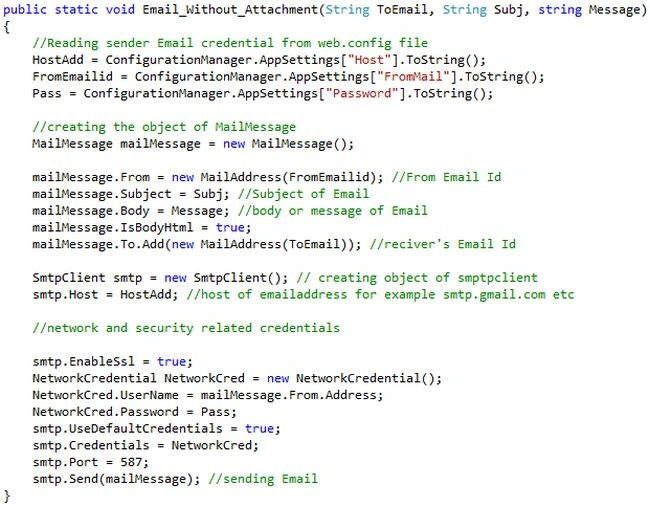
In the preceding class file, we have created one simple static function to send the emails that takes three parameters that are:
string ToEmail: recipient email id
string Subj: subject of the email
string Message: Email body or message
Now call the preceding static function on the button click of the "default.aspx.cs" page as in the following:
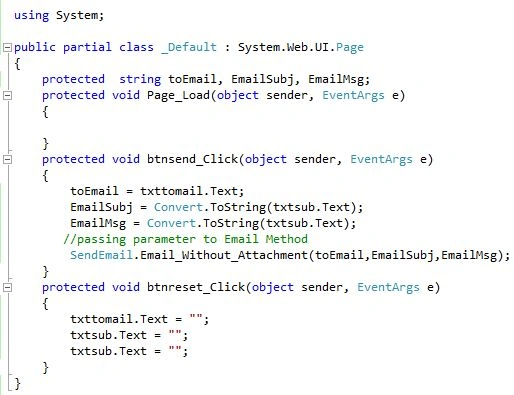
I hope you have done all the preceding steps, now run the application and add the email details in all the text boxes and click on the send button as: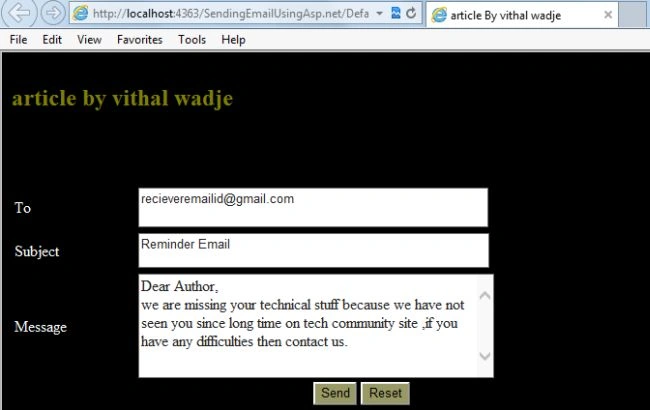
From the preceding example we learned how to send emails, I hope you have done it.
Note
- For detailed code please download the Zip file attached above.
- Don't forget to update the "Web.config" file for your email credential details.
Summary
We learned how to send emails in ASP.Net. I hope this article is useful for all students and beginners. If you have any suggestion related to this article then please contact me.


Khushboo KumariPosted Jan 23, 2018, 11:55 PM EST
I set enable ssl to false again getting error
Khushboo KumariPosted Jan 23, 2018, 11:51 PM EST
Hello vithal, i tried your code but i am getting error as An exception of type 'System.Net.Mail.SmtpException' occurred in System.dll but was not handled in user code Additional information: The SMTP server requires a secure connection or the client was not authenticated. The server response was: 5.5.1 Authentication Required. Learn more at
vishal kingPosted Sep 20, 2017, 11:41 PM EDT
The SMTP server requires a secure connection or the client was not authenticated. The server response was: 5.7.0 Must issue a STARTTLS command first. l188sm17209588pfl.28 - gsmtp
George MasihPosted Jul 20, 2017, 11:29 PM EDT
The SMTP server requires a secure connection or the client was not authenticated. The server response was: 5.5.1 Authentication Required. How ot solve this problem
sonia groverPosted Feb 7, 2017, 9:43 PM EST
How to get rid of this problem pls reply
sonia groverPosted Feb 7, 2017, 9:43 PM EST
The SMTP server requires a secure connection or the client was not authenticated. The server response was: 5.7.0 Must issue a STARTTLS command first. l188sm17209588pfl.28 - gsmtp
Vithal WadjeTOP 100Posted Jul 13, 2016, 7:13 PM EDT
Thanks
Vignesh ManiTOP 100Posted Jul 13, 2016, 1:31 PM EDT
Nice
Bala PrasathPosted Apr 12, 2016, 11:40 PM EDT
PLS SEND TO ATTACH FILE IN MAIL
Sonu ChaudharyPosted Mar 31, 2016, 12:43 PM EDT
thanks for code
Bhargav ChandegaraPosted Jan 20, 2016, 7:12 PM EST
?
Bhargav ChandegaraPosted Jan 20, 2016, 7:12 PM EST
how we set smtp enable
Vithal WadjeTOP 100Posted Jan 15, 2016, 4:25 AM EST
Thanks
Vahid SalimiPosted Jan 14, 2016, 10:22 PM EST
Thank you very much. it worked for me.
DeepAk BhAttPosted May 20, 2015, 11:16 AM EDT
The SMTP server requires a secure connection or the client was not authenticated. The server response was: 5.7.0 Must issue a STARTTLS command first. ud3sm16893426pbc.10 - gsmtp...... what will be the solution ....pls sir cmnt
rajeev sharmaPosted Apr 3, 2015, 5:01 AM EDT
why this show The SMTP server requires a secure connection or the client was not authenticated. The server response was: 5.5.1 Authentication Required.
Vithal WadjeTOP 100Posted Feb 16, 2015, 8:19 AM EST
set smtp.Enbaledssl=false;
Vivek Kumar VishwasPosted Feb 16, 2015, 5:29 AM EST
sorry it's showing a The SMTP server requires a secure connection or the client was not authenticated. The server response was: 5.5.1 Authentication Required...smtp.Credentials = NetworkCred;Line 45: smtp.Port = 587;Line 46: smtp.Send(mailMessage); //sending Email ..................................kindly help me to send mail
Vithal WadjeTOP 100Posted Feb 13, 2015, 8:29 AM EST
thanks sir
Abdul SamadhuPosted Feb 12, 2015, 6:28 PM EST
thanks vithal
Vithal WadjeTOP 100Posted Feb 11, 2015, 7:45 AM EST
refer my other article ,regarding email which i have already written
Abdul SamadhuPosted Feb 11, 2015, 12:10 AM EST
Can u answer this? I want to add Attachment files in this project.How can i write a code??
Vithal WadjeTOP 100Posted Nov 21, 2014, 12:40 AM EST
set ,smtp.EnableSSL=false;
lee zhiyangPosted Nov 21, 2014, 12:27 AM EST
Please help me solve it, thanks
lee zhiyangPosted Nov 21, 2014, 12:27 AM EST
why me after click the send button, it will jump to the sendemail.cs page, and show the smtp.Send(mailMessage); and the detail is the SMTP server requires a secure connection or the client was not authenticated. The server response was: 5.5.1 Authentication Required.