
In this article we will learn about:
- What are Sets?
- Creating and Working with Set
- Accessing and Traversing Set items
- Adding items in Set
- Removing/Deleting items from Set
- Joining Sets
- Frozen Sets
One of the built-in data structure and part of a collection is SET. The collections that we covered were: Strings, Lists, Tuples and Dictionaries. Now let’s discuss about sets in Python.
What are Sets in Python
Sets are the collections that are:
1. Unordered
Since items in sets might appear in any sequence, you cannot predict it, hence unordered.
Every time you use a set item, it may appear in a different order. Set items cannot be accessed using an index or key.
s={10,20,30,40,50,60,70}
print(s)
Output

2. Unchangeable
Although set items cannot be changed, you can take away existing items and add new ones. This means you can add, update and delete items of the sets.
If you want immutable (fixed and cannot be changed) type of set, you can also make your set as a Frozen Set. We will discuss these too.
3. Unindexed
Since they are unordered i.e., they don’t have any specific index or key to identify its items or access them, thus unindexed.
Creating a Set in Python
There are 2 ways to create a set:
1. Placing items in curly braces { }
set_example1={"a","b","c"}
print(set_example1)
Output

Note: A set can incorporate any data type you want.
s1={1,2,3,4,5,6}
print("Set 1:",s1)

s2={1.5,2,3.9,"4","abcd",600000,True}
print("Set 2:",s2)
Output

2. Using set() constructor
set_example2= set(("a","b","c"))
print(set_example2)
Output

Note: Duplicates are not allowed in Set
If there is any duplicate item in the set, it will be ignored. For example:
set_example3= set(("a","b","c","a","c"))
print(set_example3)
Output
Check Length of your set by using: len() method
set_example4={"a","b","c"}
print(len(set_example4))
Output- 3
Check data type of your set by using: type() method
set_example5={"a","b","c"}
print(type(set_example5))
Output- <class 'set'>
Note: empty { } is not an “empty set”
If you want an empty set, you cannot do s={ }, because this will be considered as an empty dictionary.
s={}
print(type(s))
Output- <class 'dict'>
You can create an empty set by using set() method.
s=set()
print(type(s))
Output- <class 'set'>
Accessing Set Items
I think you must have figured it out till now, that you cannot access specific items of a set by referring to an index or a key like list or dictionary because sets are unindexed and unordered.
Traversing through Set Items
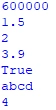
You can easily loop through the set, fetch the items and print the values. For example;
set_example7={1.5,2,3.9,"4","abcd",600000,True}
for i in set_example7:
    print(i)
Output
Adding Items in Set
There are 2 ways to add or update items in a set:
1. Using add() method
Since the sets are unordered, so when we add items to a set it can be anywhere, so no specific place defined.
set_example8={"a","b","c"}
print("Before adding:",set_example8)
set_example8.add("d")
print("After adding:",set_example8)
Output

2. Using update() method
When we want to add items from set to another set, then we use update() method, for example:
first_set={"a","b","c"}
second_set={10,20,30}

print("Before updating:")
print("First Set:",first_set)
print("Second Set:", second_set)

first_set.update(second_set)

print("After updating:")
print("First Set:",first_set)
print("Second Set:",second_set)
Output
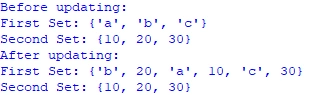
As you can see in the output, update method will add the items in the first set from second set and hence first set is updated with new elements from second set.
Note: You can even add any iterable item (tuple, list or dictionary) to a set.
s={"a","b","c","d"}
s.update([10.6,20,30,40.7])
print(s)
Output-

Removing/Deleting Items from Set
There are 5 ways to remove items from a set:
1. Using remove() method
For removing a specific item from a set we use remove().
set_example9={"a","b","c","d","e"}
print("Before remove:", set_example9)
set_example9.remove("c")
print("After remove:", set_example9)
Output

If the item to be removed does not exist, it will throw an error.
set_example10={"a","b","c","d","e"}
set_example10.remove("z")
print(set_example10)
Output

2. Using discard() method
discard() works same as remove(), just the difference is that; even if the item to be removed does not exist, it will not throw any error and will print the existing set.
set_example10={"a","b","c","d","e"}
set_example10.discard("z")
print(set_example10)
Output

3. Using pop() method
Logically, pop removes the last item from the set, but since sets are unordered, you will not know which item was removed.
So, you can use it this way:
set_example11={"a","b","c","d","e"}
print("Set before pop:",set_example11)
find=set_example11.pop()
print("Deleted element:",find)
print("Set after pop:",set_example11)
Output

4. Using clear() method
You can clear a set using clear() method which can help you print or get a set with no items. For example;
set_example12={“a”,”b”,”c”}
print(“Before clear:”, set_example12)
set_example12.clear()
print(“After clear:”, set_example12)
Output

5. Using del keyword
del keyword will delete the set i.e, set will not exist in memory and will be deleted completely (not defined).
set_example13={"a","b","c","d","e"}
print("Set before deletion:",set_example13)
del set_example13
print("Set after deletion:",set_example13)
Output

Joining Sets
There are 4 major operations:
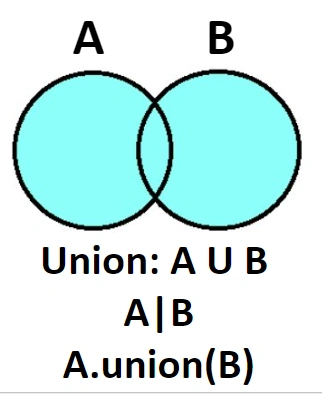
1. Union
2. Intersection
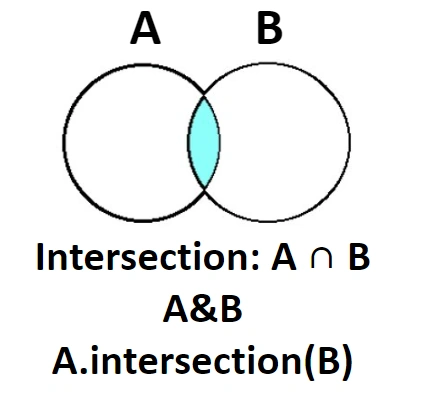
3. Difference
4. Symmetric Difference
1. UNION
Union is joining of 2 sets and displaying all the elements of all the sets together in one set; excluding the duplicates.
setA={10,20,30,40,50}
setB={60,70,80,90,100}
print("Using UNION operator:",setA|setB)
print("Using UNION method:",setA.union(setB))
Output

Note: You can also use update() method for performing the same operation. (Discussed before)
2. INTERSECTION
Intersection is finding the common elements in both the sets. So, an element which is present in both the sets will be the output of the intersection.
setA={10,20,30,40,50,60}
setB={50,60,70,80,90,100}
print("Using INTERSECTION operator:",setA&setB)
print("Using INTERSECTION method:",setA.intersection(setB))
Output

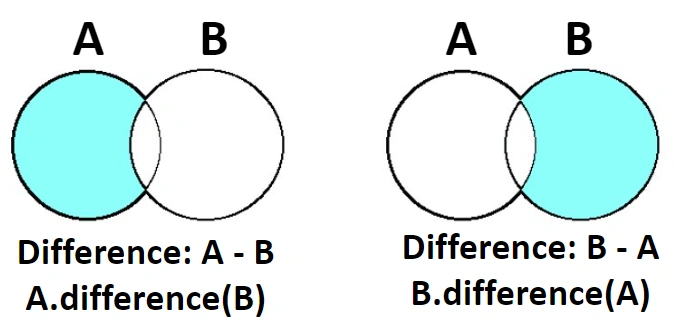
3. DIFFERENCE
Difference of two sets will return the elements that are not present in both sets. Meaning;
A-B; it will return the elements present in A and not in B
B-A; it will return the elements present in B and not in A
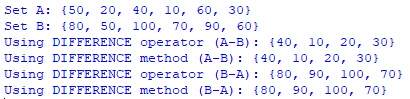
setA={10,20,30,40,50,60}
setB={50,60,70,80,90,100}

print("Set A:",setA)
print("Set B:",setB)

print("Using DIFFERENCE operator (A-B):",setA-setB)
print("Using DIFFERENCE method (A-B):",setA.difference(setB))

print("Using DIFFERENCE operator (B-A):",setB-setA)
print("Using DIFFERENCE method (B-A):",setB.difference(setA))
Output
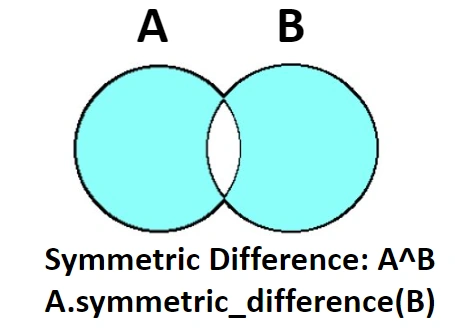
4. SYMMETRIC DIFFERENCE
You can consider this as opposite of intersection. So, apart from the common elements in both the sets it will return all other elements and will join the sets too.
In other words, only the elements that are absent from both sets will be returned.
setA={10,20,30,40,50,60}
setB={50,60,70,80,90,100}
print("Using SYMMETRIC DIFFERENCE operator:",setA^setB)
print("Using SYMMETRIC DIFFERENCE method:",setA.symmetric_difference(setB))
Output

FROZEN SETS
As discussed before, if you want immutable (fixed and cannot be changed) type of set, you can make your set as a Frozen Set. This means you will not be able to add, update or remove items from these kinds of sets.
Remember, in normal set, you can add, update and delete/remove the items, but in frozen sets, you will not be able to do so.
To create a frozen set, we will use frozenset() method.
frozen_setexample = frozenset(["x", "y", "z"])
print("Frozen Set",frozen_setexample)
Output

Looks like a normal set?
Yes, it will, until you try to do any modification.
frozen_setexample = frozenset(["x", "y", "z"])
print("Frozen Set:",frozen_setexample)
frozen_setexample.add("a")
Output

frozen_setexample = frozenset(["x", "y", "z"])
print("Frozen Set:",frozen_setexample)
frozen_setexample.remove("y")
Output


Join the conversation! Your thoughts help the community grow.