
SGLang-Neuron connects SGLang model serving to AWS Trainium hardware.
SGLang-Neuron is a public-preview plugin that lets you run supported SGLang models on AWS Trainium while keeping the familiar SGLang server and OpenAI-compatible generation API. Released on November 12, 2026, it is delivered through an AWS Deep Learning Container and uses native PyTorch through TorchNeuron, so you can start by launching a container, starting a model server, and sending an HTTP request.
Key takeaways
- SGLang-Neuron v0.1.0 is the first public-preview release of the SGLang plugin for AWS Trainium.
- SGLang still owns the API server, request scheduling, RadixAttention, and prefix-cache bookkeeping.
- The plugin supplies Trainium-specific model execution, attention, mixture-of-experts support, and graph execution.
- LLM serving in this preview requires a
trn3.48xlargeinstance, while supported diffusion workloads usetrn2.48xlarge. - This is a preview release, so supported models, APIs, and features can change.
What is SGLang-Neuron?
AWS announced SGLang-Neuron on November 12, 2026. It was released by RadixArk in collaboration with AWS Annapurna Labs and is available as an AWS Deep Learning Container.
Start with the names. SGLang is a serving system for language and multimodal models. A serving system loads a trained model, accepts requests from applications, batches work, manages model memory, and returns generated text or other output. AWS Trainium is AWS hardware for AI workloads. SGLang-Neuron is the layer that connects them.
That connection matters because hardware changes often force teams to learn a different server, runtime, deployment process, and API. With SGLang-Neuron, the application-facing workflow stays close to normal SGLang. You launch the SGLang server and call its generation endpoint. The plugin sends the work down the Trainium path.
The release is explicitly a public preview. AWS says that features, APIs, and supported models can change in later versions. Treat it as a way to evaluate Trainium for a supported workload, not as a promise that every SGLang feature or model will work today.
How SGLang-Neuron fits into the serving stack
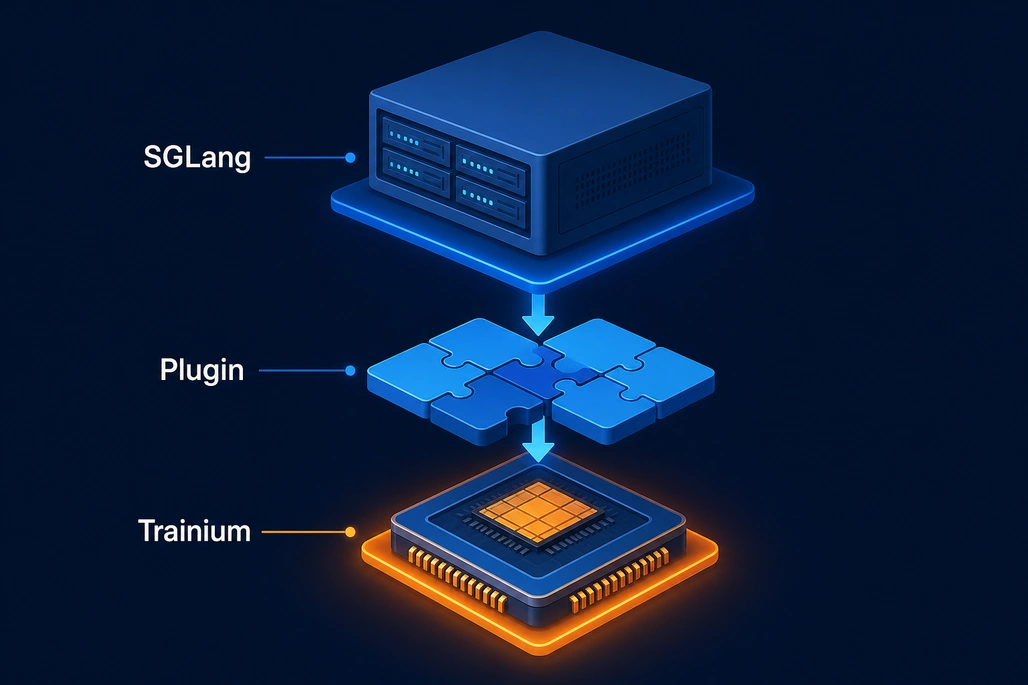
The plugin keeps the SGLang server layer separate from Trainium execution.
SGLang-Neuron is an out-of-tree plugin. In plain terms, it is a separately developed package that plugs into SGLang instead of being built into the core SGLang codebase. The server selects the plugin when you set SGLANG_PLATFORM=neuron.
This split gives each layer a clear job. SGLang core handles the HTTP API server, the request lifecycle, the scheduler, RadixAttention, and prefix-cache bookkeeping. SGLang-Neuron handles the Trainium-specific parts: model implementations, attention code, mixture-of-experts execution, the graph runner, device parallelism, and optimized kernels.
| Layer | Main responsibility |
|---|---|
| Your application | Sends chat or generation requests to an HTTP endpoint. |
| SGLang core | Runs the API server, schedules requests, and manages prefix reuse. |
| SGLang-Neuron | Implements the Trainium execution path for supported models. |
| TorchNeuron and Neuron | Expose Trainium to PyTorch and compile work for NeuronCores. |
| AWS Trainium | Runs the compiled model execution programs. |
The technical point is that SGLang-Neuron uses native PyTorch operations along with kernels written with the Neuron Kernel Interface, or NKI. It uses torch.compile to compile operations and kernels into programs that run on Trainium. You do not need to write NKI kernels to use the container, but knowing that compilation happens helps explain why model recipes and launch flags are tightly controlled.
What you need before starting
For supported LLM serving, the AWS Neuron release notes list a trn3.48xlarge instance as the prerequisite. For supported diffusion models, the listed instance is trn2.48xlarge. The LLM walkthrough below focuses on Trainium3.
You also need Docker, a directory for model checkpoints, and the Neuron driver on the host. The v0.1.0 release is validated with Neuron SDK 2.33.0 and the aws-neuronx-dkms 2.31.7.0 driver. The container packages SGLang, the plugin, and the patched NIXL components used by the preview.
Do not start by trying a random model or a random set of flags. The plugin checks the model architecture, parallel layout, and configuration at launch. If it cannot serve the requested configuration, it refuses to launch rather than silently use an untested path.
Supported workloads in v0.1.0
The preview covers more than one type of model, but the hardware path differs. LLM support is for Trainium3. SGLang Diffusion support is for Trainium2.
| Workload | Examples named in the release notes | Instance family |
|---|---|---|
| LLM serving | Qwen3-8B, GPT-OSS-120B, GLM-4-9B, DeepSeek-V2-Lite, Kimi-K3 | Trainium3 |
| Large-model serving features | Qwen3.5-397B-A17B, GLM-5.2, Kimi-K3 | Trainium3 |
| Diffusion serving | FLUX.1-dev, FLUX.3-Action, MiniMax-H3, Wan2.2 A14B, LingBot-World-V2 | Trainium2 |
Model support is configuration-specific. A model name in the list does not mean every precision, context length, topology, or optional feature is available. Use the repository recipes and release notes for the model you plan to run.
Launch a first SGLang-Neuron server
A good first exercise is to follow the official GPT-OSS-120B walkthrough. It demonstrates the moving parts: a container, the Neuron platform setting, SGLang server flags, and a standard chat-completions request.
First, start the SGLang-Neuron container on your Trainium3 host. Replace /path/to/work with a directory on your instance that you want to make available inside the container.
docker run --rm -it \
  --privileged --ipc=host \
  -v /path/to/work:/work \
  public.ecr.aws/neuron/pytorch-inference-sglang-neuron:v0.1.0-neuron-py314-sdk-2.33.0-ubuntu26.04 \
  /bin/bash
The image tag matters. It pins the public-preview plugin version, Python version, Neuron SDK version, and Ubuntu version. In a real deployment, pinning an image tag is safer than assuming a future image will behave the same way.
Inside the container, launch the server. The following command is the AWS example for openai/gpt-oss-120b. Tensor parallelism is set to 8 with --tp-size 8, and expert parallelism is also set to 8 with --ep-size 8.
SGLANG_PLATFORM=neuron \
python -m sglang.launch_server \
  --model-path openai/gpt-oss-120b \
  --tp-size 8 \
  --ep-size 8 \
  --kv-cache-dtype fp8_e4m3 \
  --context-length 10240 \
  --chunked-prefill-size 8192 \
  --max-running-requests 64 \
  --max-total-tokens 655360 \
  --mem-fraction-static 0.8 \
  --host 127.0.0.1 \
  --port 30000
For a beginner, focus on four pieces of this command. SGLANG_PLATFORM=neuron picks the Trainium plugin. --model-path identifies the model. --host and --port specify where the server listens. The remaining flags are model-serving settings validated for this example.
Do not copy the numerical settings to another model by default. Context length, cache type, memory fraction, tensor parallelism, expert parallelism, and request limits must match the supported recipe for that model.
When the server is ready, send an OpenAI-compatible chat request from another terminal on the same host.
curl -s http://127.0.0.1:30000/v1/chat/completions \
  -H 'Content-Type: application/json' \
  -d '{
    "model": "openai/gpt-oss-120b",
    "messages": [
      {
        "role": "user",
        "content": "Explain why the sky appears blue."
      }
    ],
    "temperature": 0,
    "max_tokens": 128
  }'
This request calls /v1/chat/completions, which makes it easier to connect a client already designed for an OpenAI-style chat endpoint. In the v0.1.0 preview, the default sampler is greedy on device. AWS documents that requests should use temperature set to 0 or top_k set to 1 unless you configure a supported sampling mode at server startup.
Understand prefill, decode, and the KV cache
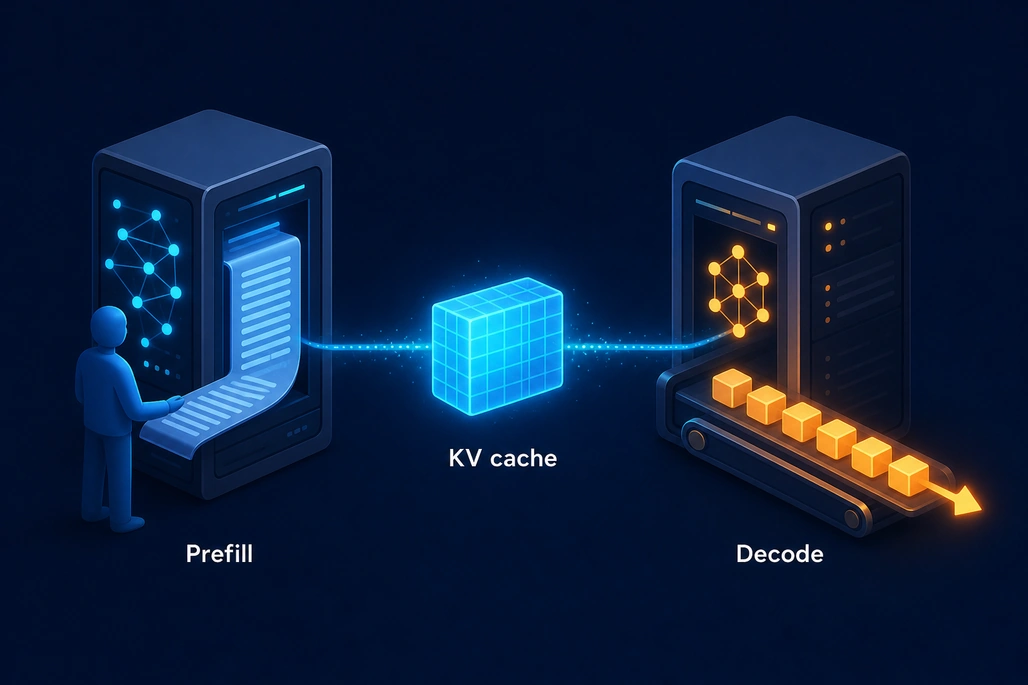
Prefill-decode disaggregation transfers prompt state before output generation.
LLM serving has two broad phases. During prefill, the server reads the input prompt and creates attention state for its tokens. During decode, the model generates the answer one token at a time. That attention state is commonly called the KV cache.
For a short prompt and a short response, you can think of a single server doing both jobs. But long prompts and high output throughput have different needs. SGLang-Neuron supports prefill-decode disaggregation, also called PD disaggregation, to split the work.
| Server role | Work performed |
|---|---|
| Prefill server | Reads the prompt and computes its KV cache. |
| Decode server | Receives the KV cache and generates the remaining output tokens. |
| Load balancer | Routes a request to a prefill server and a decode server. |
In the SGLang-Neuron design, the prefill server transfers the KV cache to the decode server through NIXL over Elastic Fabric Adapter, or EFA. The decode server can then continue generation without recalculating the prompt state.
This is advanced deployment work. It requires compatible prefill and decode configurations, the preview container on both sides, EFA device access, memory-lock settings, and a load balancer. Start with one server. Move to PD disaggregation only after you have a supported model serving correctly and you have a reason to separate prompt processing from token generation.
Know the limits before using the preview
Public preview does not mean every SGLang capability is ready on Trainium. The release notes say the plugin refuses unsupported model architectures. They also list unsupported SGLang features in v0.1.0: LoRA adapters, mixed chunks, embedding servers, and SGLang weight-update endpoints.
The plugin is also pinned to a specific SGLang revision, commit 43881a7. The launch stops if another SGLang revision is used. This may feel restrictive, but it makes the tested container path more repeatable while the project is in preview.
There is another practical limitation. AWS's release notes and the SGLang team's technical post discuss high-end configurations such as GLM-5.2 with a 1 million-token context and Kimi-K3 across three Trainium3 nodes. Those are useful examples of what the runtime is designed to support, but they are not beginner starting points. They require validated recipes, suitable infrastructure, and a clear capacity plan.
I would start with a supported smaller model such as Qwen3-8B from the repository quickstart, then compare behavior, latency, throughput, and cost using the same application workload you already understand. Keep the model, prompt mix, output length, concurrency, and measurement window fixed when you compare platforms.
Where reinforcement learning rollouts fit
A rollout is generated model output used as part of a reinforcement learning post-training loop. SGLang-Neuron can generate these rollouts on Trainium using the SGLang interface. The SGLang team also describes an end-to-end validation using the Miles reinforcement learning framework, SGLang-Neuron for rollouts, and TorchTitan through TorchNeuron for training.
You do not need reinforcement learning to use the serving workflow in this article. For most teams, the first use case is serving an open model behind an internal API. Rollouts become relevant when you are building a post-training pipeline that repeatedly generates candidate responses, scores them, and updates a model.
How to get started safely
- Read the SGLang-Neuron release notes and choose a model explicitly listed as supported.
- Create the required Trainium instance, install the validated Neuron driver, and use the public-preview container image.
- Run the smallest supported quickstart or model recipe before changing parallelism, context length, or cache settings.
- Use
temperature: 0for the default greedy sampling path unless you configure a documented sampler. - Test your client against
/v1/chat/completions, then add monitoring, authentication, networking, and load testing around the endpoint. - Check the release notes again before upgrading because the preview can change supported features and configurations.
SGLang-Neuron gives SGLang users a direct way to evaluate AWS Trainium without rewriting the application layer around a new API. The basic path is simple: use the validated container, select the Neuron platform, launch a supported model recipe, and call the normal server endpoint. The hard part is not the first request. It is matching the model, hardware, driver, container, and serving configuration that the preview supports.
Frequently asked questions
What is SGLang-Neuron?
SGLang-Neuron is a native PyTorch plugin that connects SGLang model serving to AWS Trainium. It keeps SGLang's server interface while providing Trainium-specific model execution, kernels, and graph handling.
Is SGLang-Neuron generally available?
No. Version 0.1.0 was released on November 12, 2026 as a public preview. AWS says features, APIs, and model support can change in later releases.
Which AWS instances do I need for SGLang-Neuron?
The release notes list trn3.48xlarge for supported LLM workloads and trn2.48xlarge for supported diffusion models. Some very large deployments require more than one Trainium3 node.
Can I use any model or any SGLang feature?
No. The plugin validates supported model architectures and configurations at launch. In v0.1.0, LoRA adapters, embedding servers, mixed chunks, and weight-update endpoints are listed as unsupported.
What is prefill-decode disaggregation?
It separates prompt processing from token generation. A prefill server creates the prompt KV cache, transfers it with NIXL over EFA, and a decode server uses that cache to generate the rest of the response.
Based on reporting by Amazon Web Services, AWS Neuron Documentation, LMSYS Org and SGLang Project on GitHub.

Join the conversation! Your thoughts help the community grow.