
Introduction
SharePoint 2013 adds the ability for you to remotely interact with SharePoint sites by using REST. Now, you can interact directly with SharePoint objects by using any technology that supports standard REST capabilities.
To access SharePoint resources using REST, construct a RESTful HTTP request, using the Open Data Protocol (OData) standard, which corresponds to the desired client object model API. For example:
Below are some client object model methods.
http://server17:1001/sales/_api/web
The above method will get the SPWeb details of the Sales site.
http://server17:1001/sales/_api/web/lists/?$select=title
The above method will displays all the list titles present in Sales web site.
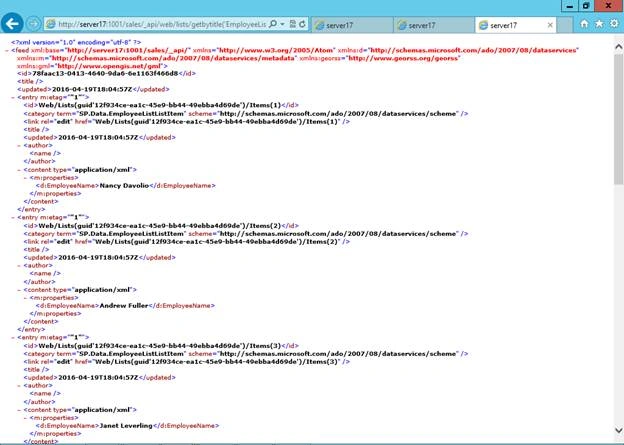
http://server17:1001/sales/_api/web/lists/getbytitle('EmployeeList')/items/?$select=EmployeeName
The above url method displays employees' names from EmployeeList in Sales web site.
Getting the list data from SharePoint List using REST Services.
We can access the SharePoint content using both Server Side and Client Side code, in this example we are going to get the SharePoint List data using Client REST Calls.
REST calls mainly depending on the Service url, client.svc service will provide data based on the URL.
Below is the structure to generate the REST URL.

Steps to create REST Service
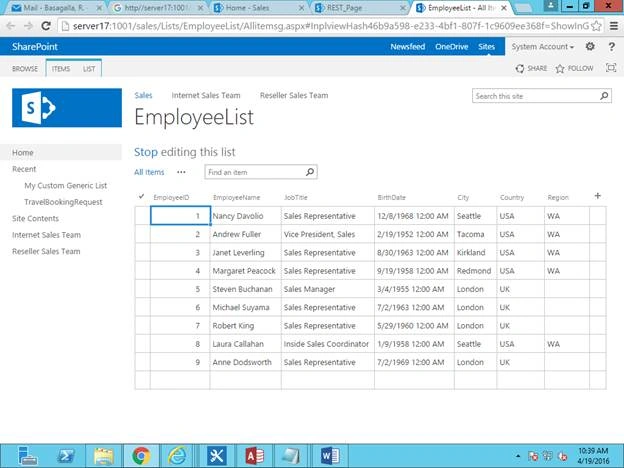
- Create Employee list and input some test data.
- Try to access the above URL to verify the service URL is returning proper data.
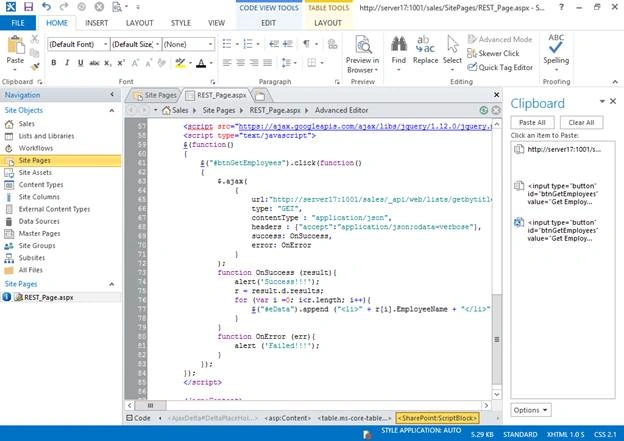
- Create site page and add below code to get the employee details.
Add below code in main content section, we are trying to bind the employee information to eData ul on click of button.Here we are making AJAX call to get the Employee details using Service URL.- <input type="button" id="btnGetEmployees" value="Get Employees" />
- <ul id="eData"></ul>
- <script type="text/javascript">
- $(function()
- {
- $("#btnGetEmployees").click(function()
- {
- $.ajax(
- {
- url:"http://server17:1001/sales/_api/web/lists/getbytitle('EmployeeList')/items",
- type: "GET",
- contentType : "application/json",
- headers : {"accept":"application/json;odata=verbose"},
- success: OnSuccess,
- error: OnError
- }
- );
- // On success we are binding the result to UL
- function OnSuccess (result){
- alert('Success!!!');
- r = result.d.results;
- for (var i =0; i<r.length; i++){
- $("#eData").append ("<li>" + r[i].EmployeeName + "</li>");
- }
- }
- // Alert the error message when error occurs
- function OnError (err){
- alert ('Failed!!!');
- }
- });
- });
- </script>
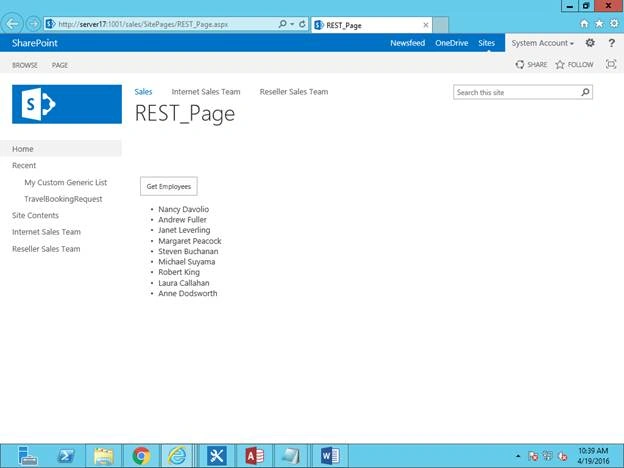
- Browse the created page and click on the Get Employees button, this will make REST call and bind the result to Unordered list.
Read more articles on SharePoint:


Ramakrishna BasagallaPosted Apr 25, 2016, 7:56 AM EDT
Thank you very much for all your comments
Humayun Kabir MamunPosted Apr 23, 2016, 8:45 PM EDT
Nice...
Kuppurasu NagarajTOP 100Posted Apr 22, 2016, 8:04 AM EDT
Nice Sharing..
Vijay SPosted Apr 21, 2016, 11:41 PM EDT
Good one
Vipin TyagiPosted Apr 21, 2016, 8:44 PM EDT
informative article.Where to start with REST API.Give some tips to write effective rest applications.Thanks!
Debasis SahaTOP 100Posted Apr 21, 2016, 9:28 AM EDT
Nice One..
Rahul Kumar SaxenaTOP 100Posted Apr 21, 2016, 5:05 AM EDT
Good one
Gk NPosted Apr 21, 2016, 4:48 AM EDT
Thank You for the detailed explanation. Please do more.
Vignesh ManiTOP 100Posted Apr 21, 2016, 4:23 AM EDT
Nice
Vinodh NarayananPosted Apr 21, 2016, 2:57 AM EDT
nice one
Gowtham RajamanickamTOP 100Posted Apr 21, 2016, 2:38 AM EDT
very good