
First we need to make sure address1_latitude and address1_longitude should be added under account form and filled for all account records based on their address.
Requirement
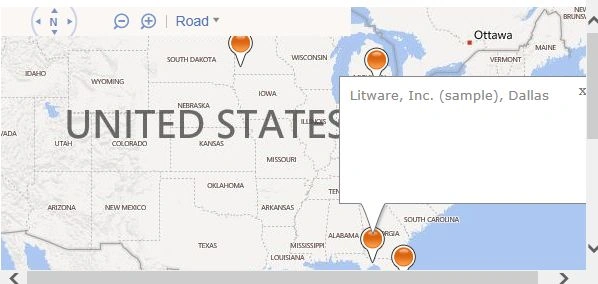
Let’s say we have a requirement to show all the child accounts (sub accounts) as pushpins on map under parent account and show their name and city when user will hover on pushpin.
Solution
We can simply develop an html web resource where we can use Bing Maps AJAX control to show pushpins for child account based on the latitude or longitude values. We can implement this in the following three steps:
- Get Bing Maps API.
- Need to retrieve all child accounts for current account.
- Add pushpins to Bing Maps based on latitude and longitude returned from child accounts.
So let’s follow the below given steps:
- To get Bing Maps key, you can follow instructions here.
- We can create a new solution or can do this customization in base solution, (If you are new to solution, please refer our earlier posts to create solution).
- Let’s first upload REST.SDK.js to your solution, we can use retrieve multiple method under this library to get child records and use the below given settings (Note: You can get this file under SampleCode\JS\RESTEndpoint\JavaScriptRESTAssociateDisassociate\JavaScriptRESTAssociateDisassociate\Scripts) under your CRM SDK folder, if you don’t have CRM SDK download and extract it first.
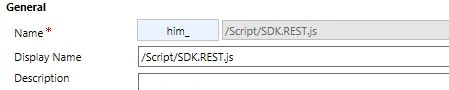
Note: We have used him prefix in our publisher it could be new for you if you are not using specific prefix.
- Create new HTML web resource and use the following details.
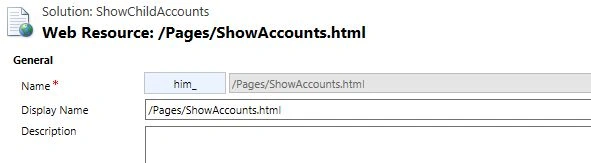
- Use the following code for this html web resource.
- <html>
- <head>
- <script src="../../ClientGlobalContext.js.aspx"></script>
- <script src="../Script/SDK.REST.js" type="text/javascript"></script>
- <title>Show Child Accounts</title>
- <meta http-equiv="Content-Type" content="text/html; charset=utf-8">
- <script src="http://ecn.dev.virtualearth.net/mapcontrol/mapcontrol.ashx?v=7.0" type="text/javascript"></script>
- <script type="text/javascript">
- var map = null;
- var messageBox = null;
- var lat = null;
- var lon = null;
- var City = null;
- var AccountName = null;
- var pushpin = null;
- var pushpinCollection = new Microsoft.Maps.EntityCollection();
- var messageBoxCollection = new Microsoft.Maps.EntityCollection();
- document.onreadystatechange = function ()
- {
- if(document.readyState == "complete")
- {
- //initialise map
- getMap();
- //Get child account records
- getChildAccounts();
- }
- }
- function getChildAccounts()
- {
- //retrieve current entity id
- var parentaccountId = window.parent.Xrm.Page.data.entity.getId();
- var entitySchemaName = "Account";
- //get all child records based on parent customer id
- var odataQuery = "?$select=Name,Address1_City,Address1_Latitude,Address1_Longitude&" + "$filter=ParentAccountId/Id eq guid'" + parentaccountId + "'";
- if(typeof (SDK) != "undefined")
- {
- //The retrieveAccountsCallBack function is passed through as the successCallBack.
- SDK.REST.retrieveMultipleRecords(entitySchemaName, odataQuery, getnotesImagesCallback, function (error)
- {
- alert(error.message);
- }, function () {});
- }
- else
- {
- alert("Not able to load REST.SDK library");
- }
- }
- //callback method
- function getnotesImagesCallback(resultSet)
- {
- //initialise message box
- messageBox = new Microsoft.Maps.Infobox(new Microsoft.Maps.Location(0, 0),
- {
- visible: false
- });
- messageBoxCollection.push(messageBox);
- //Show current account
- lat = window.parent.Xrm.Page.getAttribute("address1_latitude")
- .getValue();
- lon = window.parent.Xrm.Page.getAttribute("address1_longitude")
- .getValue();
- City = window.parent.Xrm.Page.getAttribute("address1_city")
- .getValue();
- AccountName = window.parent.Xrm.Page.getAttribute("name")
- .getValue();
- pushpin = new Microsoft.Maps.Pushpin(new Microsoft.Maps.Location(lat, lon));
- pushpin.Description = AccountName + ", " + City;
- //show message box on mouse move
- Microsoft.Maps.Events.addHandler(pushpin, 'mouseover', displaymessagebox);
- //remove message box on mouse lost
- Microsoft.Maps.Events.addHandler(pushpin, 'mouseout', hidemessagebox);
- pushpinCollection.push(pushpin);
- //add collection to map
- map.entities.push(pushpinCollection);
- map.entities.push(messageBoxCollection);
- if(resultSet.length > 0)
- {
- TotalImages = resultSet.length;
- for(i = 0; i < resultSet.length; i++)
- {
- lat = resultSet[i].Address1_Latitude;
- lon = resultSet[i].Address1_Longitude;
- City = resultSet[i].Address1_City;
- AccountName = resultSet[i].Name;
- pushpin = new Microsoft.Maps.Pushpin(new Microsoft.Maps.Location(lat, lon));
- pushpin.Description = AccountName + ", " + City;
- //show message box on move move
- Microsoft.Maps.Events.addHandler(pushpin, 'mouseover', displaymessagebox);
- //remove message box on mouse lost
- Microsoft.Maps.Events.addHandler(pushpin, 'mouseout', hidemessagebox);
- pushpinCollection.push(pushpin);
- }
- //add collection to map
- map.entities.push(pushpinCollection);
- map.entities.push(messageBoxCollection);
- }
- }
- function displaymessagebox(e)
- {
- messageBox.setOptions(
- {
- description: e.target.Description,
- visible: true,
- offset: new Microsoft.Maps.Point(0, 25)
- });
- messageBox.setLocation(e.target.getLocation());
- }
- function hidemessagebox(e)
- {
- messageBox.setOptions(
- {
- visible: false
- });
- }
- function getMap()
- {
- map = new Microsoft.Maps.Map(document.getElementById('bingMaps'),
- {
- credentials: 'Your BingMaps key',
- center: new Microsoft.Maps.Location(41.956690, -103.137798),
- mapTypeId: Microsoft.Maps.MapTypeId.road,
- zoom: 10
- });
- }
- </script>
- </head>
- <body>
- <div id="bingMaps" style="width: 600px; height: 500px; position: relative;"></div>
- </body>
- </html>
- Save and publish your web resource and place this web resource to account form by navigating Insert ->Web Resource under form editor.
- Save and publish form and open any account record, if current account will have any child record it will show pushpins for child accounts otherwise it will just show current account record pushpin.
References: BingMaps SDK





Harshad PansuriyaPosted Nov 23, 2015, 9:28 PM EST
Nice one
Sibeesh VenuTOP 100Posted Nov 23, 2015, 7:40 PM EST
Nice Share
Banketeshvar NarayanPosted Nov 23, 2015, 6:47 PM EST
Nice Article
Mukesh KumarPosted Nov 23, 2015, 6:36 PM EST
Good One Sir