
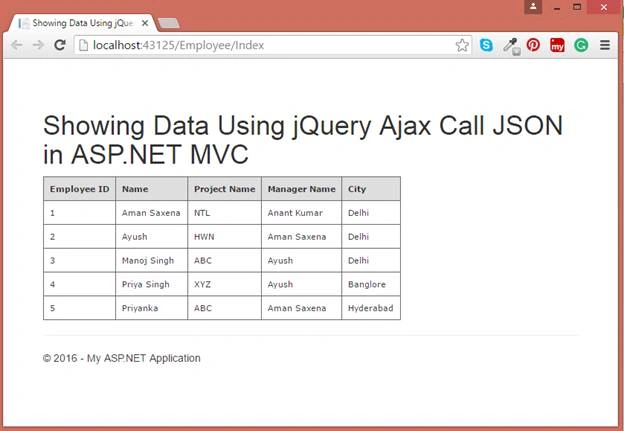
In this article I am going to show how to display data using jQuery, AJAX Call, JSON in ASP.NET MVC Application.
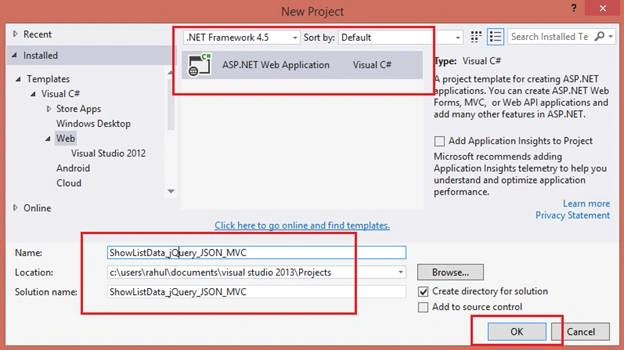
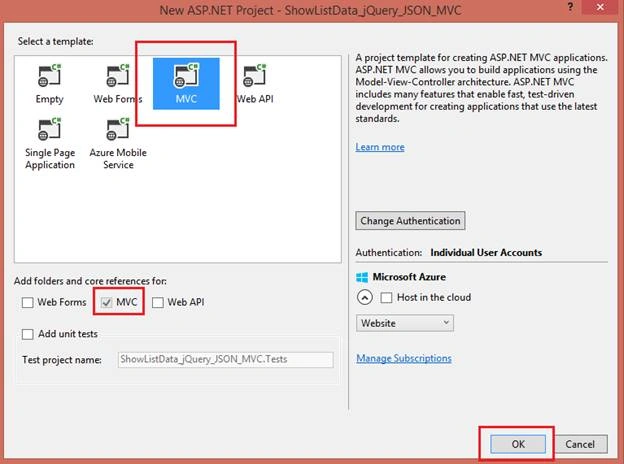
Open Visual Studio, then Add New Project.
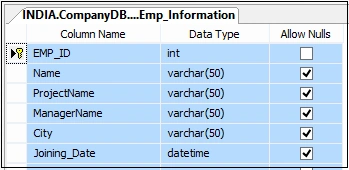
Below is my Data Table in design mode from which I will show data.
Script of my Data Table,
Below is my Data Table in design mode from which I will show data.
Script of my Data Table,
- CREATE TABLE [dbo].[Emp_Information](
- [EMP_ID] [int] IDENTITY(1,1)NOTNULL,
- [Name] [varchar](50)NULL,
- [ProjectName] [varchar](50)NULL,
- [ManagerName] [varchar](50)NULL,
- [City] [varchar](50)NULL,
- [Joining_Date] [datetime] NULL,
- CONSTRAINT [PK_Emp_Information] PRIMARYKEYCLUSTERED
- (
- [EMP_ID] ASC
- )WITH (PAD_INDEX=OFF,STATISTICS_NORECOMPUTE=OFF,
- IGNORE_DUP_KEY=OFF,ALLOW_ROW_LOCKS=ON,ALLOW_PAGE_LOCKS=ON)ON [PRIMARY]
- )ON [PRIMARY]
- GO
- SETANSI_PADDINGOFF
- GO
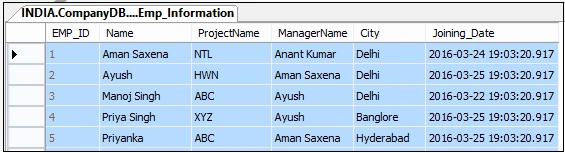
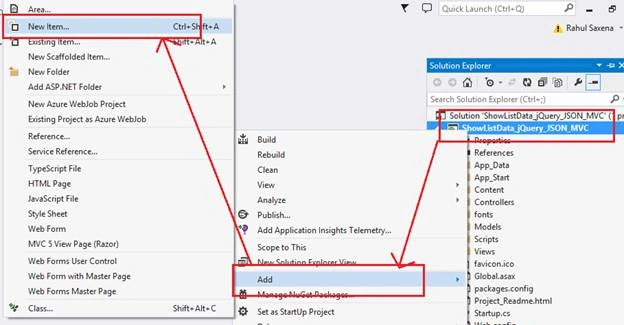
Now add an ADO.NET Entity Data Model. So, right click on Project Solution Explorer, Add, then click New Item,
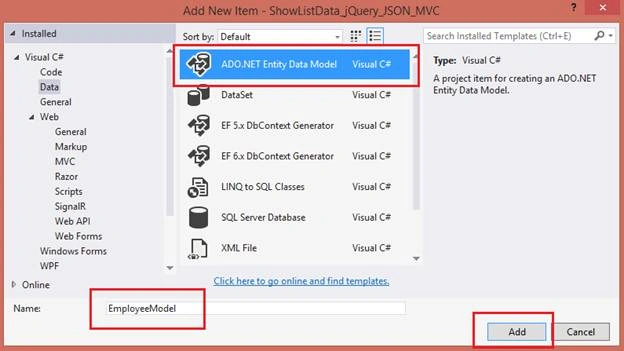
Select ADO.NET Entity Data Model,
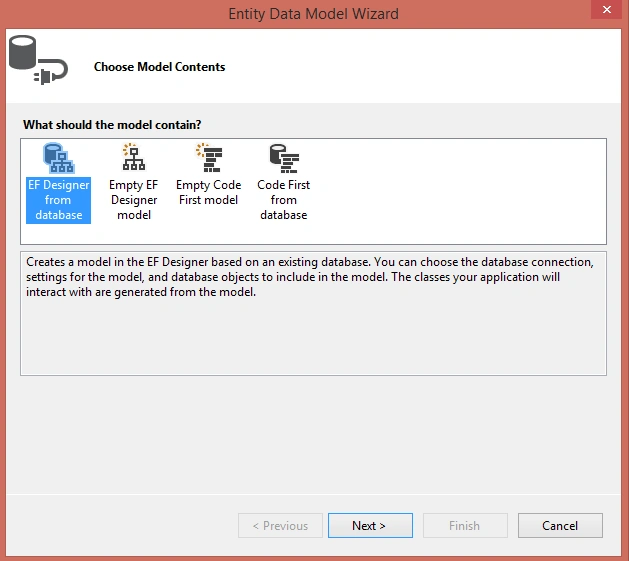
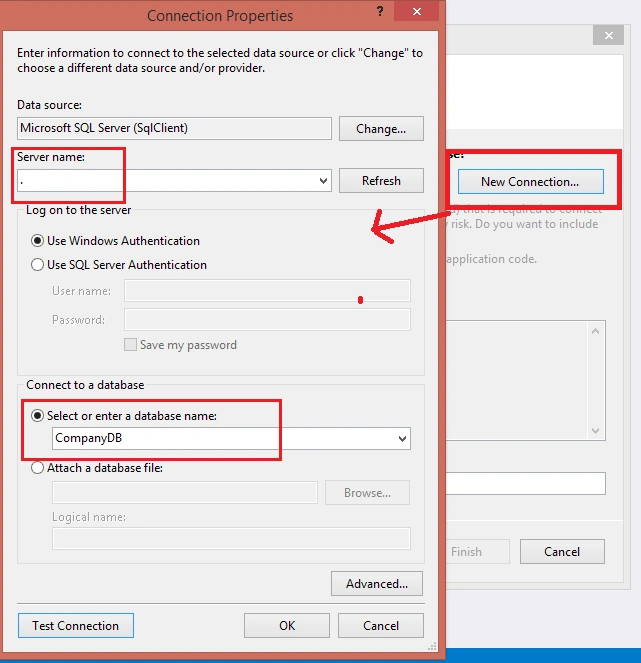
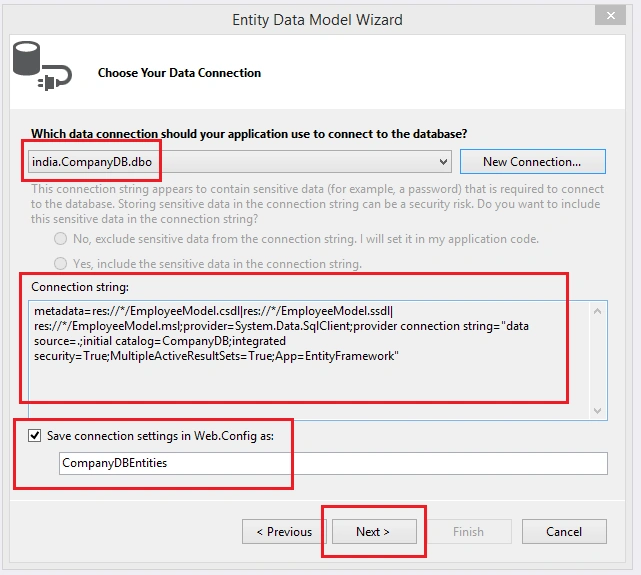
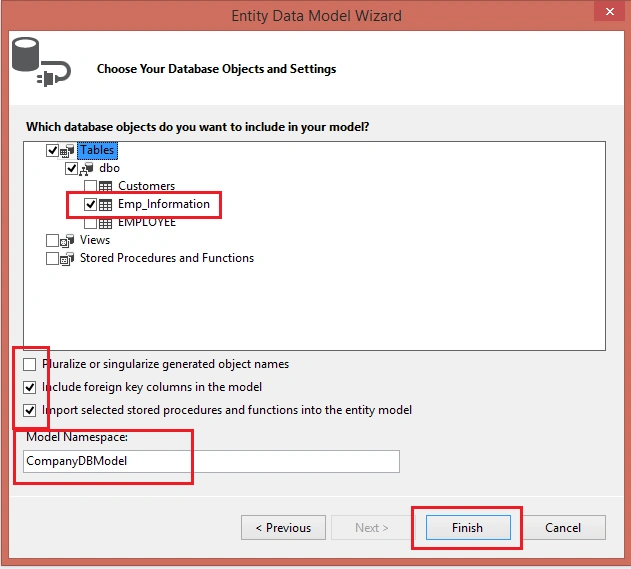
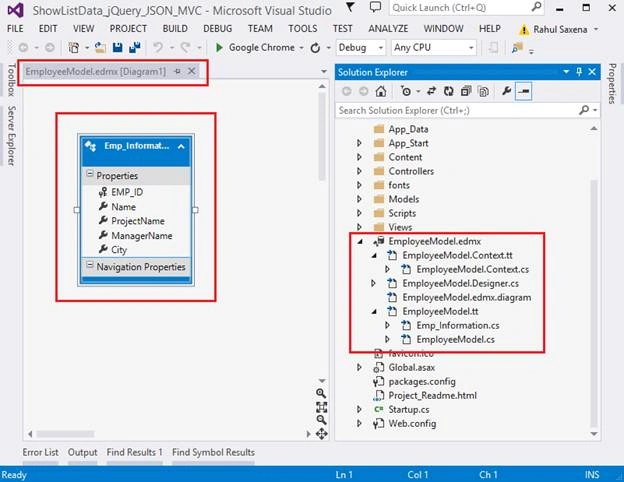
Now Right Click on Models Folder, Add, then New Class. Here's the screenshot,
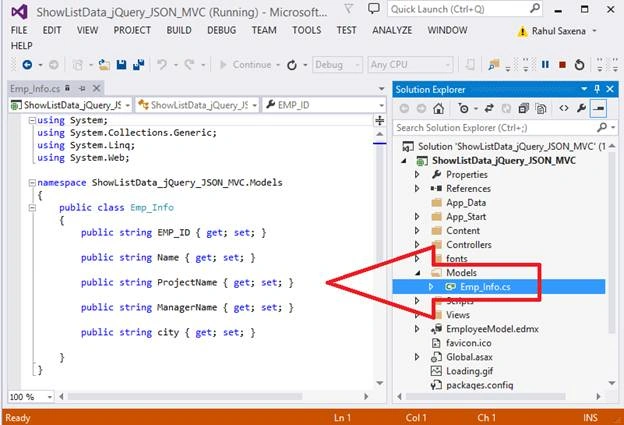
Now add a new Controller, Right Click on Controller Folder and then Add New Controller,
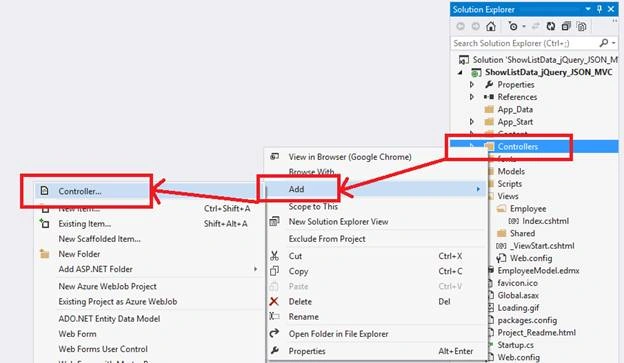
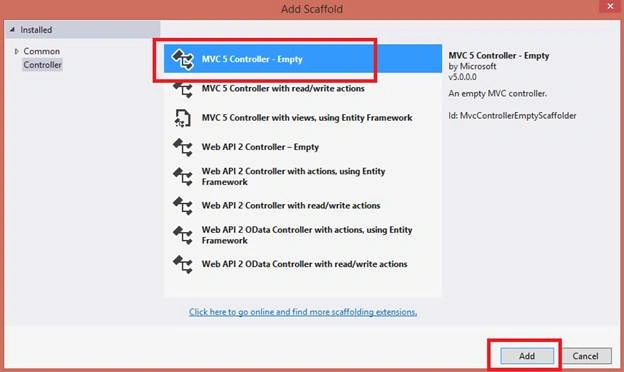
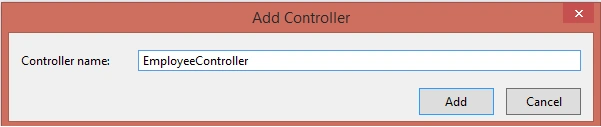
Here in this controller do the following code:
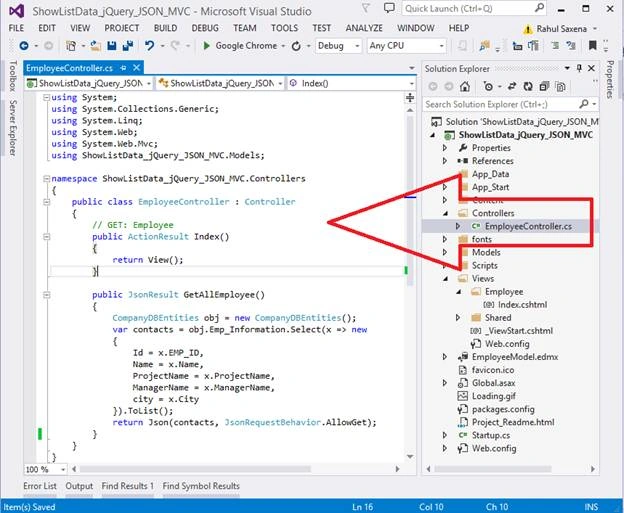
- using System;
- using System.Collections.Generic;
- using System.Linq;
- using System.Web;
- using System.Web.Mvc;
- using ShowListData_jQuery_JSON_MVC.Models;
- namespace ShowListData_jQuery_JSON_MVC.Controllers
- {
- public class EmployeeController: Controller
- {
- // GET: Employee
- public ActionResult Index()
- {
- return View();
- }
- public JsonResultGetAllEmployee()
- {
- CompanyDBEntitiesobj = new CompanyDBEntities();
- var contacts = obj.Emp_Information.Select(x => new
- {
- Id = x.EMP_ID,
- Name = x.Name,
- ProjectName = x.ProjectName,
- ManagerName = x.ManagerName,
- city = x.City
- }).ToList();
- return Json(contacts, JsonRequestBehavior.AllowGet);
- }
- }
- }
- Now my View(Index.cshtml):
- @ {
- ViewBag.Title = " Showing Data Using jQuery Ajax Call JSON in ASP.NET MVC";
- } <
- h1 >
- Showing Data Using jQuery Ajax Call JSON in ASP.NET MVC <
- /h1> <
- div >
- <
- tableid = "tblEmployee"
- class = "tblEmployee" >
- <
- thead >
- <
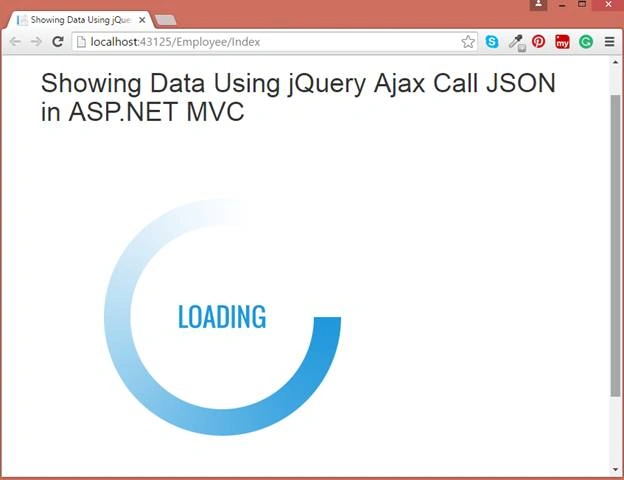
- img src = "~/Loading.gif"
- alt = "Loading"
- id = "imgLoading"
- class = "Load" / >
- <
- /thead> <
- tbody > < /tbody> <
- /table> <
- /div> <
- script src = "~/Scripts/jquery-1.10.2.min.js" > < /script> <
- script type = "text/javascript" >
- $(document).ready(function()
- {
- $("#tblEmployeetbodytr").remove();
- $.ajax
- ({
- type: 'POST',
- url: '@Url.Action("GetAllEmployee")',
- dataType: 'json',
- data: {},
- success: function(data)
- {
- $("#imgLoading").hide();
- var items = '';
- var rows = "<tr>" +
- "<th align='left' class='EmployeeTableTH'>Employee ID</th><th align='left' class='EmployeeTableTH'>Name</th><th align='left' class='EmployeeTableTH'>Project Name</th><th align='left' class='EmployeeTableTH'>Manager Name</th><th align='left' class='EmployeeTableTH'>City</th>" +
- "</tr>";
- $('#tblEmployeetbody').append(rows);
- $.each(data, function(i, item)
- {
- var rows = "<tr>" +
- "<td class='EmployeeTableTD'>" + item.Id + "</td>" +
- "<td class='EmployeeTableTD'>" + item.Name + "</td>" +
- "<td class='EmployeeTableTD'>" + item.ProjectName + "</td>" +
- "<td class='EmployeeTableTD'>" + item.ManagerName + "</td>" +
- "<td class='EmployeeTableTD'>" + item.city + "</td>" +
- "</tr>";
- $('#tblEmployeetbody').append(rows);
- });
- },
- error: function(ex)
- {
- var r = jQuery.parseJSON(response.responseText);
- alert("Message: " + r.Message);
- }
- });
- return false;
- }); <
- /script> <
- styletype = "text/css" >
- .tblEmployee
- {
- font - family: verdana, arial, sans - serif;
- font - size: 11 px;
- color: #333333;
- border-width: 1px;
- border-color: # 666666;
- border - collapse: collapse;
- }
- .EmployeeTableTH
- {
- border - width: 1 px;
- padding: 8 px;
- border - style: solid;
- border - color: #666666;
- background-color: # dedede;
- }
- .EmployeeTableTD
- {
- border - width: 1 px;
- padding: 8 px;
- border - style: solid;
- border - color: #666666;
- background-color: # ffffff;
- } <
- /style>
Read more articles on ASP.NET:


Troy WilsonPosted May 22, 2018, 7:40 AM EDT
Pay no attention to the negative person below. I used your tutorial as a basis to create a web services solution that I use in a production environment everyday and it works great. I've since made my own improvements, but this gave me a good start.
Sebastian GugPosted Apr 19, 2018, 4:43 AM EDT
This has been a giant waste of time, please never ever attempt to make a tutorial again.
Ivin Raj SPosted Feb 8, 2018, 10:45 PM EST
Sir how to add pagination ? page size 10
Chris ChanPosted Sep 2, 2017, 12:36 AM EDT
Why is that it has JsonResultGetAllEmployee() return type error?
Chris ChanPosted Sep 2, 2017, 12:36 AM EDT
Why is that it has JsonResultGetAllEmployee() return type error?
Chris ChanPosted Sep 2, 2017, 12:36 AM EDT
Why is that it has JsonResultGetAllEmployee() return type error?
ribha shakoorPosted Aug 21, 2017, 8:27 AM EDT
How can I print this dynamically created table using jquery-ajax-call ?
Alaeddin AlhamoudPosted Aug 4, 2017, 2:52 AM EDT
Thats good , but Image if i have 100 k record !!!! u should give size to ur record , should load 5 or 10 per press on button or scrolling ;) Thanx
Ashish GuptaPosted Jul 3, 2017, 2:16 AM EDT
Public JsonResultGetAllEmployee() ?? return type ?
Delpin Susai RajTOP 100Posted Aug 28, 2016, 2:34 AM EDT
Good one
Vignesh ManiTOP 100Posted Apr 11, 2016, 2:56 AM EDT
Nice
Rahul Kumar SaxenaTOP 100Posted Apr 10, 2016, 8:57 PM EDT
Tahnks 2 All
Rahul Kumar SaxenaTOP 100Posted Apr 10, 2016, 8:57 PM EDT
Thanks Ankit Bansal
Rahul Kumar SaxenaTOP 100Posted Apr 10, 2016, 8:56 PM EDT
Thanks Humayun Kabir Mamun
Rahul Kumar SaxenaTOP 100Posted Apr 10, 2016, 8:56 PM EDT
Thanks Manoj Kulkarni
Rahul Kumar SaxenaTOP 100Posted Apr 10, 2016, 8:56 PM EDT
Thanks Vivek Kumar
Rahul Kumar SaxenaTOP 100Posted Apr 10, 2016, 8:56 PM EDT
Thanks Ankur Mistry
Ankit BansalPosted Apr 10, 2016, 8:15 PM EDT
Very nice Rahul sir..
Humayun Kabir MamunPosted Apr 10, 2016, 7:54 PM EDT
Nice...
Manoj KulkarniPosted Apr 10, 2016, 7:05 PM EDT
Nice article. Thank you for sharing
Vivek KumarPosted Apr 10, 2016, 12:54 PM EDT
Nice one.
Ankur MistryTOP 100Posted Apr 10, 2016, 9:11 AM EDT
Helpful staff
Rahul Kumar SaxenaTOP 100Posted Apr 10, 2016, 7:15 AM EDT
Thanks
Rahul Kumar SaxenaTOP 100Posted Apr 10, 2016, 7:15 AM EDT
Thanks Sthitaprajnya Debasis Nayak
Sthitaprajnya Debasis NayakPosted Apr 10, 2016, 4:23 AM EDT
Super Sir !!!
Rahul Kumar SaxenaTOP 100Posted Apr 9, 2016, 10:48 PM EDT
Thanks Nitin Tyagi
NitinPosted Apr 9, 2016, 9:19 PM EDT
Wonderful representation
Rahul Kumar SaxenaTOP 100Posted Apr 9, 2016, 8:24 AM EDT
Thanks 2 All
Rahul Kumar SaxenaTOP 100Posted Apr 9, 2016, 8:23 AM EDT
Thanks Vignesh Mani
Rahul Kumar SaxenaTOP 100Posted Apr 9, 2016, 8:23 AM EDT
Thanks Prakash Tripathi
Rahul Kumar SaxenaTOP 100Posted Apr 9, 2016, 8:23 AM EDT
Thanks Gowtham K
Rahul Kumar SaxenaTOP 100Posted Apr 9, 2016, 8:23 AM EDT
Thanks Kuppurasu Nagaraj
Rahul Kumar SaxenaTOP 100Posted Apr 9, 2016, 8:22 AM EDT
Thanks Gowtham Rajamanickam
Vignesh ManiTOP 100Posted Apr 9, 2016, 7:21 AM EDT
Good one
Prakash TripathiTOP 100Posted Apr 9, 2016, 6:49 AM EDT
The way article is presented is nice.
Gowtham KTOP 100Posted Apr 9, 2016, 6:24 AM EDT
Good One, Thanks for sharing:)
Kuppurasu NagarajTOP 100Posted Apr 9, 2016, 6:18 AM EDT
Nice article..
Gowtham RajamanickamTOP 100Posted Apr 9, 2016, 5:32 AM EDT
Very good article