
This article shows how to show data using horizontal groups in a GridView in ASP.Net.
The following is my Data Table structure: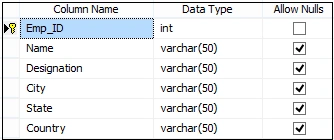
The data in my Data Table is: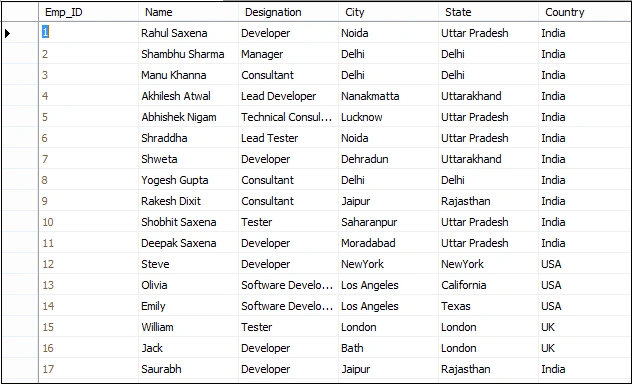
Now in a Grid View I will show the data first by country then in groups of states and last by city.
The following is my aspx code:
- <%@ Page Language="C#" AutoEventWireup="true" CodeBehind="Default.aspx.cs" Inherits="ShowingGroupingOfData.Default" %>
- <!DOCTYPE html>
- <html xmlns="http://www.w3.org/1999/xhtml">
- <head runat="server">
- <title>Showing Grouping Of Data In ASP.NET Grid View</title>
- </head>
- <body>
- <form id="form1" runat="server">
- <div>
- <table style="border: solid 15px blue; width: 100%; vertical-align: central;">
- <tr>
- <td style="padding-left: 20px; padding-top: 20px; padding-bottom: 20px; background-color: skyblue; font-family: 'Times New Roman'; font-size: 20pt; color: red;">Showing Grouping Of Data In a ASP.NET Grid View
- </td>
- </tr>
- <tr>
- <td style="text-align: left;">
- <asp:GridView ID="GridView1" runat="server" CellPadding="4" ForeColor="#333333" GridLines="Both" Width="100%">
- <AlternatingRowStyle BackColor="White" ForeColor="#284775" />
- <EditRowStyle BackColor="#999999" />
- <FooterStyle BackColor="#5D7B9D" Font-Bold="True" ForeColor="White" />
- <HeaderStyle BackColor="#5D7B9D" Font-Bold="True" ForeColor="White" />
- <PagerStyle BackColor="#284775" ForeColor="White" HorizontalAlign="Center" />
- <RowStyle BackColor="#F7F6F3" ForeColor="#333333" />
- <SelectedRowStyle BackColor="#E2DED6" Font-Bold="True" ForeColor="#333333" />
- <SortedAscendingCellStyle BackColor="#E9E7E2" />
- <SortedAscendingHeaderStyle BackColor="#506C8C" />
- <SortedDescendingCellStyle BackColor="#FFFDF8" />
- <SortedDescendingHeaderStyle BackColor="#6F8DAE" />
- </asp:GridView>
- </td>
- </tr>
- </table>
- </div>
- </form>
- </body>
- </html>
- using System;
- using System.Collections;
- using System.Collections.Generic;
- using System.Linq;
- using System.Web;
- using System.Web.UI;
- using System.Web.UI.WebControls;
- using System.IO;
- using System.Data;
- using System.Data.SqlClient;
- using System.Configuration;
- namespace ShowingGroupingOfData
- {
- public partial class Default : System.Web.UI.Page
- {
- SqlDataAdapter da;
- DataSet ds = new DataSet();
- DataTable dt = new DataTable();
- protected void Page_Load(object sender, EventArgs e)
- {
- if (!Page.IsPostBack)
- {
- BindGrid();
- }
- }
- private void BindGrid()
- {
- SqlConnection con = new SqlConnection();
- ds = new DataSet();
- con.ConnectionString = @"Data Source=INDIA\MSSQLServer2k8; Initial Catalog=EmployeeManagement; Uid=sa; pwd=india;";
- SqlCommand cmd = new SqlCommand("SELECT Country, State, City,Name, Designation FROM Employee ORDER BY Country,State, City", con);
- da = new SqlDataAdapter(cmd);
- da.Fill(ds);
- con.Open();
- cmd.ExecuteNonQuery();
- con.Close();
- if (ds.Tables[0].Rows.Count > 0)
- {
- GridView1.DataSource = ds.Tables[0];
- GridView1.DataBind();
- // First parameter is Row Collection
- // Second is Start Column
- // Third is total number of Columns to make group of Data.
- ShowingGroupingDataInGridView(GridView1.Rows, 0, 3);
- }
- }
- void ShowingGroupingDataInGridView(GridViewRowCollection gridViewRows, int startIndex, int totalColumns)
- {
- if (totalColumns == 0) return;
- int i, count = 1;
- ArrayList lst = new ArrayList();
- lst.Add(gridViewRows[0]);
- var ctrl = gridViewRows[0].Cells[startIndex];
- for (i = 1; i < gridViewRows.Count; i++)
- {
- TableCell nextTbCell = gridViewRows[i].Cells[startIndex];
- if (ctrl.Text == nextTbCell.Text)
- {
- count++;
- nextTbCell.Visible = false;
- lst.Add(gridViewRows[i]);
- }
- else
- {
- if (count > 1)
- {
- ctrl.RowSpan = count;
- ShowingGroupingDataInGridView(new GridViewRowCollection(lst), startIndex + 1, totalColumns - 1);
- }
- count = 1;
- lst.Clear();
- ctrl = gridViewRows[i].Cells[startIndex];
- lst.Add(gridViewRows[i]);
- }
- }
- if (count > 1)
- {
- ctrl.RowSpan = count;
- ShowingGroupingDataInGridView(new GridViewRowCollection(lst), startIndex + 1, totalColumns - 1);
- }
- count = 1;
- lst.Clear();
- }
- }
- }
Now run the application.
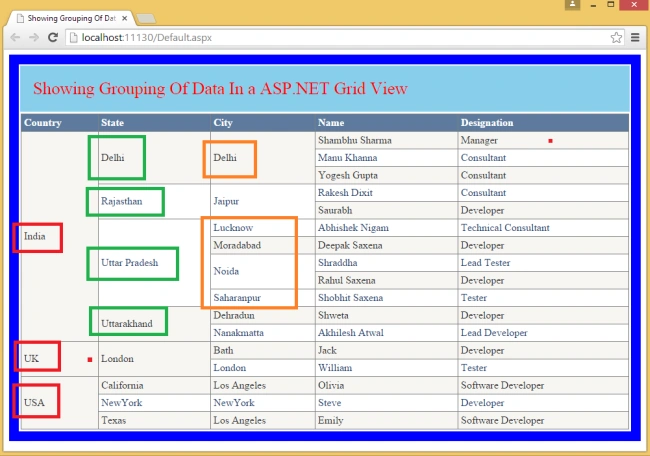
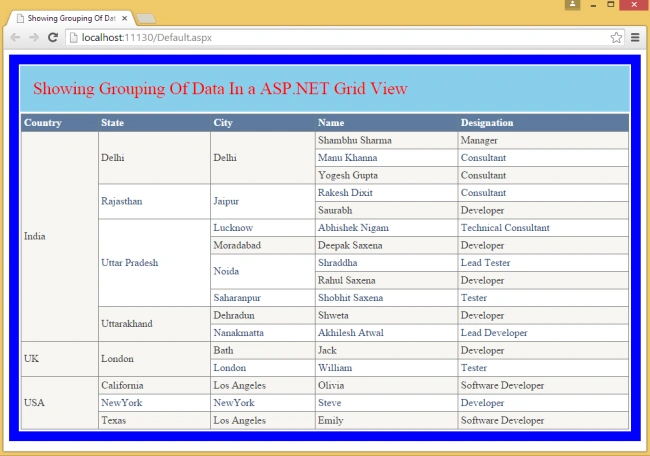
See here I am showing the data grouped horizontally first by country then by state and last by city.


Yan AungPosted Apr 1, 2019, 9:48 PM EDT
Thank you so much for this! you just saved me a lot of effort.
nilang shahPosted Jan 29, 2018, 7:55 PM EST
Its really nice article and also helpful for small amount of data but if there is millions of data into gridview in that circumstance it will take too much time for processing and got stuck between recursive call so how can overcome into such scenario? is there any other way to handle such situation??
praveen palPosted Mar 10, 2017, 12:48 AM EST
Nice article Rahul brother!
Ria GhoshPosted Jan 11, 2017, 11:05 AM EST
Thank you so much for this! you just saved me a lot of effort. Had to make a few modifications but this works like a charm! thanks again.
Rahul Kumar SaxenaTOP 100Posted Sep 4, 2015, 2:00 AM EDT
Thanks Shridhar Sharma
Shridhar SharmaPosted Jul 20, 2015, 10:14 PM EDT
Nice application to hands on. :)
Rahul Kumar SaxenaTOP 100Posted Jul 18, 2015, 3:06 AM EDT
Thanks Kautilya Vora
Rahul Kumar SaxenaTOP 100Posted Jul 18, 2015, 3:06 AM EDT
Thanks Sibeesh Venu bro...
Sibeesh VenuTOP 100Posted Jul 17, 2015, 8:11 PM EDT
Good One. Congrats. Article of the day
Rahul Kumar SaxenaTOP 100Posted Feb 24, 2015, 3:05 AM EST
Thanks 2 All...
Nimit JoshiTOP 100Posted Feb 11, 2015, 5:41 PM EST
Good One
Khargesh RajputPosted Feb 10, 2015, 11:52 PM EST
nice sir
Happy DotNetPosted Feb 10, 2015, 11:36 PM EST
very useful .....
Manish Kumar ChoudharyPosted Feb 10, 2015, 8:14 PM EST
Good one.