
In this article, I am going to share with you how to integrate and use SignalR with ASP.NET WebForm Application.
Here, we are going to learn to create a real-time chat application using SignalR, Bootstrap, and jQuery Modal Popup. There is a Login system for existing users and registration for new users. First, the user has to create an account and then they can login by using their login credentials, so the login authentications are required. After login, a user can participate in chat or discussion. The users can change their display picture after logging in the application. Before starting the explanation of functionality, please take a short overview about the SignalR as followed.
Overview of SignalR
ASP.NET SignalR is a library for ASP.NET developers that simplifies the process of adding real-time web functionality to applications, i.e., the ability to have server code push the content to connected clients instantly as it becomes available, rather than having the server to wait for a client to request new data.
SignalR can be used to add any sort of "real-time" web functionality to your ASP.NET application. While chat is often used as an example, you can do a whole lot more. Any time a user refreshes a web page to see the new data, or the page implements long polling to retrieve the new data, it is a candidate for using SignalR.
Targeted Audience
The targeted audience is people with basic knowledge of ASP.NET and C#.
Explanation
Things to do.
- Make an ASP.NET C# WebForm application.
- Add the following packages through NuGet Package Manager.
- Bootstrap
- jQuery
- Font-awesome
- Microsoft.AspNet.SignalR
- Create Startup. cs
- Create ChatHub.cs
- Create Login WebForm
- Create Register WebFrom
- Create Chat WebForm
- Create a Database in SQL Server
- Code
Create a New ASP.NET Web Project in C# and give it a suitable name as I gave the project name “SignalRChat”.
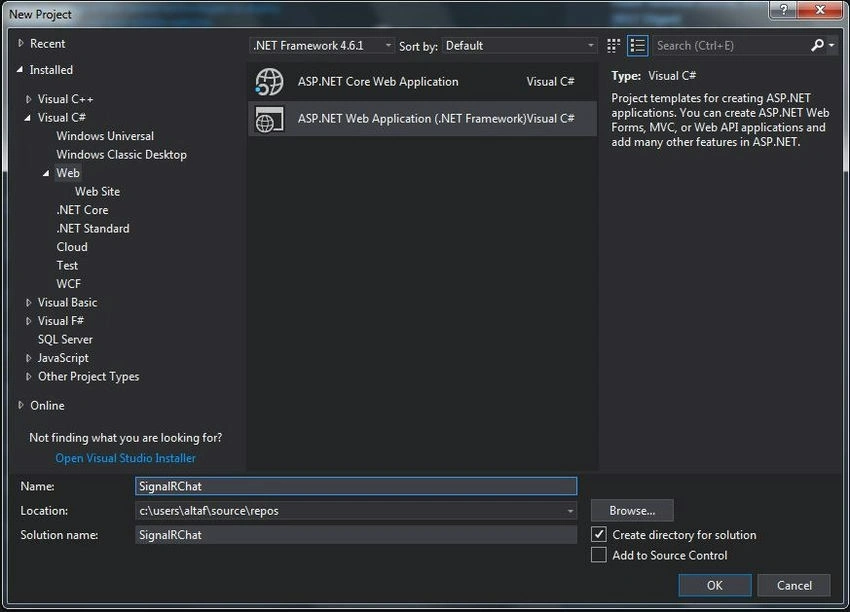
After creating the project, now, add Packages through the NuGet Package Manager like shown in the following image.


The package Console Manager will open. You can add any package just by writing the Package Name and pressing the Enter button. It will get downloaded and installed in your project. You can see the reference files in your project references Or you can see the package files in their respective project directories.
Install Packages
PM> Install-Package bootstrap -Version 3.3.7
PM> Install-Package FontAwesome -Version 4.7.0
PM> Install-Package jQuery -Version 3.2.1
PM> Install-Package Microsoft.AspNet.SignalR -Version 2.2.2
After the successful installation of above packages, the above dll's or packages are installed into your project. You can see the Reference files in your project solution.

Other Reference files like Microsoft. owin are dependency files of Microsoft.AspNet.SignalR namespace. Since our application is an OWIN-based application, we have to create a class “Startup.cs”. In this file, the components for the application pipeline are added. The OWIN attribute which specifies the type of property specifying the project's start-up and the configuration method, sets up the SignalR mapping for the App. The code for the “Startup. cs” is given below.
using Microsoft.Owin;
using Owin;
[assembly: OwinStartup(typeof(SignalRChat.Startup))]
namespace SignalRChat
{
    public class Startup
    {
        public void Configuration(IAppBuilder app)
        {
            app.MapSignalR();
        }
    }
}
Now, create a database. As we are going to create a registration and login system, so we will use login details from the database for login. When a user gets registered, it will store the User details in the database and use the same while the user logs in to the application.
Create Database
Create Database SignalRdbCreate a Table and insert a record for the admin user.
USE [SignalRdb]
GO
CREATE TABLE [dbo].[tbl_Users](
    [ID] [int] IDENTITY(1,1) NOT NULL,
      NULL,
      NULL,
      NULL,
      NULL,
    CONSTRAINT [PK_tbl_Users] PRIMARY KEY CLUSTERED
    (
        [ID] ASC
    )
    WITH (PAD_INDEX = OFF, STATISTICS_NORECOMPUTE = OFF, IGNORE_DUP_KEY = OFF, ALLOW_ROW_LOCKS = ON, ALLOW_PAGE_LOCKS = ON) ON [PRIMARY]
)
ON [PRIMARY]
insert into [dbo].[tbl_Users] (UserName, Email, Password) values ('admin', '[email protected]', '12345');
Here, I am skipping the explanation of the connection of the SQL Server database; I hope you know the connectivity of the database. You will get everything in the source code that I have attached.
After creating the database, create a new WebForm Register Page (Register. aspx). Here, I am using a ready CSS file to design my register page. The page will look like the below image.

Code for Register. cs
public partial class Register : System.Web.UI.Page
{
    ConnClass ConnC = new ConnClass();
    protected void Page_Load(object sender, EventArgs e)
    {
    }
    protected void btnRegister_ServerClick(object sender, EventArgs e)
    {
        string Query = "insert into tbl_Users(UserName,Email,Password)Values('" + txtName.Value + "','" + txtEmail.Value + "','" + txtPassword.Value + "')";
        string ExistQ = "select * from tbl_Users where Email='" + txtEmail.Value + "'";
        if (!ConnC.IsExist(ExistQ))
        {
            if (ConnC.ExecuteQuery(Query))
            {
                ScriptManager.RegisterStartupScript(this, GetType(), "Message", "alert('Congratulations!! You have successfully registered..');", true);
                Session["UserName"] = txtName.Value;
                Session["Email"] = txtEmail.Value;
                Response.Redirect("Chat.aspx");
            }
        }
        else
        {
            ScriptManager.RegisterStartupScript(this, GetType(), "Message", "alert('Email is already Exists!! Please Try Different Email..');", true);
        }
    }
}
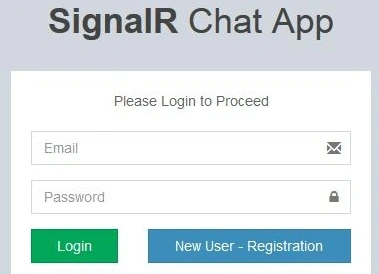
Now, create a Login Page (Login. aspx). Here, I am using a ready CSS file to design my Login page. The page will look like this.
Code for Login. cs
public partial class Login : System.Web.UI.Page
{
    // Class Object
    ConnClass ConnC = new ConnClass();
    protected void Page_Load(object sender, EventArgs e)
    {
    }
    protected void btnSignIn_Click(object sender, EventArgs e)
    {
        string Query = "select * from tbl_Users where Email='" + txtEmail.Value + "' and Password='" + txtPassword.Value + "'";
        if (ConnC.IsExist(Query))
        {
            string UserName = ConnC.GetColumnVal(Query, "UserName");
            Session["UserName"] = UserName;
            Session["Email"] = txtEmail.Value;
            Response.Redirect("Chat.aspx");
        }
        else
            txtEmail.Value = "Invalid Email or Password!!";
    }
}
Create a new WebForm “Chat. aspx” that is the main page of our application. After successful login, this page will be displayed to the user. Here, the user can chat with other online users. There is also an option “Change Profile Picture” so that the user can change his/her profile picture, which displays in the chat while chatting. The other user also can see this profile image.
Now, create a Hub Class,i.e., create a new class and name this class “ChatHub.cs”. Here, we are creating a function which we are calling in “Chat. aspx page” by using jQuery.
namespace SignalRChat
{
    public class ChatHub : Hub
    {
        static List<Users> ConnectedUsers = new List<Users>();
        static List<Messages> CurrentMessage = new List<Messages>();
        ConnClass ConnC = new ConnClass();
        public void Connect(string userName)
        {
            var id = Context.ConnectionId;
            if (ConnectedUsers.Count(x => x.ConnectionId == id) == 0)
            {
                string UserImg = GetUserImage(userName);
                string logintime = DateTime.Now.ToString();
                ConnectedUsers.Add(new Users { ConnectionId = id, UserName = userName, UserImage = UserImg, LoginTime = logintime });
                // send to caller
                Clients.Caller.onConnected(id, userName, ConnectedUsers, CurrentMessage);
                // send to all except caller client
                Clients.AllExcept(id).onNewUserConnected(id, userName, UserImg, logintime);
            }
        }
    }
}
In the Design page, we are calling this function. I am giving you only one example but there are many functions that we have created on the Hub class file and calling these functions in the design page.
$(function () {
    // Declare a proxy to reference the hub.
    var chatHub = $.connection.chatHub;
    registerClientMethods(chatHub);
    // Start Hub
    $.connection.hub.start().done(function () {
        registerEvents(chatHub);
    });
});
In the above jquery function, we are initializing the hub connection and we are writing the rest of the functions in the hub start function. See the below function. In this function, we have called a function from the Hub class that is “ChatHub.cs” and passing values through the parameters.
// Calls when user successfully logged in
chatHub.client.onConnected = function (id, userName, allUsers, messages, times) {
    $('#hdId').val(id);
    $('#hdUserName').val(userName);
    $('#spanUser').html(userName);
    // Add All Users
    for (i = 0; i < allUsers.length; i++) {
        AddUser(chatHub, allUsers[i].ConnectionId, allUsers[i].UserName, allUsers[i].UserImage, allUsers[i].LoginTime);
    }
    // Add Existing Messages
    for (i = 0; i < messages.length; i++) {
        AddMessage(messages[i].UserName, messages[i].Message, messages[i].Time, messages[i].UserImage);
    }
}
This method is used to send messages where we are passing user name, message, and message time. We are getting user image by user name that we have stored in the database. If the user does not have any image, we are setting a dummy image for them.
public void SendMessageToAll(string userName, string message, string time)
{
    string UserImg = GetUserImage(userName);
    // store last 100 messages in cache
    AddMessageinCache(userName, message, time, UserImg);
    // Broadcast message
    Clients.All.messageReceived(userName, message, time, UserImg);
}
Images are stored in the Project directory. Here, we have assigned a directory of user images and the image names will be stored in the database and image will be stored in the “images/DP/” directory.
public string GetUserImage(string username)
{
    string RetimgName = "images/dummy.png";
    try
    {
        string query = "select Photo from tbl_Users where UserName='" + username + "'";
        string ImageName = ConnC.GetColumnVal(query, "Photo");
        if (ImageName != "")
            RetimgName = "images/DP/" + ImageName;
    }
    catch (Exception ex) { }
    return RetimgName;
}
The SendMessageToAll method is requested from the client with the parameters after the connection is set on the client side and once the server receives the request, it processes and sends back the response to the client. There is a method that appends the message into HTML DIV and displays it on the UI to the client. The client-side code would look like below.
function AddMessage(userName, message, time, userimg) {
    var CurrUser = $('#hdUserName').val();
    var Side = 'right';
    var TimeSide = 'left';
    if (CurrUser == userName) {
        Side = 'left';
        TimeSide = 'right';
    }
    var divChat = '<div class="direct-chat-msg ' + Side + '">' +
        '<div class="direct-chat-info clearfix">' +
        '<span class="direct-chat-name pull-' + Side + '">' + userName + '</span>' +
        '<span class="direct-chat-timestamp pull-' + TimeSide + '"">' + time + '</span>' +
        '</div>' +
        ' <img class="direct-chat-img" src="' + userimg + '" alt="Message User Image">' +
        ' <div class="direct-chat-text" >' + message + '</div> </div>';
    $('#divChatWindow').append(divChat);
    var height = $('#divChatWindow')[0].scrollHeight;
    $('#divChatWindow').scrollTop(height);
}
User can set their profile Picture and also can change their picture so here is an option to change their profile picture for users. Here, we have used Bootstrap Modal Popup.

Output
The final output will look like below.

Conclusion
Here, we have learned the integration of SignalR and NuGet Package in a project that simplifies the work of our project, and also, the web page designing using Bootstrap. Basically, this is just a simple chat application that you can use to chat with your friends. SignalR is not just this much. There are a lot of other effective uses of SignalR. So this is the first part of the “SignalR Chat App” tutorial. I will explain to you the integration of private chat in my next article. We are going to add some more effective features of chat in our next article.
Hope this will help you and that you liked this article. I have attached the Project source code that you can download for your reference.
Please share your valuable feedback in the comments section.


sudhir bhagatPosted Oct 17, 2026, 7:32 AM EDT
CAN YOU SHARE PROJECT SOURCE CODE, BCUZ IT'S SHOWING PAGE NOT FOUND MESSAGE
hadi masoomiPosted Dec 2, 2024, 1:43 AM EST
I want a notification to be sent to the recipient when I send a message. How is that possible?
Dennis J GordonPosted Jul 26, 2023, 7:54 PM EDT
Has anybody separated concerns for a razor page set up on this project yet? there is a lot of JavaScript in in my html. Obviously I can work it out, but I want to chat about it ; Ironically. I currently have the chat page visible on a razor page. I have not got as far as implemting the C# and updating the database.
Dennis J GordonPosted Jul 26, 2023, 5:06 PM EDT
ConnClass ConnC = new ConnClass(); are you still working on this project?
Dennis J GordonPosted Jul 26, 2023, 5:05 PM EDT
Hello have you done this with asp.net core. I am curious about this line:
man_sandPosted May 2, 2023, 7:40 AM EDT
Can some one share DB Schema for this app
Markus BreitensteinPosted Mar 14, 2022, 3:35 AM EDT
There is a problem on part 3, using emojis. if i use the code as you put it into the file, the [13] key is not working int txtMessage, also the input is not deleted after sending. till now i did not find a solution, but still searching
Markus BreitensteinPosted Jan 9, 2022, 9:02 AM EST
It looks like a very good project. is it possible to use mariadb instead of sql server ?
MUNENDRA SINGHPosted Dec 1, 2021, 11:35 AM EST
Have any idea in angular of Chat App
Ishfaq AhmedPosted Apr 8, 2021, 8:22 AM EDT
Can you please guide me on how to send files in private chat. when I try to send the file in private chat it gives an error of duplicate AsyncFileUplad id which is used ajaxtoolkit.
Ishfaq AhmedPosted Apr 8, 2021, 8:20 AM EDT
Thank you sir!
A AndorPosted Feb 15, 2021, 7:19 AM EST
I tried the project local, and every thing is ok. but when tried to publish it on a cloud server, online users dose not appear, can you help me to solve this issue ?
kundan singhPosted Oct 16, 2020, 10:02 PM EDT
How to be show online user
Abid ShuaibPosted Jun 29, 2020, 7:39 PM EDT
Sir please make a video
Abid ShuaibPosted Jun 29, 2020, 7:38 PM EDT
Please Solve The ConnClass ConnC = new ConnClass();
Tapan NayakPosted May 17, 2020, 1:31 AM EDT
Online Chatting is not working. Send button not working.
Tecno WordPosted May 9, 2020, 1:03 PM EDT
When refreshing the /Chat.aspx it just duplicates the User!
Rishabh LoombaPosted Dec 4, 2019, 6:39 PM EST
Hy altaf ansari bro can u tll me why in my application not shows online user no message send
Rishabh LoombaPosted Dec 3, 2019, 11:29 PM EST
How to be show online user
louis TundePosted Oct 8, 2019, 4:46 AM EDT
Dear Altaf, in my code context is showing error and also clients. please what can I do
Yogesh MhadgutPosted Sep 29, 2019, 10:13 PM EDT
Working...Thanks Sir
Basit KhanPosted Sep 26, 2019, 9:13 AM EDT
Dear Mr. Altaf, Is this project will work in VS 2010, i tried but got an error $ client not register after entering user name and password, same error in VS 2015. Thanks.
Mohsin KhanPosted Sep 19, 2019, 3:27 AM EDT
Dear Altaf, How can i store chat into a database table?
Anoop SomanPosted Aug 29, 2019, 8:27 PM EDT
Getting the following error when i redirect to Chat page. Protocol error: Unknown transport. If anyone has faced the same issue, please advise.
Michael UshemuPosted Aug 27, 2019, 12:43 PM EDT
Thank you Sir, i tried calling tge list of users and messages in my chathub but it does not work, saying d namespace could not be found
moon lightPosted Jul 2, 2019, 11:12 PM EDT
Thank you so much sir its running in my local now i am uploading this on server but really very thanks for your wonderful support :)
Gopal GopalPosted Jun 30, 2019, 6:59 AM EDT
Where is ConnC class where it is created.Please tell me how it could be done.You have given reference of the class.
rahul dubeyPosted May 31, 2019, 1:20 AM EDT
Hello sir i have a question when i run this application on local machine it is working proper but when i host this on iis only one client connect at a time how i connect multiple client after publish my code....
Riddhi ValechaPosted May 16, 2019, 10:46 PM EDT
Dear sir, I implemented the code , but nothing is happening in "Chat.aspx" page ... No message / username and datetime are going on clicking on "Send" Button. PLease guide.
MD. HasanPosted Apr 18, 2019, 6:37 AM EDT
After finished this tutorial i am thinking writer was an indian, Yeah my guess is absolutely right.. Garbage is everywhere...
Jonathon SmithPosted Mar 2, 2019, 11:42 AM EST
Absolute Garbage! This should be removed from a tutorial
margam chakriPosted Feb 18, 2019, 2:55 AM EST
I am using visual studio2013
margam chakriPosted Feb 18, 2019, 2:55 AM EST
Please help me what do to
margam chakriPosted Feb 18, 2019, 2:55 AM EST
Error 1 The "Microsoft.CodeAnalysis.BuildTasks.Csc" task could not be loaded from the assembly C:\Users\chakradharm\Downloads\SignalRChat\packages\Microsoft.Net.Compilers.2.1.0\build\..\tools\Microsoft.Build.Tasks.CodeAnalysis.dll. Could not load file or assembly 'Microsoft.Build.Utilities.Core, Version=14.0.0.0, Culture=neutral, PublicKeyToken=b03f5f7f11d50a3a' or one of its dependencies. The system cannot find the file specified. Confirm that the <UsingTask> declaration is correct, that the assembly and all its dependencies are available, and that the task contains a public class that implements Microsoft.Build.Framework.ITask. SignalRChat
margam chakriPosted Feb 18, 2019, 2:54 AM EST
Hi sir, I am trying to build application that time getting this error
harry codePosted Feb 1, 2019, 12:42 AM EST
Hi, I am using visual studio 2010 .Net Framework 4.0.when i am trying to run the application i am not able to run it.The project is incompatable.
raj nayakPosted Jan 25, 2019, 12:46 PM EST
What is the visual studio version you used. Any version dependency
Ahmer AhsanPosted Dec 24, 2018, 3:38 AM EST
I have an issue please review my question on https://stackoverflow.com/questions/53911209/what-is-the-right-way-to-implement-signalr-in-asp-net-webform-project
Vikas VikasPosted Dec 23, 2018, 1:43 AM EST
Respected Sir Respected Sir how can save this conversation in database how can save this conversation in database
yi cianPosted Nov 24, 2018, 11:14 PM EST
Hi i'm having the error "Timeout expired. The timeout period elapsed prior to obtaining a connection from the pool. This may have occurred because all pooled connections were in use and max pool size was reached."
krishna painulyPosted Nov 19, 2018, 2:13 AM EST
Validation is not working registration page..
Ali HasanPosted Nov 1, 2018, 8:35 PM EDT
Hi, it is giving error Error 1 Could not load type 'SignalR Chat.Global' please help
Ninad ShindePosted Oct 22, 2018, 10:13 PM EDT
Hi,not working it stop automatically while running application
Anas AlSadiPosted Sep 17, 2018, 1:30 AM EDT
Hi Sir thanks for the project . but how private chat one to one work because don't work
Ajay GuptaPosted Sep 11, 2018, 9:08 PM EDT
What if want do the communication between many to one means my requirement is there multiple client but there only one server user like website support
shrestha chowdhuryPosted Aug 27, 2018, 12:34 AM EDT
Hello Sir, Thanks for the project. I almost implemented the project. Need to know how to add more than one users? Please reply my answer.
Nzama MakamoPosted Aug 20, 2018, 12:48 PM EDT
Hello the conn class is giving me an error how can i solve this problem?
Altaf AnsariPosted Aug 9, 2018, 7:49 PM EDT
Hello arsal, i already shared SQL code in this article, please refer article you will get SQL code.
arsal younaPosted Aug 9, 2018, 8:26 AM EDT
Kindly share the sql code of table where the chat messages are being stored.
prashant sharmaPosted Jul 9, 2018, 1:21 AM EDT
Hi sir, could you please make the same code using mvc5. Or maybe could you guve us some clarifications how to do it?
e_mall appPosted Jul 6, 2018, 5:23 AM EDT
Hi sir, could you please make the same code using mvc5. Or maybe could you guve us some clarifications how to do it?
Niraj DesaiPosted Jun 5, 2018, 7:07 PM EDT
I used a LocalDB (Microsoft SQL Server Database File) the application works fine till the chat.aspx. It doesn"t allow me to send messages nor change the pictures nor see others who are online maybe there is some issue with SignalR lib or do I rebuild. I have included all PPackages iin Chat.aspx as well. Please Help! Thank You. ASAP
osama shabbirPosted May 30, 2018, 8:41 AM EDT
Great Work...!
Rahul SahuPosted May 20, 2018, 9:38 AM EDT
Error 15 The "Microsoft.CodeAnalysis.BuildTasks.Csc" task could not be loaded from the assembly F:\SignalRChat\packages\Microsoft.Net.Compilers.2.1.0\build\..\tools\Microsoft.Build.Tasks.CodeAnalysis.dll. Could not load file or assembly 'Microsoft.Build.Utilities.Core, Version=14.0.0.0, Culture=neutral, PublicKeyToken=b03f5f7f11d50a3a' or one of its dependencies. The system cannot find the file specified. Confirm that the <UsingTask> declaration is correct, that the assembly and all its dependencies are available, and that the task contains a public class that implements Microsoft.Build.Framework.ITask. SignalRChat erreo shown
shubhanshu bhardwajPosted Apr 17, 2018, 3:55 AM EDT
How to create groups and add users to that group and broadcast message to those users?
Malik AsgharPosted Apr 3, 2018, 9:48 PM EDT
Is it possible to make it private chat instead of group chat
Altaf AnsariPosted Apr 1, 2018, 7:21 PM EDT
We have used sql sever database.. and database script i already posted in article please use the same..
Denisa VlădăuPosted Apr 1, 2018, 10:15 AM EDT
Hi. Nice app. How can I see the database?
Altaf AnsariPosted Feb 5, 2018, 9:31 PM EST
Sorry shubhanshu... but there is no big deal.. you can easily implement all these things in mvc. because most of functions we calling using JavaScript so it will work same in MVC..
shubhanshu bhardwajPosted Feb 5, 2018, 9:25 PM EST
Can i get this code in mvc?
Altaf AnsariPosted Jan 31, 2018, 1:57 AM EST
Make sure that you added Reference dll files and Startup.cs class file...
ehsan aliPosted Jan 31, 2018, 1:32 AM EST
Hi Altaf i have created this app on .net framework 4.5 i can't access classes in chathub class