
API is an Application Program Interface for either a web server or a web browser. ASP.NET Web API is a framework for building HTTP service for a wide range of devices. WEB API is very similar to ASP.NET MVC. It contains most of the MVC features like routing, controllers, action results, filter, model binders, etc.
Let us create a simple application using the WEB API 2.
Start Visual Studio and go to New Project, then click ASP.NET Web Application.
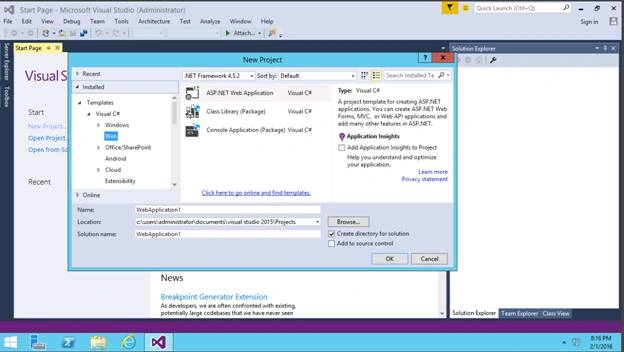
After selecting the option give a name to the web application and click OK. Another dialog box will appear. In that dialog box select Empty web page and check the WEB API option.
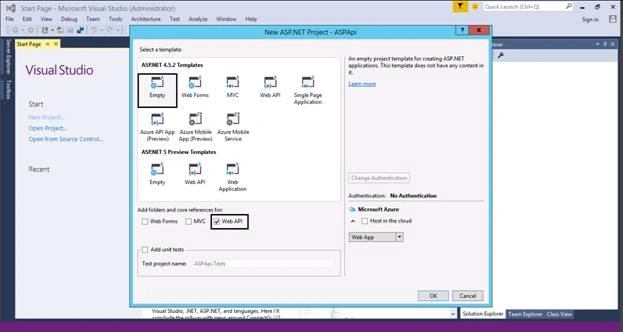
Now the Empty web application is created in the project. Then add a class like the the following image.
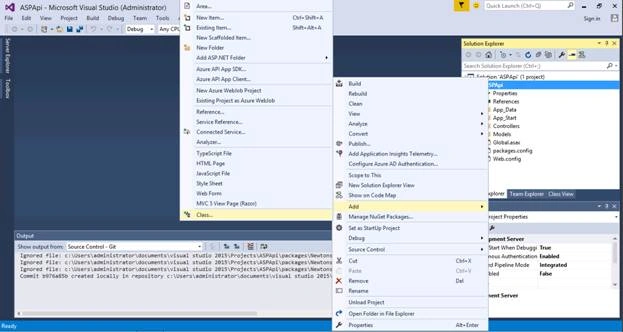
Enter the following model code in the class file.
- public class StudentBasicDetails
- {
- public int stuID
- {
- get;
- set;
- }
- public string stuName
- {
- get;
- set;
- }
- public int stuAge
- {
- get;
- set;
- }
- }
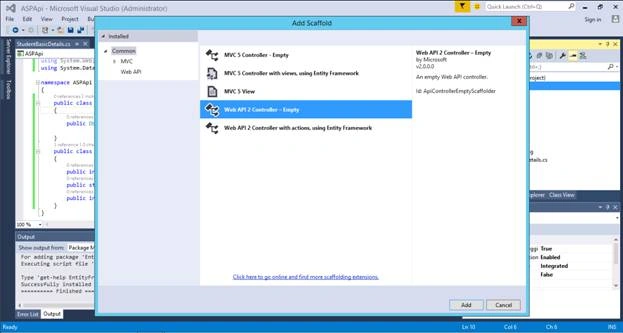
Now add a new Scaffolded item in the created project.
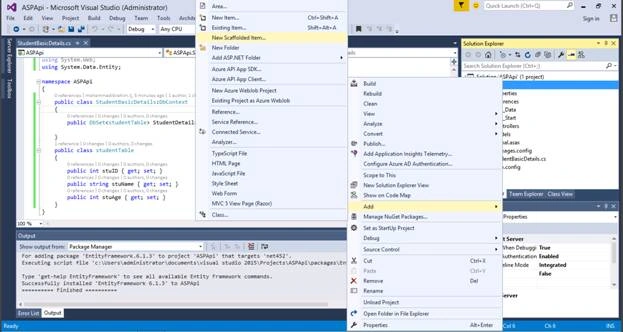
After selectin an item it will open a dialog box which contains a list of Web API and MVC Entity Framework items. In that choose the WEB API 2 Controller - Empty. Here's the screenshot:
Add the following methods in the Web Api 2 controller,
- using System;
- using System.Collections.Generic;
- using System.Linq;
- using System.Net;
- using System.Net.Http;
- using System.Web.Http;
- namespace ASPApi
- {
- public class StudentController: ApiController
- {
- StudentBasicDetails[] st = new StudentBasicDetails[]
- {
- new StudentBasicDetails
- {
- stuID = 1, stuName = "AAA", stuAge = 8
- },
- new StudentBasicDetails
- {
- stuID = 2, stuName = "BBB", stuAge = 9
- },
- new StudentBasicDetails
- {
- stuID = 3, stuName = "CCC", stuAge = 8
- },
- new StudentBasicDetails
- {
- stuID = 4, stuName = "DDD", stuAge = 8
- },
- new StudentBasicDetails
- {
- stuID = 5, stuName = "EEE", stuAge = 9
- },
- new StudentBasicDetails
- {
- stuID = 6, stuName = "FFF", stuAge = 8
- }
- };
- public IEnumerable < StudentBasicDetails > GetAll()
- {
- return st;
- }
- public IHttpActionResultGetStuID(intstuid)
- {
- var studet = st.FirstOrDefault((s) => s.stuID == stuid);
- if (studet == null)
- {
- return NotFound();
- }
- return Ok(studet);
- }
- }
- }
Now we will add a html page to call the API using AJAX. Ajax call can be made by using the jQuery. Go to the Solution Explorer window and right click the project to add new HTML Page like the following screenshot:
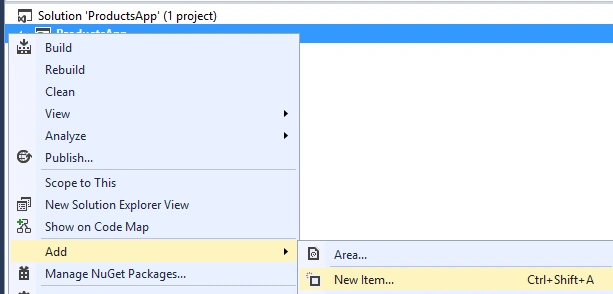
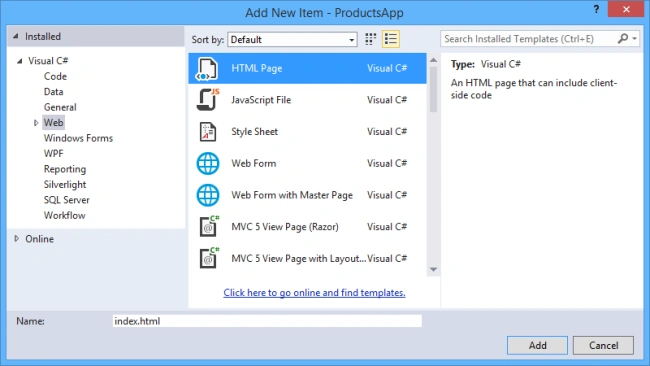
After adding the HTML page replace the HTML code with the following code.
- <!DOCTYPE html>
- <html>
- <head>
- <title></title>
- <meta charset="utf-8" />
- </head>
- <body>
- <div>
- <h4>All Student List</h4>
- <ul id="AllStudent" />
- </div>
- <div>
- Student ID:<input id="GetId" type="text" /><input type="button" value="Search" onclick="GetStu();" />
- <p id="getStudent"></p>
- </div>
- <script src="http://ajax.aspnetcdn.com/ajax/jQuery/jquery-2.0.3.min.js"></script>
- <script>
- var link = 'api/Student';
- $(document)
- .ready(function()
- {
- $.get(link)
- .done(function(data)
- {
- $.each(data, function(i, val)
- {
- $("#AllStudent")
- .append("<li>Name: " + val.stuName + " Age: " + val.stuAge + "</li>")
- });
- });
- });
- function GetVal(studet)
- {
- return "Name: " + studet.stuName + " , Age: " + studet.stuAge
- }
- function GetStu()
- {
- varstuid = $("#GetId")
- .val();
- $.getJSON(link + '/' + stuid)
- .done(function(data)
- {
- $("#getStudent")
- .text(GetVal(data))
- })
- .fail(function()
- {
- alert("data not found");
- });
- }
- </script>
- </body>
- </html>
You can view the code from the GitHub link.
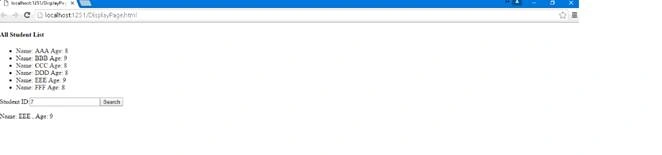
Final Output
Read more articles on ASP.NET:


Amar BhagatPosted Mar 28, 2018, 7:24 PM EDT
Nice Article shared...It is Very Helpful
Vivek KumarPosted Mar 22, 2016, 8:44 AM EDT
Nice share
Kirtan ParmarPosted Mar 17, 2016, 11:48 PM EDT
good..thanks for sharing
Navratna PawalePosted Mar 17, 2016, 11:33 PM EDT
Nice...
Vipan SharmaPosted Mar 17, 2016, 10:43 PM EDT
nice
Sibeesh VenuTOP 100Posted Mar 17, 2016, 7:16 AM EDT
Nice Share
Jaipal ReddyPosted Mar 16, 2016, 8:06 PM EDT
Nice. .
Vignesh ManiTOP 100Posted Mar 16, 2016, 2:00 PM EDT
nice one
Saillesh PawarPosted Mar 16, 2016, 10:03 AM EDT
Need to explain more. about what is web api and all..
Debasis SahaTOP 100Posted Mar 16, 2016, 9:49 AM EDT
Good One..
kalu singh raoPosted Mar 16, 2016, 8:02 AM EDT
Nice...
Shaili DashoraPosted Mar 16, 2016, 4:52 AM EDT
Nice explanation
Shaili DashoraPosted Mar 16, 2016, 4:51 AM EDT
Nice one
Debendra DashPosted Mar 15, 2016, 10:04 PM EDT
good one..
Raja TPosted Mar 15, 2016, 8:24 PM EDT
Nice,Thanks for sharing..
Humayun Kabir MamunPosted Mar 15, 2016, 8:06 PM EDT
Nice...
Kashif SohailPosted Mar 15, 2016, 1:12 PM EDT
A simple article to learn the WebAPI
Anil Kumar MurmuPosted Mar 15, 2016, 9:52 AM EDT
Good one
Debasis SahaTOP 100Posted Mar 15, 2016, 9:47 AM EDT
Good One..
Saillesh PawarPosted Mar 15, 2016, 9:27 AM EDT
Good start Mohammed Ibrahim Sir